Stop 2 - Word Trivia Game
- 888.00
- 4.3
- Installs
- 10.00M
- Price
- Free

Screenshots

Analysis by Reviewed
I often find that word games work best in the small gaps of a shared day: while someone is waiting for dinner, during a quiet stretch on a weekend, or when friends are together but nobody wants to set up a complicated activity. Stop 2 - Word Trivia Game suits that kind of moment because its central challenge is easy to explain: think of words that fit categories and begin with a given letter. The quick pace gives a group something to focus on without turning a casual break into a big commitment.
A quick game for a shared room
Picture a few people relaxing in the same room after a meal. One person can start a round and invite others to join, while anyone who would rather not compete can simply watch and call out possible answers. That makes the game a useful conversation starter, though it is still a phone game rather than a substitute for a proper board-game session: people need to be able to see or use the device, and the timed answers reward quick thinking more than long discussion.
For a household, I would treat shared play as a social choice, not assume the app offers family profiles or parental controls. If several people take turns on one device, agree whose session is active before starting and avoid leaving personal chats open for others to browse. That small bit of coordination matters more than any elaborate setup, especially when children and adults are sharing a screen.
Making a shared round feel fair
A useful way to keep a household session friendly is to settle the practical details before the timer starts: who is holding the phone, whether others will answer aloud, and whether the group is playing to win or just trying to come up with words together. That avoids turning device handoffs into interruptions and gives quieter players a clear way to join in. If several people are sharing one screen, taking turns operating it can also keep one person from becoming the default host every time.
The format works best when people can hear one another and the device is easy for everyone to see. It is less convenient if the room is noisy, if someone needs a large screen, or if a player finds timed word recall stressful. In those situations, I would keep the game as an optional prompt and let the group discuss answers casually, or switch to paper and remove the screen-and-timer pressure altogether.
Choosing who plays and how
The game may suit people who enjoy recalling vocabulary under pressure, whether they usually play alone or want a head-to-head contest. It is less ideal for someone looking for a slow crossword, a detailed language lesson, or a puzzle that can be paused for careful deliberation. Compared with a solo word search, its category prompts call for flexible recall; compared with a trivia quiz built around fixed facts, players generate their own answers. That difference is the appeal, but it also means a round can feel uneven when players have very different vocabularies or ages.
If you are introducing it to a mixed-age group, I would keep the first session relaxed and let people learn the rhythm before treating scores as meaningful. The age rating is Everyone, but that does not mean every category will feel equally familiar to every player. A younger participant may need more time or a little help understanding a prompt, while an adult may find the pace more satisfying as a competitive test. I would use it as a light shared activity rather than as a measure of anyone’s knowledge.
More From Our News Desk

Weather by Xiaomi Review: Clear at a Glance, Less Clear Up Close

X Under Pressure: Can It Recover When Posting Goes Wrong?

Clash of Clans Is Won Between the Battles

Android Auto Makes the Case for Quieter Car Software

MobiOffice: Transforming Mobile Productivity with Seamless Integration

EA SPORTS FC™ Mobile Soccer: Redefining Mobile Sports Gaming
It is also worth deciding in advance whether the point is friendly play or a serious contest. A fast timer can make the game exciting, but it can leave less confident players feeling rushed. Taking turns choosing when to play, or letting someone sit out a round, can make the experience more welcoming without changing the game itself. If your group wants rules everyone can adapt together, a paper category game may be more flexible; if you want a ready-made phone activity, this is the more convenient option.
For a simple everyday test, I would bring it out during a short wait rather than promise a whole evening around it. A couple of people can try a round while dinner finishes or while they are waiting for a ride, then decide whether the pace suits them. That low-commitment approach is especially useful when one person is curious and another is unsure about competitive word games. If the group enjoys calling out possibilities more than keeping score, the prompt can still spark conversation, even if the app itself remains a timed game.
As a word game from Fanatee, Inc., it has a focused premise rather than the broad range of activities found in general party-game collections. It is free to download, with in-app purchases ranging from $0.99 to $99.99 per item, so I would check purchase settings on a device used by children and make sure everyone understands that optional spending is separate from simply trying the game. The game is rated for Everyone, and its current version is 1.5.0; it runs on Android 6.0 and later.
Keeping device and purchase boundaries clear
On a shared phone or tablet, I would treat the game session and the device owner’s account as separate things. A guest can join the fun without being handed unrestricted access to the rest of the device; the host can open the game, keep the screen focused on play, and take the device back afterward. This is ordinary household coordination rather than a special feature, but it helps avoid accidental browsing or confusion about whose activity is on screen.
Because the game is free to download and also offers in-app purchases, it is sensible to agree in advance that nobody should make a purchase without asking the device owner. That is a practical boundary, not a reason to avoid trying it. If children use the device, an adult should handle account and purchase settings in the normal way for that device, rather than assuming the game itself provides a family spending system.
Getting Started with Stop 2
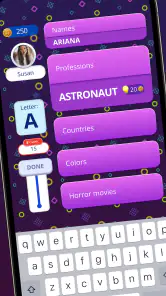
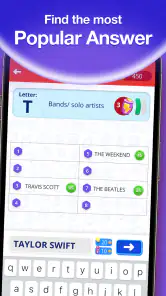
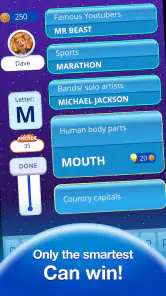
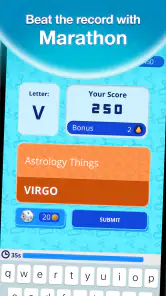
When you first fire up Stop 2 - Word Trivia Game, you'll be greeted with a vibrant and user-friendly interface that sets the stage for some serious fun. The aim of the game is simple yet challenging: you're given a letter and a series of categories, and your task is to come up with words that start with the given letter for each category. Sounds easy, right? Well, think again!
The Gameplay Experience
One of the things I love most about Stop 2 is the fast-paced nature of the rounds. You're racing against the clock, which adds a thrilling layer of pressure to the game. It's not just about coming up with any word; it's about outsmarting your opponents by thinking of unique answers that earn you more points. Trust me, there's nothing more satisfying than seeing your word pop up when your friends are stumped!
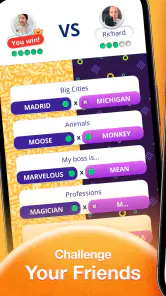
The game also features a variety of modes, including solo play and multiplayer. Whether you're in the mood for a solo challenge or want to pit your wits against friends or random opponents, Stop 2 has got you covered. Plus, the app includes a chat feature, so you can gloat over your victories or commiserate over your losses in real-time.
For a household deciding whether to keep playing, I would judge the social side separately from the solo challenge. If one person likes quick vocabulary tests but others do not enjoy competing, solo play may still make the game worthwhile for that person. If everyone is interested in the same round, multiplayer can make it feel more like a shared activity. The best fit depends on whether your group enjoys fast answers and a bit of rivalry, not simply on whether they like words in general.
Why You'll Keep Coming Back
Aside from the addictive gameplay, what really keeps me coming back to Stop 2 is the constant challenge to expand my vocabulary. Each round is a new opportunity to learn and remember new words, making it not just entertaining but educational too. It's a great way to sharpen your mind and have fun at the same time.
Another great feature is the customization options available in the game. You can choose from different themes and avatars, adding a personal touch to your gaming experience. And let's not forget the regular updates that bring new categories and challenges, keeping the game fresh and exciting.
One practical way I use category games is as a brief warm-up before a longer activity: a round can get people thinking without demanding a quiet room or a long explanation. I also find it useful to play solo when I want a short mental challenge, then switch to a social round when someone else is available. The trade-off is that the pressure which makes multiplayer lively may be frustrating if you prefer to take your time and check every answer carefully.
For anyone used to crosswords or word searches, the main adjustment is that this is about retrieving an answer quickly, not gradually uncovering one through clues or a grid. Someone who enjoys learning a language may also prefer a dedicated study tool, since a category game is about play rather than structured lessons. I would choose Stop 2 when I want a lively vocabulary prompt, and pick a calmer puzzle when I want to think at my own speed.
The game has an average rating of 4.3 from around 83,000 ratings, and it has been installed over 10 million times. Those figures suggest that the basic idea has found a large audience, though they cannot tell you whether its pace or competitive style will suit your household. I would try a few rounds before deciding whether it belongs in your regular rotation, particularly if you are choosing it for players with very different comfort levels.
Who should give it a try
I would recommend it most to people who like quick category challenges, enjoy finding words under a little pressure, and want an easy activity to share without setting up a full game night. It can also suit someone who wants a short solo diversion and is happy to play in brief bursts. The combination of category recall and a letter gives the mind a specific task, which is more engaging for me than simply scrolling when I have a few spare minutes.
I would skip it if you strongly dislike timers, want a calm puzzle with no competitive edge, or need a structured learning app with explanations and progression. It may also be a poor fit for a group where reading speed, vocabulary, or comfort with phones varies widely and nobody wants to adapt the pace. A paper version of a category game is a better choice when you want to invent house rules, give everyone as much time as they need, or keep the whole activity away from a screen.
Final Thoughts
In a world where mobile games can sometimes feel repetitive, Stop 2 - Word Trivia Game stands out with its clever concept and engaging execution. It's a game that challenges you, entertains you, and even teaches you a little something along the way. So, if you're looking for a game that offers a mental workout while still being a blast to play, give Stop 2 a try. You might just find yourself hooked like I did!
Happy gaming, everyone!
Stop 2 - Word Trivia Game Frequently Asked Questions
Can I play Stop 2 with friends?
Yes. Stop 2 is presented as a fast-paced quiz to enjoy with friends, with players solving category riddles by coming up with suitable words. Its quick turns make it a natural fit for a casual group session, whether you want a light contest or a shared word challenge. The game’s central idea is simple to grasp, so friends can focus on thinking quickly and having fun.
What kind of word challenge does Stop 2 offer?
Stop 2 focuses on category-based word trivia. Players need to think of words that fit a prompt, turning vocabulary and quick associations into the heart of the game. This makes it a good match for people who enjoy quizzes as well as word games, and the fast-paced format keeps the challenge active rather than asking players to work through a long sequence of written puzzles.
Is Stop 2 - Word Trivia Game suitable for quick play sessions?
Yes. Stop 2 is built around fast-paced category riddles, so a round can fit into a short break or a casual get-together. The quick-thinking format gives each turn a clear goal: come up with a word that matches a category and the required letter before time runs out. It can also be enjoyed with friends, making it easy to add a little friendly competition.
What is Stop 2 - Word Trivia Game?
Stop 2 - Word Trivia Game is an exciting and engaging word-based trivia game that challenges players to think quickly and creatively. The game involves generating words that fit specific categories and start with a given letter, all within a limited time. It is a perfect blend of fun and mental exercise, making it ideal for both casual gamers and word enthusiasts alike.
Is Stop 2 - Word Trivia Game free to download and play?
Yes, Stop 2 - Word Trivia Game is free to download and play. However, it may offer in-app purchases that allow players to enhance their gaming experience. These purchases can include additional game features, hints, or ad-free gameplay. Players can enjoy the core game without spending any money, but optional purchases are available for those who wish to expand their experience. Optional in-app purchases range from $0.99 to $99.99 per item, so check the purchase details before confirming anything.
Pros
- Engaging and challenging puzzles.
- Expands vocabulary effectively.
- User-friendly interface.
- Regular updates with new content.
- Offline mode available.
Cons
- Contains ads that can be intrusive.
- Limited hints without in-app purchases.
- Occasional crashes reported.
- Repetitive background music.
- Requires internet for some features.
- Category
- Word
- Version
- 1.5.0













