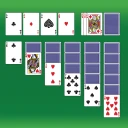
Spades: Classic Card Games
- 13.43K
- 4.6
- Installs
- 10.00M
- Price
- Free

Screenshots








Analysis by Reviewed
When I want a trick-taking game that works on my own schedule, Spades: Classic Card Games is an appealing option. It brings the familiar decisions of bidding, following suit, and judging a hand to a phone, without requiring a physical deck or a group to be free at the same time. The appeal is practical rather than elaborate: I can settle in for a proper match or use a spare moment to play, depending on whether I choose solo or multiplayer.
A practical fit for short breaks
I find a digital Spades game most useful when I want a complete card-game session without arranging a table, finding three other players, or carrying a deck. A quick match can fill a quiet stretch between errands, while playing against the AI gives me a way to practice at my own pace. That makes this a natural pick for someone who already enjoys trick-taking games and wants an easy option on a phone.
It is less suitable if what you want is a social gathering in app form. Playing with people online can add company, but it does not replace seeing friends across a table, reading their expressions, or chatting naturally. If you prefer a different card game with shorter rounds or fewer rules to keep in mind, a simpler casual card game may be a better fit.
Getting Started and Finding a Comfortable Way to Play
First things first, downloading and setting up Spades: Classic Card Games is a breeze. Whether you’re on Android or iOS, just a quick search and a couple of taps, and you’re good to go. The app is lightweight, so it won’t hog your phone’s memory, which is always a plus in my book. MobilityWare is the developer, and the game is free to start, with optional in-app purchases. Its listed age rating is Everyone, and it is designed for devices running Android 8.0 or later. The current version is 2.2.0.3663.
Once you’ve got it up and running, you’re greeted with a clean and intuitive interface. It’s not overly flashy, which I personally appreciate because it keeps the focus on the game itself. You can jump straight into a match or explore the different modes available. As a newbie, or even as a seasoned pro, the app offers a smooth experience. I didn’t find myself fumbling around trying to navigate through endless menus, so kudos for that!
Readability, rules, and a useful way to practice
Spades asks you to follow suits, count tricks, and think about what your partner may be able to take. That mental workload matters more on a small screen than it does with physical cards. I’d suggest starting with the AI rather than immediately joining a competitive game: it gives you room to learn the rhythm of bidding and play without feeling rushed by other people. If you already know the rules, adjusting a setting before a match can make practice more relevant to the house rules you usually use.
For a realistic everyday use, imagine waiting for a delayed appointment with only a few minutes to spare. A solo round gives you something focused to do without needing to coordinate with anyone, and you can stop when the appointment begins. For a longer evening session, multiplayer makes more sense, especially if you have friends who also play. The key distinction is that solo play is convenient practice, while online play is where the social competition comes in.
More From Our News Desk

Weather by Xiaomi Review: Clear at a Glance, Less Clear Up Close

X Under Pressure: Can It Recover When Posting Goes Wrong?

Clash of Clans Is Won Between the Battles

Android Auto Makes the Case for Quieter Car Software

MobiOffice: Transforming Mobile Productivity with Seamless Integration

EA SPORTS FC™ Mobile Soccer: Redefining Mobile Sports Gaming
One useful habit is to make a quick mental note of what you want to practice before starting a solo match: estimating a bid, for example, or paying closer attention to which suits have already been played. That gives each game a purpose beyond simply passing time. It also helps me notice whether a poor result came from a risky choice or from a run of cards that did not go my way. Spades has enough decisions to reward that kind of reflection, but I would not treat an AI match as a complete substitute for learning how different human partners communicate through their play.
Game Modes and Features
This app offers a variety of game modes. Whether you’re looking to play solo against the AI or dive into multiplayer to test your skills against real opponents, Spades: Classic Card Games has got you covered. The AI isn’t a pushover either; it offers a challenge that keeps the game engaging rather than frustrating.
One of my favorite features is the ability to customize your gameplay. You can tweak the rules to fit your style, whether you like to stick to the traditional format or want to shake things up with some house rules. This flexibility makes the app stand out in a sea of card games.
That rule flexibility is worth using deliberately. If a match feels unfamiliar, check the rules you selected before deciding that you have forgotten how to play; a house-rule variation can change the decisions a hand calls for. I also like treating a solo game as a low-pressure way to test one choice at a time, such as whether a conservative bid works better for me than an ambitious one. It is a more useful habit than simply replaying hands quickly and hoping to improve by chance.
For players joining a table with friends, matching the app’s rules to the group’s usual version can prevent an avoidable disagreement once a hand is underway. I would set that up before inviting anyone, rather than assuming everyone means the same thing by “standard” Spades. That small bit of preparation is especially handy when house rules have become second nature over years of playing with the same people. If the group’s preferred format is not represented by the available choices, a physical deck or a different app with a closer rules fit may be less frustrating.
Multiplayer and the trade-off with physical play
Let’s talk about the multiplayer aspect. It’s smooth, responsive, and quite addictive. You can connect with friends or random players from around the world. The matchmaking is quick, meaning you won’t be twiddling your thumbs waiting for a game to start. Plus, the chat feature allows for some fun banter, which I think is a nice touch.
If you’re competitive, you’ll love the leaderboard system. It’s a great way to see how you stack up against other players globally. I found myself getting a tad competitive, always eager to climb just one more spot!
Compared with a physical deck, the app removes the small chores of dealing and keeping track of cards, making it convenient for a quick game. The trade-off is that online opponents and chat make the experience less predictable than playing with people you know face to face. If you mainly want relaxed conversation, a real table is better; if you want an available opponent and a competitive nudge, multiplayer is the more practical choice. I’d also treat leaderboard progress as a bit of extra motivation rather than the only reason to play, since a ranking does not tell you whether a particular match was enjoyable or useful practice.
There is also a difference between this and choosing a very simple solitaire-style card game. Those games are often easier to dip into without coordinating with another player or keeping track of a partner’s likely contribution. Spades asks for more attention to the partnership and the tricks already taken, so I find it more rewarding when I want decisions to matter. If I only have a brief moment and do not want to resume a train of thought, a simpler game is the better choice; if I have enough time to follow a hand, this gives me a richer kind of engagement.
For an evening with friends who are in different places, online play offers a practical middle ground: it preserves the shared competition without requiring everyone to meet in person. I would still choose a table game for a family gathering or a relaxed catch-up, because conversation and the physical rhythm of dealing are part of that experience. The app is strongest when access to a ready-made game matters more than recreating the whole social setting.
Comfort across different situations
Visually, the game keeps it simple, which is honestly refreshing. The graphics are clean and not overly cluttered, allowing you to focus on strategy rather than distractions. The sound effects are subtle and add to the overall experience without being intrusive. You can even mute them if you’re playing in a public place or just prefer peace and quiet.
Those choices help in some everyday settings: muted audio is considerate on a bus or in a waiting room, and a restrained screen makes it easier to keep attention on the cards. Still, a simple visual style does not automatically make a card game comfortable for everyone. If small card faces or prolonged screen focus are tiring for you, try a short session first and see how it feels on your own device. People who rely on larger physical cards, tactile handling, or a screen reader should check whether the actual card presentation and controls work for them before committing to longer play.
Motor comfort deserves the same practical trial. A game built around selecting individual cards can ask for repeated precise taps, and the phone’s size or the way you hold it may affect how easy that feels. I would test a hand while seated and holding the device in the position I normally use, rather than judging comfort from the opening screen. If accidental taps or hand fatigue make it hard to follow a trick, shorter sessions may be more manageable, but a large physical deck or another format with controls that better suit your movement would be the kinder option.
The game can also fit quiet, shared spaces because its audio can be muted, but the screen itself still calls for attention. That makes it more appropriate for a waiting room than for a situation where I need to keep watching my surroundings or respond quickly to someone nearby. On a commute, I would only play when I have a stable place to sit and can safely look at the screen; the convenience of a phone should not turn a distracting setting into a good one.
It is worth thinking about the social setting before choosing a mode, too. Solo play is the straightforward option when I want a private, self-paced game. Multiplayer adds human opponents and a livelier feel, but I would avoid relying on chat for the kind of warm, personal conversation that comes naturally among friends in the same room. A player who wants quiet concentration can stay with solo matches, while someone who enjoys a competitive exchange may prefer online play.
There are a few other practical questions worth considering. The game is free to download, but optional purchases mean it is sensible to check purchase choices before handing your phone to a child, even with an Everyone age rating. The game has a 4.6 average from around 167,000 ratings, and more than 10 million installs, so it has attracted a broad audience; that popularity does not mean every player will enjoy its pace or online style. If you are choosing between this and another Spades app, focus less on broad popularity and more on whether its rule options, solo play, and multiplayer setup match how you actually like to play.
The free starting point makes it easy to try the game before deciding whether it belongs in a regular rotation. I would begin with a solo match, explore the rules that matter to me, and only then decide whether the online side is worth using. Optional purchases are priced from $4.99 to $29.99 per item, so anyone sensitive to in-app spending should review purchase prompts carefully and use their device’s purchase safeguards where appropriate. That is particularly sensible if a child may use the phone, regardless of the game’s Everyone rating.
One question many first-time players have is whether they need to know Spades already. I think the game is approachable for someone who understands basic card play, but the decisions about bidding and partnership take practice; starting against the AI is less intimidating than learning in a live match. If the main attraction is a fast, uncomplicated distraction, that learning curve may feel like work rather than fun. Another practical question is whether it suits a group that uses unusual house rules: its rule options are useful, but players should compare those choices with their group’s habits before starting a shared session.
MobilityWare’s Spades is at its best when I want familiar card strategy without setting up a group, and when I’m happy to alternate between practicing alone and competing online. I would skip it if I need a highly social, face-to-face game, or if screen-based card handling is uncomfortable for me. The game first appeared on July 2, 2020, and its straightforward presentation remains appealing, but the most important question is still personal: does its way of showing and playing cards feel comfortable for you?
My inclusive verdict is positive but conditional. The uncluttered presentation, adjustable rules, quiet play option, and choice between solo and online games give different players useful ways to approach Spades. They do not remove the underlying demands of reading cards, tapping accurately, and concentrating on a sequence of tricks. I would recommend trying a short solo session on the device you plan to use, then making a longer commitment only if the cards and controls feel comfortable. For players who want trick-taking strategy in a convenient format, that is a fair way to see whether it fits; for anyone who needs tactile cards, highly legible physical materials, or a more naturally social evening, another way to play is likely better.
In conclusion, Spades: Classic Card Games does a fantastic job of bringing the classic card game to the digital world. It's a solid choice whether you’re looking to kill time on your commute or engage in some serious strategic gameplay. The blend of simplicity and customization options makes it a must-try for any card game enthusiast. So, shuffle up and deal, because this app is ready to entertain!
Spades: Classic Card Games Frequently Asked Questions
What kind of game is Spades: Classic Card Games?
Spades: Classic Card Games is a mobile card game centered on the familiar trick-taking game of Spades. It is designed for players who enjoy bidding, planning each hand, and trying to win tricks with a partner. The store describes it as a way to play and master classic card games, so it may appeal to both longtime Spades fans and people looking for a traditional card-game experience on their phone.
Can I play Spades: Classic Card Games with friends?
Yes. The game includes multiplayer features for playing with friends or other players, which makes it a more social option than a solo card game. You will need an internet connection to use those features. If you prefer to play on your own, the game also supports offline play against AI opponents, so you can choose between a match with other people and a solo session.
Is Spades: Classic Card Games appropriate for children and families?
The game has an Everyone content rating, so it is intended for a broad audience and can suit casual family play. Its focus is the rules and strategy of Spades rather than mature themes. As with any game that offers online multiplayer or optional purchases, parents may want to review those features and device settings before letting a child play, particularly if the child can access purchase controls.
Who developed Spades: Classic Card Games, and what devices can run it?
Spades: Classic Card Games is a card game developed by MobilityWare. It runs on devices using Android 8.0 or later, so checking your device’s operating system before downloading can help avoid compatibility issues. The game is rated Everyone, making it suitable for a broad audience. Its focus is the familiar Spades experience, presented in a format designed for mobile play.
Is Spades: Classic Card Games free to download?
Yes. Spades: Classic Card Games is free to download, so you can try the game without paying an upfront price. It also offers optional in-app purchases, with items priced from $4.99 to $29.99 each. Those purchases are separate from the initial download, and the basic appeal remains the classic card game itself. Review any purchase details before confirming a transaction.
Pros
- Easy to learn and play format.
- Smooth and user-friendly interface.
- Engaging multiplayer options.
- Offline play mode available.
- Regular updates with new features.
Cons
- Contains in-app advertisements.
- Occasional connectivity issues.
- Limited customization options.
- Requires internet for some features.
- Can be addictive for some users.
- Category
- Card
- Version
- 2.2.0.3663