FreeCell Solitaire: Card Games
- 40.27K
- 4.6
- Installs
- 10.00M
- Price
- Free

Screenshots

Analysis by Reviewed
I reach for FreeCell Solitaire: Card Games when I want a quiet game that rewards thinking rather than quick reactions. This free card game from MobilityWare keeps the familiar FreeCell format at the center, so there is little to learn before playing. Its 4.6 average from around 315,000 ratings and more than 10 million installs suggest it has found a large audience, but the appeal is more specific: it suits people who enjoy planning several moves ahead and don’t mind replaying a deal to understand where a decision went wrong.
What the pace feels like in everyday play
FreeCell is turn-based, so the game’s pace comes from your decisions, not reflexes or timed action. That makes it easy to pick up during a short break and just as comfortable to play slowly at home. A useful habit is to scan the free cells and empty columns before moving anything: those spaces are temporary tools, and filling them too early can leave you with fewer ways to rearrange cards later. I find that this small pause makes the game feel more deliberate and helps avoid the familiar dead end of moving cards simply because a move is available.
A realistic use case is a few hands while waiting for an appointment. You can stop thinking about the board when your turn comes, then return to the puzzle without needing to react to a timer. The trade-off is that a single game can stretch beyond a quick distraction if you start testing a sequence of moves. For a fast burst of action, a reflex-based game is a better fit; for a calm mental task, FreeCell’s measured rhythm is the point.
How to make a short session count
If I only have a few minutes, I don’t try to race through a deal. I first look for cards that are blocking a useful sequence, then decide whether a free cell will help unlock them or merely store a card temporarily. That quick scan is more valuable than making the first legal move I notice. It also gives me a natural stopping point: if I’ve made a meaningful rearrangement, I can pause without feeling that I have to finish the entire board immediately.
For a longer session, I treat each deal as a small planning exercise rather than a test of speed. When a column opens, I ask whether leaving it empty is more useful than placing a card there right away. An empty column can help move a longer run, while a free cell is convenient but limited. This distinction is easy to overlook when the board looks crowded, and it is one reason deliberate play tends to feel more satisfying than tapping through moves.
All About Strategy and Skill
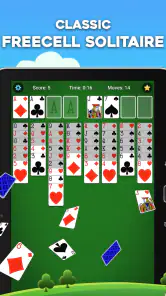
Unlike some other solitaire games, FreeCell Solitaire requires a good mix of strategy and skill. The game is based on a standard 52-card deck, and the objective is to move all the cards to the foundation piles, following the usual suit and rank rules. What makes FreeCell unique is that nearly all deals are solvable, provided you plan your moves carefully. This isn't just a game of chance; it's about honing your strategic thinking and problem-solving skills.
User-Friendly Interface
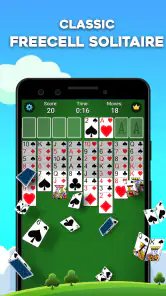
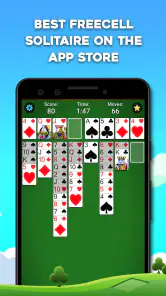
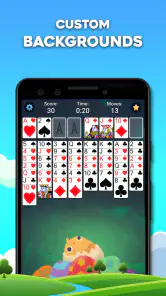
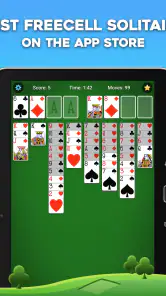
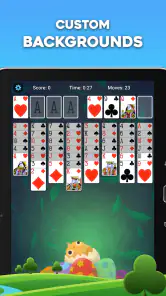
One of the first things you'll notice about FreeCell Solitaire: Card Games is its intuitive and clean interface. Navigating through the app is a breeze, making it suitable for both beginners and seasoned players. The cards are easy to read, and the animations are smooth, enhancing the overall gaming experience. Plus, if you're someone who enjoys customizing your gameplay, the app offers various themes and card designs to keep things fresh and exciting.
More From Our News Desk

Weather by Xiaomi Review: Clear at a Glance, Less Clear Up Close

X Under Pressure: Can It Recover When Posting Goes Wrong?

Clash of Clans Is Won Between the Battles

Android Auto Makes the Case for Quieter Car Software

MobiOffice: Transforming Mobile Productivity with Seamless Integration

EA SPORTS FC™ Mobile Soccer: Redefining Mobile Sports Gaming
Undo, hints, and learning from a mistake
What sets this app apart are its thoughtful features aimed at improving your gaming experience. For instance, there's an undo option for those moments when you make a move you regret. The hint function is also incredibly handy if you ever find yourself stuck and need a nudge in the right direction. Additionally, the app tracks your statistics, allowing you to see how you’re improving over time. It’s always rewarding to beat your own record!
These tools work best as a way to learn, not as a substitute for choosing your own moves. When a deal stalls, I’d undo just the last move or two and look for a card that opens a column or frees a useful card, rather than repeatedly tapping hints. That approach makes it easier to see why a choice helps. Statistics can give you a personal point of comparison, though they are most useful when you treat them as a record of your own play rather than a measure of skill against other players.
Getting more from undo and hints
I find undo most useful when I can identify the decision I want to reconsider. Rewinding one move at a time keeps the cause and effect clear; backing out too far can make it harder to learn which choice actually caused the board to tighten up. A hint can be a helpful prompt when I’m genuinely stuck, but I still check what it changes before accepting it as a plan. The aim is not simply to keep the game moving, but to notice why a card becomes accessible or why a temporary space matters.
Statistics are best read with some context. A personal record can make a familiar game feel rewarding, but a streak or total does not tell the whole story: a cautious player may take longer while exploring a deal, and a quick finish is not automatically a better learning session. I’d use the numbers to notice my own habits over time, such as whether I tend to fill free cells too early, rather than treating them as a scorecard that should dictate every move.
How it compares with other solitaire choices
Compared with Klondike, where the draw pile can leave you relying more on chance, FreeCell puts more of the puzzle in the open from the start. That makes it a stronger choice if you like tracing consequences and revising a plan. It can also feel less relaxing to someone who prefers a quick, familiar card flip with little analysis. The app is aimed at classic FreeCell rather than a broad collection of card games, so players looking to switch between several solitaire rule sets may prefer a multi-game option.
The interface and customization help make repeated deals comfortable, but the basic card layout remains the reason to stay. A practical way to keep sessions engaging is to vary your goal: sometimes focus on clearing a column, and other times try to avoid filling all the free cells. Both choices sharpen your sense of how much working space a deal needs, without turning every game into a race for a personal record.
Choosing between focused FreeCell and a card-game collection
The choice depends on what I want from a card app. If I already know I enjoy FreeCell and want to settle into its open-board decisions, a dedicated game is easier to return to than a menu of unrelated modes. If I’m still deciding which solitaire rules I like, or I regularly want a different kind of puzzle, a collection can offer more variety in one place. That extra breadth comes at the cost of the focused routine this game provides: here, the challenge is consistently about managing visible cards, columns, and temporary spaces.
FreeCell can also be a better fit than Klondike when I want to review a decision instead of blaming a run of unlucky draws. That does not make every hand easy or guarantee that a casual player will solve it quickly. It simply makes planning more central. If I’m tired and want something almost automatic, Klondike may feel more soothing; when I have enough attention to think a few moves ahead, this game gives me more to chew on.
Perfect for On-the-Go Gaming
Whether you're commuting, waiting for an appointment, or just relaxing at home, FreeCell Solitaire: Card Games is perfect for quick gaming sessions. The app doesn't require an internet connection, so you can play anytime, anywhere. It's a great way to unwind and give your brain a good workout whenever you have a few minutes to spare.
When a quick break turns into a longer game
Imagine I’m sitting in a waiting room with a few minutes free. I can start a deal, make a couple of considered moves, and put the phone away when I’m called without having to keep up with a live opponent. On another day, I might have a longer quiet stretch and use the same board to test a more careful sequence. The flexibility comes from the unhurried format, although it’s worth remembering that thinking through a difficult position can make a “quick” hand last longer than expected.
This is a solo game, so it suits a pocket of personal downtime rather than a shared activity. I wouldn’t choose it to fill a group wait or to compete with friends; its appeal is in having a small puzzle to return to on my own. The ability to play without an internet connection is particularly useful when connectivity is uncertain, but I’d still avoid assuming that a specific unfinished board will be preserved if I close the app or move to another device.
Stability, device fit, and practical trade-offs
Because this is a single-player card game without fast action, it does not ask for the kind of constant attention that a competitive or graphics-heavy game would. I’d expect its simple board to be a modest workload for many phones, though actual smoothness can vary by device. The listed minimum is Android 6.0, and the current version is 6.5.5.4477. If your phone is older or short on storage, check that it has room before installing; keeping the operating system and app current is also a sensible first step if you run into trouble.
For reliability, the undo option gives you a way back from a mistaken card move, but it is not a replacement for recovering a session after closing the app. I would avoid starting a long, carefully planned game just before switching devices or clearing apps if preserving that exact board matters to you. The game is free to install, rated Everyone, and includes optional in-app purchases priced from $1.99 to $29.99 per item. If you prefer an entirely purchase-free experience, that is worth keeping in mind; the core attraction remains the card puzzle, not spending.
What to expect from performance over time
For ordinary play, I’d expect the demands to stay modest because the screen is built around a card layout rather than a busy action scene. That is a reasonable expectation, not a promise that every older phone will feel identical: device age, available storage, and the state of the operating system can all affect how an app behaves. If it feels sluggish, I would first close other demanding apps, check for available space, and make sure the game and system are up to date before deciding the game itself is the problem.
There is also a difference between a move-level recovery and a session-level recovery. Undo can correct a choice while I’m still playing, which is useful when I tap the wrong card or want to test a different sequence. It should not be treated as a save system. If I need to leave in the middle of a carefully planned deal, I make that decision with the possibility of having to rebuild my thinking in mind rather than relying on undo to restore a closed session.
Who should choose it
I’d recommend it to players who want a familiar, thoughtful solo game, especially anyone who enjoys learning from mistakes and improving a personal routine. It is also a good fit for short offline stretches, such as waiting in a lobby or taking a quiet break. I’d skip it if you need multiplayer competition, rapid action, or a wide variety of game modes; those are different needs from what a focused FreeCell app is built to serve.
It is especially well suited to someone who likes making a plan but is comfortable changing it when a column or free cell becomes more valuable than expected. A beginner can learn the basic rhythm without needing reflexes, while an experienced solitaire player can focus on tighter choices about space and sequencing. I would be less likely to recommend it to someone who finds repeated layouts monotonous, wants a constant stream of new modes, or prefers games where every session is social. In those cases, a broader card collection or a multiplayer title would be a more natural match.
MobilityWare released the game on September 15, 2011, and the long-running format still works because the challenge comes from the cards rather than a complicated progression system. My performance verdict is straightforward: expect an unhurried, low-intensity game whose real demands are patience and planning, not device power. It is a solid pick when I want to think through a puzzle at my own pace, with undo and hints available when I need help, but it won’t satisfy someone looking for constant novelty or high-energy play.
In conclusion, FreeCell Solitaire: Card Games is a fantastic app for anyone who loves card games and wants to enjoy a classic with a modern twist. Its combination of strategic gameplay, user-friendly interface, and thoughtful features make it a standout in the crowded world of mobile card games. So why not give it a try? Download it today and see for yourself why it's a timeless favorite!
FreeCell Solitaire: Card Games Frequently Asked Questions
Can I adjust the sound or other settings before playing?
If you prefer a quiet game or want to tailor the experience, check the in-game settings after opening FreeCell Solitaire: Card Games. Settings can help make a mobile card game more comfortable to use, especially when playing in shared spaces or during a short break. The core activity remains arranging cards strategically, so you can focus on the puzzle at your own pace.
Is FreeCell Solitaire: Card Games suitable for quick sessions as well as longer play?
FreeCell is a turn-based card game, so you can think through your moves rather than react under time pressure. That makes it a natural fit for a brief break, while a challenging deal can also keep you occupied for longer. Since each hand centers on organizing cards and planning ahead, you can return to the familiar style of play whenever it suits your routine.
Who develops FreeCell Solitaire: Card Games, and how popular is it?
FreeCell Solitaire: Card Games is a card game from MobilityWare, built around the familiar patience-style challenge of arranging cards strategically. It has a 4.6 average from around 315,000 ratings, with roughly 40,000 written reviews and over 10 million installs. That broad audience makes it a well-established option for anyone looking for a classic solitaire game on mobile.
What is FreeCell Solitaire: Card Games?
FreeCell Solitaire: Card Games is a classic card game app available for both Android and iOS devices. It involves a standard 52-card deck and requires strategic thinking to sort all cards into four foundation piles by suit. The game is known for its challenging gameplay and requires careful planning to win each hand.
Is FreeCell Solitaire: Card Games free to download and play?
Yes, FreeCell Solitaire: Card Games is free to download and play. However, it may include in-app purchases or ads. These purchases typically offer extra features, ad removal, or cosmetic enhancements. Ensure to check the app store listing for detailed information about any potential costs. Optional in-app purchases are listed at prices ranging from $1.99 to $29.99 per item, so you can start playing without buying anything.
Pros
- Highly addictive and engaging gameplay.
- Easy to learn with intuitive controls.
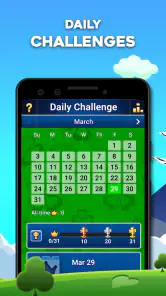
- Daily challenges keep it interesting.
- Offline mode available for travel.
- Minimal ads for a better experience.
Cons
- Graphics are a bit outdated.
- Lacks multiplayer functionality.
- Can be too challenging for some.
- In-app purchases add up quickly.
- Limited customization options.
- Category
- Card
- Version
- 6.5.5.4477