Monster DIY: Mix Beats
- 145.00
- 4.5
- Installs
- 5.00M
- Price
- Free

Screenshots
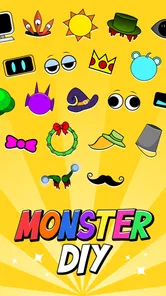
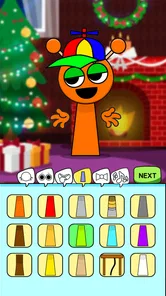
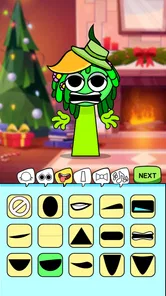
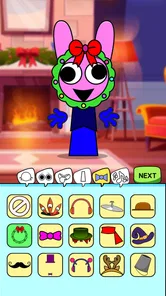
Analysis by Reviewed
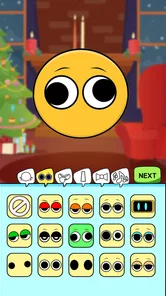
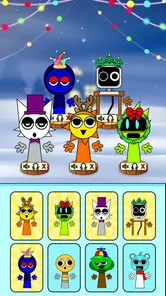
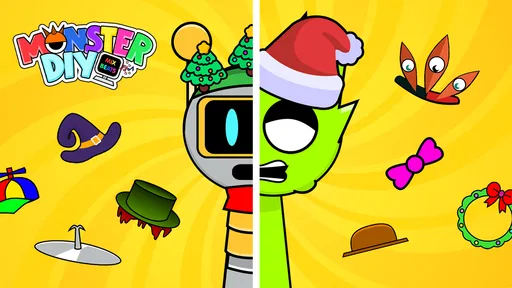
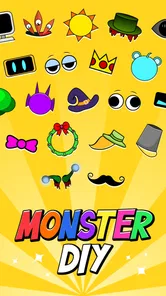
I find Monster DIY: Mix Beats most interesting as a playful way to shape a beat around a funny monster rather than as a full music-production workspace. That difference matters: I’d open it when I want a quick creative distraction or a light introduction to mixing, not when I need precise control for a finished track. Its central appeal is pairing a DIY monster with music-making, so the character gives the activity a visual hook while the beat remains the thing to experiment with.
Why the monster-led idea changes the session
The monster is more than a decorative theme in the way I approach the game: it gives a musical activity a clear, silly focus. Instead of starting with the blank-page feeling that can come with a production app, I can think about making a character and hearing a beat take shape alongside it. That framing is useful for people who are curious about music but don’t yet know what they want to compose.
It also sets expectations. I wouldn’t come here to learn a complete production workflow or to make a carefully arranged song. I’d come for a compact loop of visual play and sound experimentation. When I treat the result as a small playful creation rather than a track that needs to meet a standard, it’s easier to enjoy trying ideas without worrying whether I’m doing things “properly.”
Building a beat around a monster
The game comes from HIGAME GLOBAL and sits in the music category, but its tone is much more casual than a conventional digital audio workstation. The monster concept makes experimentation feel approachable: instead of approaching music as a technical project, I can treat it as a bit of playful trial and error. That is a useful distinction for anyone who finds rows of controls and production jargon off-putting.
In practical terms, I’d think of each session as a small creative loop: try a combination, listen for how the beat feels, then adjust the idea rather than aiming immediately for a polished song. A handy approach is to change one musical choice at a time. If I alter several things together, it becomes harder to tell which change made the result more fun or less coherent. That simple habit turns casual tapping into a more satisfying little experiment.
A quick creative break, not a studio replacement
The game’s best everyday use is a short break when I want something more active than scrolling but less demanding than learning a full music app. I can imagine opening it while waiting for a friend or winding down at home, making a beat just for the amusement of hearing how the parts fit together. The monster theme helps keep that session light, so there’s no pressure to turn every idea into something shareable or serious.
That also shapes how I’d compare it with alternatives. Music games often focus on keeping time or following a performance, while production apps tend to offer deeper editing and more deliberate workflows. Monster DIY: Mix Beats belongs closer to the playful end: its appeal is the combination of a character-led activity and beat experimentation. If I wanted to practice rhythm against a structured challenge, I’d choose a rhythm game; if I needed detailed arranging or recording, I’d reach for a dedicated music-making tool instead.
More From Our News Desk

Weather by Xiaomi Review: Clear at a Glance, Less Clear Up Close

X Under Pressure: Can It Recover When Posting Goes Wrong?

Clash of Clans Is Won Between the Battles

Android Auto Makes the Case for Quieter Car Software

MobiOffice: Transforming Mobile Productivity with Seamless Integration

EA SPORTS FC™ Mobile Soccer: Redefining Mobile Sports Gaming
Making a short session more satisfying
A practical way to get more from a brief visit is to give yourself a tiny goal before you start. I might aim for a beat that feels bouncy, odd, or calmer than my first attempt, then listen for whether the choices support that mood. This is more useful than tapping randomly and hoping for a surprising result, because it gives each adjustment a reason while keeping the activity relaxed.
I’d also use a quick before-and-after check: make one change, listen again, and decide whether it improved the mood I had in mind. That approach is especially handy on a small phone screen, where rapid changes can blur together. It doesn’t require music theory; it simply helps me notice cause and effect. If a combination stops being enjoyable, I can switch direction rather than treating the first idea as something I must rescue.
Where the experience asks for patience
The casual approach has a trade-off. Anyone expecting fine-grained production control may find the experience too light, and a novelty-driven game can lose its pull if the player wants a clear skill path or a serious musical result. I’d also avoid judging a beat only by whether it sounds impressive on the first try. Listening once, changing a single element, and comparing the before-and-after is a better way to enjoy the creative process without expecting professional polish.
There’s another useful trade-off in the character-first presentation: it can make the activity less intimidating, but it may not satisfy someone who wants the music-making itself to be the whole point. If I’m in the mood to focus on detailed musical decisions, a dedicated tool is the better choice. If I want something more game-like and lighthearted, the monster framing is exactly what makes this one distinct.
It is free, has a Teen age rating, and has reached over five million installs, with a 4.7 average from around 29,000 ratings. Those figures suggest that plenty of players have given it a try, though they don’t tell me whether its particular style will suit someone who prefers realism over goofy presentation. The current version is 0.0.7, and it was released on December 19, 2024; I’d treat it as a casual game rather than assume it will replace a more established production workflow.
Who is likely to enjoy it?
I’d recommend giving it a look if you enjoy playful music experiments, like character-based games, or want a low-pressure way to explore how changing a beat affects its mood. It may also be a comfortable starting point for a younger teen interested in music, while the age rating is a reminder that it is intended for teen audiences rather than very young children. If you mainly want a tool for composing complete songs, exporting a polished track, or carefully controlling every musical detail, this is probably not the right fit.
It should also suit someone who likes making small things without turning every hobby into a project. A teenager curious about beats could use it as a first, informal taste of changing musical ideas; a casual player could dip in for a few minutes without needing to plan a long session. By contrast, anyone who finds goofy characters distracting, or who wants a serious practice routine with measurable musical goals, will probably be happier elsewhere.
One useful question is whether I need musical experience before starting. For this kind of casual activity, I wouldn’t expect prior production knowledge to be necessary; curiosity and a willingness to try combinations are more important. Another is whether it suits a quick session: its playful premise makes it a natural pick-up-and-play option, though players who want a long-term progression system may prefer a game built around structured goals. I’d approach it with modest expectations and let the experimentation itself be the point.
Choosing the right moment to play
For a realistic everyday use, I can picture opening it during a short wait when I don’t have enough time or focus for a longer game. I’d choose a simple musical mood, try a few combinations, and stop when I’ve had a satisfying little change of pace. That’s a better fit than starting it when I’m looking for a full evening’s challenge or a tool to support a larger music project.
It may also work well as a shared bit of casual play in the same room: one person can suggest a mood or a funny monster idea, while the other experiments with the beat. I’d keep expectations modest and make the discussion part of the fun, rather than assuming the game is designed for collaboration. The point is the immediate reaction to the sound and character, not a formal group workflow.
The store summary captures the basic idea, but what makes the game worth considering is the way its silly monster framing lowers the stakes of trying musical choices. The developer is HIGAME GLOBAL, and the game is free to play. For me, its strongest case is simple: when I want a cheerful, hands-on diversion with a musical angle, it offers a different mood from a standard rhythm challenge or a serious beat-making app.
What to expect from the music-making
I’d approach the musical side as casual experimentation, not as a promise of a complete composing toolkit. The key question is what kind of satisfaction I want: if it’s the pleasure of trying combinations and seeing how a beat changes, the premise makes sense. If I need to record, arrange, or refine a finished piece with dependable control, I would choose a dedicated music app instead of expecting this game to fill that role.
That distinction is worth keeping in mind before downloading, because “music” can describe very different experiences. A rhythm game tests timing against a structure; a production app gives room for deliberate editing; this game is aimed at a lighter meeting point between music play and a character-driven idea. Knowing which kind of session I’m after helps me decide whether its simple, playful focus is a strength or a limitation.
The first thing that struck me about Monster DIY: Mix Beats is its user-friendly interface. Seriously, even if you're a complete newbie to music production, you'll find your way around the app in no time. The layout is intuitive, and the app is packed with features that make music creation both fun and accessible.
One of the coolest aspects is the wide variety of sounds and beats you can choose from. Whether you're into hip-hop, EDM, or something more eclectic, there's a little something for everyone. You can mix and match to your heart's content, and the possibilities feel endless. I spent hours just playing around with different combinations, and I still feel like I've only scratched the surface.
Features That Make It Stand Out
Another thing I love about this app is the ability to customize and tweak beats to suit your personal style. The app offers a range of tools that let you adjust tempo, pitch, and even add effects like reverb or echo. It's like having a mini recording studio in your pocket, and the creative freedom it offers is just fantastic.
One feature that deserves a special mention is the community sharing option. Once you've crafted your masterpiece, you can share it with other users, listen to their creations, and even collaborate on projects. It's a vibrant community of music lovers and creators, and the support and feedback you receive from other users is incredibly motivating.
Perfect for Casual and Serious Creators
What's great about it is that it's perfect for both casual users who just want to have fun and serious music producers looking for a portable tool. The app runs smoothly on both Android and iOS, which is a huge plus, and I haven't encountered any bugs or glitches so far. It’s reliable, and that's something I really appreciate in an app.
To wrap it up, if you're looking for an app that combines creativity, fun, and a sense of community, give it a shot. It's a fantastic way to explore your musical talents, connect with other music enthusiasts, and just have a great time experimenting with sounds. So go ahead, download it, and start mixing those beats. Who knows, you might just create the next big hit!
My final take
I’d choose this game for its particular mix of goofy visual play and low-pressure beat experimentation, not because I expect it to teach advanced production or replace a proper music workspace. The strongest reason to try it is that it gives a curious player an easy excuse to make a few musical choices and hear how they change the feel of a session. If that sounds like a pleasant break, it is worth considering; if you want structure, precision, or a serious composing workflow, another kind of app will serve you better.
Monster DIY: Mix Beats Frequently Asked Questions
What age is Monster DIY: Mix Beats suitable for?
Monster DIY: Mix Beats has a Teen content rating, so it is intended for a teen audience rather than very young children. Parents and caregivers may want to consider that rating when deciding whether it is suitable for a particular player. The game is centered on creating a funny monster and watching it dance to mixed beats, which gives it a playful music-focused feel.
What is Monster DIY: Mix Beats?
Monster DIY: Mix Beats is an innovative mobile application that allows users to create their own unique music tracks by mixing different beats and sounds. It is designed to be user-friendly, making it accessible for both beginners and experienced music creators. The app offers a wide range of features, including customizable sound packs and intuitive editing tools, to enhance your music-making experience. It is a music game from HIGAME GLOBAL, built around making a funny monster and watching it dance to the beats you mix.
Is Monster DIY: Mix Beats free to download and use?
Yes, Monster DIY: Mix Beats is free to download from both the Google Play Store for Android devices and the Apple App Store for iOS devices. While the basic version of the app is free, there may be in-app purchases available for additional sound packs and features that can enhance your music creation experience. These purchases are optional and not necessary to enjoy the core functionalities of the app.
What are the main features of Monster DIY: Mix Beats?
Monster DIY: Mix Beats offers a variety of features designed to help users create and mix music seamlessly. Key features include a vast library of sound packs, intuitive drag-and-drop editing tools, and the ability to share your creations directly from the app. Additionally, the app supports multiple audio formats, making it versatile for different music production needs. The user interface is designed to be straightforward, catering to both novices and professional music producers.
Can I use Monster DIY: Mix Beats offline?
While Monster DIY: Mix Beats requires an internet connection for downloading the app and additional sound packs, the core functionalities of the app can be used offline. This means you can create and edit music tracks without needing to be connected to the internet. However, to access new sound packs or share your creations online, an internet connection will be required.
Pros
- Unique monster customization options.
- Wide variety of beat-making tools.
- Engaging and intuitive interface.
- Regular updates with new features.
- Encourages creativity and experimentation.
Cons
- Occasional in-app purchase prompts.
- Can be overwhelming for beginners.
- Requires a stable internet connection.
- Limited free content available.
- Some features are locked behind paywalls.













