Just Dance Now
- 42.94K
- 3.9
- Installs
- 50.00M
- Price
- Free

Screenshots

Analysis by Reviewed
I like how Just Dance Now turns a phone and a screen into a reason to get moving, especially when I want a playful break rather than a formal workout. It is a music game from Ubisoft Entertainment, free to install, and it has been around since 2014. The current version is 8.3.0, so this is an established title rather than a brand-new experiment; that history is useful context, though it does not tell me what every future update will bring.
What the setup means in a real home
The phone-as-controller idea is convenient, but it shapes the whole experience more than the song selection does. Before starting, I would decide where the phone can be held comfortably, where the screen should go, and how much room dancers need to move without bumping into furniture. For a solo player, that is a quick bit of preparation; for a group, it can be the difference between a lively round and people stopping to rearrange the room.
I would also choose the viewing screen with the least awkward setup, rather than assume the largest screen is automatically best. What matters is that dancers can see the routine while holding the phone securely. If the display is off to one side, people may keep turning their heads or lose track of the next move. A short test round is a useful way to sort this out before everyone joins.
Get Ready to Groove
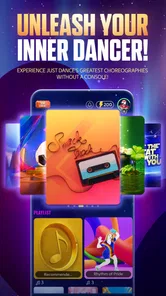
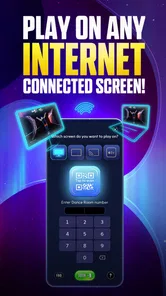
Just Dance Now is a mobile version of the popular console game where you can dance to hit songs from a wide array of genres. The beauty of this app is its accessibility. You don’t need a console or any fancy equipment – just your smartphone and a screen to mirror the dance moves, like a smart TV or a computer monitor. Talk about convenience!
How It Works
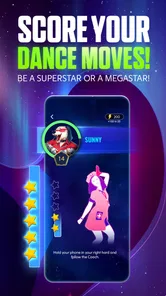
Once you've downloaded the app, getting started is as simple as pie. You sync your phone with the screen, choose a song from their vast library, and start dancing. The app tracks your movements using your smartphone’s sensors, scoring you based on how well you follow the dance routines. It's like having a personal dance instructor right in your pocket!
For the smoothest first session, I’d set the viewing screen where everyone can see it, clear a little space, and check that the phone is secure in your hand before the music starts. The phone is the controller, so dancing freely depends on being comfortable holding it throughout a routine. I would also test the setup with one song before inviting a group: it quickly reveals whether the screen is easy to follow and whether the room has enough space.
That controller setup is the main trade-off compared with console dance games. A console can offer a more dedicated living-room arrangement, while this version lowers the equipment barrier and makes spontaneous play easier. It is a strong fit for a shared apartment, a family visit, or a quick after-school dance break, but less appealing if you want hands-free play or precise workout tracking.
More From Our News Desk

Weather by Xiaomi Review: Clear at a Glance, Less Clear Up Close

X Under Pressure: Can It Recover When Posting Goes Wrong?

Clash of Clans Is Won Between the Battles

Android Auto Makes the Case for Quieter Car Software

MobiOffice: Transforming Mobile Productivity with Seamless Integration

EA SPORTS FC™ Mobile Soccer: Redefining Mobile Sports Gaming
Making the game work for different players
This is easiest to enjoy when nobody treats the score as a serious judgment. New dancers may need a round or two to understand the choreography, while confident players might want to repeat a song and improve their result. I would let people join at their own pace: one person can dance, another can watch the screen and choose the next track, and then they can swap. That small change makes the game more welcoming for guests who are curious but not ready to jump in immediately.
It can also fit a short everyday break better than a planned workout. For example, after a long afternoon at home, I might choose one familiar track, dance through it, and stop there rather than promise myself a full exercise session. The low setup barrier makes that sort of spontaneous use plausible, but the game is still entertainment first. I would not rely on it to measure exertion, build a training routine, or replace advice from a fitness professional.
Song Selection
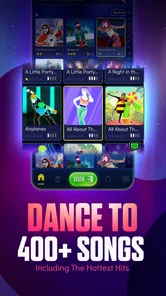
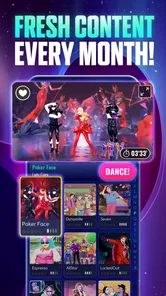
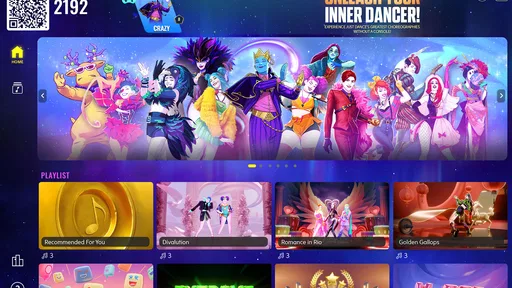
The song library is fantastic, covering everything from the latest pop hits to classic oldies. Whether you're in the mood for some Ariana Grande or want to rock out to Queen, Just Dance Now has got you covered. The app updates regularly, adding new songs to keep the content fresh and exciting. There's nothing quite like dancing to your favorite tunes, am I right?
One practical point is to choose a track for the people in the room, not only for yourself. A familiar song can make newcomers comfortable enough to join in, while a more challenging routine gives returning players something to work on. If you are deciding whether the game suits your taste, try the available free play before spending: in-app purchases range from $0.49 to $99.99 per item, and the amount you enjoy it will depend heavily on how often you want access to more music.
That makes the cost decision personal rather than automatic. I would treat it as a casual party game first and see whether it earns a regular place in my week. Someone who only wants an occasional song may be content with limited access; a household that dances often may value having a broader selection. It is worth checking the purchase options in the app before committing, since the free download does not mean every song or option is free.
Choosing music without slowing the room down
For a mixed group, I would agree on a simple rotation before the first song: each person gets a turn to pick, and the next dancer can choose between a familiar track and something new. That keeps one confident player from dominating the session and avoids long pauses while everyone debates the catalogue. If children are playing, an adult can help with song choices and keep the play area clear; the game’s Everyone 10+ rating is a useful reminder that it is intended for a broad audience, not a reason to skip ordinary supervision.
Song access is also the main question to settle before treating the game as a regular activity. The free download lets you try the basic experience, while in-app purchases can change how much music is available to you. I would check the current options inside the app and decide based on actual use rather than assume that one purchase is necessary or that the full catalogue comes with installation. That is a better approach for someone who only wants an occasional party game than paying before knowing whether the household will return to it.
Multiplayer Madness
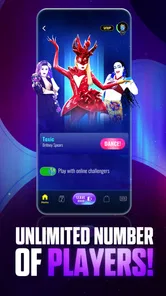
One of the standout features is the multiplayer option. You can invite friends over or connect with other players worldwide. It's a great way to have fun and compete against friends without stepping outside. Plus, it's an awesome workout – who knew exercising could be this fun?
In an everyday setting, I can imagine starting a few rounds after dinner when friends are still around: pick an easy-to-recognize song, let one person lead the first attempt, and then rotate who chooses next. That keeps the session light and avoids turning a party into a high-pressure contest. For a solo session, I would use the score as a playful nudge to repeat a routine, not as a measure of fitness or dance skill; the appeal is getting up and moving, not receiving a detailed training plan.
It is also worth setting expectations with a group. A phone-based dance game needs enough room for people to move safely and a screen that is visible from the playing area. If the room is cramped, the display is hard to see, or guests would rather listen than dance, a music playlist or a conventional rhythm game may be the better choice. The game’s social energy is its strength, but it works best when people are willing to take part.
When another kind of music game is a better fit
Compared with a playlist, this game asks people to do more than listen, which is exactly why it can rescue a quiet gathering—but it also makes it less suitable as background entertainment. A playlist wins when guests want to talk, choose their own movements, or keep music going without taking turns. A console dance title may be a better pick for someone who already owns the hardware and wants a more dedicated setup. A rhythm game focused on taps or timing suits players who prefer to stay seated. I see this app as the flexible middle ground: more active than music playback, less demanding to set up than buying into a console arrangement.
That flexibility has limits. Holding a phone while copying dance moves may be uncomfortable for people who want both hands free, and a small screen can be a poor fit for a large room. I would skip it if the main goal is detailed exercise guidance, if players cannot safely move in the available space, or if the group dislikes taking turns and being scored. In those cases, a dance video, playlist, or purpose-built fitness option is likely to feel more natural.
Pricing and Availability
The app itself is free to download. However, to access the full library of songs, you'll need a VIP pass, which is a subscription-based service. In my opinion, it's well worth the price if you're a dance enthusiast. You can try a few songs for free to see if it's your jam before committing.
It is rated Everyone 10+ and has an average rating of 3.9 from around 1.2 million ratings, with over 50 million installs. Those figures suggest that many people have tried it, but they are not a substitute for checking whether the controller-and-screen setup fits your home. The game is aimed at a broad audience, yet younger players should still have enough space and a sensible adult nearby if the room gets lively.
For existing players, the current version number is a useful reference when checking compatibility or troubleshooting: make sure the app is updated before a gathering, and test the connection before guests arrive. Its release history shows that the product has continued beyond its 2014 debut, but I would judge it by the experience available now rather than assume every older song, feature, or routine has stayed unchanged. If a familiar setup behaves differently after an update, restarting the app and reconnecting the screen is a sensible first check.
What longtime and new players should keep in mind
The game’s release in 2014 and its current 8.3.0 version show that it has had a long life as a mobile dance title. That is useful context for someone deciding whether to try it: it is not a newly launched concept, and it has attracted a large audience. Still, a version number is not a promise that every device or screen arrangement will behave identically. For an existing player, I would make sure the app is current before hosting, then test the connection while there is time to adjust. For a new player, I would begin with one song and learn the setup before buying anything.
One small but useful habit is to treat the screen connection as part of the game night checklist, just like clearing space. If you wait until guests arrive to discover that the display is difficult to see or the phone is awkward to hold, the first impression can be frustrating. Testing early also gives you time to decide whether the room actually suits dancing, rather than trying to force the activity into a tight space. The app is at its best when the technology fades into the background and people can focus on the routine.
Who Will Enjoy It—and What to Watch
I would recommend it to people who want an easy-to-start dance game for casual gatherings, family time, or short bursts of movement at home. It is less suitable for anyone looking for a structured exercise program, hands-free motion controls, or a dependable substitute for a console game night. The Android minimum requirement is version 7.0, so checking the device’s software before downloading can save a wasted attempt; on iOS, I’d check the current store compatibility details for the device.
Ubisoft Entertainment remains the developer behind the game, and the best reason to keep it installed is simple: it can turn a spare moment into a shared activity without asking players to learn a complicated system. I’d keep expectations grounded around song access, room setup, and the phone as controller. If those compromises sound fair, it is an enjoyable way to bring dancing into an ordinary evening; if not, a playlist, a dedicated console title, or a more fitness-focused app will suit you better.
In conclusion, Just Dance Now is more than just a game; it’s an experience. It’s perfect for parties, workouts, or just dancing your heart out when no one’s watching. So, if you're looking to add a little rhythm to your life, give it a whirl. Who knows, you might just discover your inner dancing queen!
Just Dance Now Frequently Asked Questions
Can I play Just Dance Now on a phone without connecting it to another screen?
A phone is used as the controller, while a larger screen lets you see the dancer and follow the choreography. The game’s format is designed around viewing the routine on a connected display and moving along with it. If you are considering downloading it, think about whether you have a suitable screen and enough room to dance comfortably.
Does Just Dance Now need an internet connection?
Just Dance Now uses a phone and a screen together during gameplay, and a reliable internet connection helps them stay in sync. This is worth considering before you download if you expect to play somewhere with limited connectivity. For a smoother session, check that your phone can connect to the network you plan to use and that the screen setup is ready before starting.
Is Just Dance Now suitable for a small room or limited space?
The game asks you to follow dance moves, so having enough clear space to move safely can make playing more comfortable. You do not need dedicated exercise equipment, but it is sensible to move furniture or other obstacles out of the way before beginning. If you share a small room, take turns or choose a spot where everyone can move without bumping into anything.
Can I try Just Dance Now before paying for extra content?
Just Dance Now is free to download and uses a free-to-play model, with limited access to songs. Optional in-app purchases are available for players who want more content. This lets you get a feel for the dancing format before deciding whether to spend money. Review the purchase options in the app and consider setting spending limits if children will be playing.
What age rating does Just Dance Now have?
Just Dance Now is rated Everyone 10+, and its dance-along format can make it an entertaining activity for families. Players follow choreography on a larger screen while using a phone to participate, so it can work well as a shared music game. As with any app, parents may want to review its in-app purchase options and decide what settings and spending limits are appropriate for their household.
Pros
- Engaging and fun dance routines
- Wide variety of music genres
- User-friendly interface
- Supports multiplayer sessions
- Frequent updates with new songs
Cons
- In-app purchases can be costly
- Requires a stable internet connection
- Limited offline functionality
- Ads can be intrusive
- Some songs are region-locked













