Guitar Band: Rock Battle
- 10.93K
- 4.5
- Installs
- 50.00M
- Price
- Free

Screenshots
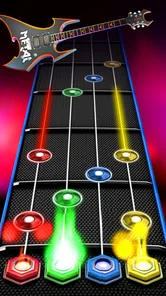
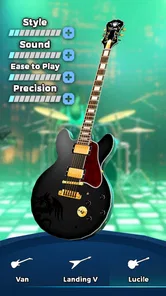
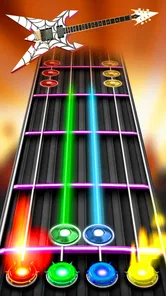

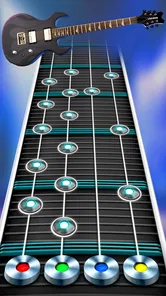
Analysis by Reviewed
I like rhythm games best when they make a short break feel active without asking me to learn a complicated control scheme. That is the appeal of Guitar Band: Rock Battle: it turns familiar music-game timing into a little stage performance, with the goal of hitting notes cleanly rather than simply listening along. It is a free music game from Supercharge Mobile, rated for Everyone, and it suits players who want a quick musical challenge more than a realistic guitar simulator.
Who Will Enjoy This Kind of Rock Challenge?
I’d recommend it first to people who already enjoy rhythm games and want a guitar-focused theme without needing to know how to play guitar. It is also a reasonable choice if you like having a clear task during a short break: watch the notes, respond in time, and see whether your accuracy improves. The game’s music framing gives those familiar inputs a more performance-oriented feel than a plain sequence of taps.
It is less suitable if your main aim is to discover new music passively, sing along, or learn an instrument. Those needs call for a streaming service, karaoke game, or guitar-learning tool instead. Here, the music is part of the challenge, and the screen asks for your attention. I would also think twice if competition tends to make games stressful for you; the multiplayer framing may be motivating for some players but unnecessary pressure for others.
A More Useful Way to Approach Early Sessions
When I try a new rhythm game, I resist the urge to judge it by one difficult run. I’d use the first few sessions to find a comfortable grip and learn how the note patterns feel at a pace I can follow. Then I’d replay a track with one modest goal, such as keeping a steadier rhythm, rather than trying to improve every part of my performance at once. That makes practice feel more purposeful and helps separate unfamiliarity from a genuine mismatch with the game.
There is a small but useful trade-off here: a phone held too loosely can move just as your tapping gets busier, while gripping it hard can make quick inputs feel awkward. I’d prop my hands comfortably, keep the screen at a readable angle, and avoid playing while walking. Those habits do not change the game’s mechanics, but they make it easier to tell whether a missed note came from timing or from handling the device poorly.
Getting Started with Your Rock Journey
From the moment you launch Guitar Band: Rock Battle, you’re greeted with an electrifying interface that’s all about the rock ‘n roll vibe. The app is available on both Android and iOS, making it accessible to a wide audience. Upon opening, you’re prompted to create your very own band. The customization options are pretty neat—you can choose from a variety of instruments, band names, and even some cool outfits to really make your band stand out.
The tutorial is straightforward and gets you jamming in no time. It walks you through the basic controls, which, thankfully, are simple enough for beginners but also offer a challenge for seasoned players. The game’s mechanics are based on tapping the notes as they scroll on your screen, aiming to hit them with precision to score points and make your band the ultimate rock legends.
More From Our News Desk

Weather by Xiaomi Review: Clear at a Glance, Less Clear Up Close

X Under Pressure: Can It Recover When Posting Goes Wrong?

Clash of Clans Is Won Between the Battles

Android Auto Makes the Case for Quieter Car Software

MobiOffice: Transforming Mobile Productivity with Seamless Integration

EA SPORTS FC™ Mobile Soccer: Redefining Mobile Sports Gaming
Learning the Timing, Not Just the Buttons
The simple tap input is approachable, but precision is where the practice comes in. I’d start with a relaxed session and focus on the rhythm of the notes rather than trying to chase a score immediately. A useful habit is to keep your tapping hand relaxed and the phone steady; frantic movements make it easier to lose the beat, especially when a track gets busier. If you’re playing on a smaller screen, a comfortable grip matters more than dramatic gestures.
This is also why the game works well in short bursts. A few attempts can fit into a commute wait or a break between tasks, while a longer session makes more sense when you want to repeat a track and improve your timing. If you’re looking for an instrument-learning app that teaches chords, technique, or music theory, this is not a substitute: the fun here comes from matching notes on screen, not learning to play a physical guitar.
Rock On with the Gameplay
Once you’re past the initial setup, the real fun begins. The game features a wide array of music tracks, spanning multiple rock genres. What’s cool is how the game keeps things fresh by regularly updating its playlist with new songs. You’ll find yourself rocking out to classics as well as discovering new hits that you might just add to your personal playlist.
The competitive edge of the game is what keeps players coming back for more. The multiplayer mode lets you battle it out with other players from around the world. There’s nothing quite like the thrill of seeing your band climb the leaderboards, proving you’ve got what it takes to be the best.
Choosing Between Practice and Competition
I’d treat the competitive side as an optional extra, not the only reason to play. It gives a focused goal to a session, but players who mainly want a calm, private music break may prefer to concentrate on improving their own consistency. For a fair comparison, this sits closer to a note-tapping rhythm game than to karaoke or a music streaming app: it asks for attention and timing, so it is more engaging than passive listening but less useful when you simply want songs playing in the background.
One practical trade-off is that the appeal depends on enjoying the available tracks and replaying them. If a song doesn’t suit your taste, the timing challenge may still be satisfying, but the music itself is less likely to pull you back. I’d sample different styles before deciding whether the playlist fits you, and avoid treating a leaderboard position as the only measure of progress; cleaner, steadier play is a more rewarding personal target.
Making Competition Work for You
If you do want to compete, I’d choose a moment when you can give the screen your full attention rather than squeezing a match into a situation where you might be interrupted. A brief practice run first can help you settle into the timing before you put a result on the line. This is particularly useful when you have just picked up your phone or changed how you are holding it; a short warm-up can make the first serious attempt feel less rushed.
Competition is not the only reason to return, though. If you notice that you are hitting notes more consistently, that can be a satisfying target even when you are not focused on other players. I’d use leaderboards as an occasional nudge, not a verdict on whether I am good at the game. That keeps the experience enjoyable if your preferred way to play is repeating a track and improving at your own pace.
Graphics and Sound Quality
Visually, the game is a treat. The graphics are vibrant and dynamic, perfectly capturing the essence of a high-energy rock concert. The sound quality is equally impressive, with each guitar riff and drum beat coming through crisp and clear. It’s easy to get lost in the music, which, let’s be honest, is exactly what you want in a game like this.
How It Fits Into an Everyday Routine
Imagine having ten minutes free before meeting a friend: you can open the game, play a track or two, and leave without needing to turn that pause into a long gaming session. At home, headphones can help you focus on the musical cues, while a quieter setting makes it easier to notice whether your timing is drifting. If you’re playing around other people, keep the volume considerate; the concert presentation is part of the fun, but it need not take over the room.
For players comparing it with other music games, the key question is what kind of interaction they want. This one centers on guitar-themed performance and direct note tapping. A karaoke-style option is a better fit if singing is the point, and a music player is better if you don’t want to keep your eyes on the screen. I’d skip this if you dislike repeated attempts, competitive framing, or games that reward precise reactions; its straightforward controls do not make it a hands-free listening experience.
When a Short Session Is Better Than a Long One
A realistic routine for me would be to play a couple of tracks while waiting for a pickup or winding down after a task, then stop before the session turns into mindless repetition. If I am trying to improve, I’d make the next run deliberate: choose one track, pay attention to the note flow, and decide afterward whether the timing felt better. That is more useful than tapping through several attempts while distracted and wondering why none feels satisfying.
It is also worth considering the setting. A quiet moment with headphones can make the musical cues easier to follow, but a noisy bus stop or a conversation-filled room may divide your attention. If you only have a few seconds to spare or need to keep your phone away, this is not the right kind of music app; it rewards looking and responding, rather than simply pressing play and carrying on.
Speed, Stability, and Device Expectations
The game’s basic interaction is easy to understand, so there is little control complexity to slow down a first session. Still, rhythm play is sensitive to interruptions: notifications, switching apps, or a shaky grip can break concentration even when the tapping itself is simple. I’d close out distractions before a competitive run and use a stable connection for online play where possible. That is a practical precaution, not a guarantee of uninterrupted performance.
It is free to start, though optional in-app purchases range from $0.99 to $99.99 per item, so I’d decide in advance whether I’m happy to play without spending. Its current version is 4.11.0, and the game has a 3.8 average from around 277,000 ratings, with more than 10 million installs. Those figures suggest a sizeable audience, but they don’t tell you whether the songs or competitive style will suit your taste. On Android, it requires version 7.0 or later; as with any rhythm game, a device that responds smoothly to taps is more important than flashy visual effects.
What to Expect from Repeated Play
The main performance demand I’d plan around is attention rather than extended, complicated input. A track can feel easy when I am settled and noticeably less forgiving when I am distracted, so I would not use a difficult run as the only test of how responsive the game feels. If inputs seem inconsistent, I’d first put the phone down securely, stop switching between apps, and try again in a calmer moment. That simple check helps distinguish an awkward session from a problem that keeps happening.
For heavier use, such as playing several attempts in a row, I’d take a pause if my tapping becomes tense or my focus starts to slip. Repetition can help build familiarity, but it can also turn into rushed retries that teach little. I would not assume every phone handles the game identically, especially if it already struggles with other games. Trying a short session before settling into a longer one is a sensible way to judge whether it feels comfortable on your own device.
Final Thoughts: Should You Download?
So, is Guitar Band: Rock Battle worth your time? If you’re a fan of rhythm games or just someone who loves music, I’d say give it a shot. It’s a fun, engaging app that offers a solid mix of entertainment and challenge. Plus, the ability to connect with other players globally adds a nice social element to the experience.
Whether you’re playing solo or taking on the world with your band, this game is sure to strike a chord with music lovers. So go ahead, download it, and let your inner rockstar shine!
My Performance Verdict
For me, this is best approached as a lightweight, attention-focused game rather than something to leave running in the background. I would expect the familiar tap-based play to feel immediate, but smoothness can vary with the device and whatever else is happening on it; I wouldn’t promise identical responsiveness on every phone. If a session stutters or an interruption knocks you out of rhythm, pause, return when the screen is settled, and try again rather than assuming you have to commit to a long run.
The game has been available since September 27, 2017, and the current release is 4.11.0. Its size and battery demands are not something I can responsibly quantify, so my practical advice is modest: if your phone already struggles with games or has little room to spare, check how it behaves on your device before making it a regular pick. Overall, I’d recommend it to anyone who enjoys quick, competitive rock-themed tapping challenges, while a more relaxed listener or someone seeking guitar lessons will be happier elsewhere.
Guitar Band: Rock Battle Frequently Asked Questions
Is Guitar Band: Rock Battle suitable for children?
The game has an Everyone content rating, so it is marked as suitable for a broad audience. Its focus is music and rhythm gameplay, with players following songs in a guitar-themed format. Parents may still want to review the in-app purchase options and decide whether purchase controls are appropriate before letting a child play.
Does Guitar Band: Rock Battle require a powerful phone?
Guitar Band: Rock Battle is designed for mobile devices, and the Android version requires Android 7.0 or later. A compatible device is the main starting point; as with other games, performance can vary across phones and tablets. Check that your device has room for the installation and any additional content you choose to download.
Is Guitar Band: Rock Battle suitable for a first music game?
Yes. Guitar Band: Rock Battle is a music rhythm game built around playing along with songs, so it offers an approachable way to try a guitar-themed game even if you are new to the genre. The store describes its aim as becoming an amazing guitarist and playing famous songs. Its content rating is Everyone, making it suitable for a broad audience.
What is Guitar Band: Rock Battle?
Guitar Band: Rock Battle is an exciting music simulation game available on Android and iOS platforms. It allows players to immerse themselves in the world of rock music by playing guitar with a variety of songs. The game offers different difficulty levels and a wide range of guitar models to choose from, making it suitable for both beginners and seasoned players.
Is Guitar Band: Rock Battle free to play?
Yes, Guitar Band: Rock Battle is free to download and play. However, like many free-to-play games, it offers in-app purchases, with prices ranging from $0.99 to $99.99 per item. These purchases can enhance gameplay by unlocking additional songs, features, and guitar models. Players can enjoy the game without spending money, but some features may require purchase to access.
Pros
- Immersive rock band simulation experience.
- Wide variety of songs to play.
- Engaging multiplayer mode.
- Customizable band members.
- Regular updates with new features.
Cons
- In-app purchases can be pricey.
- Requires constant internet connection.
- Ads can be intrusive.
- Some songs locked behind paywall.
- Can be resource-intensive on devices.













