Duet Tiles - Rhythm Music Game
- 106.00
- 3.6
- Installs
- 10.00M
- Price
- Free

Screenshots





Analysis by Reviewed
When a rhythm game feels harder than the music suggests, I first check whether I’m matching the beat or reacting to the tiles too late. In Duet Tiles - Rhythm Music Game, that distinction matters: the simple tap-and-swipe controls are easy to start, but quick patterns can make a casual session unexpectedly demanding. I’d approach the first attempts as practice, not as a test of musical ability.
Where a run can go wrong
The most common friction in a tile game is timing. If I watch the screen and wait until a tile seems to reach the bottom before moving, I can end up behind the beat; listening for the rhythm while keeping the tiles in view gives me a steadier cue. When a section gets busy, I also avoid trying to anticipate several moves at once. Aiming for the next clear action is more useful than rushing and losing track of the pattern.
It’s worth distinguishing a missed note from an unpleasant play session. If the music feels too loud, the screen is tiring to follow, or I’m playing in a noisy place, those conditions can make timing feel worse even when the game is working normally. A short break or a quieter setting may help more than repeatedly restarting the same section.
Small setup checks before playing
I’d start by checking that the device can run the game: its minimum Android requirement is version 7.0. I’d also make sure the phone has enough battery for the session and that audio is coming through the speaker or headphones I actually intend to use. These are ordinary checks, but they help separate a device or listening issue from a gameplay mistake.
Because precise rhythm depends on what I hear and see together, I prefer to avoid changing audio devices halfway through a run. If taps suddenly feel out of time after switching between a speaker and headphones, I stop and test a fresh attempt under one consistent setup. That’s a practical way to tell whether I’m adjusting to the song or reacting to a change in how I’m listening.
Getting back into a comfortable rhythm
When a run goes badly, I don’t keep tapping faster to compensate. I reset my attention: listen to the song, watch the next tile, and make one deliberate input at a time. If a particular pattern keeps catching me, I treat it as a cue to slow down mentally rather than proof that I need a different control scheme. The game’s straightforward inputs make it easy to focus on timing, but they also leave little room to hide a missed beat.
For a quick everyday session, this makes the game easy to pick up while waiting for a ride or taking a short break. I would keep the sound at a comfortable level and choose a place where I can pay attention; it is less suitable when I need to stay alert to conversations, traffic, or other surroundings. If I’m looking for a game to play without listening closely, a less rhythm-dependent puzzle would be a better fit.
More From Our News Desk

Weather by Xiaomi Review: Clear at a Glance, Less Clear Up Close

X Under Pressure: Can It Recover When Posting Goes Wrong?

Clash of Clans Is Won Between the Battles

Android Auto Makes the Case for Quieter Car Software

MobiOffice: Transforming Mobile Productivity with Seamless Integration

EA SPORTS FC™ Mobile Soccer: Redefining Mobile Sports Gaming
Getting Into the Groove
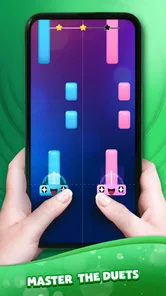
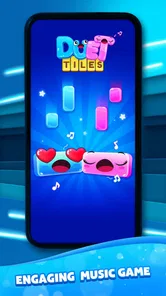
Once you download Duet Tiles - Rhythm Music Game, you’re immediately greeted with a vibrant interface that’s easy on the eyes. The app doesn’t waste time with complicated tutorials; instead, it throws you right into the action. The premise is simple: tap on the tiles as they slide down to the rhythm of the music. But trust me, it’s easier said than done! As the tempo picks up, so does the challenge. You’ll find yourself in a trance, trying to nail every beat.
Music Selection
One of the standout features of this app is its music library. Whether you’re into pop, classical, or electronic beats, there’s something for everyone. The songs are updated regularly, which means you’ll always have something fresh to tap along to. I personally love that they include both mainstream hits and indie gems. It’s like having a mini concert in your pocket.
Gameplay Mechanics
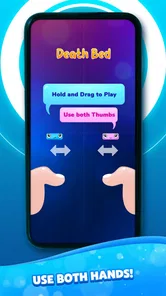
Now, let’s talk about the gameplay mechanics. The controls are intuitive, a simple tap or swipe is all you need to get started. But don’t let this simplicity fool you; mastering the game takes skill and practice. The app does a great job of teaching you the ropes with beginner-friendly levels, but as you progress, the tiles come faster and the patterns get trickier. It’s a satisfying challenge that keeps you coming back for more.
Visual and Audio Experience
The visual design is sleek and modern, with a color palette that’s both vibrant and soothing. The tiles move in sync with the music, creating a mesmerizing dance of colors. Coupled with the high-quality audio, the experience is immersive. I often find myself lost in the rhythm, forgetting the world around me.
For those who love to personalize their gaming experience, the app offers various themes and skins. It’s a small touch, but it adds a layer of customization that I appreciate.
Choosing the right kind of music game
This is a music game rather than a music player or a tool for learning an instrument. I wouldn’t choose it when I want to explore a full album, make a playlist, or practice an instrument; a streaming app or dedicated learning tool serves those goals better. Its appeal is the active task of responding to music, so it suits someone who wants a compact challenge more than someone who only wants background listening.
The dual-vocal focus gives the game a distinctive angle, though it also means the experience is built around following musical cues rather than freely choosing how to play each song. That trade-off is useful to know before downloading: the format can make familiar pop feel playful, while players who prefer open-ended rhythm charts or strict instrument-style note practice may be happier with a different rhythm game.
Who will enjoy it, and what it costs
I’d recommend it to casual players who like pop-led music challenges, quick retries, and controls that don’t demand a long learning period. It can also suit a rhythm-game fan looking for a lighter change of pace. It is a weaker match for anyone who dislikes fast reactions, wants a quiet game, or expects a detailed music-training experience.
The game is free to download, with in-app purchases ranging from $1.19 to $48.99 per item, so I’d check purchase prompts carefully and avoid treating optional spending as necessary to enjoy a short session. It is rated Everyone 10+, and AMANOTES PTE. LTD. is the developer. The game was released on May 18, 2023, and version 1.9.15 is the current version; its 3.8 average from around 2.8 thousand ratings and more than 10 million installs suggest a sizable audience, though those figures alone can’t tell me whether its music or pace will suit you.
Final Thoughts
In a sea of rhythm games, Duet Tiles - Rhythm Music Game stands out for its engaging gameplay and excellent music selection. It’s perfect for both quick play sessions and long gaming marathons. Whether you’re a casual gamer or a rhythm enthusiast, this app offers something that’s both fun and rewarding. So, if you’re on the hunt for a new music game, give it a try. You might just find yourself tapping along to the beat all day!
My practical verdict is more measured: I’d try it when I have a few uninterrupted minutes, headphones or a comfortable speaker setup, and the patience to learn the timing. If a run feels off, I’d first check my listening conditions and focus on one input at a time rather than blaming the phone or buying anything. The game is at its best when I want to engage with a song through quick reactions; when I want calm listening, broad control over the music, or a precise instrument lesson, I’d pick another option.
Duet Tiles - Rhythm Music Game Frequently Asked Questions
Is Duet Tiles suitable for younger players?
Duet Tiles - Rhythm Music Game is rated Everyone 10+, so it is aimed at a broad audience while being designated for players aged ten and up. The gameplay focuses on tapping and swiping along with music. Since the game includes in-app purchases, it is sensible for parents to review purchase settings with younger players before they begin.
What is Duet Tiles - Rhythm Music Game all about?
Duet Tiles - Rhythm Music Game is an engaging rhythm-based game where players tap on tiles in sync with the music to score points. The game combines beautiful music tracks with challenging tile patterns, offering a thrilling experience for music and rhythm game enthusiasts. It’s designed to entertain and improve your timing skills. Its store description also highlights dual vocals, swipe-and-tap piano tiles, and pop and exclusive songs.
Is Duet Tiles - Rhythm Music Game free to play?
Yes, Duet Tiles - Rhythm Music Game is free to download and play. However, it offers in-app purchases that enhance the gaming experience. Players can buy additional songs, remove ads, or get special items to improve their gameplay. It’s important to manage these purchases carefully, especially for younger players. The listed purchase options range from $1.19 to $48.99 per item, so check the price of any offer before confirming it.
What are the main features of Duet Tiles - Rhythm Music Game?
Duet Tiles offers several exciting features including a wide variety of music genres, different difficulty levels, and visually appealing graphics. The game supports both single and multiplayer modes, allowing players to compete with friends or enjoy solo sessions. Regular updates ensure new songs and features are frequently added to keep the gameplay fresh. Its central appeal is coordinating taps and swipes with the music, including duet-style vocals and piano-tile play.
Can Duet Tiles be played offline?
Duet Tiles - Rhythm Music Game can be played offline, which is great for users who want to enjoy the game without an internet connection. However, to access certain features like downloading new music tracks or participating in online leaderboards, an internet connection is required. Offline play ensures that you can enjoy the game anywhere, anytime.
Pros
- Engaging rhythm-based gameplay.
- Wide variety of music tracks.
- Smooth and intuitive controls.
- Visually appealing graphics.
- Regular updates and new content.
Cons
- Ads can be intrusive.
- Limited offline functionality.
- Some tracks are premium only.
- Occasional in-app purchase prompts.
- Requires stable internet connection.













