Zoom Rooms Controller
- 438.00
- 3.9
- Installs
- 10.00M
- Price
- Free

Screenshots
Analysis by Reviewed
I tend to judge a meeting-room app less by how impressive it feels on day one and more by whether it saves small amounts of time every week. Zoom Rooms Controller is a business app from zoom.com, and its purpose is specific: it turns a mobile device into a control surface for a Zoom Room rather than another place to host an ordinary video call. That distinction matters. If your work regularly moves into equipped meeting spaces, the idea can become part of a useful routine; if you mostly join calls from your own phone or laptop, it may have little reason to stay installed.
Why the first week feels easy
My first impression was that the controller makes more sense once you are standing in the room than when you are browsing an app menu at home. In a shared space, having meeting controls on a device you can hold is more practical than reaching for a keyboard or asking someone else to handle every adjustment. The appeal is immediate: tap into the room’s meeting workflow, then keep the conversation moving instead of turning setup into a group activity.
A realistic example is a team arriving for a weekly planning meeting. One person can get the room ready while others settle in, and the person leading can make routine adjustments without interrupting the discussion to hunt through controls on a display. That is where I see the strongest day-to-day benefit: not a dramatic new way to meet, but fewer awkward pauses at the moment everyone is ready to begin.
Getting Started with Zoom Rooms Controller
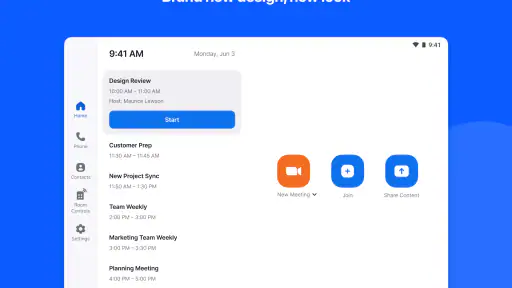
First things first, setting up the Zoom Rooms Controller was a breeze. I downloaded it on my tablet, and within minutes, I was ready to roll. The app connects seamlessly to your Zoom Room setup, which is a relief because nobody wants to spend hours figuring out tech stuff. It's designed to integrate perfectly with your existing Zoom account, so if you're already in the Zoom ecosystem, it's smooth sailing.
Intuitive Controls and Features
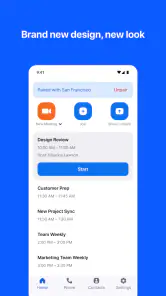
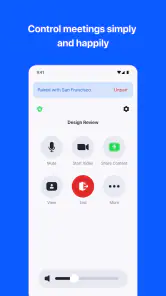
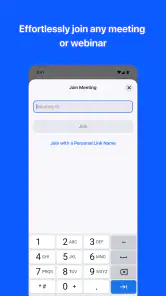
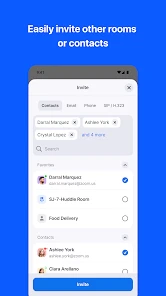
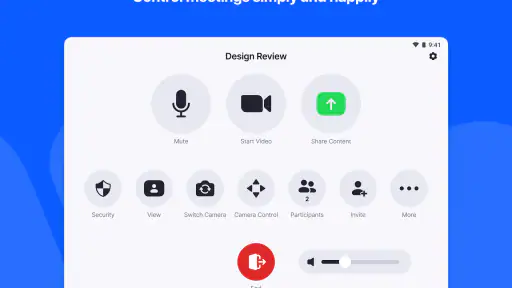
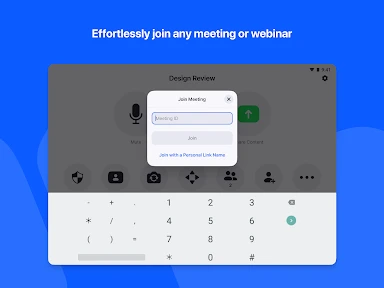
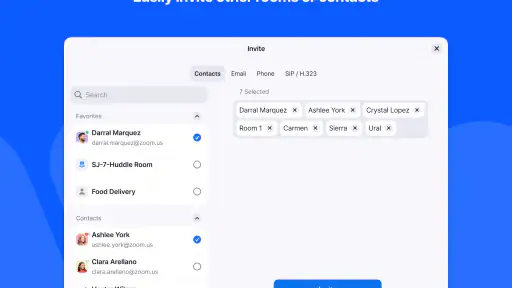
Once you're in, the interface is super user-friendly. It's like the app designers really thought about what would make our lives easier during meetings. You can start or join a meeting with just a tap, and the controls are laid out in a way that even your tech-challenged uncle could manage. The app turns your tablet into a command center for your meetings, letting you control the camera, adjust the volume, and even manage participants effortlessly.
One feature I found particularly neat is the ability to share content directly from the app. Whether it's a presentation or some quick notes, you can share your screen with everyone in the meeting without any fuss. It's those little touches that make a big difference, especially when you're trying to keep a meeting on track.
Customization and Flexibility
Another thing I love about the Zoom Rooms Controller is its flexibility. You can customize the settings to suit your preferences, whether it's the layout of the controls or the background of the app. And if you're managing multiple rooms, switching between them is as easy as pie. It’s like having a universal remote for all your Zoom meetings.
More From Our News Desk

Weather by Xiaomi Review: Clear at a Glance, Less Clear Up Close

X Under Pressure: Can It Recover When Posting Goes Wrong?

Clash of Clans Is Won Between the Battles

Android Auto Makes the Case for Quieter Car Software

MobiOffice: Transforming Mobile Productivity with Seamless Integration

EA SPORTS FC™ Mobile Soccer: Redefining Mobile Sports Gaming
For those of you who are into analytics, the app also provides insights into room usage and meeting statistics, which can be a game-changer for businesses looking to optimize their meeting spaces.
Making room changes less disruptive
One practical advantage of a mobile controller is that it lets the meeting host stay engaged with people rather than hover beside the room’s main display. If a participant joins late or the conversation needs a quick adjustment, the person leading can handle the room controls from the tablet. I would still agree on who is operating it before a meeting starts; two people trying to steer the same session can create confusion, while one clear host makes the setup feel simple.
For teams using several rooms, the useful habit is to check the selected room before starting anything important. Room switching is convenient, but it also makes it worth pausing to confirm you are controlling the space you are physically in. That small check is especially helpful when colleagues move between rooms or use a shared tablet.
Where it fits beside other meeting options
Compared with joining a call from a personal phone or laptop, this app is better suited to operating a dedicated Zoom Room than replacing those devices as general meeting tools. A laptop remains the more natural choice when I need to prepare documents, type notes, or run several work tasks at once. A phone is handy for joining while away from a meeting space. The controller’s advantage is narrower but meaningful: it puts room-level meeting actions within reach when the room itself is the focus.
That also sets a clear boundary. It is most useful for people who regularly use a Zoom Room and have the room setup available; it is not a shortcut for turning any ordinary space into one. If your meetings rarely happen in equipped rooms, the extra controller may become an app you forget about rather than a lasting part of your routine.
Month-to-month usefulness and upkeep
After the initial novelty, I would keep it installed only if room meetings recur often enough to make the controller familiar. The lasting value is in reducing repeated setup friction, not in discovering a new trick every time. A team can make that value more dependable by deciding who brings or keeps the control device, who starts the meeting, and who handles changes. That simple routine prevents the app from being useful in theory but unavailable when the meeting is about to begin.
There is also a trade-off in relying on a separate device for room control: someone has to keep it available and ready. I would make sure the tablet is easy for the team to find and that people know which room it is meant to control. If nobody owns that small bit of housekeeping, the familiar fallback is to operate the meeting from another device, which weakens the reason to use a controller at all.
What may grow tiring
The app’s focused role is both its strength and its limitation. People who expect it to replace a full desktop meeting setup may find the controller-oriented approach too narrow, while casual Zoom users may not need a separate room interface. It also depends on the wider Zoom Rooms arrangement being part of the workplace; the app alone is not the whole meeting-room system. I would choose it for a regular room workflow, not simply because the team already uses Zoom for calls.
Zoom Rooms Controller is free, rated for Everyone, and has an average rating of 3.9 from around 19,000 ratings, with more than 10 million installs. It was released on September 10, 2017, and version 6.6.5 requires Android 6.0 or later. Those details make it easy to consider, but the real test is whether your room routine supports it. Before making it a team habit, try one recurring meeting with a designated controller and see whether it actually reduces interruptions.
Keeping the workflow dependable
For a shared workplace, I would treat the controller more like a room remote than a personal productivity app. That changes the setup question from “Who wants this on their phone?” to “Where will the control device live, and who can use it?” A device that stays with the room is easier for rotating teams than one tied to the person who happened to install the app. It also makes handoffs clearer when the meeting host changes from one session to the next.
Before an important meeting, I would do a quick check that the tablet is available and that the room selection is right. This is not glamorous, but a controller only saves time when it is ready at the moment people need it. If you are testing it in a new space, try the basic routine before a high-stakes presentation: connect to the intended room, check the controls, and make sure the person leading knows how to take over. The point is to discover small snags when there is time to fix them.
Who gets the most lasting value
I see the clearest fit for office coordinators, recurring meeting hosts, and teams that move between equipped rooms but want a familiar way to manage them. It can also help a presenter who would rather stay near the group than keep walking back to a console. The payoff grows when meetings follow a repeatable pattern and several people understand the same basic workflow. In that setting, the app is less about one person’s convenience and more about making the room easier for the whole team to use.
By contrast, a freelancer who mostly joins calls from a laptop, a student attending online classes, or a small team meeting around an ordinary table is unlikely to get much from it. Those users are better served by the regular Zoom meeting experience on a computer or phone, where documents, chat, and other everyday work are already at hand. Installing a room controller without access to a Zoom Room does not make the room equipment appear, so I would check that the workplace has the appropriate setup before building a routine around the app.
Small habits that prevent avoidable friction
One non-obvious benefit of assigning a clear operator is that it keeps the meeting itself calmer. If everyone assumes someone else is handling the room, basic actions can be delayed; if several people try at once, changes may conflict. I would name a host at the start, especially for a meeting with a presentation or a group joining at different times. The host can then handle room controls while another participant focuses on notes or discussion.
For teams that switch rooms, room names deserve attention too. A quick glance before starting can prevent the awkward situation of trying to control the wrong space. This is especially worth doing when a tablet is shared or passed between colleagues, since the device may not be where its previous user left it. These checks are small, but they are exactly the sort of maintenance that determines whether a handy tool stays handy.
When another option is better
If your priority is creating content, a laptop is still the better centre of gravity: typing, preparing slides, and moving between work applications are simply more natural there. If you are joining from a train, home, or a client site without a dedicated room, a phone or standard meeting app is the practical choice. The controller does not compete with those options so much as serve a different job. Its value is tied to the physical meeting space and the need to operate it without turning the room display into the only point of control.
That narrowness is worth considering before asking a whole team to adopt it. An app can be polished and still be unnecessary if the room is used only occasionally. I would run a trial through a normal recurring meeting rather than judging it during a one-off demonstration: note whether starting is easier, whether the host can stay involved with the group, and whether the device is reliably available next time. If the routine creates more coordination than it removes, stick with the existing room controls.
Final Thoughts
In a nutshell, the Zoom Rooms Controller is a must-have if you're frequently using Zoom Rooms for meetings. It simplifies the whole process and lets you focus on what's important—your meeting content. Plus, it’s incredibly intuitive, so you won't need to spend extra time training your team on how to use it.
If you're looking to streamline your Zoom experience, give this app a try. It might just become your new favorite tool for meetings. Happy Zooming!
Zoom Rooms Controller Frequently Asked Questions
What is Zoom Rooms Controller used for in a workplace?
Zoom Rooms Controller is a business app for operating a Zoom Rooms meeting space from a mobile device. Its role is to provide room controls, rather than to replace the equipment and setup that make the room a Zoom Room. The app is aimed at people who need a convenient way to manage meetings in a space configured for Zoom Rooms.
Can Zoom Rooms Controller work with a personal Zoom meeting or another video-conferencing system?
Zoom Rooms Controller is built around Zoom Rooms, so it is not a general remote control for arbitrary meeting software or a substitute for a standard video-conferencing app. Before downloading it for a particular meeting, check that the room is configured as a Zoom Room and that you have permission to control it. That distinction helps avoid installing an app that does not match your intended use.
Does Zoom Rooms Controller require a particular mobile operating system?
The app is available for Android and iOS devices, and Android users need version 6.0 or later. A compatible phone or tablet is only one part of the setup: the room itself must use Zoom Rooms, and software compatibility can also matter. Keeping the mobile device and room system current is a sensible way to reduce avoidable connection or control problems.
Can I use Zoom Rooms Controller from a phone or tablet?
Yes. Zoom Rooms Controller is intended to let a mobile device control a Zoom Rooms system, so a phone or tablet can serve as the room’s controller. This can be handy when you want to manage a meeting without using the room’s physical controls. The experience depends on having a Zoom Rooms setup to connect to and suitable access to that room.
Can Zoom Rooms Controller be used without a Zoom Rooms setup?
Zoom Rooms Controller is intended to control a Zoom Rooms system, so its main purpose is to connect a mobile device to meeting-room equipment rather than act as a standalone video-conferencing app. If you are considering downloading it, first make sure the meeting space you want to manage uses Zoom Rooms. Once connected, the app gives you a way to handle meeting controls from your device.
Pros
- User-friendly interface for easy navigation.
- Seamless integration with Zoom Rooms.
- Customizable settings for different needs.
- Remote control of meeting features.
- Supports multiple devices and platforms.
Cons
- Requires stable internet connection.
- Limited functionality without Zoom Rooms.
- Can be complex for first-time users.
- Needs regular updates for new features.
- Compatibility issues with older devices.
- Category
- Business
- Version
- 6.6.5













