Zip - Buy Now, Pay Later
- 51.26K
- 4.8
- Installs
- 5.00M
- Price
- Free

Screenshots
Analysis by Reviewed
When I first opened Zip, the useful question wasn’t what I could buy, but whether splitting a payment would make a planned purchase easier to manage. This is a shopping app from Zip, Co. for paying online or in person over time. I’d treat it as a payment option to consider at checkout, not as extra spending money: the installments still need room in your budget.
What to expect from the app
The basic idea is simple: use Zip for a purchase, then handle the cost in installments rather than all at once. That can be handy when a necessary expense lands at an awkward point in the month, but it doesn’t make the item cheaper. I find that distinction important, especially if you’re comparing it with paying by debit card or waiting until you have the full amount.
It’s free to download, rated for Everyone, and has a 4.8 average from around 95,000 ratings. More than 5 million installs suggest it has reached plenty of shoppers, though popularity alone doesn’t tell you whether the payment schedule suits your finances. The app’s current version is 1.238.4, and it first appeared in May 2019.
Getting started with a clear plan
When I first tried to understand Zip - Buy Now, Pay Later, I found it more useful to think of it as a checkout choice than a shopping destination. The central question is not how much the app lets you spend, but whether a particular purchase and its future payments fit comfortably into your plans. That mindset makes the first use feel less intimidating and helps keep a convenient option from turning into an excuse to buy more.
What Exactly is Zip?
So, what’s the deal with Zip? Well, in a nutshell, it’s an app that allows you to buy something now and pay for it later. It’s like having your cake and eating it too! With Zip, you can split your payments into manageable installments, making those big purchases a little easier on the wallet. And who doesn’t love that?
Getting Started with Zip
Let me take you through my experience of getting started with this app. First things first, downloading and installing it is a breeze. Just head to your app store, search for “Zip - Buy Now, Pay Later,” and you’re good to go. Once installed, signing up is as easy as pie. Just fill in your details, link your preferred payment method, and voilà, you’re ready to roll.
One thing I appreciated was the user-friendly interface. It’s clean, intuitive, and pretty straightforward. Even if you’re not super tech-savvy, navigating through the app is a walk in the park.
You May Like

Clash of Clans Is Won Between the Battles

Android Auto Makes the Case for Quieter Car Software

MobiOffice: Transforming Mobile Productivity with Seamless Integration

EA SPORTS FC™ Mobile Soccer: Redefining Mobile Sports Gaming

How Microsoft OneDrive Became a Mobile Productivity Giant

How Google Translate Breaks Language Barriers Effortlessly
Shopping Made Simple
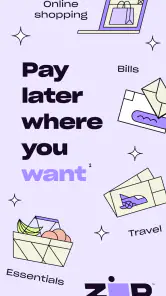
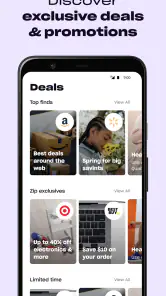
Now, onto the fun part - shopping! Whether you’re eyeing that fancy gadget or some stylish new threads, Zip’s got you covered. The app partners with a ton of retailers, both online and in-store, giving you plenty of options. You can shop to your heart’s content without worrying about immediate payment.
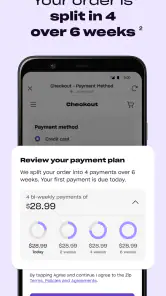
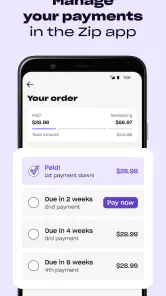
Here’s how it works: You make your purchase, and Zip splits the cost into four equal payments, spread over six weeks. No interest, no hidden fees, just simple, transparent payments. It’s like having a financial fairy godmother by your side!
A checkout decision, not a budget shortcut
A practical first success is using Zip for something you already intended to buy, then checking that the scheduled payments fit alongside rent, bills, groceries, and other commitments. For example, if a household essential needs replacing just before payday, spreading the expense may help with timing. I would still compare the total cost and payment dates with simply waiting until payday; convenience is only useful if the plan stays manageable.
Compared with a credit card, Zip is centered on splitting a purchase into installments, while a card may offer a revolving balance and different repayment choices. Paying directly with a debit card avoids taking on a future payment commitment. Neither alternative is automatically best: I’d choose the clearest, lowest-stress option for that particular purchase, rather than reaching for installments by habit.
Make the first payment plan easy to follow
My first-use routine would be simple: decide what I’m buying before opening the app, check that the retailer’s checkout offers a suitable Zip route, and look at the payment schedule before committing. That order matters. Starting with a specific need helps prevent browsing from quietly becoming a larger basket, while checking the schedule early makes it easier to back out if the timing feels tight.
A useful extra step is to work from the purchase total, not just the first installment. I’d write down the amount and each due date, then compare them with the dates of other regular expenses. This is particularly helpful for purchases made near the end of a month, when a payment may land in the next budgeting period. The plan can look comfortable today and still compete with an upcoming bill.
If you’re setting up for the first time, take a moment to make sure the payment method you connect is one you actively monitor. A rarely used account can make it harder to notice when money is getting tight. The app’s interface may make navigation straightforward, but the financial check is still yours to do; a clear screen cannot tell you whether your overall budget has enough room.
Making the schedule work for you
Before confirming a purchase, I’d pause to note the due dates somewhere I already check, such as a calendar or budget. Reminders can help, but they work best as a backup rather than the whole plan. A useful habit is to consider all active installment purchases together; several small commitments can compete for the same paycheck even when each one looks affordable on its own.
That’s also why I wouldn’t use a pay-later option for impulse buys or to cover an ongoing shortfall. If the purchase is not urgent, saving first gives you a straightforward way to avoid future payment obligations. Zip makes most sense when the purchase is planned, the schedule is understood, and you have a reliable way to cover each installment.
Who benefits most, and who should skip it
I can see Zip being useful for someone with a predictable budget who has already chosen a necessary or planned item and wants to spread the timing of its cost. A replacement household item is a good example: if it cannot reasonably wait, the installment option may help avoid taking the full amount from one pay period. The key is that the purchase is still affordable as a whole, not merely that the first payment looks manageable.
I’d be more cautious if income varies, if bills already leave little room, or if keeping track of several future obligations is stressful. In those situations, paying by debit when funds are available—or delaying the purchase and saving—is easier to understand and leaves fewer moving parts. Someone who tends to shop more when payment is deferred may also be better off avoiding installment checkout altogether.
For an everyday example, imagine noticing that a kitchen appliance has stopped working shortly before payday. I’d check whether the item is genuinely needed now, compare the price with alternatives, and then see whether the payment dates fit around rent and groceries. If they do, Zip can be a practical way to handle the timing. If the dates collide with essential expenses, I’d wait or choose another option rather than treating the app as a fix for a cash-flow gap.
Why I’m Loving Zip
Okay, real talk. What sets Zip apart from the rest? For me, it’s the flexibility and freedom it offers. I can make purchases without overextending myself financially. Plus, the app sends reminders for upcoming payments, so you’re never caught off guard. It’s a nifty little feature that makes budgeting a breeze.
Another cool aspect is the app’s security. Zip takes your privacy seriously, ensuring all transactions are secure and encrypted. In a world where data breaches are all too common, this is a major plus.
How it compares with familiar payment choices
The main difference from paying by debit is that debit settles the purchase from available funds rather than leaving installments to manage later. That simplicity is valuable if you want a clean budget and dislike tracking dates. A credit card can offer more flexible repayment, but that flexibility can also make a balance less clear. Zip’s appeal is the defined installment approach described in the app, provided the schedule works for you.
These options are not interchangeable in every situation. For a small everyday purchase, I’d usually prefer a direct payment rather than creating another future commitment. For a planned larger expense, I’d compare the total cost, payment timing, and the effort of keeping track. If I already had enough set aside, paying immediately would be the simpler choice; if I didn’t, I’d only use installments when the need was real and the future payments were comfortably covered.
One trade-off is that convenience can make the checkout decision feel smaller than it is. Splitting a total changes when money leaves your account, not the amount the item costs. I’d keep the full price visible in my budget and avoid judging affordability by the first payment alone. That small habit is one of the most useful safeguards for someone new to pay-later shopping.
What to check before relying on it
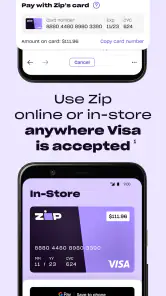
One point that can trip up a first-time user is assuming the same checkout route will work at every store. The app supports online and in-store shopping, but the exact steps can depend on where and how you’re paying. I’d open the app before reaching the till or beginning checkout, follow the instructions shown for that purchase, and keep a second payment method available in case the option isn’t offered there.
If you’re wondering whether you need to use it for every purchase, my answer is no. It’s better treated as an occasional tool for a planned expense than as your default way to shop. If you prefer one immediate payment, want to avoid tracking future due dates, or find installment plans make spending harder to control, a debit payment or saving up is likely a better fit.
Another point worth checking is whether your own records match what you see in the app. I’d review the purchase and payment dates after checkout, then make sure the same commitment appears in my personal budget. That is more dependable than relying on memory, especially if the purchase happens during a busy day. If the checkout flow differs from what you expected, I would pause and read the on-screen steps instead of guessing or rushing through.
The practical question after a first purchase is whether the routine felt easy to manage, not simply whether checkout worked. If tracking the installments was comfortable and the dates did not crowd out essentials, it may suit another planned purchase later. If I found myself worrying about the next due date or tempted to add unplanned items, I’d take that as a sign to use a direct payment or wait until I had saved the full amount.
The Final Verdict
So, would I recommend Zip - Buy Now, Pay Later? Absolutely! It’s a fantastic tool for anyone looking to manage their finances smarter, without missing out on the things they love. Whether you’re a shopaholic or just someone who likes to keep their budget in check, Zip is worth checking out.
At the end of the day, having the option to buy now and pay later is a game-changer. So go ahead, give Zip a whirl and enjoy a more flexible shopping experience. Happy shopping!
Zip - Buy Now, Pay Later Frequently Asked Questions
Can I use Zip with any retailer, or only certain shops?
Zip is intended for shopping with participating retailers, so it is not automatically available at every online store or physical checkout. Before relying on it for a purchase, look for Zip as a payment option during checkout or check within the app. Retailer participation and checkout steps can vary, so confirming availability first can help avoid surprises.
What kind of app is Zip, and who is it for?
Zip is a shopping app from Zip, Co. that focuses on splitting payments for purchases made online or in-store. It may suit shoppers who want to use a buy-now, pay-later option rather than pay the full purchase amount at once. As with any payment service, it is worth considering your budget and making sure scheduled payments fit your circumstances.
Can I use Zip for both online and in-store shopping?
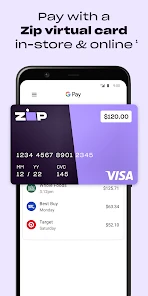
Zip is designed to help shoppers split payments for purchases made online and in-store. The app’s summary highlights both ways to shop, so it may be useful if you want one payment option for different shopping situations. Availability can depend on the retailer and checkout process, so check that Zip is offered before completing a purchase.
What is Zip - Buy Now, Pay Later and how does it work?
Zip is a payment platform that allows users to purchase items immediately and pay for them over time in installments. After signing up, users can shop at various partnered retailers and split their payments into four interest-free installments, due every two weeks. This service helps in managing finances by spreading out costs, providing a convenient alternative to traditional credit cards.
Is Zip - Buy Now, Pay Later safe to use?
Yes, Zip implements stringent security measures to protect user information and transactions. It uses encryption to safeguard personal data and offers secure payment options. Additionally, Zip is trusted by numerous reputable retailers, ensuring that your purchases and financial information are handled securely. Users can confidently use Zip as a reliable payment method.
Pros
- Easy installment payment options
- No interest fees if paid on time
- User-friendly interface
- Wide range of partner stores
- Quick approval process
Cons
- High late payment fees
- Limited to certain regions
- Requires a good credit history
- May encourage overspending
- Privacy concerns with data sharing

- Category
- Shopping
- Version
- 1.238.4