Xbox Family Settings
- 899.00
- 3.7
- Installs
- 1.00M
- Price
- Free

Screenshots




Analysis by Reviewed
I find family gaming rules work best when everyone understands them before a console session starts. Xbox Family Settings gives parents a phone-based way to manage parts of a child’s Xbox experience, which can make those rules easier to set and revisit. It is a Lifestyle app from Microsoft Corporation, and its focus is narrower than a general screen-time manager: it is built around family gaming on Xbox, not every device a child might use.
Deciding whether Xbox is the right focus
Before installing it, I’d ask one practical question: is Xbox where the child spends enough gaming time for a dedicated family app to be worthwhile? If the answer is yes, keeping console-related decisions together can be simpler than trying to remember separate settings or rules. If gaming is spread across multiple consoles, phones, and computers, the advantage fades. A broader parental-control tool may offer a better view of the whole household, even if it is less tailored to Xbox.
This distinction also helps set expectations about what the app can do for a family. It supports decisions around Xbox play; it does not replace a household agreement about bedtime, homework, or which devices are allowed in a bedroom. I’d use it to put agreed gaming boundaries into practice, not as the sole place where every family rule lives.
Readability and navigation for busy households
Getting started with the Xbox Family Settings app is surprisingly straightforward. You’ll need an Xbox account to link your family members, which is as easy as pie if you’re already in the Microsoft ecosystem. Once you’re logged in, the app walks you through creating profiles for each family member. This is where you can set permissions, screen time limits, and even content restrictions based on age ratings. The interface is user-friendly, with a clean layout that even the least tech-savvy among us can navigate without breaking a sweat.
In practice, the useful test is whether a parent can make a small change quickly rather than learn a complicated control panel. I’d set expectations and limits together with a child, then use the app to apply the agreed rule; that turns a setting into a shared routine instead of a surprise punishment. If another adult helps supervise, it is also worth agreeing who will make changes so that different decisions do not undermine the same household rule.
One small but useful approach is to begin with the rule that causes the most friction, rather than adjusting every available setting in one sitting. A family might first agree on when play should end, then revisit content or social permissions separately. This makes it easier to explain what changed and to notice whether the new routine is working. It also gives a child a clearer chance to ask questions about one boundary at a time.
Managing play without making it a battle
Motor and sensory considerations
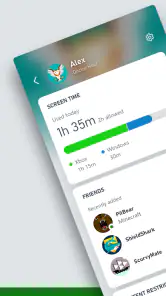
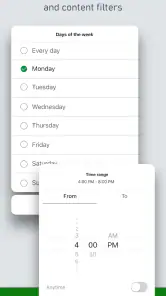
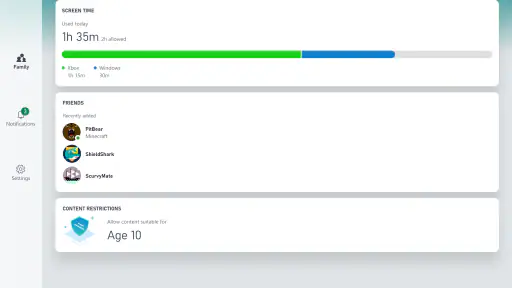
One of the standout features is the ability to set daily screen time limits, which are customizable for each day of the week. Having a battle over weekend gaming hours? Not anymore! You can easily adjust these limits to fit your family’s schedule. Additionally, the app allows you to approve or decline friend requests remotely, giving you peace of mind about your child’s online interactions. Notifications are sent directly to your device, so you’re always in the loop with what’s happening on the console.
More From Our News Desk

Clash of Clans Is Won Between the Battles

Android Auto Makes the Case for Quieter Car Software

MobiOffice: Transforming Mobile Productivity with Seamless Integration

EA SPORTS FC™ Mobile Soccer: Redefining Mobile Sports Gaming

How Microsoft OneDrive Became a Mobile Productivity Giant

How Google Translate Breaks Language Barriers Effortlessly
That remote control is handy if a child has difficulty navigating console menus independently or if a parent wants to handle a decision away from the TV. It does not replace a conversation about why a request was declined, though; a short explanation can make a boundary feel fairer than an unexplained block. For a child who is sensitive to abrupt endings, I’d agree on a stopping point in advance and use the schedule as a predictable reminder rather than relying on last-minute intervention.
There is a useful trade-off here for families who want to reduce repeated negotiation. A schedule can make the rule less dependent on a parent having to announce it in the middle of a game, but it may not match every session naturally. If a child is playing with family or has reached a sensible stopping point just after the limit, the adults still need to decide how to handle that moment. I’d treat the limit as a shared structure, not a substitute for judgment.
Situational access and everyday routines
Another noteworthy feature is the content filter, which automatically blocks games and media that aren’t age-appropriate. No more surprise horror games popping up during a sleepover! The app’s default settings are pretty spot-on, but you have the flexibility to adjust them as you see fit.
On a school night, for example, I’d set a shorter allowance than on a free day, then check the activity report before deciding whether a weekend adjustment is needed. That makes the app useful for families with changing routines, such as alternating care arrangements or busy weeks, provided the adults agree on the same expectations. It is also a practical fit when a parent is not in the room but still needs to respond to a request or check what has been played.
A realistic routine might be a parent checking the app during a commute home, noticing a request, and deciding whether it fits the plan they already discussed with the child. The value is not simply that a decision can be made remotely; it is that the family can avoid pausing a conversation until everyone is standing in front of the console. For separated households or relatives who share supervision, a clear agreement about who responds is especially helpful. Otherwise, quick remote decisions can create conflicting expectations.
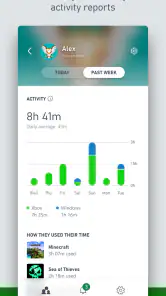
The real-time activity reports are a godsend for busy parents. You can view what games your kids are playing and how much time they’re spending on each. This not only helps in keeping tabs but also opens up opportunities for conversations about responsible gaming. The app also provides insights into gaming habits that might need tweaking, ensuring your kids have a healthy relationship with their screens.
Those reports are most helpful as a prompt, not a verdict. A longer session may be planned family play, while a short burst can be part of a normal break; context matters more than treating a number as proof of a problem. I’d use a recurring pattern to start a calm conversation, rather than checking the phone constantly or turning every play session into monitoring.
For a child who has trouble explaining a routine verbally, looking at play patterns together may give the family a concrete place to start: what felt enjoyable, when a break was needed, and whether the schedule fits school or other activities. That does not mean a report can explain a child’s needs on its own. It is most useful when paired with their own account of how gaming feels, especially if a parent is trying to balance structure with trust.
Remaining barriers and practical trade-offs
It's worth noting that the app doesn't just cater to restrictions. It also encourages positive gaming habits by allowing parents to reward extra screen time for good behavior or achievements, which can be a great motivator for the little ones.
The main trade-off is scope: this is a companion for Xbox family management, not a universal dashboard for all gaming or device use. If your child mainly plays on other platforms, or you need one place to manage a household’s phones, computers and consoles, a broader parental-control option may suit you better. I’d also avoid changing several limits at once; adjusting one rule and observing how it works makes it easier to tell whether the routine is helping.
Another consideration is how the family handles exceptions. A reward can be encouraging, but if extra time is granted inconsistently, children may focus on negotiating for more rather than understanding the routine. I’d explain what earns an extension before using that option and keep the reason specific. If rewards are not a good fit for your child, the app’s other family-management uses may still be relevant without making extra time the center of the arrangement.
Families should also think about who will carry the day-to-day responsibility. Remote controls are only helpful if an adult checks requests and keeps settings aligned with the actual household plan. A parent who does not want to monitor gaming, or who cannot reliably review changes, may be better served by a simpler family agreement and occasional conversation. The app can make a chosen approach easier to manage; it cannot decide what level of supervision is right.
For a family deciding whether to try it, the practical question is whether Xbox is a regular part of the child’s week and whether a parent will actually review the settings. It is free, rated for Everyone, and has a 3.7 average from around 9,300 ratings, with over 1 million installs. The app was released on September 15, 2020, and its current version is 20250902.250902.1; it requires Android 8.0 or later. Those basics make it accessible to many Android households, but the account setup and Xbox focus still determine whether it fits your situation.
The number of reviews—899—offers another reason to approach it as a tool to assess against your own needs rather than a guaranteed fit. Families differ in how much independence they want children to have, how they handle online contact, and how often gaming rules need to change. I’d start with a modest setup, check that it reflects the family’s actual expectations, and make adjustments only when there is a clear reason.
Inclusive verdict for the right household
In the grand scheme of parenting, the Xbox Family Settings app is a game-changer. It strikes a perfect balance between allowing kids to enjoy their gaming adventures and ensuring they don’t lose sight of the outside world. While no app is perfect, this one comes pretty close with its comprehensive features and ease of use. Whether you’re a tech-savvy parent or someone just looking for a bit of help in managing your kids' gaming habits, this app is definitely worth a try. Plus, the added peace of mind is something you really can’t put a price on.
My verdict is more measured: it is a sensible choice for a household that already uses Xbox and wants its gaming rules in one focused place. A parent who prefers not to supervise online activity, or who needs controls across several platforms, should look elsewhere; this tool cannot make those broader decisions for you. The rating and the volume of written reviews—899—also suggest it is worth checking whether its approach suits your family rather than assuming every household will find it effortless.
For me, the strongest reason to install it is the chance to make limits more predictable: decide the routine together, use the controls consistently, and treat activity information as a starting point for conversation. That is more useful than expecting an app to settle every disagreement. If Xbox is where most family gaming happens, it can help parents stay involved without needing to stand beside the console; if not, a wider family-management tool is the more practical choice.
On balance, I’d recommend trying it when a family wants support specifically for Xbox and is willing to keep the settings connected to everyday conversations. It is less suitable as a universal answer to screen use or as a replacement for adult judgment. The most inclusive approach is to adapt the routine to the child, explain decisions in a way they can follow, and use the app to reduce avoidable friction—not to assume that the same controls will work equally well for everyone.
Xbox Family Settings Frequently Asked Questions
Is Xbox Family Settings free, and what devices can I install it on?
Xbox Family Settings is a free lifestyle app from Microsoft Corporation for managing family gaming activities. It is available for Android and iOS, with a minimum operating system requirement of version 8.0. The app is rated for Everyone, so parents and guardians can review its purpose and compatibility before downloading it to a supported device.
Do parents and children need separate accounts to use Xbox Family Settings?
The app is intended for parents and guardians to manage children’s gaming activities through a family group. To use the controls described in the app, set up a family group and add your child’s Xbox account. This creates the account relationship needed to manage settings such as screen time and content access from the parent’s device.
What is the Xbox Family Settings app used for?
The Xbox Family Settings app is designed to help parents and guardians manage their children's gaming activities on Xbox consoles. It allows you to set screen time limits, filter content, and monitor gaming activity, ensuring a safe and balanced gaming experience for younger users. The app provides remote management capabilities, making it convenient for parents to oversee gaming habits without needing direct access to the console.
How do I set screen time limits with the Xbox Family Settings app?
Setting screen time limits on the Xbox Family Settings app is straightforward. Once you have set up a family group and added your child’s account, navigate to the 'Screen Time' section within the app. Here, you can set daily or weekly limits for gaming on Xbox consoles, ensuring that your child maintains a balanced routine between gaming and other activities. You can adjust these limits at any time as needed.
Can I block inappropriate content using the Xbox Family Settings app?
Yes, the Xbox Family Settings app allows you to block inappropriate content effectively. You can set age-appropriate content filters that restrict access to games, apps, and media unsuitable for your child’s age group. This ensures a safe gaming environment, as the app will automatically block content that exceeds the selected restriction level. Parents can easily modify these settings as their child grows or as per their discretion.
Pros
- User-friendly interface for easy navigation.
- Allows screen time limits for kids.
- Customizable content filters available.
- Real-time activity reporting.
- Notifications for new friends or purchases.
Cons
- Limited features without internet connection.
- Some settings may be hard to find.
- Occasional syncing issues.
- Restricted to Xbox ecosystem.
- Limited language support.

- Category
- Lifestyle
- Version
- 20250902.250902.1