

wX
- 581.00
- 4.5
- Installs
- 50.00K
- Price
- Free

Screenshots
Analysis by Reviewed
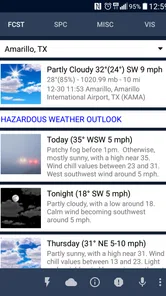
I approached wX as the kind of weather tool I would keep beside a simpler forecast app: not because it is immediately effortless, but because it tries to turn a large amount of US weather information into something useful for people who want to look beyond a basic temperature card. Developed by Joshua Tee, this free weather app focuses on radar, forecast models, satellite imagery, observations, and specialist weather products in one place.
That ambition is both its appeal and its main challenge. During my first few sessions, I found plenty to explore, especially when a storm system was developing or the regular forecast felt too vague. At the same time, wX is not designed around the most relaxed “open it, glance at the forecast, close it” experience. It rewards curiosity and repeated use, but it asks you to learn how its information is organized.
After the novelty wears off, the important question is whether all that detail remains useful. My answer is yes, particularly for US users who follow severe weather, plan outdoor activities carefully, or enjoy comparing different forecast perspectives. For someone who only wants a quick daily forecast, a conventional weather app will probably be more comfortable.
What the first week feels like
The first week with wX is largely an orientation period. The store presents it as an advanced US weather app, and that description is accurate in spirit: the app is less about presenting one polished prediction and more about giving you access to several ways of examining current and upcoming conditions. Radar is the obvious starting point, but the wider collection of weather layers is what gives the app its identity.
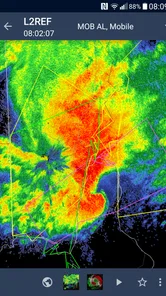
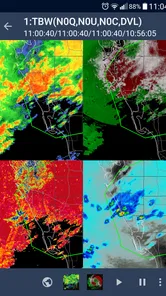
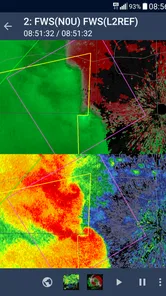
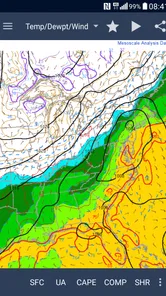
I found the radar view most immediately useful when I wanted to answer a practical question: is rain approaching my area, is it moving away, and does the wider pattern suggest that the next hour will be messy? That is a different task from reading “rain likely this afternoon.” Seeing the movement and surrounding structure can make a forecast feel more understandable, even when it does not make the weather perfectly predictable.
Satellite imagery adds another perspective. It is especially valuable when the radar picture alone does not explain what is happening across a larger region. Looking at cloud cover and the broader system can help connect local conditions with the weather pattern around them. This is one of the first signs that wX is aimed at people who want to interpret weather rather than simply receive a notification.
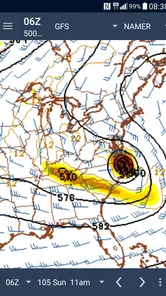
The app also brings together observations and model information. That combination matters because current observations tell me what is happening now, while model views are attempts to describe what may happen later. Keeping those ideas separate is a useful habit. A model is not a promise, and an observation is not a long-range forecast. wX makes it possible to move between those viewpoints instead of treating one forecast number as the whole story.
More From Our News Desk

 Gmail
GmailGmail in a Busy Inbox: Who Benefits Most?
From first account to crowded workday, Gmail earns its place through dependable search and flexible sorting—but its best fit depends on how much inbox maintenance you can tolerate.

 Prime Video
Switching to Prime Video: What Changes in Your Viewing Routine
Prime Video can make a compelling second home for streaming, but switching means learning a different catalog, rental layer, and route from browsing to playback.

 Universal TV Remote Control
Universal TV Remote Control Works Best as a Reliable Backup
A phone remote earns its place through quick setup and reliable habits. Here is how to get more from Universal TV Remote Control—and where its limits show.

 Weather - By Xiaomi
Weather by Xiaomi Review: Clear at a Glance, Less Clear Up Close
Xiaomi’s weather app makes everyday forecasts quick to scan, but its calm surface can leave useful details and recovery paths harder to find than they should be.

 X
XX Under Pressure: Can It Recover When Posting Goes Wrong?
A resilience-focused review of X, examining setup, mistaken posts, interruptions, weak connections, and the gaps that matter when recovery needs to be dependable.

 Clash of Clans
Clash of Clans Is Won Between the Battles
Its raids are quick; its community is a long-term project of coordination, teaching, rivalry, and shared responsibility—with all the friction that entails.
Latest News



There is a learning curve, though. A newcomer may open the app expecting large, obvious forecast cards and instead encounter a denser information environment. I had to slow down and decide which views were genuinely helping me and which were merely interesting. My advice is to begin with one regular workflow: check the local conditions, inspect radar when weather is active, and only then explore models or specialist products. Trying to understand everything at once makes the app feel more complicated than it needs to be.
A useful first-week experiment is to check the same weather event at several points during the day. Compare the current observation with the radar picture, then look at the model view and return later to see which part of the earlier expectation held up. This turns wX from a collection of maps into a way of building weather judgment. It is also a better test of its value than simply browsing dramatic-looking imagery.
The app has a strong advantage over the usual phone weather alternative here. Most mainstream weather apps are optimized for speed and visual simplicity. They are excellent when I want a forecast at a glance, but they often hide the reasoning behind it. wX gives more room for investigation. The trade-off is that I have to provide some of the interpretation myself.
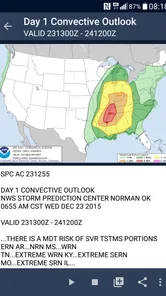
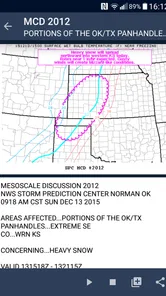
Its specialist coverage is another reason the first week can be compelling. References to SPC, WPC, and NHC in the app’s summary point toward products associated with severe weather, national prediction, and tropical systems. For a user who follows those subjects, having them near the rest of the weather picture is more useful than jumping between unrelated apps or websites. For a casual user, those same choices may feel like unnecessary noise.
Who gets the most from the early experience
I would recommend the first-week trial to people who live in the United States and regularly ask more detailed questions than “what is the temperature?” It suits someone planning a long drive around storms, watching a developing severe-weather setup, checking conditions before outdoor work, or learning how weather maps relate to the forecast.
It is also a good fit for users who prefer evidence over a single confident-looking icon. When the forecast is uncertain, being able to inspect several views can be more honest and more informative than receiving one simplified answer. That does not mean wX eliminates uncertainty; it means it gives me more material for judging it.
I would skip it if my only requirement is a clean morning summary, a large current-temperature display, or a very gentle introduction to weather. The app’s strength is depth, and depth inevitably creates more decisions. A simpler alternative is better when convenience matters more than investigation.
Why it can remain useful month after month
The lasting value of wX depends on whether weather information is part of your routine. For me, the app makes most sense as a repeatable tool rather than an occasional curiosity. Its usefulness is highest when I return for a reason: a storm is forming, a forecast has changed, a trip crosses several areas, or official weather guidance deserves a closer look.
One realistic everyday scenario is a weekend drive where the route passes through several weather zones. A standard app may provide separate location forecasts, but wX is more helpful when I want to understand the larger pattern along the route. I can begin with observations, inspect radar for active precipitation, and use broader weather views to decide whether the timing deserves flexibility. The practical benefit is not a magical answer; it is better preparation and fewer assumptions.
Another recurring use is outdoor work. If I need to decide whether to start a job, take a break, or postpone it, a current forecast alone may not be enough. Radar movement and nearby observations can provide context that a daily summary lacks. I still would not treat any map as a guarantee, especially during rapidly changing conditions, but the extra information can improve a decision that has real consequences for time and safety.
For severe-weather followers, the app’s inclusion of specialist products may provide a stronger reason to return. Instead of opening wX only for a local forecast, I can use it to follow the evolution of a wider setup. The value is cumulative: the more often I compare what was expected with what actually happened, the better I become at recognizing which views help me and which ones only attract attention.
That learning effect is one of the app’s less obvious strengths. Many weather apps are built to answer questions for me. wX can also help me learn how to ask better questions. Is the concern immediate rain, a broader storm track, uncertainty in the models, or an official severe-weather outlook? Choosing the right view for the right question is more important than simply having every view available.
There is a practical way to keep the app from becoming a daily time sink. I would create a short check-in habit: start with the local observation, move to radar only when conditions are active or uncertain, and use model or specialist information when the situation warrants it. This keeps the detailed tools available without turning every ordinary day into a weather research session.
The current version is listed as 55990, and the app has been available since late September 2015. That long presence helps explain why it feels like a mature specialist tool rather than a novelty built around a fashionable interface. Its appeal is not dependent on a single visual trick. It comes from the continuing usefulness of its weather information and the possibility of fitting that information into a personal routine.
Its audience is also reflected in its reception. wX has a 4.5 average from around 992 ratings, with roughly 581 written reviews, and it has passed 50 thousand installs. Those figures do not decide whether it belongs on my phone, but they suggest that the app has found a committed audience beyond a brief experiment. The important point is that its repeat value comes from the type of weather questions it supports, not from constant novelty.
The maintenance cost of keeping it useful
“Maintenance” here is less about managing the app and more about managing my relationship with it. A detailed weather tool can become cluttered if I keep checking every available layer without a clear purpose. The app rewards a little personal organization: deciding which views matter for ordinary days, which ones matter during storms, and which ones I only need occasionally.
The first useful maintenance habit is learning the difference between a quick check and a deep check. A quick check might involve current observations and nearby radar. A deep check might include satellite imagery, model comparisons, and official products. Treating both sessions as identical makes the app feel demanding. Separating them lets me use its depth when it matters without paying the full attention cost every time.
The second habit is remembering that more detail does not automatically mean more accuracy. If two forecast perspectives disagree, the correct response is not to choose the most dramatic one. I would look at the timing, compare it with current observations, and allow for uncertainty. wX is most valuable when it supports careful judgment, not when it encourages false confidence through a larger number of maps.
The third habit is checking whether the information is relevant to my location and purpose. Because the app is built around US weather, it makes the most sense for people whose regular weather needs are within that context. Someone outside the United States should think carefully before adopting it as a primary weather tool. Even within the country, a user interested only in a tiny local forecast may not benefit from the broader specialist coverage.
There is no need to open the app on a strict schedule for it to earn its place. In fact, I think forcing a detailed weather check every day can create fatigue. The better approach is event-driven use: look more closely when the weather may affect plans, travel, work, or safety. On quiet days, a simpler glance may be enough.
Because the app is free and rated for Everyone, the barrier to trying it is low. That does not mean every family member will find it equally approachable. The age rating describes general suitability, while the interface and information density still require patience. I would happily recommend it to a curious teenager or adult learning about weather, but I would not assume that a young or inexperienced user will understand every product without guidance.
Where long-term fatigue can appear
The main source of fatigue is density. wX gives me many ways to inspect weather, but each additional layer creates another choice. On a day when I only want to know whether I need an umbrella, that richness can feel like reaching for a toolbox to tighten one small screw.
A second source is interpretation. The app can show information that is meaningful to an experienced weather enthusiast but intimidating to someone who expects the app to explain everything in plain language. This is not a flaw in the data itself; it is a trade-off in the product’s design. wX gives me access to material, but I remain responsible for understanding what it means.
There is also a risk of overchecking. Animated radar and changing forecast views can encourage me to refresh repeatedly, especially when a storm is nearby. That behavior does not necessarily improve a decision. I found the app more useful when I set a specific question before opening it. Without that discipline, the experience can shift from preparation to anxious monitoring.
Compared with a typical weather app, wX is therefore less polished as a passive companion and stronger as an active instrument. The usual alternative wins for a fast forecast, simple notifications, and a low-effort daily routine. wX wins when I want to investigate what is happening, compare perspectives, or follow weather beyond one small location.
It is also worth being clear about safety. Radar, models, satellite views, and official products can support awareness, but they should not replace urgent alerts or local emergency instructions during dangerous weather. I would use wX to understand the situation and official channels to act on warnings. That distinction is especially important when conditions change faster than any app view can communicate.
Another limitation is that the app’s strongest material may be wasted on users who never explore beyond the basic view. Paying the attention cost without using the extra capability makes it harder to justify keeping the app installed. I would not recommend downloading it simply because it has more weather information. I would recommend it when that information answers questions you regularly have.
Even with those reservations, I do not see the complexity as careless excess. The app has a clear point of view: weather is not only a number and an icon. For the right user, that is refreshing. For everyone else, it may be a reminder that the best app is not always the one with the most available detail, but the one that fits the way they make decisions.
Does it earn permanent space?
For me, wX earns lasting space when I treat it as a specialist companion rather than a universal replacement for every weather tool. Its recurring value comes from the combination of radar, model views, satellite imagery, observations, and broader US weather products. That combination makes it particularly useful during unsettled weather, travel planning, outdoor work, and serious weather watching.
I would keep it installed if I lived in the United States and wanted to investigate forecasts instead of accepting a single summary. The free price makes that decision easier, and the app’s long availability suggests that its usefulness is not tied to a short-lived trend. Joshua Tee has built something aimed at repeat users who are willing to spend a little time learning their preferred workflow.
I would not make it my only weather app if I valued instant simplicity above all else. A conventional alternative remains better for a quick glance, a clean home-screen widget, or a forecast that requires almost no interpretation. wX is also a poor match for anyone outside its main US focus or for people who find map-heavy weather information stressful rather than helpful.
My best recommendation is to give it a focused trial instead of judging it after one glance. Use it for a real weather question, start with observations and radar, and gradually add satellite, models, or specialist products only when they serve a purpose. If that workflow becomes natural, the app can develop into a dependable part of your routine. If it still feels like too much work for ordinary forecasts, that is a useful answer too.
In the end, wX is not trying to be the friendliest weather app for everyone. It is a detailed US weather workspace for people who want context, movement, and multiple perspectives. Its lasting strength is that the information remains useful whenever the weather becomes consequential. Its lasting weakness is that the same depth can demand more attention than a casual forecast deserves. Choose it for informed weather watching, not for effortless weather glancing.
wX Frequently Asked Questions
Does wX provide weather information for locations outside the United States?
wX is an advanced US weather app, with tools for radar, models, satellite imagery, observations, and information from weather agencies. If you mainly need forecasts for a location outside the United States, check whether the app’s available maps and products cover your area before downloading. Its focus is on US weather resources, so it may be best suited to users who follow weather in the United States.
What is wX, and what can I use it for?
wX is an application whose usefulness depends on the specific version and platform you download. Before installing it, users should review its official description, supported features, compatibility information, and developer details. Because the name is very short and may refer to different products, confirm that the listing matches the app you intend to use and that it is available from a legitimate Android or iOS store.
Is wX free to download and use?
wX is free to download. The download and usage conditions for wX may vary between Android and iOS, as well as between different releases of the application. Check the store page carefully for pricing, subscriptions, in-app purchases, advertisements, or premium tools before proceeding. If payment is required, review the billing frequency, trial terms, cancellation process, and refund policy so there are no unexpected charges after installation.
What permissions does wX request?
Before opening wX for the first time, examine the permissions requested by the app and consider whether they are necessary for its advertised functions. Depending on its purpose, it may request access to notifications, storage, the camera, microphone, location, or account information. You can usually deny optional permissions or change them later through your device’s privacy settings.
Is wX safe and compatible with my device?
Safety and compatibility should be checked through the official Google Play Store or Apple App Store listing rather than through unofficial download websites. Look for the verified developer name, recent updates, user reviews, privacy information, and required operating-system version. Also make sure your device has enough free storage and that the application is supported in your country or region.
Pros
- Simple interface that is easy to navigate
- Lightweight app with modest storage requirements
- Useful features are accessible without a steep learning curve
- Runs smoothly on a wide range of compatible devices
- Convenient option for users seeking a straightforward experience
Cons
- May feel limited for users wanting advanced customization
- Some features may require an internet connection
- Compatibility can vary between older devices
- The app may offer fewer options than established alternatives
- Updates and support may not be consistent over time











