

Wireless Reverse Charging
- 224.00
- 3.8
- Installs
- 500.00K
- Price
- Free

Screenshots
Analysis by Reviewed
When was the last time you found yourself in a bind because your phone was about to die, and there wasn't a charger in sight? We've all been there, and it's not a fun situation. That's where Wireless Reverse Charging comes in, offering a nifty solution to this all-too-common problem.
Start with the phones, not the app
My first check would be the hardware, because this is where expectations can go wrong. Wireless power sharing needs a phone built to send power, and the second device needs to be able to receive it wirelessly. An app cannot add those capabilities to phones that lack them. If I were planning a day around this feature, I’d verify compatibility before leaving home rather than discover a mismatch when someone’s battery is nearly gone.
That check also helps decide whether this is the right sort of backup. A compact power bank is more dependable when I need a meaningful recharge, and a cable is often easier when an outlet is available. Reverse charging has a narrower job: offering a little power when carrying accessories is inconvenient and both phones happen to support the feature. I find it more useful as an occasional handoff than as a replacement for everyday charging.
Who this app suits best
Wireless Reverse Charging is a free app in the Libraries & Demo category, developed by Masivapp. Its name points to an appealing idea: using one phone to help power another. I’d consider it if I enjoy trying practical phone utilities or want to explore what wireless power sharing involves, but I would not treat an app as a substitute for compatible charging hardware. The distinction matters: an app can present or guide a function, while the phones themselves need the capability to send and receive power.
That makes this a better fit for someone curious about the feature than for someone who simply needs a guaranteed emergency charger. If your phone already supports reverse wireless charging, check its built-in settings first; a manufacturer’s native control is usually the more direct place to start. If neither phone supports the necessary hardware, installing an app cannot create it.
What is Wireless Reverse Charging?
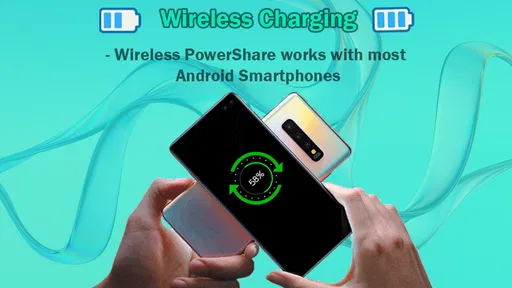
Imagine your smartphone turning into a power bank for your other devices. That's precisely what Wireless Reverse Charging does. It allows one device to wirelessly charge another, meaning if your friend's phone is about to die, and yours is fully charged, you can lend them some juice. Pretty cool, right?
How Does it Work?
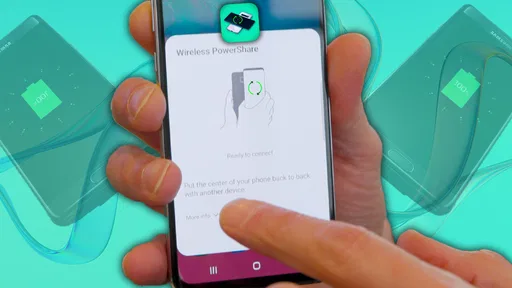
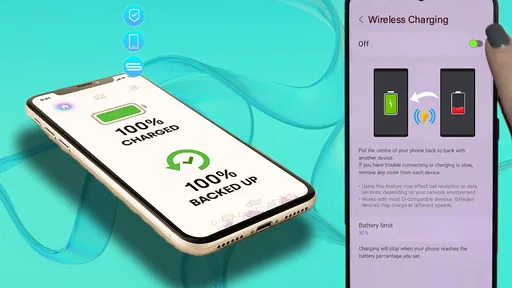
Now, you might be wondering, "How does this sorcery actually work?" It's simpler than it sounds. Most of the newer smartphones come equipped with this technology. All you need to do is enable the feature on your phone, place the device you want to charge on its back, and voila! The magic of induction charging takes over, transferring power from your device to theirs.
More From Our News Desk

 Gmail
GmailGmail in a Busy Inbox: Who Benefits Most?
From first account to crowded workday, Gmail earns its place through dependable search and flexible sorting—but its best fit depends on how much inbox maintenance you can tolerate.

 Prime Video
Switching to Prime Video: What Changes in Your Viewing Routine
Prime Video can make a compelling second home for streaming, but switching means learning a different catalog, rental layer, and route from browsing to playback.

 Universal TV Remote Control
Universal TV Remote Control Works Best as a Reliable Backup
A phone remote earns its place through quick setup and reliable habits. Here is how to get more from Universal TV Remote Control—and where its limits show.

 Weather - By Xiaomi
Weather by Xiaomi Review: Clear at a Glance, Less Clear Up Close
Xiaomi’s weather app makes everyday forecasts quick to scan, but its calm surface can leave useful details and recovery paths harder to find than they should be.

 X
XX Under Pressure: Can It Recover When Posting Goes Wrong?
A resilience-focused review of X, examining setup, mistaken posts, interruptions, weak connections, and the gaps that matter when recovery needs to be dependable.

 Clash of Clans
Clash of Clans Is Won Between the Battles
Its raids are quick; its community is a long-term project of coordination, teaching, rivalry, and shared responsibility—with all the friction that entails.
Latest News



A practical handoff, not just a feature toggle
Picture a day out when a friend’s phone is nearly empty and you’re away from a wall outlet. Before relying on power sharing, I’d check that the sending phone supports it, enable the relevant setting, and make sure the receiving device is compatible with wireless charging. Then I’d remove bulky cases if they prevent the backs from sitting flat and place the devices carefully together. A small shift can interrupt the connection, so keeping them still is part of the handoff.
There’s also a useful trade-off to decide in advance: helping another device means spending some of your own battery. I’d reserve this for a brief top-up that gets someone through a call, a message, or finding their way, rather than expecting a full recharge. If your own phone is already low, a cable or a dedicated power bank is the kinder option to both devices.
Make the handoff count
In an everyday situation, I’d treat the process as a short, deliberate pause rather than something to leave running unattended. First, ask what the other person actually needs: enough charge to call a ride, send a message, or keep navigation available is a more realistic goal than restoring their battery for the rest of the day. Then make sure your own phone can spare that energy. Sharing power is a small act of help, but it shifts the battery problem from one device to another, so it is worth agreeing on a stopping point.
The placement itself can be fiddly. Phone backs are not always flat, and a camera bump can make the receiving device wobble or sit at an angle. I’d set both phones on a stable surface, line up their charging areas, and avoid picking them up while the transfer is underway. If the connection drops, reposition them before changing several settings at once; that makes it easier to tell whether alignment was the issue. This is a simple but useful troubleshooting habit, especially when someone is waiting for a quick top-up.
Where it fits among charging options
Compared with a cable, wireless sharing asks for more careful positioning and usually makes less sense when speed or convenience is the priority. A cable also lets the phones stay apart, which is easier if one person needs to keep using their device. A power bank is better when I need to carry a predictable reserve or help more than one device over the course of a day. Reverse wireless charging wins mainly on the occasions when I already have a compatible source phone and do not have another charger with me.
Small accessories can be a more sensible target than another phone. If compatible, earbuds or a watch may need only a modest top-up, and setting them on the source phone can be less awkward than balancing two full-size phones together. I would still check that the accessory supports wireless charging and that the phone’s sharing feature is enabled. The practical advantage is not that this method is universally better, but that it can turn a phone already in your pocket into a temporary backup for a small device.
Real-World Applications
At first glance, you might think, "Why would I need this?" But let me tell you, in our hyper-connected world, this feature can be a game-changer. Whether you're out camping, in a meeting, or just too lazy to get up and grab a charger, Wireless Reverse Charging has you covered.
“It’s like having a backup plan for your backup plan.”
For those who rely heavily on gadgets throughout the day, this feature can help ensure that your earbuds, smartwatch, or any other compatible device never run out of battery when you need them the most.
What to check before counting on it
Compatibility is the first practical question: the device receiving power must support wireless charging, and the source phone must be able to share power wirelessly. Alignment matters too; if charging doesn’t begin, I’d reposition the devices and check their settings before assuming anything is broken. A case, a camera bump, or movement can keep the charging surfaces from meeting properly.
For regular charging, a cable is usually simpler and more predictable, while a portable power bank is the better choice when you need a larger reserve or want to charge without holding two phones together. Reverse wireless charging is most useful as an occasional rescue or a way to top up a small accessory when carrying extra gear is inconvenient. It is not the right answer for every low-battery situation.
When the plan can fail
The weak point is dependence on two compatible devices at the same time. If the source phone lacks wireless power sharing, or the receiver cannot take power wirelessly, there is no setting in an app that can bridge that gap. Even with suitable hardware, poor alignment or a case that keeps the backs apart can turn a quick favour into repeated repositioning. For a person who needs reliable charging at a particular time, that uncertainty is a good reason to carry a cable or power bank instead.
I’d also avoid treating a brief transfer as a way to rescue a phone that has already become essential for a long trip or a full day away. The source phone may be the one holding tickets, maps, messages, and emergency contacts. Giving away its remaining charge without a clear priority can leave both people short. In that situation, I’d use reverse charging only for the most important immediate task, then look for a proper charging option.
Is It Worth It?
So, the big question: Is Wireless Reverse Charging worth it? As someone who has had the pleasure of using this feature, I’d say it’s a resounding yes. It’s not just a gimmick; it’s a genuinely useful tool that can save the day in unexpected ways. Sure, it may not replace your traditional charging methods, but it’s a fantastic supplement.
However, it's essential to remember that the efficiency of charging varies. It won't charge as quickly as plugging into a wall outlet, but for those emergency situations, it's a lifesaver.
The app has a 4.0 average from around 4,800 ratings, and it has been installed over 100,000 times. It is rated for Everyone, with version 11.0 and a minimum OS requirement of 7.0. Those details make it easy to see why it attracts people interested in simple phone utilities, but the deciding factor for me is still whether the actual devices support wireless power sharing. The app’s presence alone is not a promise that every phone can perform the job.
A sensible way to decide
If you are choosing whether to try it, I’d start by asking what you expect it to do. For learning about the idea or exploring a supported phone’s charging options, a free utility in the libraries-and-demo space can be an easy experiment. If you want an app to make an incompatible phone share power, or need a guaranteed way to keep your battery alive, this is not the right solution. The app is most relevant when it complements hardware you already own, not when it is expected to replace a charger.
One practical approach is to test the feature at home with the devices you intend to use, while both have enough battery and there is no urgency. That gives you time to check compatibility, positioning, and the phone’s built-in controls without a friend waiting or a journey depending on the result. If the test works, you will know when this backup is worth attempting; if it does not, you can plan around a cable or power bank before you actually need one.
Wireless Reverse Charging is aimed at people curious about phone utilities and the idea of sharing power between devices. Masivapp’s app is free, and its broad Everyone age rating makes it accessible to a general audience. It was released on November 15, 2023, and the current version is 11.0. These details may help you identify the app, but they do not change the central practical question: do your devices have the hardware needed for the transfer?
In conclusion, Wireless Reverse Charging is a testament to how far technology has come in terms of convenience and utility. It's a feature that, once you start using, you'll wonder how you ever lived without it. So, the next time you're updating your smartphone, consider one that offers this capability. You'll thank me later!
Wireless Reverse Charging Frequently Asked Questions
Is Wireless Reverse Charging an app or a feature built into a phone?
Wireless Reverse Charging is listed as an app in the Libraries & Demo category, with a short description of “Wireless Charging.” The underlying ability to transfer power wirelessly depends on compatible phone hardware and system support. Installing the app alone does not make an unsupported phone capable of wireless reverse charging, so check that your device supports the feature before downloading.
What is Wireless Reverse Charging and how does it work?
Wireless Reverse Charging is a feature that allows a device to charge other compatible devices wirelessly. It utilizes the device's battery power to charge another device through inductive charging technology. To use it, ensure both devices support the feature, activate it on your device, and place the device you wish to charge on its back.
Which devices are compatible with Wireless Reverse Charging?
Devices that support Wireless Reverse Charging are typically high-end smartphones and some tablets that have the necessary hardware for inductive charging. To check compatibility, look for specifications on your device's manufacturer website or in the device settings under the battery or charging section.
How fast is the charging speed with Wireless Reverse Charging?
The charging speed with Wireless Reverse Charging is generally slower than wired charging. It is suitable for topping up small devices like earbuds or smartwatches rather than fully charging a smartphone. The speed can vary depending on the device’s battery capacity and the charging coil's efficiency.
Does Wireless Reverse Charging affect battery life?
Using Wireless Reverse Charging can generate additional heat, which may affect the battery's lifespan over time if used frequently. It's recommended to use this feature sparingly and only when necessary to minimize potential long-term battery degradation.
Pros
- Convenient for charging devices on the go
- Eliminates the need for cables and adapters
- Supports multiple device types
- Easy to use with a simple setup
- Energy-efficient technology
Cons
- Limited charging speed
- Not compatible with all devices
- May drain the primary device's battery fast
- Requires close proximity for effective charging
- Potential overheating with prolonged use










