

Wireless charge Phone to Phone
- 126.00
- 4.1
- Installs
- 100.00K
- Price
- Free

Screenshots
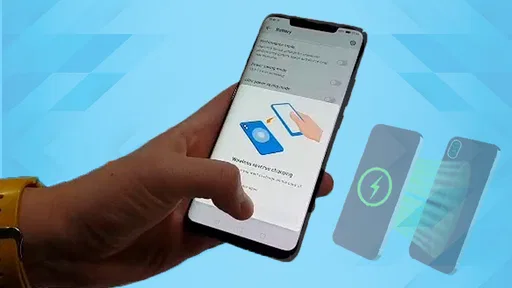
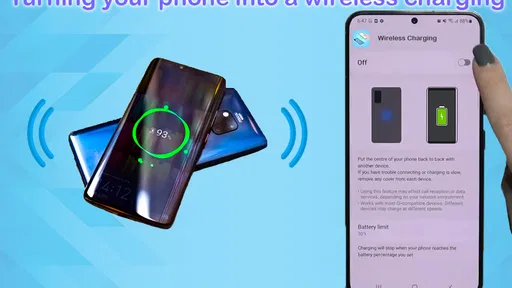
Analysis by Reviewed
I’d treat phone-to-phone wireless charging as an emergency hand-off, not a way to refill a battery quickly. Wireless charge Phone to Phone is an app in the Libraries & Demo category from Masivapp, built around the idea of using one phone to provide power to another without a cable. The concept sounds simple, but the important catch is that the phones themselves must support reverse wireless charging; an app cannot add that hardware capability to a device that lacks it.
Check the phone before counting on a top-up
The first question I’d ask is not whether the app is installed, but whether the phone giving power has reverse wireless charging built in. The receiving phone also needs wireless charging support. These capabilities vary by device, so check the charging settings and the manufacturer’s guidance on both phones before you plan around a transfer. If either phone lacks the required hardware, trying again through the app won’t change that.
That distinction is especially useful if you’re considering the app for a trip or a day out. I’d test the setup at home, while both phones have plenty of battery and there is time to troubleshoot. A successful test tells you whether the devices can work together and helps you learn how they need to sit. It is much better to discover a compatibility problem before you’re relying on your last few percent to get directions.
What to expect from the charging speed
In practice, I’d set expectations low and aim for just enough power to keep essential tasks going. Wireless transfers between phones tend to be less convenient than plugging into a wall charger or a power bank, and positioning can interrupt the process. Think of it as a way to gain a little breathing room for a call, a message, or directions—not a dependable way to fill a nearly empty battery before heading out.
The app is free, rated for Everyone, and has an average rating of 4.3 from around 2,400 ratings. It has over 100,000 installs, which suggests that plenty of people are curious about sharing battery power. Those figures are useful context, but they don’t guarantee that the feature will work with every phone. I’d check the device settings and manufacturer guidance first, especially if you’re deciding whether to rely on it away from home.
Why a slow top-up can still help
A small charge can matter when the phone receiving power is close to shutting down but still needs to stay usable. For example, if I’m walking through an unfamiliar area and a friend’s compatible phone has spare battery, a short top-up may buy time to finish navigation or arrange a ride. I’d pause battery-heavy tasks such as filming or gaming during the transfer: they can consume power as quickly as the other phone supplies it, making the effort feel less worthwhile.
That trade-off also affects the donor. Sharing power takes energy from its battery, so I’d agree on a practical limit before placing the phones together: the recipient gets enough for the immediate task, while the donor keeps a reserve for its owner. It is a considerate option when both people understand the cost, but a poor plan if the donor is also running low or will need its phone for an important journey.
More From Our News Desk

 Gmail
GmailGmail in a Busy Inbox: Who Benefits Most?
From first account to crowded workday, Gmail earns its place through dependable search and flexible sorting—but its best fit depends on how much inbox maintenance you can tolerate.

 Prime Video
Switching to Prime Video: What Changes in Your Viewing Routine
Prime Video can make a compelling second home for streaming, but switching means learning a different catalog, rental layer, and route from browsing to playback.

 Universal TV Remote Control
Universal TV Remote Control Works Best as a Reliable Backup
A phone remote earns its place through quick setup and reliable habits. Here is how to get more from Universal TV Remote Control—and where its limits show.

 Weather - By Xiaomi
Weather by Xiaomi Review: Clear at a Glance, Less Clear Up Close
Xiaomi’s weather app makes everyday forecasts quick to scan, but its calm surface can leave useful details and recovery paths harder to find than they should be.

 X
XX Under Pressure: Can It Recover When Posting Goes Wrong?
A resilience-focused review of X, examining setup, mistaken posts, interruptions, weak connections, and the gaps that matter when recovery needs to be dependable.

 Clash of Clans
Clash of Clans Is Won Between the Battles
Its raids are quick; its community is a long-term project of coordination, teaching, rivalry, and shared responsibility—with all the friction that entails.
Latest News



Keep the transfer focused during heavy use
When a phone is charging another phone, I’d avoid treating the moment like normal plugged-in charging. If the recipient continues to run demanding tasks, the incoming power may not translate into a useful increase in battery life. For a practical test, close anything you don’t need and use the time for one priority: send a message, check a route, or make a call. That makes it easier to judge whether the transfer is helping rather than watching a battery indicator while the phone is busy draining power.
The same applies to the donor. I would not start sharing while it is handling a long call, navigation, or another task the owner cannot interrupt. Decide what the donor needs to retain before the transfer begins, then stop as soon as the recipient can manage its next essential step. This is less about squeezing out every possible bit of power and more about making sure neither person loses access to a phone they still need.
Compatibility and positioning matter
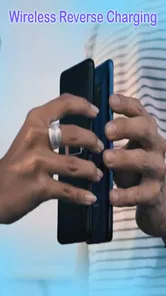
Before trying it, I’d confirm that the giving phone supports reverse wireless charging and that the receiving device can charge wirelessly. Then I’d remove anything that makes a stable, close fit difficult and place the backs together, adjusting them gently if charging does not begin. Cases, camera bumps, and movement can make alignment awkward; for a quick transfer, setting the phones on a flat surface is often less frustrating than holding them in place.
Once the phones are together, I’d check that charging has actually started rather than assume the placement is right. If it hasn’t, shift the position slightly and check the donor’s reverse-charging setting. Repeatedly opening and closing the app is unlikely to fix a poor physical fit or missing hardware support. A stable surface is a small but useful choice when you’re at a café, on a bench, or in a quiet corner at an event.
How phone-to-phone charging fits into real life
So, here’s the deal. Some phones can act as a wireless power source for another device, but that depends on the phone’s hardware and settings. It’s like lending a cup of sugar to your neighbor, except the useful part is a brief transfer of battery power. The Wireless charge Phone to Phone feature is most practical when both devices are compatible and already within reach. Place the phones back-to-back and check the donor’s charging controls; the app cannot substitute for a device that does not support this capability.
When Can This Be Useful?
Picture this: you’re at a concert, capturing every epic moment on your phone, when that dreaded low battery warning pops up. Or maybe you’re navigating through the city using maps, and your phone’s battery is about to tap out. In these critical moments, having a friend with reverse wireless charging can be a total lifesaver. It’s not just about convenience; it’s about peace of mind knowing you have that backup when you need it the most.
A quieter example may be more realistic: you and a friend are leaving a station, and one phone has enough battery to spare while the other needs to display a ticket or call a ride. A short transfer could help the low-battery phone stay available for that task. I’d first switch off any nonessential activity on the recipient, agree how much reserve the donor should keep, and set the phones down together. That routine gives the transfer a clear purpose and an obvious stopping point.
Things to Keep in Mind
Now, I’m not saying this feature is without its quirks. First off, the charging speed is not going to break any records. It’s more like a gentle trickle than a rushing river, so patience is key. Also, both phones will need to be positioned just right for the magic to happen, so it might take a bit of fiddling. And yes, it does consume the donor phone’s battery quite a bit, so use it wisely!
Heat and interruptions are worth paying attention to in any wireless charging situation, so I would keep the phones where I can check on them and stop if either device becomes uncomfortably warm. I would also avoid treating a transfer as a set-and-forget solution while walking around: movement can disturb alignment, and the connection may need attention. Keeping the phones still makes it easier to see whether the arrangement is working and prevents a small emergency from turning into a frustrating battery experiment.
Another thing to note is that while this feature is becoming more common, it’s still not universal. So, before you plan to rely on it, make sure that both devices are compatible and have sufficient battery power to share. Oh, and while it’s super handy, it’s always good to have a portable power bank as a backup, especially if you’re going off the grid for a while.
Choosing the right backup
Compared with a cable, phone-to-phone charging avoids carrying an extra lead, but the two devices have to stay close and correctly aligned. A cable is usually the better choice when you need a predictable connection, while a power bank is more useful when you’re alone or need a larger reserve. I’d keep this method for moments when another compatible phone is already nearby and a little extra power solves the immediate problem.
There is also a practical difference in who can use each option. A cable or wall charger does not ask a second phone owner to spend their battery, while a power bank works when you are on your own. Phone-to-phone charging makes most sense as a social backup: it can save the day when someone is with you and has power to spare, but it is not a substitute for planning ahead on a long outing.
A useful routine is to check the donor’s battery before starting, stop once the recipient can handle its next essential task, and check that charging is still active after moving the phones. If nothing happens, reposition them and verify the phone’s reverse-charging setting rather than repeatedly tapping through the app. This avoids wasting time and lets the donor stop sharing promptly if its own battery becomes more important.
Who should rely on it—and who should not
I can see this being handy for people who travel with friends, attend events, or occasionally need enough power to contact someone and get home. It is less suitable for anyone who expects fast charging, routinely needs to recharge alone, or owns devices without the necessary wireless charging support. In those situations, a wall adapter or portable battery is the more dependable everyday option; this is a backup trick, not a replacement for either.
I’d also skip it as a regular charging routine if preserving the donor’s battery matters more than helping another phone in the moment. The person giving power has to accept the trade-off, and the recipient should not expect a quick refill for a full evening of demanding use. For shared travel, agree on the donor’s minimum reserve before you begin; for solo travel, carry a charger or power bank instead.
The app is currently at version 10.0 and supports Android 7.0 or later. I’d still distinguish the app from the phone’s underlying charging hardware: installing it does not turn a standard phone into a wireless power source. If the feature is available on your device, the key questions are whether the second phone can receive wireless power and whether both owners are comfortable trading some battery life for convenience.
What the app can and cannot solve
It helps to think of this as a way to access a phone capability, not as a software fix for every battery problem. The app’s focus is clear, but successful charging still depends on the devices, their settings, and steady placement. If the recipient does not respond, I would troubleshoot those basics before assuming the app itself is the issue: check compatibility, confirm reverse charging is enabled, and make sure the backs are aligned.
That distinction also answers a common practical concern: installing the app alone does not guarantee that a phone can send or receive wireless power. The giving device needs the relevant hardware, and the receiving device must be able to charge wirelessly. If either requirement is missing, a cable or power bank is the sensible alternative. If both are present, a short test before you need it can reveal whether your particular pair is convenient enough to use in the field.
My take on its usefulness
Overall, the Wireless charge Phone to Phone capability is a useful extra for the right situation, though I would not call it a replacement for ordinary charging. It’s about keeping a device available when someone nearby can spare a little power. While it might not be perfect, it’s worth considering if your phone supports reverse wireless charging and you already spend time with people using compatible devices. The most sensible plan is to test it once, keep expectations modest, and save it for a specific need rather than relying on it to carry your battery through the day.
Wireless charge Phone to Phone Frequently Asked Questions
Is Wireless Charge Phone to Phone free to download?
Wireless Charge Phone to Phone is free to download, so you can try the app without paying for it. It is listed for Everyone and falls under Libraries & Demo. Before installing, it is still sensible to check the app page on your device’s store for the current download details and make sure you are comfortable with the permissions and terms shown there.
What is Wireless Charge Phone to Phone and how does it work?
Wireless Charge Phone to Phone is an innovative app designed to enable wireless power sharing between two mobile devices. By using NFC or Bluetooth technology, it allows a device with sufficient battery to transfer power to another compatible device without the need for cables or chargers. This feature can be particularly useful in emergency situations where a quick charge is needed.
Is my device compatible with Wireless Charge Phone to Phone?
Most modern smartphones that support NFC or Bluetooth are compatible with Wireless Charge Phone to Phone. It's important to check the app's requirements on the download page to ensure your device is supported. Additionally, both devices involved in the power transfer need to have the app installed and be compatible with the wireless charging feature.
How secure is the power transfer via Wireless Charge Phone to Phone?
Wireless Charge Phone to Phone employs secure protocols to ensure that the power transfer is safe and reliable. The app uses encrypted connections and requires user authorization before initiating any power transfer, ensuring that your device's energy is shared only with your consent and with trusted devices.
Does Wireless Charge Phone to Phone affect my device's battery health?
While Wireless Charge Phone to Phone is designed to minimize any potential impact on battery health, frequent use of any power-sharing technology can reduce battery lifespan over time. It's recommended to use the feature as needed and avoid excessive power transfers to maintain optimal battery health.
Pros
- Allows device charging without cables
- Convenient for on-the-go charging
- Compatible with various devices
- Reduces need for multiple chargers
- Eco-friendly with less electronic waste
Cons
- Slower charging compared to wired
- Requires close proximity for charging
- Not all devices support the feature
- Can cause device overheating
- Limited charging distance










