WeatherPulse (WxPulse)
- 18.00
- 4.9
- Installs
- 100.00
- Price
- $2.99

Screenshots
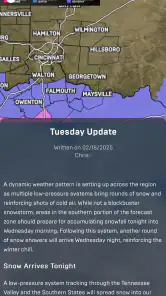
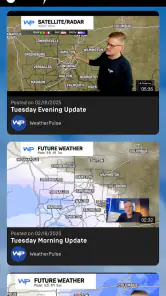
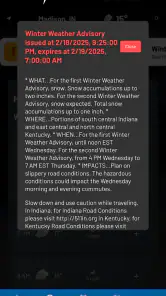
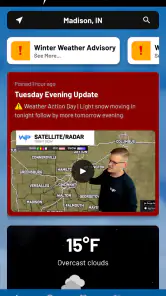
Analysis by Reviewed
Ever find yourself staring out the window, trying to make sense of the skies? Well, let me introduce you to WeatherPulse (WxPulse). This nifty app is like having a personal weather station right in your pocket. I’ve been using it for a while, and trust me, it’s a game-changer for weather enthusiasts and casual users alike.
A routine that makes regional forecasts useful
What makes a weather app worthwhile to me is not the number of details on screen, but whether I can turn them into a sensible decision. With a regional app, that starts by checking that the places I care about are actually within its intended area. WeatherPulse is built around Indiana, Kentucky and Ohio, so it is a natural candidate for local errands, commutes and plans across that part of the country, rather than a universal travel companion.
I’d make two checks part of an ordinary day: one while deciding what to wear or whether to bring outdoor gear, and another shortly before leaving if rain or severe conditions could affect the plan. The gap between those checks matters. A morning forecast can help me prepare, while a later radar look can help me decide whether to take a different route or wait before heading out. I would not keep refreshing it without a reason; a repeatable check is more useful than watching every change.
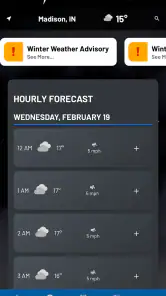
A realistic example is a drive between towns for an appointment followed by a stop outdoors. I’d first look at the hourly outlook to judge whether the timing seems comfortable, then use the radar closer to departure to see whether a rain area appears to be moving toward the route. If the plan is flexible, I might shift the outdoor stop. If it is not, I would carry what I need and allow extra time rather than expecting the forecast to guarantee a dry window. That is the kind of small decision where a regional forecast can earn its place on a phone.
Interface and Usability
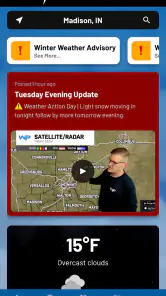
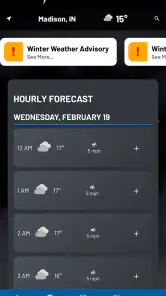
First off, the interface of WeatherPulse (WxPulse) is sleek and intuitive. As soon as you fire up the app, you’re greeted with a clean dashboard that screams user-friendly. Everything is laid out in a way that makes sense, even if you’re not a tech wizard. The app offers a vibrant color scheme that not only looks good but also makes it easy to differentiate between various weather elements. Real-time updates are just a tap away, and it’s incredibly satisfying to have all that information at your fingertips without any fuss.
Making a Forecast Useful
WeatherPulse is a weather app from cpweather focused on Indiana, Kentucky and Ohio. That regional focus is the first thing I’d weigh before downloading it: it makes the most sense if your routines and plans happen in or around those states. If you mostly need forecasts elsewhere, a broad national service may be a better everyday fit. The app costs $2.99, so I’d treat it as a paid regional tool rather than assume it is a free substitute for a general-purpose forecast app.
My practical habit with a forecast app is to check it at two different moments: once while deciding what the day might involve, then again shortly before leaving. The first glance helps with broad choices, while a later look at the radar and alerts can change a route or an outdoor plan. That distinction matters because a forecast is guidance, not a guarantee; a useful routine leaves room to adjust instead of treating one early check as the final word.
More From Our News Desk

Clash of Clans Is Won Between the Battles

Android Auto Makes the Case for Quieter Car Software

MobiOffice: Transforming Mobile Productivity with Seamless Integration

EA SPORTS FC™ Mobile Soccer: Redefining Mobile Sports Gaming

How Microsoft OneDrive Became a Mobile Productivity Giant

How Google Translate Breaks Language Barriers Effortlessly
Features Galore
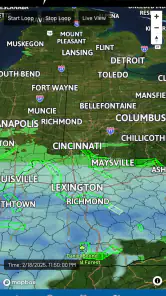
Now, let’s talk features. This app is packed! Whether you’re looking for hourly updates, 10-day forecasts, or even humidity levels, WeatherPulse has got you covered. One feature I particularly love is the radar map. It’s interactive, allowing you to zoom in and out, giving you a detailed view of weather patterns. And for those who love sharing their weather finds, the app lets you easily share updates with friends and family. It’s like being a mini meteorologist!
The app also provides severe weather alerts, which is a lifesaver. I remember once getting a heads-up about a storm that was brewing, and it gave me enough time to secure everything outside. It’s little things like this that make this app indispensable.
Settings and Repeatable Checks
For a commute or a day spent moving between towns, I’d use the hourly outlook to decide when to leave and the radar to see whether rain appears to be approaching the places I’ll actually pass through. Zooming in is more useful than staring at a broad regional view when a short trip depends on a narrow window of dry weather. I’d still keep a backup plan for outdoor work: radar is helpful for timing, but it does not turn uncertain weather into a promise.
Alerts are most valuable when they support a plan rather than replace one. If severe weather is possible, I’d check that the phone can deliver notifications and then make a habit of looking at the app before heading out or leaving pets and outdoor items unattended. The useful trade-off is attention: alerts can help you react sooner, but no phone notification should be treated as a substitute for paying attention to changing conditions or following local safety guidance.
Settings worth checking before relying on alerts
When I install a weather app, I make a point of checking the phone’s notification settings before assuming an alert will arrive. The practical test is simple: confirm notifications are allowed for the app, and make sure the phone is not silencing them during the hours when I need to notice a warning. This is a device-level habit, not a special WeatherPulse feature, but it can make the difference between an alert being useful and being missed.
I’d also be deliberate about which places I check. Someone who lives in one town but works in another should think about the destination as well as home; the conditions at the start of a commute may not describe the conditions at the end. Before a long drive, I would inspect the forecast for the places that shape the decision, rather than relying on a single nearby reading to represent the whole trip. That is especially useful in a region where plans can cross state lines.
There is a small but important trade-off between staying informed and creating notification fatigue. If every phone alert becomes background noise, the one that matters may be easier to overlook. I’d treat severe-weather notifications as a prompt to check the situation and act sensibly, not as a reason to enable every possible interruption from every app. For routine rain planning, a deliberate radar check may be less disruptive than depending on a stream of alerts.
Faster patterns for people who check often
Experienced weather-app users tend to build a short sequence rather than explore the screen from scratch each time. With WeatherPulse, I’d keep the routine focused: start with the hourly outlook when timing matters, switch to the radar when the question is where precipitation may be, and look at the longer forecast only when planning farther ahead. Each view answers a different question, and using them in that order helps avoid treating a broad outlook as a precise answer to a near-term problem.
For a school pickup, for example, I would check the hour around the trip rather than letting a sunny morning settle the question. If rain seems possible, a closer radar view can help me decide whether to carry a raincoat or allow a little extra time. If the forecast is unsettled, I’d make the easy preparation early, then do one last check before leaving. The value is not perfect certainty; it is avoiding a rushed decision at the door.
Sharing a forecast can also be more effective when the message includes the decision it supports. Instead of sending only a map, I’d tell a family member that I’m planning to leave earlier because the weather may complicate the drive, or that I’m bringing a backup layer for an outdoor plan. WeatherPulse’s sharing option can help pass along an update, but a short explanation makes it more useful to someone who is not looking at the same screen or interpreting the map in the same way.
Personal Experience
Using this app feels like having a reliable companion. There was this one time I planned a weekend picnic. I checked the app, and it gave me a heads-up about a drizzle that could spoil our plans. Thanks to the app, we rescheduled, and it turned out to be a sunny day. It’s moments like these when you realize how much you can depend on it.
Another thing worth mentioning is the app’s performance. It’s smooth and doesn’t lag, a crucial aspect for any app in today’s world. Plus, the app barely sips on battery life, so you don’t have to worry about it draining your phone.
Who Will Get the Most from It
I’d recommend it most to people in its regional footprint who want a quick mix of hourly conditions, a longer outlook, radar, and severe weather alerts in one place. It may suit a household that plans yard work, school pickups, or weekend outings around changing skies, especially when different people need a shareable update. The average rating is 4.9 from 39 ratings, with 18 written reviews, though that is a relatively small pool; I’d read that as encouraging feedback, not proof that every forecast will match local conditions.
It is less compelling if you mainly want a worldwide travel companion, prefer a free app, or rely on highly specialized information beyond everyday forecasts. The app is rated Everyone, and version 4.4 requires Android 8.0 or later. It has over 100 installs, so it is a smaller option than the familiar mass-market weather services. Those alternatives may make more sense if you need a widely used app or already rely on a particular weather ecosystem; here, the appeal is a focused regional tool with several practical ways to check conditions.
Where it sits among weather alternatives
Compared with the weather app already included on a phone, WeatherPulse is worth considering when its regional focus and combination of radar, hourly outlook, longer forecast and alerts better match the way you plan. A default app may be more convenient if you only want a quick glance and do not want to pay for another tool. A large national service may suit someone who travels widely or wants one familiar source across many destinations. I would choose based on the geography and decisions I actually face, not on which app displays the most information.
The same distinction applies to specialist services. If a person needs information tailored to a particular outdoor pursuit or professional task, a general regional weather app may not be enough, and a dedicated source may be the better companion. For everyday choices—whether to bring a coat, shift a yard task, or check the timing of a drive—the more relevant test is whether the forecast is easy to consult and whether the radar and alerts fit into a routine. WeatherPulse makes its strongest case for people whose daily map overlaps with its regional coverage.
Where It Has Limits
The useful question is not whether a ten-day forecast can settle every plan, but how much confidence to place in it as the date gets closer. I’d use the longer view to spot a possible wet or humid stretch, then return to the hourly forecast and radar nearer the event before committing. For a time-sensitive decision, such as arranging outdoor work, I would not treat an early outlook as final. That cautious workflow is sensible with any weather app, and it keeps the radar from being mistaken for certainty.
Likewise, this is not the right choice simply because it has several familiar weather tools. If your priority is a different region, a free service, or a specialized source for a particular activity, compare those needs before paying. For someone who wants a straightforward regional check, however, having the forecast, radar, and alerts together can be more convenient than bouncing between unrelated sources. Sharing an update is handy for coordinating plans, but I’d still tell friends the relevant timing in plain language rather than assume they will interpret a map exactly as I do.
Practical questions before making it your daily app
Would I use it while travelling beyond its core area? I would not make it my only weather reference for a trip far outside Indiana, Kentucky and Ohio; a broader service is more sensible when the destination is elsewhere. Would I pay for it if I already have a weather app? Only if the regional focus and the way I use radar, hourly conditions and alerts add enough everyday value to justify the $2.99 cost. If my built-in app already answers those questions clearly, there may be little reason to switch.
Can I rely on a warning as the only signal to act? No. I would use an alert as a prompt to check conditions and follow local safety guidance, while keeping in mind that phone settings and attention affect whether a notification is noticed. Is it a good fit for occasional checking? It can be, particularly for someone who wants the key views together, but its strongest value is for people who repeatedly make local plans around the weather rather than someone who rarely checks beyond the temperature.
Ending Thoughts
All in all, WeatherPulse (WxPulse) is more than just a weather app. It’s a must-have for anyone who wants to stay ahead of the weather game. With its rich set of features and user-friendly interface, it’s hard not to fall in love with it. I’d say, give it a shot, and you might just find yourself wondering how you ever got by without it. Happy weather watching!
My more measured recommendation is for people whose routines are genuinely local to the states it serves and who will use its forecast views as part of a simple check-and-adjust habit. I would skip it if I needed wide-ranging travel coverage, a free option, or highly specialized weather information. For the right person, the strongest benefit is not predicting every change; it is making a few ordinary decisions with better timing and a clearer backup plan.
WeatherPulse (WxPulse) Frequently Asked Questions
What features does WeatherPulse offer to enhance my weather tracking experience?
WeatherPulse (WxPulse) offers a comprehensive suite of features designed to enhance your weather tracking experience. It includes real-time weather updates, detailed forecasts for up to 10 days, severe weather alerts, and interactive radar maps. The app also provides personalized weather insights based on your location, along with lifestyle forecasts such as pollen levels and UV index, making it a versatile tool for planning your day-to-day activities.
Is WeatherPulse free to use, or does it require a subscription?
WeatherPulse is free to download and use, offering basic features without any cost. However, it also offers a premium subscription for users who want access to advanced features like ad-free experience, extended forecasts, and premium radar data. The subscription model is flexible, allowing monthly or yearly payments, making it suitable for users looking for an enhanced weather tracking experience.
How accurate is the weather data provided by WeatherPulse?
WeatherPulse prides itself on delivering highly accurate weather data, sourced from reliable meteorological services and updated frequently. Its advanced algorithms and data analytics ensure precision in forecasting, providing you with the latest weather conditions and predictions. Users have consistently rated its accuracy highly, making it a dependable app for weather monitoring.
Can I customize weather alerts and notifications in WeatherPulse?
Yes, WeatherPulse allows you to customize weather alerts and notifications to suit your needs. You can set up alerts for specific weather conditions such as rain, snow, or severe weather events. The app lets you choose the type of notifications you receive and the frequency, ensuring you are always informed about the weather changes that matter most to you.
Does WeatherPulse support multiple locations for weather updates?
WeatherPulse supports multiple locations, allowing you to keep track of weather conditions in different areas of interest. You can easily add and manage locations within the app, making it convenient for users who travel frequently or need to monitor weather conditions in various regions for family, work, or recreational purposes.
Pros
- Detailed weather forecasts available
- User-friendly interface
- Customizable alerts for severe weather
- Integration with smart home devices
- Offers real-time radar maps
Cons
- Contains ads in free version
- Limited features without subscription
- Occasional slow loading times
- Requires internet for full functionality
- No offline mode available
- Category
- Weather
- Version
- 4.4