

WeatherPop Español (Aviso)
- 12.00
- 4.6
- Installs
- 50.00K
- Price
- Free
Screenshots

Analysis by Reviewed
Weather apps are easy to overlook until one fails at the exact moment you need it. I approached WeatherPop Español as a decision rather than a popularity contest: can it make checking the forecast quicker, clearer, and more useful in ordinary life? My answer is generally positive, especially if you prefer an app focused on weather information in Spanish rather than a crowded dashboard full of unrelated extras.
WeatherPop is a free weather app from WeatherPop, available for devices running Android 7.0 or later. It is rated for Everyone, so it is approachable for a broad audience, including families who want a straightforward way to check conditions. The app reached a 4.7 average from around 331 ratings, and its 50K-plus installs suggest that it has already found a modest but interested audience.
That audience matters because this is not the kind of app I would choose solely for novelty. I would choose it when the language, simplicity, and speed of a weather check matter more than having every possible meteorological tool in one place. The current version is 0.10.3.5, and the app was released on January 5, 2024, which places it among relatively recent options rather than a long-established weather utility.
How I Decide Whether a Weather App Is Worth Keeping
My first test is not how attractive the opening screen looks. It is whether I can answer a practical question almost immediately: do I need a jacket, an umbrella, or a change of plan? A useful weather app should reduce uncertainty without making me interpret a wall of symbols, scroll through unnecessary sections, or switch between languages.
For WeatherPop Español, the first decision point is obvious: do you want your weather experience in Spanish? The short store description identifies it as “WeatherPop Español,” and that positioning is important. Someone comfortable with Spanish may find the app more natural than a general-purpose alternative whose menus, labels, or forecast wording are primarily designed around another language.
The second test is how often you check weather. If you only look once before leaving home, a compact app can be preferable to a feature-heavy service. If you plan outdoor work, travel across several locations, or need specialist information, you should judge it more strictly. A simple daily checker and a detailed planning tool serve different people, even when both are placed in the weather category.
I also consider friction. A weather app becomes part of a routine: open it while getting dressed, glance at it before commuting, or check it before taking children outside. Every extra tap, unclear label, or overloaded screen weakens that routine. WeatherPop’s appeal is tied to the idea of making that check feel direct, but users who expect a complete meteorological workstation should compare its approach with more comprehensive alternatives before changing over.
More From Our News Desk

 Gmail
GmailGmail in a Busy Inbox: Who Benefits Most?
From first account to crowded workday, Gmail earns its place through dependable search and flexible sorting—but its best fit depends on how much inbox maintenance you can tolerate.

 Prime Video
Switching to Prime Video: What Changes in Your Viewing Routine
Prime Video can make a compelling second home for streaming, but switching means learning a different catalog, rental layer, and route from browsing to playback.

 Universal TV Remote Control
Universal TV Remote Control Works Best as a Reliable Backup
A phone remote earns its place through quick setup and reliable habits. Here is how to get more from Universal TV Remote Control—and where its limits show.

 Weather - By Xiaomi
Weather by Xiaomi Review: Clear at a Glance, Less Clear Up Close
Xiaomi’s weather app makes everyday forecasts quick to scan, but its calm surface can leave useful details and recovery paths harder to find than they should be.

 X
XX Under Pressure: Can It Recover When Posting Goes Wrong?
A resilience-focused review of X, examining setup, mistaken posts, interruptions, weak connections, and the gaps that matter when recovery needs to be dependable.

 Clash of Clans
Clash of Clans Is Won Between the Battles
Its raids are quick; its community is a long-term project of coordination, teaching, rivalry, and shared responsibility—with all the friction that entails.
Latest News



The everyday test: deciding what to do before leaving
Imagine a normal weekday morning. I am getting ready for work, the sky outside looks uncertain, and I want to know whether a light coat is enough or whether rain could affect the trip. In that moment, I do not need a deep explanation of atmospheric conditions. I need a readable answer in a familiar language, presented quickly enough that checking the app does not become another chore.
This is where a focused weather app can beat a broader utility. The value is not necessarily in showing more information; it is in helping me notice the information that affects my next decision. WeatherPop Español makes sense for that kind of repeated glance, particularly for Spanish-speaking users who want the interface to feel immediately understandable.
A less obvious benefit of this workflow is consistency. If I use the same app each morning, I learn where to look and how to interpret its presentation. That reduces the temptation to open several weather services and compare slightly different forecasts without knowing which one is more useful for my situation. I would still verify important conditions through another source when the consequences are serious, but for ordinary planning, one familiar view can be more practical than constant comparison.
Where WeatherPop Español feels strongest
The clearest strength is its focused identity. WeatherPop Español is not presented as a general portal for news, shopping, travel bookings, or social updates. It is a weather app, and the Spanish-language emphasis gives it a specific reason to exist. That makes it easier for me to recommend to someone who wants weather information without navigating an unnecessarily busy experience.
The free price also lowers the barrier to trying it. I can install it without making a financial commitment, test whether its presentation suits my routine, and remove it if it does not. That is especially useful for households where different people have different language preferences. A free app can become the convenient choice for a shared tablet or a family member who wants a simple weather check rather than a technical forecast interface.
Its Everyone content rating is another practical advantage for mixed-age use. I would not treat that rating as proof that every screen will suit every person’s preferences, but it does make the app easier to consider for general household use. The minimum Android requirement of 7.0 also means it is not restricted to only the newest phones, which may help users who keep an older but still functional device.
The 4.7 average is encouraging, but I would read it as a signal to try the app rather than as a guarantee that it will suit every location or habit. Weather apps are judged partly by regional expectations, phone settings, and the kind of forecast detail each person wants. A high average tells me that many users found value in it; it does not remove the need for a short personal test.
Useful habits that make a simple weather app more effective
My first practical tip is to use WeatherPop Español as a decision checkpoint, not as a source of endless browsing. Check it at the moments when weather changes your behavior: before commuting, before exercising outside, before hanging laundry, or before planning a walk. This keeps the app useful and prevents a quick forecast check from turning into an unproductive search through every available detail.
My second tip is to compare the forecast with the actual conditions around you during the first few days. Notice whether the information helps with your particular neighborhood and routine, not just whether the screen looks clear. A forecast that is adequate for a city-center commute may not answer the needs of someone working in an exposed rural area or planning a long trip between locations.
My third tip is to make language part of the evaluation. If you normally translate weather terms mentally, a Spanish-focused experience may save more time than an app with a larger feature list. On the other hand, if you regularly discuss forecasts with people who use another language, a more multilingual or internationally oriented alternative may fit your household better.
There is also a useful trade-off in keeping expectations proportional. WeatherPop Español can be the app I open for a quick answer while a specialist service remains available for unusual conditions or detailed planning. Installing it does not have to mean abandoning every other weather source immediately. A short parallel trial can show whether its speed and clarity are enough for daily use before I make it my default.
Where a different kind of weather app may fit better
WeatherPop Español may not be the right choice for users who want the deepest possible forecast analysis. Some people need highly detailed information for aviation, sailing, farming, mountain activities, photography, or long-distance travel. In those situations, an app built around specialist layers and technical interpretation may be a better fit, even if it feels heavier for everyday checks.
It may also be less suitable if your main requirement is a broad travel dashboard. Someone who constantly monitors many destinations, plans routes, or combines weather with other travel information may prefer a service designed around locations and trip planning rather than a focused Spanish weather experience.
Another reason to choose an alternative is personal preference about presentation. Some users like maps, animated radar views, charts, alerts, widgets, or extensive customization. I would not switch to WeatherPop Español expecting it to replace every possible weather tool unless its own interface proves that it meets those needs. The sensible comparison is between workflows: quick Spanish-language checks on one side, deeper or more specialized monitoring on the other.
That does not make the alternative automatically better. A feature-rich app can create its own problems. More panels may mean slower scanning, more settings to maintain, and more chances to focus on information that does not affect the decision at hand. If I mainly want to know how to dress or whether an outdoor errand is sensible, a simpler tool can be the more efficient choice.
What switching really costs
Moving to a new weather app is usually easy technically, but the real cost is habit. I have to learn where the important information appears, decide whether the wording feels natural, and determine whether the app fits the places I check most often. That is why I would not judge WeatherPop Español after a single glance. I would use it during several normal routines and see whether I stop reaching for the previous app.
The free price makes that trial relatively low-risk. I can keep the old app available while testing the new one, then decide based on actual convenience rather than assumptions. This is particularly sensible for users who depend on weather information for work or safety. A quick side-by-side period can reveal whether the Spanish presentation improves understanding without disrupting an established routine.
There is also a switching cost for people who have built their day around advanced tools. If you rely on carefully arranged screens, specialized visualizations, or a large collection of saved locations, changing to a more focused app may feel like losing part of your workflow. In that case, WeatherPop Español might work better as a lightweight companion than as a complete replacement.
For a casual user, however, the cost is much smaller. If your current weather app is confusing, cluttered, or difficult to read in the language you prefer, trying this one may be worthwhile simply because a weather check should not require training. The best indicator is not the number of features you can list, but whether you make better everyday decisions with less effort.
Who should install it, and who should skip it?
I would recommend WeatherPop Español to Spanish-speaking Android users who want a free, approachable weather app for regular checks. It is especially appealing if you value readable language, a focused purpose, and compatibility with a device that is not running the newest Android release. Families and casual users may also appreciate its Everyone rating and uncomplicated role.
I would be more cautious about recommending it as the only weather tool for professionals, serious outdoor planners, or anyone who needs specialized meteorological detail. Those users should first confirm that the app’s presentation and information depth match their responsibilities. A high user average and a growing install base are positive signs, but they cannot replace a practical test against your own requirements.
I would also suggest skipping it if your priority is an all-in-one platform with extensive customization, broad travel planning, or advanced visual analysis. In that case, a more specialized alternative may justify its extra complexity. The important point is not to choose the app with the longest feature list, but the one that answers your most common weather questions reliably and comfortably.
My final recommendation
After weighing the decision, I see WeatherPop Español as a sensible choice for everyday weather checking, not as a universal replacement for every specialist forecast service. Its strongest case is the combination of a Spanish-focused identity, free access, broad age suitability, and a straightforward purpose. Those qualities matter when I want to check conditions quickly instead of managing a complicated information panel.
WeatherPop, the developer, has given the app a clear direction rather than trying to make it serve every possible weather enthusiast. That focus is its advantage for ordinary routines and its likely limitation for demanding users. I would install it, use it during my normal morning and outdoor-planning checks, and keep it if the Spanish presentation makes those decisions faster.
My recommendation is therefore clear: choose WeatherPop Español when clarity and a low-friction daily check matter more than specialist depth. Start with a short real-world trial, pay attention to how naturally it fits your routine, and do not feel pressured to replace a detailed weather service if your activities depend on information beyond a basic forecast. For the right user, this free app can become the quiet, practical tool that prevents weather from being an afterthought.
WeatherPop Español (Aviso) Frequently Asked Questions
Which devices and operating systems can run WeatherPop Español (Aviso)?
WeatherPop Español (Aviso) is a weather app from WeatherPop, and its current version is 0.10.3.5. It requires Android 7.0 or later, so checking your device’s Android version before downloading can help avoid installation problems. Compatibility can also depend on the device and the app version available through its download platform.
Is WeatherPop Español (Aviso) suitable for all ages?
The app has an Everyone content rating, making it suitable for a broad audience, including families looking for a Spanish-language weather app. Its focus is weather information rather than age-specific entertainment. As with any app, parents can review its permissions and notification settings on a child’s device to decide how it should be used.
What is WeatherPop Español (Aviso), and what does it do?
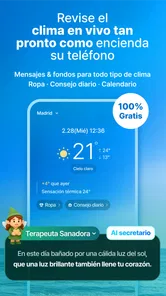
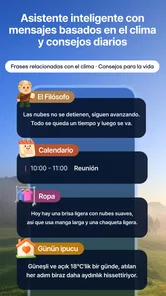
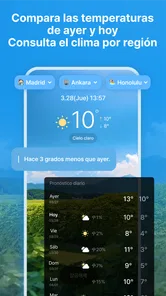
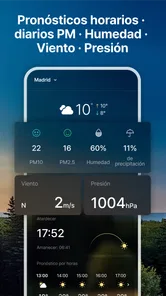
WeatherPop Español (Aviso) is a weather-focused app designed for Spanish-speaking users who want quick access to current conditions, forecasts, and weather notifications. Its main purpose is to present information in Spanish in a simple, accessible format. Depending on the device and app version, available features may include temperature updates, precipitation details, forecasts, alerts, and location-based weather information.
Does WeatherPop Español (Aviso) require access to my location?
The app may request location permission so it can provide weather information for your current area automatically. This is useful if you travel or want local alerts without entering a city manually. However, location access is not always essential for basic use; you may be able to search for or select a location yourself. Review the permission request carefully and choose the option that best suits your privacy preferences.
Can I receive weather alerts and notifications in Spanish?
WeatherPop Español (Aviso) is intended to deliver weather-related information and notices in Spanish, making it easier for users who prefer that language to understand forecasts and warnings. Notifications can depend on the app’s settings, your selected location, operating-system permissions, and available weather data. Before relying on alerts, enable notifications and confirm that the correct city or region is selected.
Pros
- Spanish interface makes forecasts easy to understand for local users.
- Provides timely weather alerts for changing conditions.
- Compact design keeps key forecast details easy to find.
- Useful for planning commutes
- trips
- and outdoor activities.
- Low-effort setup makes checking local weather quick.
Cons
- Forecast accuracy can vary depending on location and data coverage.
- Frequent alerts may become distracting if notification settings stay enabled.
- Some features may require a stable internet connection.
- Limited appeal for users who prefer English or other languages.
- Battery and data use may increase with background location updates.











