

Weather You
- 24.00
- 4.0
- Installs
- 50.00K
- Price
- Free
Screenshots
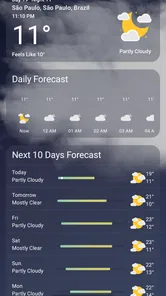
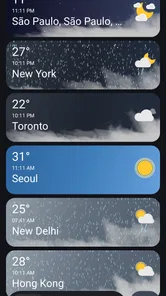
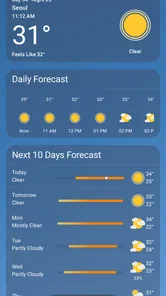
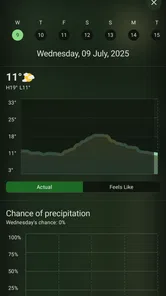
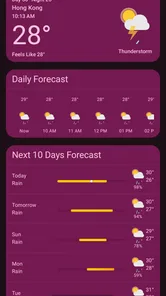
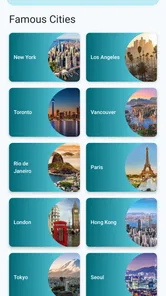
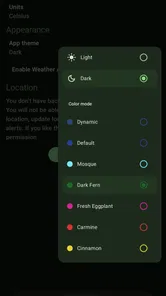
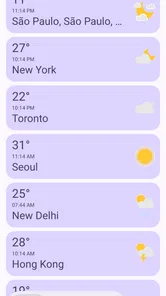
Analysis by Reviewed
I approached Weather You as a practical decision rather than a search for the most crowded forecast screen. This free weather app from rodrigmatrix is built around a Material 3 Expressive visual style, and that immediately gives it a different feel from the dense, utility-first weather tools many people already have on their phones. My main question was simple: does the cleaner presentation make checking the weather easier, or does it leave out the detail that serious users expect?
After using it as an everyday weather companion, I found an app that makes sense for people who want a quick, pleasant way to understand current conditions and plan ordinary activities. It is aimed at the moment when I am deciding whether to walk, commute, open a window, or carry an umbrella—not at replacing a specialist forecasting service for aviation, outdoor safety, or detailed meteorological analysis. That distinction is important because the best weather app is not always the one with the most information.
How I decided whether Weather You is a good fit
When I compare weather apps, I first look at how quickly I can answer three questions: what is happening now, what is likely to happen soon, and whether the forecast is clear enough to act on. A beautiful interface helps, but only if it keeps those answers visible. I also pay attention to how much effort is needed to revisit a location, interpret changing conditions, and move between the current view and the forecast.
That is where this app’s design matters. Its Material 3 Expressive approach gives the experience a modern Android character instead of making it look like a miniature news portal. The interface feels intended for short visits. I can open it, understand the general weather, and leave without sorting through layers of panels. For someone who checks the forecast several times a day, that low-friction rhythm is more valuable than a long list of technical readings.
I also considered whether the app works for different kinds of users. A casual user may care about temperature, rain, cloud cover, and the general outlook. A commuter may need a fast glance before leaving home. A gardener, runner, cyclist, or traveler may want more confidence before committing to a plan. Those needs overlap, but they are not identical, so I would not judge Weather You only by its appearance.
The app is available at no cost and is suitable for Everyone, which makes trying it straightforward. It was released on April 14, 2022, and its presence has grown to over 50 thousand installs. Its average rating is 4.0 from around 962 ratings, with 24 written reviews. I see those figures as a sign of a useful but still relatively focused app rather than a universal weather platform that tries to serve every possible audience.
The first-use experience and daily routine
My preferred way to use Weather You is as a morning checkpoint. I open it while getting ready, look at the current conditions, then check the coming outlook before choosing clothes or deciding how to travel. The app’s visual language supports this routine because the information feels organized for recognition rather than study. I do not need to treat every visit like a research session.
More From Our News Desk

 Gmail
GmailGmail in a Busy Inbox: Who Benefits Most?
From first account to crowded workday, Gmail earns its place through dependable search and flexible sorting—but its best fit depends on how much inbox maintenance you can tolerate.

 Prime Video
Switching to Prime Video: What Changes in Your Viewing Routine
Prime Video can make a compelling second home for streaming, but switching means learning a different catalog, rental layer, and route from browsing to playback.

 Universal TV Remote Control
Universal TV Remote Control Works Best as a Reliable Backup
A phone remote earns its place through quick setup and reliable habits. Here is how to get more from Universal TV Remote Control—and where its limits show.

 Weather - By Xiaomi
Weather by Xiaomi Review: Clear at a Glance, Less Clear Up Close
Xiaomi’s weather app makes everyday forecasts quick to scan, but its calm surface can leave useful details and recovery paths harder to find than they should be.

 X
XX Under Pressure: Can It Recover When Posting Goes Wrong?
A resilience-focused review of X, examining setup, mistaken posts, interruptions, weak connections, and the gaps that matter when recovery needs to be dependable.

 Clash of Clans
Clash of Clans Is Won Between the Battles
Its raids are quick; its community is a long-term project of coordination, teaching, rivalry, and shared responsibility—with all the friction that entails.
Latest News



A second useful routine is the “before I leave” check. If the sky looks uncertain, I can compare what I see outside with the app’s current presentation and make a quick decision about a jacket or umbrella. This is a small use case, but it is exactly where a weather app earns its place. The value is not only forecast depth; it is reducing hesitation at the right moment.
I also found the calmer presentation helpful when checking the weather repeatedly. Many alternatives compete for attention with cards, warnings, articles, maps, and promotional elements. That can be useful for some people, but it can also make a basic forecast feel unnecessarily busy. Weather You is more appealing when I want the forecast to stay in the background of my day.
Where the design genuinely wins
The strongest part of the app is the relationship between its visual style and its purpose. Material 3 Expressive is not merely a decorative label here; it shapes how the weather information is presented. The result feels more like a modern personal utility than a traditional weather bulletin. For readers who care about a consistent Android design language, this can make the app feel more natural than older-looking alternatives.
The biggest practical advantage is reduced visual noise. I can see why someone would prefer this app after becoming tired of weather services that mix forecasts with news feeds, advertising, sensational alerts, or too many competing modules. A focused screen can improve comprehension, especially when the user only wants to know whether conditions are comfortable or inconvenient.
That simplicity also helps with shared use. If I hand my phone to someone who does not regularly use weather apps, a restrained interface is easier to explain. There is less need to describe what every panel means or which section contains the actual forecast. This makes it a sensible choice for family members who want a straightforward weather check rather than a dashboard full of specialist terminology.
Another advantage is that the app does not ask me to turn ordinary planning into a data hobby. Some weather applications encourage constant comparison between multiple models, radar layers, hourly graphs, and historical views. Those tools have their place, but they can distract from a simple decision. Weather You is better suited to users who want a readable answer, not a collection of weather instruments.
Three ways to get more value from a simple weather app
First, I recommend using it at fixed decision points instead of checking it continuously. A morning check, a pre-commute check, and an evening check are often more useful than repeatedly refreshing the screen. This approach makes the app a planning tool and prevents the interface from becoming another source of distraction.
Second, I would compare the forecast with local observation when conditions are changeable. A clean app can make information easier to read, but no interface removes the uncertainty of rapidly shifting weather. If the sky is already dark, wind is strengthening, or rain is approaching, I treat the app as one input alongside what I can see outside. That habit is especially important for outdoor plans.
Third, I would use the app to establish a personal threshold for decisions. For example, I might decide that a short walk is comfortable under one set of conditions, while cycling or a longer trip requires more confidence. Weather You works well as the quick first screen in that process. If the situation crosses my personal threshold, I would then move to a more detailed service instead of expecting one compact app to answer every question.
These workflows reveal a useful trade-off: the less cluttered the app is, the more responsibility remains with the user to recognize when a basic overview is not enough. That is not a flaw for casual use, but it matters if the weather itself is the main risk in a planned activity.
Where the usual alternatives may fit better
Weather apps generally fall into a few broad groups. Some are designed as simple daily forecast tools. Others combine forecasts with radar, maps, alerts, news, widgets, and extensive customization. A third group targets enthusiasts who want detailed charts and atmospheric information. Weather You belongs closest to the first group, with a design emphasis that makes it feel more polished and expressive than a bare-bones utility.
If I need to examine a storm’s movement visually, I would choose a service built around radar or map layers. If I am planning a demanding outdoor activity, I may prefer an app that exposes more specialized detail. And if I want weather news, severe-condition coverage, or a broad information feed, a larger alternative may be more appropriate. Those choices are not criticisms of Weather You; they reflect different jobs.
The important comparison is not “which app has the most features?” but “which app makes the right information easiest to use?” Weather You wins when speed, readability, and visual calm matter most. A more comprehensive alternative wins when I need verification from several views or want to investigate changing conditions. Installing both types can even make sense, with Weather You handling routine checks and a detailed service reserved for unusual days.
I would also be cautious about choosing it as the only weather tool for people who need dependable, specialized planning. A runner preparing for a long event, a traveler coordinating several outdoor stops, or anyone making a safety-sensitive decision may reasonably want more depth than a streamlined interface is designed to provide. The app is most convincing when the forecast is a helpful part of the day, not the central subject of the day.
What switching to it is really like
The cost of switching is low because the app is free and easy to test alongside an existing weather service. I would not delete a trusted alternative immediately. Instead, I would use Weather You for a week during normal routines and notice whether I can find the information I need without returning to the old app out of habit.
That trial matters because the main question is personal: do I value a focused presentation enough to accept a less specialist workflow? Someone coming from a cluttered weather app may feel immediate relief. Someone already using a detailed forecasting tool may find Weather You pleasant but incomplete. Neither reaction is surprising, and the difference comes from expectations rather than from a single universal standard.
There is also a small mental adjustment when moving from a feature-heavy app to a calmer one. I may initially look for extra panels or advanced views simply because I am used to them. After a few days, I might discover that I rarely used those features in the first place. That is one of the app’s quiet strengths: it encourages me to judge weather information by usefulness rather than by quantity.
For an Android user who cares about interface coherence, the switch may feel more worthwhile than it would for someone who only wants the most detailed forecast possible. The developer, rodrigmatrix, has positioned the experience around a recognizable design idea, and that identity gives the app more character than a generic forecast screen. Still, design alone should not persuade someone whose daily needs depend on specialist weather tools.
Who I would recommend it to
I would recommend Weather You to people who want a free, attractive, uncomplicated weather app for everyday decisions. It is particularly suitable for checking conditions before commuting, walking, shopping, opening the windows, or deciding what to wear. It also makes sense for anyone who finds large weather apps distracting and prefers a focused view that feels at home on a modern Android phone.
I would also suggest trying it if the visual side of an app affects whether you use it consistently. A forecast can be accurate in theory, but if the interface feels unpleasant, users often stop checking it. Weather You’s expressive Material 3 presentation gives routine weather checks a more inviting quality, and that can be a real practical advantage.
I would not make it my first recommendation for users who need deep meteorological analysis, extensive map-based investigation, or a specialized planning workflow. Those users should keep a more detailed alternative available. I would also skip it if my priority were a large ecosystem of weather content rather than a clean daily forecast experience.
My final decision after regular use
Weather You succeeds because it understands that many people do not want to study the weather; they want to make a decision and continue with the day. Its free price, Everyone age rating, focused weather category, and expressive design make it approachable, while its growing install base and solid 4.0 average suggest that the concept has found an audience.
My recommendation is clear: try it if you want a calmer, more visually considered way to check everyday conditions. Keep a more detailed weather service for situations where maps, specialist information, or extra confirmation matter. Choose Weather You for clarity and routine; choose a heavier alternative when weather detail is the task itself.
In my experience, that is the fairest way to view Weather You. It does not need to compete with every kind of weather app to be useful. Its appeal is narrower and more practical: making ordinary forecast checks feel quick, readable, and pleasant. For the right user, that is enough to make it the app I would open first.
Weather You Frequently Asked Questions
Who developed Weather You, and is it suitable for everyday use?
Weather You is a weather app developed by rodrigmatrix. Its focus is clear from its short description: it is a Material 3 Expressive weather app, making it an option for people who want weather information presented in a contemporary mobile interface. It is rated for Everyone, so it is suitable for a broad audience. Whether it fits your routine depends on the forecasts and controls you prefer.
What is Weather You, and what can I use it for?
Weather You is a weather application designed to provide current conditions, forecasts, and practical atmospheric information in a simple mobile interface. After reviewing the app, its main purpose is to help users check temperature, precipitation, wind, humidity, and other local details before planning a commute, trip, outdoor activity, or daily routine. Available features may vary by device, location, and app version.
Does Weather You require access to my location?
Weather You can use your device’s location to automatically identify the area for which you want weather information. This makes setup more convenient, especially when you travel or regularly move between locations. However, users who prefer greater privacy can generally search for a city manually or manage location permissions through Android or iOS settings. Forecast accuracy and available local details may depend on the selected location.
How accurate are the forecasts provided by Weather You?
Weather You presents forecasts using data supplied by weather services, but no weather application can guarantee perfect accuracy. Short-term predictions are usually more dependable than forecasts several days ahead, while rapidly changing conditions can affect results at any time. During testing, the app is most useful as a planning guide rather than an absolute source, so severe-weather warnings should also be checked through official local authorities.
Does Weather You send weather alerts and notifications?
Depending on the version and your device settings, Weather You may provide notifications for forecast changes, rain, temperature shifts, severe conditions, or other relevant weather events. Notifications are useful when you want updates without opening the application, but they can consume attention and battery if enabled too frequently. Before downloading, review the notification controls and adjust alert types, timing, and permissions to suit your needs.
Pros
- Clean interface makes forecasts easy to scan quickly.
- Supports location-based forecasts for more relevant local updates.
- Useful weather details help with planning outdoor activities.
- Forecast information is presented in a straightforward
- readable format.
- Convenient access to current conditions and upcoming weather trends.
Cons
- Forecast accuracy can vary depending on location and weather conditions.
- Some features may require location access to work properly.
- Frequent notifications could be distracting for some users.
- Weather data may take time to refresh on slower connections.
- Advanced information may feel limited for serious weather enthusiasts.











