

Weather the Trip
- 37.00
- 3.5
- Installs
- 10.00K
- Price
- Free

Screenshots

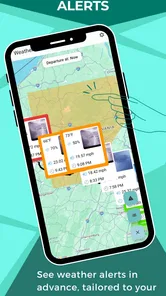
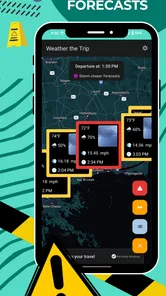

Analysis by Reviewed
I usually know within a week whether a weather app deserves a permanent place on my phone. Weather the Trip made a good first impression because it approaches forecasts from the point of view of a journey rather than a single address. Instead of treating weather as something I check only after waking up, it encourages me to think about the conditions along the route I am planning to take.
That focus makes the app especially interesting for drivers, motorcyclists, campers, families travelling by car, and anyone whose plans cross several towns or regions. It is a free weather app from Witt Software, available for Everyone, with a 3.5 average from around 72 ratings and more than 10K installs. Those figures suggest a smaller, more specialised audience than the huge general-purpose weather services, but they also make sense: this is not trying to replace every weather tool on a phone.
How Weather the Trip feels after the first week
During my first few days with it, the most useful change was mental rather than visual. A normal weather app answers, “What is happening where I am?” This one is built around the more practical question, “What might I meet while travelling from here to somewhere else?” That distinction matters when a clear morning at home could turn into rain, strong wind, or uncomfortable heat later in the drive.
I found myself using it before leaving instead of opening a local forecast only when the sky looked threatening. For a short outing, that may not seem important. For a full-day drive, however, checking conditions at the destination and along the route can influence when I leave, where I stop, what I pack, and whether an outdoor plan is sensible at all.
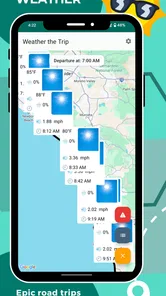
The store summary describes comprehensive road-trip weather forecasts for destinations around the world, and that is the app’s clearest identity. I would not install it merely to see today’s temperature outside my front door. I would install it when the route itself is the problem I need to solve.
A practical road-trip routine
A useful workflow is to check the trip the evening before, then repeat the check shortly before departure. The first look helps with preparation: clothing, food stops, vehicle supplies, and whether a scenic detour is realistic. The second look is more about changing conditions. Weather can shift enough between planning and leaving that relying on yesterday’s impression is a poor habit.
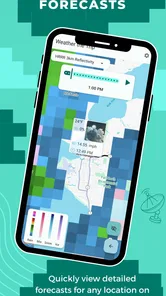
For a family drive, I would use the app to identify parts of the journey where a break is likely to be more comfortable. If rain is expected later, an outdoor stop may be better earlier. If heat is the concern, I would rather schedule walking or sightseeing before the warmest part of the day. This is a small but valuable advantage over opening separate forecasts for several towns one by one.
More From Our News Desk

 Gmail
GmailGmail in a Busy Inbox: Who Benefits Most?
From first account to crowded workday, Gmail earns its place through dependable search and flexible sorting—but its best fit depends on how much inbox maintenance you can tolerate.

 Prime Video
Switching to Prime Video: What Changes in Your Viewing Routine
Prime Video can make a compelling second home for streaming, but switching means learning a different catalog, rental layer, and route from browsing to playback.

 Universal TV Remote Control
Universal TV Remote Control Works Best as a Reliable Backup
A phone remote earns its place through quick setup and reliable habits. Here is how to get more from Universal TV Remote Control—and where its limits show.

 Weather - By Xiaomi
Weather by Xiaomi Review: Clear at a Glance, Less Clear Up Close
Xiaomi’s weather app makes everyday forecasts quick to scan, but its calm surface can leave useful details and recovery paths harder to find than they should be.

 X
XX Under Pressure: Can It Recover When Posting Goes Wrong?
A resilience-focused review of X, examining setup, mistaken posts, interruptions, weak connections, and the gaps that matter when recovery needs to be dependable.

 Clash of Clans
Clash of Clans Is Won Between the Battles
Its raids are quick; its community is a long-term project of coordination, teaching, rivalry, and shared responsibility—with all the friction that entails.
Latest News



Another useful approach is to compare the route forecast with the actual purpose of the trip. A little rain may be irrelevant for a motorway drive but decisive for a motorcycle ride, a picnic, or a hike beginning at the destination. The app does not make that judgement for me, and I appreciate that. It gives the trip context, while I still decide how much risk or inconvenience I am willing to accept.
Who gets the strongest first impression
The best early experience comes from people who already plan journeys in stages. If I am travelling through multiple places, a local forecast can leave gaps in my thinking. Weather the Trip encourages a route-wide view, which is more useful than repeatedly searching for individual locations.
It is also a good fit for occasional travellers who do not want a complicated planning system. The concept is easy to understand: enter or consider a journey, inspect the weather associated with it, and adjust the plan. That simplicity matters when I am preparing luggage or trying to leave on time.
On the other hand, someone who only wants a quick glance at current conditions may find the trip focus unnecessary. A standard weather app is often faster for a single location, especially when the question is simply whether to carry an umbrella. Weather the Trip earns its place when movement between places is central to the decision.
What remains useful from month to month
The novelty of a travel-focused forecast fades fairly quickly, so the important question is whether it continues to solve recurring problems. In my view, its lasting value depends on how often I make weather-sensitive journeys. For regular road trips, commuting between regions, weekend escapes, or seasonal travel, the route perspective can become a dependable planning habit.
I would use it before recurring journeys where conditions often differ between departure and arrival. A trip that crosses a broad area can begin under one type of sky and end under another. Looking only at the starting point creates false confidence, while checking only the destination ignores the drive itself. The app’s purpose is strongest in that middle ground.
It can also support a simple go-or-delay decision. If the forecast looks uncomfortable but manageable, I might leave earlier, shorten the stop, or choose an indoor activity. If the conditions look genuinely unsuitable for the reason I am travelling, I can postpone rather than discover that after several hours on the road. This is not dramatic technology, but it is the kind of repeated convenience that can justify keeping an app installed.
Three habits that make it more valuable
First, I would avoid checking only once. A single forecast snapshot is useful for a rough plan, but a repeat check near departure gives the journey a better chance of matching reality. This is particularly important when the trip is long enough for conditions to change between its beginning and end.
Second, I would use the forecast to plan stops rather than merely packing for weather. That is a less obvious benefit. The question is not only whether I need a jacket; it is whether a particular break, viewpoint, meal, or walk will still be enjoyable when I reach it. Turning weather information into a schedule makes the app more practical than treating it as a passive display.
Third, I would separate confidence from convenience. A pleasant forecast does not remove driving risks, and an unpleasant forecast does not automatically make a journey impossible. I use the app as one input alongside road conditions, daylight, my own energy, and the needs of passengers. That trade-off is important because a route forecast can inform a decision without being a complete safety assessment.
For people who travel internationally or across very different climates, the worldwide scope mentioned in the app’s store description is appealing. It means the basic idea is not limited to a familiar local trip. Still, the value will vary with the quality and clarity of the forecast in the places I care about. I would treat it as a planning aid and keep sensible alternatives in mind for critical journeys.
How it compares with ordinary weather apps
General weather apps usually win on speed, familiarity, and broad everyday coverage. They are convenient for current conditions, hourly checks, alerts, and a saved home location. If that is all I need, Weather the Trip may feel like an extra step rather than an improvement.
The difference appears when I stop thinking in terms of one place. With a conventional app, I may search for the departure city, destination, and several stops separately. That approach works, but it makes me assemble the journey in my head. A trip-oriented tool is more natural when the route is the object I am evaluating.
I would not call it a universal replacement. For severe-weather monitoring, local alerts, detailed radar work, or highly specialised outdoor planning, a dedicated service may be better suited. For a quick temperature check, the phone’s built-in weather option may be enough. Weather the Trip has a narrower role, but within that role it is easier to justify than a generic forecast screen.
Maintenance, friction, and the reasons I might stop opening it
The main maintenance burden is behavioural. The app only helps if I remember to consult it before a journey. It is not the kind of utility that automatically becomes part of every morning unless travel is already part of my routine. I need to build a small habit around it: check before planning, check again before leaving, and translate the result into a practical decision.
That can be both its strength and its weakness. A focused tool gives me a reason to open it, but outside that situation it may sit unused. If I make only one major trip every few months, a general weather app may cover my needs without asking me to maintain another habit.
There is also a possible attention cost. Planning a route already involves maps, traffic, fuel, accommodation, luggage, and timing. Adding another screen can create fatigue if the weather information does not clearly change what I should do. I found the app most worthwhile when I approached it with a question: should I leave earlier, alter a stop, pack differently, or reconsider the plan? Browsing without a decision in mind is less rewarding.
The free price makes trying it easy, although in-app purchases range from $2.99 to $20.23 per item. That means I would explore the free experience first and decide cautiously whether any paid option solves a problem I actually have. I would not pay simply because the trip concept sounds useful. The purchase needs to save repeated effort or provide something I would use across several journeys.
The current version is 2.50-googleplay, and the minimum operating-system requirement is Android 12. That requirement is worth checking before installation, especially if I am using an older phone as a travel device. A road-trip tool is only helpful if it runs reliably on the device I plan to carry, so compatibility should be part of the preparation rather than an afterthought.
Where fatigue can build over time
My biggest source of fatigue would be opening the app for trips where the answer is obvious. If I am driving a short distance in familiar conditions, a route-focused forecast may provide more information than I need. Repeating a full planning process for every small outing could make the tool feel like work.
Another issue is decision overload. A detailed journey forecast can encourage me to overanalyse minor changes. Not every cloud should alter a plan, and not every temperature difference deserves a new departure time. I get the best long-term value by using it for weather-sensitive or logistically important trips, not as a compulsory ritual before every drive.
I would also avoid treating the app as a substitute for common sense. Forecasts are estimates, and road safety depends on more than weather alone. If I am tired, unfamiliar with the route, or facing difficult driving conditions, the sensible response may be to stop or postpone regardless of how attractive the forecast looks. That limitation does not make the app weak; it defines the responsible way to use it.
For travellers who need rich mapping, live traffic, navigation, or emergency warnings in one place, a broader travel application may be more convenient. Weather the Trip is better viewed as a focused companion than a complete travel command centre. Its narrower design is useful when it matches my question, but it means I may still switch to other apps for the rest of the journey.
My long-term verdict on keeping it installed
After the first-week appeal wears off, Weather the Trip earns lasting space only for a specific kind of user: someone who regularly plans road journeys and wants weather considered across the route, not just at one location. For that person, the app can become a repeatable step in preparation and may prevent avoidable discomfort, poorly timed stops, or unrealistic outdoor plans.
I especially recommend trying it if ordinary weather apps leave me searching for several locations separately. The route-centred approach is the meaningful difference, and it is practical rather than decorative. My strongest tip is to connect every forecast check to an action. If I cannot name what I will change after seeing the conditions, I probably do not need to open it for that particular trip.
I would skip it if my weather needs are limited to home, work, and a quick glance at the day ahead. In that case, a familiar general weather app is likely to be faster and less demanding. I would also be cautious about paying for extras until I have used the free version through more than one real journey and know exactly where it saves me time.
Witt Software has created a useful niche app rather than an all-purpose weather replacement. Its 3.5 average from roughly 72 ratings reflects a product that may appeal strongly to the right audience while feeling unnecessary to everyone else. With a free entry point, an Everyone content rating, and a clear travel purpose, it is easy to test without much commitment.
My final view is positive but selective. I would keep it installed during periods when I am taking frequent road trips, especially when the route, timing, and outdoor plans depend on changing conditions. Between those periods, I might remove it or leave it dormant rather than force it into a daily routine. Its lasting value comes from making weather part of trip planning, not from replacing the weather app I already use at home.
Weather the Trip Frequently Asked Questions
Who develops Weather the Trip, and what devices can install it?
Weather the Trip is developed by Witt Software and is designed for Android devices that meet its minimum operating-system requirement. Before downloading, check your device’s system version and available storage so installation goes smoothly. The app is listed as suitable for everyone, making it a straightforward option for travelers who want weather information as part of trip planning.
What is Weather the Trip, and what does it do?
Weather the Trip is a travel-focused weather app designed to help users check conditions before and during a journey. Instead of showing only the weather at your current location, it can be used to review forecasts for destinations and travel plans. This makes it useful for choosing suitable clothing, planning outdoor activities, checking potential disruptions, and deciding when it may be safer or more comfortable to travel.
Can Weather the Trip provide forecasts for multiple destinations or an entire route?
The app is intended for travelers who need more than a single local forecast, allowing them to look up weather information for places connected with a trip. Depending on the version and device, available route-planning or multi-location features may vary. Users should check how many destinations can be saved, whether stops can be added manually, and whether the app supports their preferred travel method before relying on it for a long journey.
How accurate are the forecasts in Weather the Trip?
Weather forecasts are generally useful for planning, but they are not guaranteed to be perfectly accurate. Weather the Trip depends on forecast data and location services, so results can change as new information becomes available. Short-term forecasts are usually more dependable than predictions several days ahead. For flights, mountain trips, severe weather, or other high-risk situations, compare the app with official meteorological warnings and local authorities.
Does Weather the Trip require an internet connection or location permission?
An internet connection is normally needed to download current forecasts and update weather information. Location permission may be requested if you want the app to identify your current position automatically, although destinations can often be searched manually. If you are traveling abroad or through areas with weak coverage, check whether recently viewed forecasts remain available offline and consider saving important information before leaving a reliable connection.
Pros
- Clear weather forecasts help plan routes and daily activities.
- Useful travel-focused information for changing destinations.
- Simple interface makes forecasts quick to check.
- Can help prepare for rain
- heat
- or severe weather.
- Convenient for travelers visiting unfamiliar locations.
Cons
- Forecast accuracy may vary by destination and data source.
- Some features may require an internet connection while traveling.
- Frequent location changes can make setup less convenient.
- Weather details may be limited in smaller or remote areas.
- Notifications and background location use may affect battery life.











