

Walli - Stunning 4K Wallpapers
- 19.92K
- 4.5
- Installs
- 10.00M
- Price
- Free

Screenshots


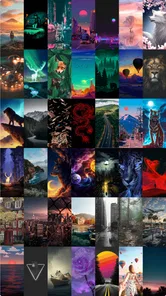

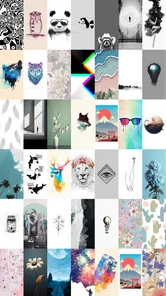


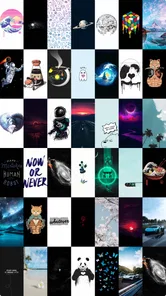
Analysis by Reviewed
I often change my phone’s wallpaper when I want a small reset without rearranging apps or altering settings. That’s where Walli - Stunning 4K Wallpapers fits: it’s a free personalization app from Tap AI, built around discovering artwork to use as a phone background. I’d consider it for anyone who wants more character than the default options, especially in a household where people share ideas but still want their own screens to feel personal.
A shared phone, different tastes
In an everyday family scenario, one person might want a calm landscape while someone else prefers bold illustration. Walli’s variety makes it easier to browse for distinct looks in one place rather than passing around image files or settling on a single background everyone dislikes. I’d use it as a source of inspiration together, then let each person choose and apply a favorite on their own device. That keeps the shared activity fun without assuming the app provides household profiles or shared settings.
It also works well for a quick change between routines: I might pick a softer image for a busy work week, then switch to something brighter for the weekend. A practical tip is to preview a design against your icons before committing. A detailed image can look beautiful on its own but make app labels harder to pick out, while a quieter composition may suit a crowded home screen better.
Choosing images that work beyond the preview
I’d also think about how a wallpaper will look throughout the day, not just in the app’s preview. A bright design may feel lively at first but make a screen full of notifications feel busy; a darker or less detailed image can give icons and text more breathing room. If the phone is used outdoors often, readability matters even more, so I’d test a candidate on the actual home screen before treating it as a keeper.
One useful approach is to save a small set for different purposes rather than searching for one image that has to suit every mood. For example, I might keep one quiet background for work and a more expressive one for personal time. That gives the app a practical role in a routine, instead of turning every wallpaper change into a long browsing session.
Discover Endless Possibilities
First things first, let’s talk about the variety. Walli offers an extensive range of wallpapers in 4K quality. Whether you’re into abstract art, nature scenes, or something more quirky, you’ll find it here. The app is designed to cater to all tastes and preferences, which is pretty cool because it feels like there’s something new to discover every day. Plus, the wallpapers are created by talented artists from all over the world. It’s like having a mini art gallery right in your pocket!
Setting sensible boundaries
Walli is a wallpaper-discovery app, not a shared-device management tool. If several people use the same phone or tablet, I’d decide together who can change the background and avoid treating one person’s saved choices as a household collection. On a personal phone, favorites can help keep appealing finds in reach; on a shared device, it’s worth agreeing whether a new image is a temporary experiment or the background everyone will see.
More From Our News Desk

 Gmail
GmailGmail in a Busy Inbox: Who Benefits Most?
From first account to crowded workday, Gmail earns its place through dependable search and flexible sorting—but its best fit depends on how much inbox maintenance you can tolerate.

 Prime Video
Switching to Prime Video: What Changes in Your Viewing Routine
Prime Video can make a compelling second home for streaming, but switching means learning a different catalog, rental layer, and route from browsing to playback.

 Universal TV Remote Control
Universal TV Remote Control Works Best as a Reliable Backup
A phone remote earns its place through quick setup and reliable habits. Here is how to get more from Universal TV Remote Control—and where its limits show.

 Weather - By Xiaomi
Weather by Xiaomi Review: Clear at a Glance, Less Clear Up Close
Xiaomi’s weather app makes everyday forecasts quick to scan, but its calm surface can leave useful details and recovery paths harder to find than they should be.

 X
XX Under Pressure: Can It Recover When Posting Goes Wrong?
A resilience-focused review of X, examining setup, mistaken posts, interruptions, weak connections, and the gaps that matter when recovery needs to be dependable.

 Clash of Clans
Clash of Clans Is Won Between the Battles
Its raids are quick; its community is a long-term project of coordination, teaching, rivalry, and shared responsibility—with all the friction that entails.
Latest News



There’s a useful trade-off in choosing high-resolution artwork: it can look crisp on a suitable screen, but a striking image may compete with widgets, notifications, and icons. I’d check the crop and readability before making it permanent. If the main goal is a plain color, a simple built-in background may be quicker; if the goal is to find distinctive art, Walli is the more interesting place to browse.
Easy to Use Interface
One of the things I really appreciate about Walli is its user-friendly interface. Navigating through the app is a breeze, even if you’re not tech-savvy. You can easily browse through different categories or search for something specific if you have a particular theme in mind. The app also lets you save your favorite wallpapers to a personalized list, making it super convenient to switch things up whenever you feel like it.
For a more deliberate search, I’d start with a mood or visual style rather than scrolling without a plan. Saving a few favorites gives you a small shortlist to compare later, which is handy when you want a background that works with your existing icons. If you’re choosing for someone else, show them a few options rather than setting one on their behalf; wallpaper is a small choice, but personal taste matters.
A shortlist also helps when the first appealing image is not the most usable one. I’d compare the composition, the area where the clock and icons sit, and whether the subject gets awkwardly cropped when applied. That quick check is more useful than judging an image only by its full-screen artwork, particularly on phones with a dense home screen.
Community and Artist Support
Another aspect that sets Walli apart is its strong community focus. The app actively supports artists by giving them a platform to showcase their work. Every time you download a wallpaper, you’re supporting the artist behind it, which is a fantastic way to give back to the creative community. Plus, you can follow your favorite artists and stay updated with their latest creations.
That artist-centered angle is a meaningful difference from simply picking a stock image or choosing a basic color already on the phone. I like that browsing can lead me to a creator whose style I want to see again, rather than treating every image as anonymous decoration. If you prefer a very minimal process and already have a photo you love, though, the built-in gallery or wallpaper picker is likely faster than exploring an art collection.
This distinction is worth keeping in mind when comparing Walli with the usual alternatives. A phone’s built-in picker is convenient for applying a photo you already have, and a search engine can be quicker when you know the exact image you want. Walli makes more sense when you want to discover artwork and revisit creators. I wouldn’t open it expecting the same straightforward job as selecting a family photo from the camera roll; its strength is the browsing experience and the art it brings together.
More Than Just Wallpapers
Oh, and did I mention that Walli is more than just a wallpaper app? It’s packed with features that let you customize your phone’s look even further. You can set automatic wallpaper changes to keep things fresh, or explore the editor’s choice section for some curated picks. There’s even a feature that lets you create and share your own wallpapers, which is perfect if you’re feeling creative!
Automatic changes are best suited to someone who enjoys variety; I’d avoid them on a shared device unless everyone is comfortable with the background changing, since a favorite could disappear from the screen without warning. For a coordinated household look, agree on a theme first, then let each person pick an image within it. That gives the group a loose visual connection without making every device identical.
For a shared tablet in a kitchen or living room, I’d be more cautious about automatic changes than I would on my own phone. People may rely on the same familiar screen, and a sudden switch can be confusing if others assume the device’s appearance is stable. A manually chosen image is easier to coordinate, while automatic rotation suits a personal device where the owner welcomes a changing look.
Who will get the most from it
I’d recommend Walli to people who enjoy visual discovery, want artwork rather than generic patterns, or like having a few saved choices ready for a screen refresh. The app has a 4.5 average from around 887,000 ratings and over 10 million installs, which suggests it has reached a broad audience, though popularity alone can’t tell you whether its styles match yours. It’s free to install, with in-app purchases ranging from $0.99 to $29.99 per item, so I’d check any purchase details before choosing one.
On the other hand, it may not be the right fit if you want only a plain background, need a tightly managed shared-device setup, or don’t enjoy browsing lots of visual options. For children and teens using a device, I’d make the choice of images an ordinary part of family screen rules rather than assume a wallpaper app provides parental controls. Its Teen content rating is useful context, but it isn’t a substitute for adult guidance.
For a teen setting up a first personal phone, I’d treat choosing a wallpaper as a low-stakes way to talk about taste and shared expectations, not as a reason to hand over account access or assume the app handles supervision. Adults can browse alongside them and let them decide what feels appropriate for their screen. If the household needs formal controls over device use, that is a separate job for the phone’s own family and account settings.
The purchase range is another reason I’d keep the setup conversation simple, especially on a device used by more than one person. Free installation does not mean every optional purchase is automatically right for everyone sharing the phone. I’d make sure the person making a purchase understands the displayed cost before confirming it, and avoid sharing payment access casually just because the app itself is easy to browse.
Everyday coordination and trust
If several people are choosing wallpapers together, a simple routine works better than constantly changing one another’s screens: each person can browse, show a shortlist, and decide what belongs on their own device. That avoids confusion about whose account or favorites are being used and keeps personal preferences separate. I would not rely on Walli to coordinate household settings; its appeal is finding and enjoying art, not managing who controls a device.
For example, during a weekend visit, family members could each pick a few images and share the screen to compare them, then apply choices only to their own phones. That keeps the activity collaborative without making one person the curator of everyone else’s device. If people use separate accounts or profiles on a shared device, I’d still check which profile is active before changing anything; the practical boundary is to confirm whose screen you are customizing.
When people share a device, the question is less about finding a universally liked image than deciding who gets to make the change. A quick agreement—such as asking before replacing the current background—prevents small misunderstandings. Walli can supply ideas for that conversation, but it should not be mistaken for a tool that coordinates household preferences or separates people’s settings.
Compatibility and the final choice
Walli has been available since June 9, 2016, and its current version is 2.12.90, with Android 9 as the minimum operating system. Before installing, I’d check that an older phone meets that requirement. Those details matter most when you’re helping someone else set it up: a device that can’t run the app is better served by its built-in wallpaper picker or images already stored on the phone.
That also answers the practical question of whether it suits every household device: not necessarily. I’d use it on a compatible personal phone when artwork discovery is part of the appeal, and stick with the device’s existing options when the goal is simply to put a known photo on the screen or keep the setup as uncomplicated as possible. The right choice depends on whether browsing is enjoyable or just an extra step.
In conclusion, if you’re looking to add a personal touch to your phone and want an app that’s both stylish and easy to use, Walli is definitely worth checking out. It’s not just about pretty pictures; it’s about expressing yourself and supporting artists from all corners of the globe. So go ahead and give it a try—you might just find your next favorite wallpaper!
Walli - Stunning 4K Wallpapers Frequently Asked Questions
Does Walli need an internet connection to browse its wallpaper collection?
Walli is designed around discovering 4K HD wallpapers and art backgrounds in the app, so an internet connection is useful when browsing its collection and looking for designs. Once you have chosen a wallpaper, you can apply it through the app’s wallpaper options. If you expect to browse away from a connection, it is sensible to save the images you want beforehand.
Can I use Walli wallpapers on my lock screen as well as my home screen?
Walli helps you choose artwork for your device background, making it a handy option when you want to personalize the screen you see most often. The choices available when applying an image can depend on your device and operating system. Browse to a design you like, then check the wallpaper options presented by your phone to choose where you want it displayed.
Is Walli free to download, and are there in-app purchases?
Walli is free to download and offers a free version that includes a wide selection of wallpapers. However, in-app purchases are available, with items priced from $0.99 to $29.99. This lets users start browsing without paying, while optional purchases may suit those who want to explore paid offerings. Check the purchase details in the app before confirming any transaction.
What devices and operating systems can I use Walli on?
Walli is a personalization app for Android and iOS, so you can use it to browse artwork and choose a background for a compatible device. On Android, it requires version 9 or later. The experience is centered on finding wallpapers in the app and applying the designs you like, making it useful when you want to refresh your screen without changing how you use your device.
What makes Walli different from other wallpaper apps?
Walli stands out due to its community-driven platform that features artwork from artists worldwide, offering a unique and diverse range of wallpapers. Unlike other apps that use generic images, Walli collaborates with creatives to ensure high-quality, exclusive 4K wallpapers that are both stunning and original, making your device truly personal.
Pros
- High-quality 4K wallpapers collection.
- User-friendly interface with easy navigation.
- Regular updates with fresh wallpapers.
- Customizable categories to suit tastes.
- Offline access to downloaded images.
Cons
- Contains ads in free version.
- Limited features without subscription.
- Some images require premium access.
- Occasional lag when browsing images.
- Large app size may affect storage.













