Walgreens
- 215.88K
- 4.6
- Installs
- 10.00M
- Price
- Free

Screenshots
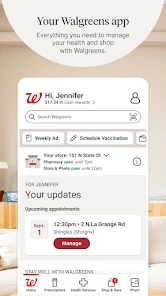
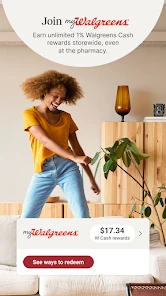
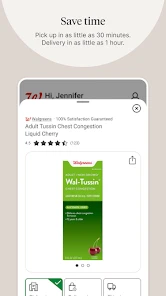
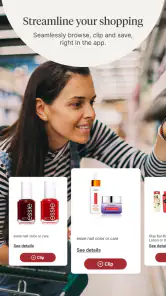

Analysis by Reviewed
I’d decide whether to use Walgreens by looking at how many of my regular errands it can genuinely bring together. If I already go to a Walgreens for prescriptions or everyday items, having those tasks on my phone can be useful. If I rarely shop there, the app may add another account and another place to check without simplifying much. Walgreens is at its best when its pharmacy, shopping, coupons, and photo services line up with a routine I already have.
Start with the errands you actually make
Before downloading a retailer’s app, I think about what I need it to do repeatedly, not what sounds appealing in a feature list. For Walgreens, the strongest reasons are managing prescription tasks, checking products for a planned store visit, and handling a photo order in the same retail environment. A person who regularly uses just one of those services may still find it worthwhile, but the value grows when a couple of them overlap.
There is a practical distinction between an app that helps me prepare for an errand and one that makes the errand unnecessary. Walgreens can help organize a refill or check an item before I leave, but I still need to confirm the details that matter at the time of the visit. I would treat the phone as a planning tool, not as a guarantee that a prescription is ready or a product will still be on the shelf.
When a single retailer makes life easier
The app is developed by Walgreen Co. and is free, with an Everyone age rating. That makes it easy to try without paying for the download, though the more important question is whether I shop at Walgreens enough to justify keeping it. It is a shopping app with a pharmacy role rather than a general marketplace, so its usefulness is naturally tied to the retailer and the services I can access through it.
That focus can be a strength. Instead of searching a general shopping app for an item and then opening a separate pharmacy tool, I can start with Walgreens when I’m already planning a Walgreens visit. Its 4.6 average comes from around 1.4 million ratings, and it has over 10 million installs. That level of use is reassuring as a sign of broad adoption, but it cannot tell me whether my local store’s stock or my own prescription workflow will suit me.
Your Pharmacy At Your Fingertips
First things first, if you're like me and always on the go, the Walgreens app is a game-changer for handling prescriptions. You can easily refill your medications with just a tap, and if you're ever in doubt about when to take them or need a reminder, this app has got your back. I love how it sends notifications right when it's time to pop a pill. It's like having a little pharmacist in your phone!
Shopping Made Simple
Now, let's talk shopping. The app gives you access to a wide range of products, from beauty essentials to groceries. The best part? You can quickly check if something's in stock before making a trip. Plus, there are exclusive deals and discounts that are just a scan away. Seriously, who doesn't love saving a few bucks?
More From Our News Desk

Weather by Xiaomi Review: Clear at a Glance, Less Clear Up Close

X Under Pressure: Can It Recover When Posting Goes Wrong?

Clash of Clans Is Won Between the Battles

Android Auto Makes the Case for Quieter Car Software

MobiOffice: Transforming Mobile Productivity with Seamless Integration

EA SPORTS FC™ Mobile Soccer: Redefining Mobile Sports Gaming
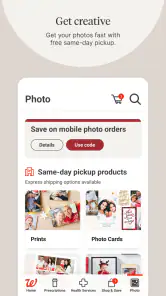
One of my favorite features is the photo printing service. It's as easy as selecting your favorite snaps from your phone, choosing your print size, and picking them up in-store. Perfect for those last-minute gift ideas or when you want to update your photo wall.
Making the visit count
For a real-life example, imagine realizing after work that a prescription needs a refill and you’re also out of a basic household item. I’d check the medication and product details before leaving, then use the store visit for both errands. The useful habit is to confirm the selected location and stock close to the time you go; an earlier check can’t make a product remain available or remove the need to verify prescription status.
Coupons are most helpful when I treat them as a final checkout check, not a reason to add things I didn’t plan to buy. I’d compare the offer with the item already on my list and scan the app before paying. That keeps the savings practical and avoids turning a quick pharmacy stop into an impulse-shopping trip.
Small habits that prevent wasted trips
I’d make the app work around a short, concrete list: the prescription task, the specific product I need, and any coupon that applies to something already on that list. That is more reliable than opening it at the store and browsing until I find a reason to buy something. I would also check that I’m looking at the location I intend to visit before using an availability result to plan my route.
For a photo order, I’d separate choosing images from the pickup errand. Selecting pictures when I have a few quiet minutes makes it easier to review them rather than rushing through the choice at the counter. The service is most convenient when a Walgreens stop is already planned; if I need a different kind of photo product or a delivery arrangement, I’d compare other photo providers before assuming a store pickup is the right fit.
Where another option may work better
If I mainly want to compare prices across retailers, a broader shopping app may be a better starting point than a store-specific one. If I need only medication management, I might prefer an app focused on my healthcare provider or pharmacy rather than carrying shopping and photo tools I won’t use. Walgreens makes the strongest case when its physical stores are already convenient and several of its services matter to me.
There’s also a trade-off in keeping prescriptions and shopping together: I need to pay attention to which task I’m doing and check that the right item, location, and account details are selected. A phone app can make routine steps easier, but it doesn’t replace a conversation with a pharmacist when I have a medication question. For urgent concerns, I’d contact the pharmacy directly rather than relying on an app notification.
Choosing between retail and pharmacy tools
A general retailer’s app is a better match when my main goal is comparing a large range of sellers or consolidating purchases from several shops. A pharmacy-focused app may be preferable when medication tasks are the only thing I want to manage digitally, especially if my prescriptions are already handled elsewhere. Walgreens sits between those approaches: it can connect pharmacy errands with purchases and photos, but it is not a neutral comparison tool for the wider market.
That distinction affects what I would expect from it. I would use Walgreens to prepare for a visit to Walgreens, not as my first stop for deciding which retailer has the best overall price or selection. Nor would I use it as a substitute for medical guidance. When the question is about how to take a medicine or what to do about a health concern, a direct conversation with a pharmacist or clinician is the more appropriate route.
Health is Wealth
Another cool aspect of the app is its focus on health and wellness. It offers a variety of resources, from informative articles to health tests you can schedule. The app even tracks your activities, helping you stay on top of your fitness goals. It's like having a fitness buddy who's always there to cheer you on.
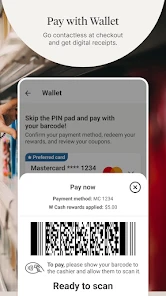
And if you're someone who keeps losing their reward cards, fret not! The app has a nifty feature that stores all your loyalty cards. Just scan them directly from your phone at checkout and bam, points added!
Decide what deserves a place on your phone
I wouldn’t keep every tool active just because it appears in one app. If I only want to refill prescriptions, I’d focus on getting that workflow set up and ignore shopping or wellness sections that don’t help me. If I mostly come for products and coupons, I’d keep the list and offer check simple. That selective approach makes the app feel like an aid to a routine rather than another feed asking for attention.
There is a trade-off to bundling several activities together: I get fewer separate places to visit, but I also need to be deliberate about account and location details. Before placing or planning anything, I’d pause to check which store is selected and whether the task is a prescription, a product purchase, or a photo order. That small checkpoint is especially useful when I’m multitasking or arranging an errand for someone else.
Keeping the setup worthwhile
I’d start by adding only the services I expect to use, then check that the prescription and preferred store details are correct before depending on reminders or planning a pickup. That small setup step matters: the app is convenient only when the information it uses matches my real routine. If I change pharmacies often, rarely shop at Walgreens, or prefer to keep health and retail accounts separate, switching may create more upkeep than value.
The current version is 108.1, and the app has been around since June 3, 2010. I see that longevity as context rather than a promise that every feature will suit me; what matters is whether the current tools help with my own errands. I’d give it a trial run with one low-pressure task, such as checking an item or organizing a refill, before making it my default for everything.
Questions I’d settle before relying on it
Can I use it if I only need one service? Yes, I’d try it for that one task first; there is no need to make shopping, photos, and pharmacy tools part of my routine if I don’t use them. Can I assume an item will be waiting because I saw it listed? I wouldn’t. I’d recheck the selected store and availability close to departure, and I’d verify prescription status rather than treating a screen as confirmation.
Is it the right place to compare deals? It can help me check Walgreens offers against my shopping list, but someone comparing several retailers will likely get more value from a broader shopping option. And does it replace asking a pharmacist? No: I’d use the app for routine organization and reach out to the pharmacy for a medication concern or an urgent question. Those boundaries keep the convenience realistic.
Final Thoughts
All in all, the Walgreens app is a handy tool for anyone looking to streamline their pharmacy and shopping experience. Whether you're managing prescriptions, hunting for deals, or keeping track of your health, this app covers all bases. I recommend giving it a whirl if you haven't already. Happy shopping and stay healthy!
My recommendation is strongest for someone who already visits Walgreens and can combine a refill, a planned purchase, or a photo pickup without adding a special trip. If I mainly shop elsewhere, want cross-retailer price comparisons, or prefer a dedicated tool for medication alone, I’d choose an option built around that priority instead. I’d test Walgreens with one ordinary errand first; if it saves a step without creating extra account or location checks, then it has earned a place in my routine.
Walgreens Frequently Asked Questions
What can I use the Walgreens app for besides pharmacy services?
The Walgreens app brings together pharmacy services, coupons, photo features, and shopping in one place. It can be useful if you want to browse everyday essentials as well as handle prescription-related tasks from your phone. The app is a shopping app developed by Walgreen Co., with features aimed at people who already shop at Walgreens or use its pharmacy.
Who develops the Walgreens app, and what kind of app is it?
Walgreen Co. develops the Walgreens app, which combines shopping with pharmacy-related services. Its store summary highlights prescriptions, coupons, photos, and shopping, so it is designed to serve more than one everyday need. Before downloading, consider whether you would use those features together; the app is most relevant to people who shop at Walgreens or use its pharmacy.
Is the Walgreens app free, and what devices can I use it on?
The Walgreens app is free to download and is rated for Everyone. It is available for Android devices running version 10 or later, making it worth checking your device’s operating system before installing. The app is developed by Walgreen Co. and brings pharmacy services, shopping, coupons, and photo features together in one place.
Can I use the Walgreens app to shop for items beyond prescriptions?
Yes. Alongside pharmacy features, the Walgreens app lets you shop for everyday essentials and explore coupons and deals. It also includes photo services, so the app can be useful for more than managing prescriptions. The mix of shopping and pharmacy tools makes it a practical option if you already use Walgreens for health and household needs.
What is the Walgreens app and what can I do with it?
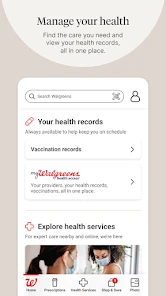
The Walgreens app is a versatile tool for managing your pharmacy and health needs conveniently from your mobile device. You can refill prescriptions, check immunization records, manage your healthcare needs, and access a range of wellness services. Additionally, the app offers features like photo printing, shopping for daily essentials, and access to exclusive app-only deals and rewards.
Pros
- Wide range of pharmacy services.
- User-friendly interface.
- Convenient prescription refills.
- Loyalty rewards program.
- Integrated photo printing.
Cons
- Occasional app crashes.
- Limited customer support.
- Can be slow at times.
- Some features require account.
- Ads can be intrusive.
- Category
- Shopping
- Version
- 108.1











