

Piano: Learn & Play Songs
- 411.00
- 4.8
- Installs
- 10.00M
- Price
- Free
Screenshots
Analysis by Reviewed
I approached Piano: Learn & Play Songs as a practical music app rather than expecting it to replace a real keyboard. That distinction matters. On a phone or tablet, the main challenge is not simply producing notes; it is seeing the keys clearly, touching the intended area accurately, and staying comfortable while playing. My experience is that this app makes that basic interaction approachable, especially for casual practice and first attempts, while still leaving some important limits for people who need more flexibility or a more physical playing experience.
It belongs to the Music & Audio category and is developed by Firehawk. The app is free to install, with optional purchases ranging from $0.99 to $99.99 per item. Its age rating is Everyone, and it works on devices running Android 6.0 or later. That combination makes it easy to try on an older compatible device without committing money first, although the purchase range means I would still check exactly what an optional item unlocks before buying.
How the piano feels to read and navigate
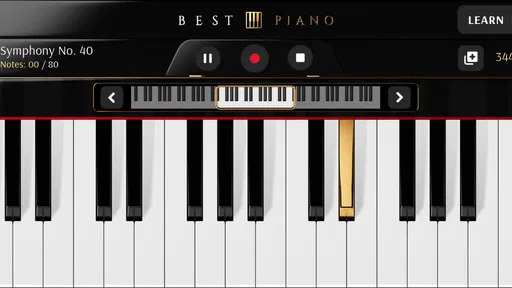
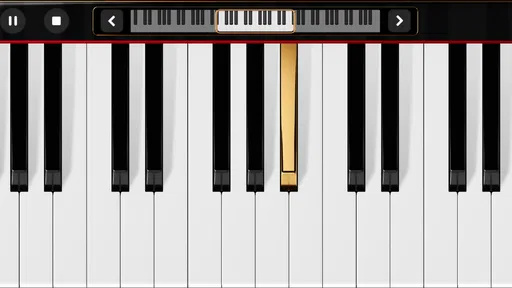
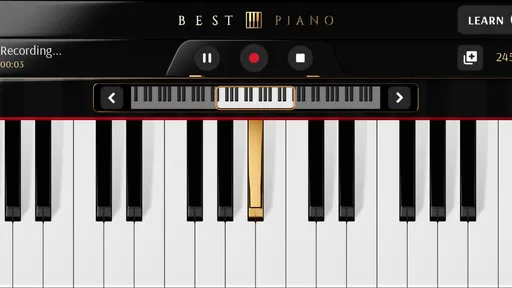
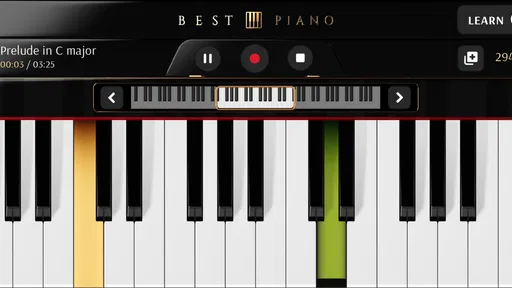
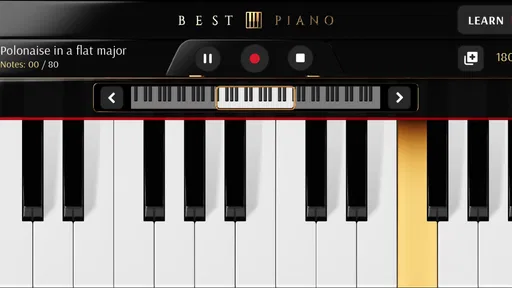
The first thing I noticed is that a piano app lives or dies by visual clarity. A keyboard has a familiar arrangement, so even a beginner can understand the basic layout quickly, but a small screen changes the experience. On a phone, the keys occupy limited width, and my fingers can cover neighboring notes. A tablet gives the interface more breathing room and is the better choice when reading the keyboard for longer sessions.
The app’s appeal is strongest when I want to open it and start making sound without setting up equipment. That simplicity is useful for someone who feels intimidated by a traditional instrument. There is no bench, stand, cable, or physical keyboard to arrange. I can use a quiet moment to test a melody, repeat a short phrase, or let a child explore notes under supervision.
For a new player, the visual keyboard also provides an immediate connection between touch and pitch. Pressing a key and hearing the corresponding note is easier to understand than studying notation before making any sound. I found that this makes the app suitable for experimenting with intervals and simple melodies, even when I am not trying to complete a formal lesson.
Navigation is most comfortable when I treat the app as a focused instrument, not as a complete music workstation. A phone screen is not a generous canvas, so switching attention between controls and keys can interrupt concentration. My practical tip is to decide what I want to do before starting: casual playing, a short practice attempt, or song exploration. That small habit reduces unnecessary tapping and keeps the session centered on the keyboard.
Readability also depends on the device itself. A larger display can make the keys easier to distinguish, while a smaller phone may suit quick use but become tiring during longer practice. People with reduced vision should try the free version on their own device before spending money, because the physical screen size and touch response will affect the experience more than the app’s category label suggests.
More From Our News Desk

 Weather - By Xiaomi
Weather by Xiaomi Review: Clear at a Glance, Less Clear Up Close
Xiaomi’s weather app makes everyday forecasts quick to scan, but its calm surface can leave useful details and recovery paths harder to find than they should be.

 X
XX Under Pressure: Can It Recover When Posting Goes Wrong?
A resilience-focused review of X, examining setup, mistaken posts, interruptions, weak connections, and the gaps that matter when recovery needs to be dependable.

 Clash of Clans
Clash of Clans Is Won Between the Battles
Its raids are quick; its community is a long-term project of coordination, teaching, rivalry, and shared responsibility—with all the friction that entails.

 Android Auto
Android Auto Makes the Case for Quieter Car Software
The car interface is no longer judged by how much it can do, but by how quietly it helps. Android Auto shows what drivers now expect—and what still gets in the way.

 MobiOffice: Word, Sheets, PDF
MobiOffice: Transforming Mobile Productivity with Seamless Integration
MobiOffice: Word, Sheets, PDF is redefining mobile productivity with a surprising blend of functionality and innovation.

 EA SPORTS FC Soccer Mobile 26
EA SPORTS FC™ Mobile Soccer: Redefining Mobile Sports Gaming
Dive into EA SPORTS FC™ Mobile Soccer, where immersive gameplay and strategic depth transform mobile sports gaming.
Latest News



Why the simple layout helps beginners
I think the strongest design choice is the directness of the piano surface. Beginners can learn through immediate feedback instead of worrying about complex terminology. Someone who has never touched a keyboard can start by locating repeated patterns, listening to the difference between higher and lower notes, and building confidence through short experiments.
This also makes it useful in informal teaching. A parent can sit beside a child and demonstrate a two- or three-note pattern without bringing a full instrument into the room. A friend who already plays can use the screen to show where a melody begins. The app is not a substitute for a teacher’s explanation, but it can make the first demonstration less abstract.
There is a trade-off, though. A straightforward piano surface does not automatically teach posture, fingering, rhythm, or reading music in depth. I would use it as an accessible entry point and a portable practice aid, not as the only method for someone pursuing structured piano study.
Touch, movement, sound, and different abilities
Touch interaction is both the app’s main strength and its biggest accessibility challenge. A physical piano gives each key a stable, tactile boundary. On a screen, I rely on sight and precise finger placement. That can be comfortable for people with accurate touch control, but frustrating for anyone with tremors, limited dexterity, reduced sensation, or difficulty holding a finger steadily in a narrow area.
One useful approach is to begin with one finger and a slow melody rather than trying to play chords immediately. This reduces accidental presses and lets me learn how much movement the screen requires. For users with motor limitations, a tablet may offer more space between target areas, although the larger device can also be heavier or harder to hold. Using it flat on a stable surface is often more practical than trying to play while carrying it.
Rapid passages are where the screen format becomes less forgiving. Even if I know which notes to play, speed increases the chance of hitting an adjacent key. This is not necessarily a flaw in the app; it is a consequence of translating a full instrument into a touch surface. I would not choose this format for serious performance work that depends on fast, precise, repeated finger patterns.
Sound is another important consideration. The app can be useful for people who learn through listening, but the phone’s speaker may be too quiet or thin in a noisy room. Headphones can make notes easier to hear, yet they may not be suitable for every listener, particularly people who need to remain aware of surrounding sounds. In a shared home, low-volume practice is convenient; in public spaces, the environment can make subtle notes difficult to distinguish.
For users who are sensitive to sound, the best experience will depend on keeping the volume at a comfortable level and choosing a calm setting. I would also avoid assuming that a visual piano is automatically suitable for every sensory preference. Some people may prefer the predictable feedback of physical keys, while others may appreciate being able to explore quietly without the mechanical noise of an acoustic instrument.
Small adjustments that make practice easier
I found three practical habits more valuable than trying to force the app into a professional setup. First, I use a stable surface instead of holding the device in one hand. Second, I choose short sessions so visual concentration and finger accuracy do not decline. Third, I start with isolated notes before attempting simultaneous touches. These steps do not add features, but they make the existing interaction more manageable.
Another helpful trade-off is choosing the right device for the person, not simply the newest device available. Someone who needs larger targets may benefit from a tablet. Someone who needs portability may accept a smaller keyboard for brief practice. Someone with limited hand movement may find that a single-note melody is realistic while chords are not. The app can support different approaches, but the user has to adapt the playing method to the screen.
Using it in ordinary situations
The most convincing use case for me is a short, unplanned practice moment. Imagine waiting at home while dinner cooks, with ten minutes available and no room for a keyboard. I can open the app, work through a small melodic idea, and put the device away without disturbing anyone nearby. That is where a phone piano earns its place: not as a replacement for a full instrument, but as a low-friction way to keep musical curiosity active.
It can also help someone decide whether piano is worth pursuing. Buying a keyboard before knowing whether the activity feels enjoyable is a bigger commitment. Trying a free app first lowers that barrier. If the user discovers that they enjoy locating notes and repeating phrases, moving to a physical keyboard later becomes a more informed decision.
For travel, the advantage is obvious. A phone is already easier to carry than a piano, and the app can turn spare time into light musical exploration. The limitation is that travel environments are often noisy, crowded, or visually distracting. I would use it in a hotel room, quiet waiting area, or private space rather than expecting a satisfying session on a busy street or public vehicle.
It may also suit children who want to experiment, but supervision and device comfort matter. The Everyone rating makes the app broadly appropriate from an age-classification perspective, yet that does not mean every child will find the touch keyboard easy. Younger users may press several keys at once or lose interest without a clear activity. A parent can make it more useful by giving a small challenge, such as finding a repeating pattern or copying a short melody.
For people with limited access to instruments, the app offers a meaningful alternative to having nothing available. It does not provide the same physical feedback, volume control, or expressive range as a real keyboard, but it can still support musical discovery. That matters for beginners who need an inexpensive first step or for users whose living arrangements make a full instrument impractical.
Where it fits among piano alternatives
Compared with a physical digital piano, this app wins on portability, cost of entry, and convenience. A digital piano is better for proper two-hand technique, consistent key spacing, sustained practice, and developing a feel for dynamics. If I were preparing for lessons or building serious technique, I would choose the physical instrument and use the app only as a secondary tool.
Compared with a browser-based piano, a dedicated app feels more natural for repeated mobile use. I do not need to treat the instrument as a webpage or keep a separate browser session open. That makes it easier to use spontaneously, although the actual advantage will depend on how well the individual device handles touch and sound.
Compared with a full music-production app, this piano is less intimidating and more focused. A production suite may offer recording, sequencing, effects, and many virtual instruments, but those options can distract a beginner who only wants to play notes. I would choose this app for direct piano exploration and a broader music workstation when composition and arrangement become the priority.
Compared with lesson-centered piano software, it is better suited to open-ended playing than to a carefully staged curriculum. A learner who needs progressive exercises, detailed feedback, or accountability may outgrow it quickly. Someone who wants to touch the keys, test melodies, and practice casually may appreciate the lack of pressure.
Limitations that affect inclusive use
The central barrier is the absence of physical key boundaries. Users who depend on tactile landmarks may find the screen less predictable than a real keyboard. People with low vision may also struggle if the displayed keys are too small for their device or if they need stronger visual separation. I would not make a purchase based only on the broad age rating; I would first test whether the keyboard is comfortable to see and touch on the intended device.
Another barrier is the dependence on accurate touch. A physical piano can sometimes be played with different parts of the hand or with a modified technique. A touchscreen expects a particular kind of contact, and accidental touches can change the result. Users with involuntary movement may need to slow down, use a larger screen, or restrict themselves to simpler musical patterns.
There is also a social and environmental limit. Sound from a phone may be too quiet in a busy setting and too noticeable in a silent one. Headphones can solve part of that problem, but not everyone can or wants to use them. The app is therefore most inclusive when the user has control over the surrounding noise, device position, and volume.
Optional purchases deserve a cautious approach as well. Because the app is free to start but includes items from $0.99 to $99.99, I would avoid assuming that every useful experience is included at no cost. I would explore the basic version first, identify whether it meets the intended need, and only then consider an upgrade. That is particularly important for families or anyone using a shared device.
The current version is 3.0.2, and the app has been available since March 27, 2013. Its long presence and broad reach suggest that it has remained relevant to many users, but longevity should not be confused with universal suitability. Device age, screen size, touch sensitivity, and the user’s preferred learning style still determine whether it feels comfortable.
My inclusive verdict
I recommend Piano: Learn & Play Songs to beginners, casual players, travelers, families testing the waters, and anyone who wants a quick piano surface without carrying an instrument. Firehawk’s app has a clear practical role: it makes basic note exploration available on a compatible mobile device and removes much of the setup that can discourage a first attempt.
Its audience reach is reflected in a 4.7 average from around 34 thousand ratings and over 10 million installs. Those figures do not guarantee that it will fit every player, but they do show that the app has found a substantial audience. I would interpret that popularity as a reason to try it, not as proof that it can replace a keyboard or a structured teacher.
My strongest recommendation is to begin with the free version on the exact device you plan to use. Test the keyboard in a quiet room, try single-note melodies, check whether the keys are readable, and see whether your fingers can land accurately without strain. If that basic interaction feels comfortable, the app can become a useful pocket instrument. If you need tactile feedback, advanced technique, detailed instruction, or dependable two-hand performance, a physical keyboard or a more specialized learning tool will be the better investment.
In the end, I see it as an inviting first step rather than a complete piano education. Its real value is lowering the effort between wanting to play and actually touching the first note. That makes it accessible in everyday situations, while its screen-based controls remain a genuine barrier for some abilities and serious playing styles. Used with realistic expectations, it is an easygoing and worthwhile music app; used as a replacement for a real instrument, it will feel limited.
Piano: Learn & Play Songs Frequently Asked Questions
What is the current version of Piano: Learn & Play Songs?
Piano: Learn & Play Songs is currently listed as version 3.0.2. If you already use the app, checking for updates can help you access the latest version available for your device. Before installing, make sure your operating system meets the app’s requirements; on Android, version 6.0 or later is required.
How much storage or setup does Piano: Learn & Play Songs require?
The app is designed to let you explore piano practice on a mobile device, but the amount of storage needed can depend on your device and the content you choose to access. As with any app, it is sensible to check that you have enough free space before downloading and to allow time for any in-app content to load. You can then try the on-screen keyboard and lessons to see how they fit your routine.
What devices and operating systems can run Piano: Learn & Play Songs?
Piano: Learn & Play Songs is a mobile app for Android and iOS users who want to practice piano on a phone or tablet. On Android, it requires version 6.0 or later, so check your device’s system version before downloading. The app is categorized under Music & Audio and is rated for Everyone, making it suitable for a broad range of users.
Who developed Piano: Learn & Play Songs, and is it popular?
The app is developed by Firehawk and has reached over 10 million installs. Its average rating is 4.7 from around 34,000 ratings, with 411 written reviews. Those figures suggest that many users have tried it, though individual experiences can differ depending on learning goals, device, and expectations. Its store summary describes it as a perfect piano designed and tested by professional musicians.
What is Piano: Learn & Play Songs, and who is it designed for?
Piano: Learn & Play Songs is an interactive mobile learning app that helps users practice piano through guided lessons, song tutorials, exercises, and playable keyboard features. It is generally suitable for beginners, casual learners, and users who want to practice anywhere without carrying a physical instrument. More experienced players may also use it for basic song practice, although advanced musicians may find the lessons less comprehensive than professional piano courses.
Pros
- Interactive lessons make learning basic piano skills approachable.
- Includes songs across different difficulty levels.
- Practice mode lets users learn at their own pace.
- Visual guidance helps beginners follow notes and rhythms.
- Suitable for short practice sessions on mobile devices.
Cons
- Many songs and lessons may require a paid subscription.
- Touchscreen controls cannot fully replace a real piano keyboard.
- Some features may depend on an active internet connection.
- Advertisements can interrupt the free learning experience.
- Advanced players may find the lessons too limited.













