Video Downloader Pro
- 94.00
- 4.7
- Installs
- 10.00K
- Price
- $9.99

Screenshots
Analysis by Reviewed
I judge a video downloader less by how exciting its promise sounds and more by whether it fits neatly into a habit I already have. With Video Downloader Pro, that habit is simple: find a clip I’m allowed to keep, save a local copy, and check that it plays before I need it. The app is aimed at people who want that extra step between discovering a video and watching it later without relying on a connection. It makes the most sense when offline access solves a real problem, rather than as another place to collect videos I may never revisit.
Choose the right source before you start
A downloader can only be as useful as the source and link you bring to it. Before switching apps, I’d make sure I’m copying the link for the video itself, not a profile, a search result, or a page that requires access I don’t have. This small distinction can save time, especially when a social post opens inside a platform’s own interface and the share controls offer several different destinations.
I’d also treat permission as part of the workflow, not an afterthought. Saving a public link does not automatically mean the creator or platform permits a separate copy. For personal reference, I’d stick to material I’m entitled to download, and I wouldn’t use a downloader to get around a restriction or preserve someone else’s work without permission. If a service already provides an offline viewing option, that is often the more straightforward route.
Make offline viewing a deliberate habit
The best use case I can see is preparing a small set of useful clips before a predictable stretch without reliable internet. Think of a traveler saving permitted cooking demonstrations for a rental with weak reception, or a student keeping a few public reference videos ready for a study session away from Wi-Fi. In both cases, the value is not collecting more; it is knowing which specific videos will be available when needed.
I’d make the check part of the download itself: open the saved file, confirm that it plays, and make sure it is the clip I meant to keep. A thumbnail or completed-looking action is not as reassuring as playback. This is particularly worthwhile if a video is important for a lesson, a repair, or a trip. A quick test at home is far less frustrating than discovering a problem when the original source is out of reach.
Keep the collection manageable
Local files are convenient, but they compete with photos, documents, and other media for space on a phone. I’d avoid building a large archive without a reason. A useful routine is to save only what has a near-term purpose, watch it, and remove it when that purpose is over. For clips I need to keep longer, I’d decide where they belong and whether the phone is the right place to store them, rather than letting every download accumulate in one crowded folder.
That approach also makes it easier to find the right video later. If I am collecting material for one journey, I would download those clips together and check them together, rather than mixing them with unrelated funny videos and tutorials. Even without relying on any special organization feature, a little discipline around what I save can make a basic download workflow feel much more useful.
More From Our News Desk

Weather by Xiaomi Review: Clear at a Glance, Less Clear Up Close

X Under Pressure: Can It Recover When Posting Goes Wrong?

Clash of Clans Is Won Between the Battles

Android Auto Makes the Case for Quieter Car Software

MobiOffice: Transforming Mobile Productivity with Seamless Integration

EA SPORTS FC™ Mobile Soccer: Redefining Mobile Sports Gaming
Effortless Video Saving
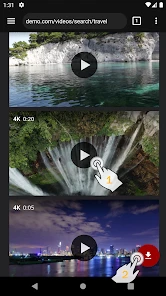
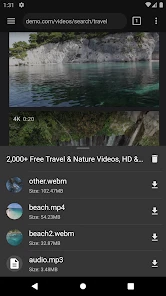
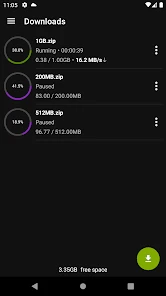
So, what's the fuss about Video Downloader Pro? For starters, it's all about simplicity and efficiency. This app makes downloading videos from various platforms a breeze. Whether it's a funny TikTok clip, an inspiring Instagram story, or a YouTube tutorial you want to keep, this app handles it all. All you need is the video link, and boom, it's saved to your device. It's as easy as pie!
Check the details before building a collection
Video Downloader Pro is a paid video-downloading app from MobiDevApps, priced at $9.99. It has a 4.7 average from over 800 ratings, and more than 10,000 installs. It’s rated for Everyone, runs on Android 6.0 or later, and its current version is 1.7.2. Those details make it worth checking your device and budget before you plan to rely on it; it is not a free utility to try casually.
Before saving a batch, I’d also check that the source actually offers a downloadable video and that keeping a copy is permitted. A link-based workflow depends on the source: a post can be private, restricted, or changed, and a downloader cannot make unavailable content accessible. For anything important, verify the saved file promptly rather than trusting the original post to remain reachable.
User Interface and Experience
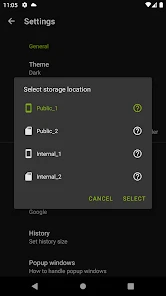
The user interface is clean and intuitive, making it super easy for anyone to navigate. You don’t need to be tech-savvy to figure this one out. The menus are straightforward, and the download process is as simple as copy-pasting a link. Plus, the app runs smoothly without annoying lags, which is a huge win in my book.
Make the link step work for you
The useful habit here is to copy a video link while it is open, then switch to the downloader and confirm the result before moving on. If I’m saving several clips for one trip, I’d do them in a short, deliberate batch and play them back before leaving. That catches a failed or unsuitable download while there is still time to choose another source or skip that clip.
Compared with simply bookmarking videos, a downloaded copy can be available without a connection, which is the main reason to choose this kind of tool. Bookmarks are tidier and avoid using local storage, but they still rely on the original service and an internet connection. A platform’s own offline option may be a better fit when available, especially if you want to stay within its normal viewing setup rather than manage separate files.
Settings and choices worth checking
Rather than assuming every saved video will be suitable, I’d test one example from each kind of source I expect to use. That gives me a practical sense of whether the link is accepted and whether the resulting file behaves as I need. If the first attempt fails, I would check the source’s sharing options and try a permitted, directly accessible video before deciding that the whole workflow is unreliable.
It is also worth thinking through what “offline” means for your situation. If you only need a clip for a short commute, a single local file is enough; if you want a reference collection, storage and file management become more important. I wouldn’t download a large batch until I had played one representative file on the device I intend to use. That small test is more useful than discovering later that the chosen source or format does not suit the way I watch.
Compatibility and Formats
One of the standout features of this app is its ability to handle a variety of formats. Whether you’re downloading in MP4, AVI, or even MP3 for those catchy tunes, Video Downloader Pro has you covered. And it doesn’t matter if you’re using an Android or iOS device; this app is versatile and works seamlessly across platforms.
Know where the convenience ends
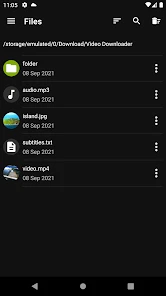
Offline copies take up device storage, so I wouldn’t save every clip I come across. I’d keep a small, purposeful selection and delete anything I have finished watching. Also, formats and playback needs can differ: before collecting a large set, test one representative file on the device you plan to use. That is a simple way to avoid discovering later that a particular video does not suit your player or intended use.
This app is most appealing if you regularly need personal, offline copies and are comfortable handling links and files. If you mainly watch videos inside one service, rarely lose internet access, or prefer not to pay for a dedicated downloader, the service’s own tools or ordinary streaming may be the better choice. I would also skip downloading anything when the creator or platform does not allow it.
Who benefits most from a repeatable routine
I’d recommend this kind of tool to someone who can name a recurring reason to keep videos locally: a handful of permitted tutorials for a workshop, reference clips for a trip, or material they need to review where streaming is inconvenient. The strongest case is not simply “I like videos”; it is “I know when I will need these particular videos and I’m willing to manage the files.” That distinction helps decide whether paying for a dedicated downloader is worthwhile.
On the other hand, I’d steer away from it if you expect every link from every service to work, want an automatic library, or never want to think about storage and file cleanup. A browser bookmark is easier when a connection is available, while a platform’s own offline feature is preferable when it covers the content you watch. The downloader’s value is in making a separate local copy where that is allowed and genuinely useful—not in replacing the streaming services themselves.
Safe and Secure
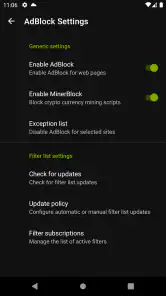
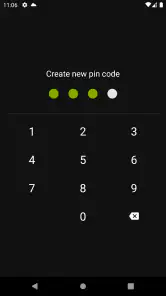
Now, I know what you’re thinking – is it safe to use? Absolutely! The developers have ensured that the app is secure, keeping your data private and free from any malicious threats. It's like having a trusty sidekick that's got your back while you explore the world of online videos.
A grounded verdict for everyday use
The app’s appeal is its straightforward link-and-save approach, but I’d avoid treating it as a universal answer for every website or video. Source restrictions, storage limits, and the need to check each saved file are real parts of the routine. A small test download is a sensible first step, particularly if you are deciding whether the paid app fits your habits.
Overall, Video Downloader Pro is a handy tool for anyone who loves to save and savor their favorite online content. Whether you're a video enthusiast or just someone who loves to keep a collection of fun clips, this app is definitely worth checking out. So, go ahead, give it a try, and let me know what you think!
Video Downloader Pro Frequently Asked Questions
Who developed Video Downloader Pro, and what kind of app is it?
Video Downloader Pro is an app by MobiDevApps in the video player and editing category. Its main purpose is straightforward: downloading videos and playing them offline. If you are comparing it with other video tools, consider whether saving content for later viewing is the feature you need, since that is the app’s central focus.
How much does Video Downloader Pro cost, and what devices can run it?
Video Downloader Pro costs $9.99 and is available for Android devices running version 6.0 or later. Before downloading, check your device’s operating system and make sure it meets that requirement. The price and compatibility are useful to know upfront, especially if you are deciding whether this app fits your budget and can run on your phone or tablet.
What is Video Downloader Pro and how does it work?
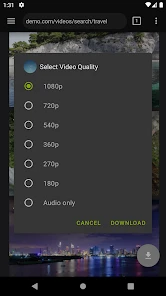
Video Downloader Pro is a powerful application designed to help users download videos from various online platforms directly to their Android or iOS devices. It supports multiple video formats and resolutions, allowing you to choose the best quality for offline viewing. The app is user-friendly, with a simple interface that makes it easy to paste video URLs and download them efficiently. Whether you want to save videos for offline viewing or backup purposes, Video Downloader Pro provides a reliable solution.
Is Video Downloader Pro safe to use?
Yes, Video Downloader Pro is safe to use, provided you download it from a reputable source such as the official app store for your device. The app is designed with user security in mind, ensuring that your personal data and device remain secure. However, users should be cautious about downloading copyrighted content without permission, as this may violate terms of service on certain platforms.
What platforms and formats does Video Downloader Pro support?
Video Downloader Pro supports a wide range of platforms, including popular sites like YouTube, Facebook, Instagram, and more. The app is compatible with various video formats such as MP4, AVI, MOV, and others, providing flexibility in how you choose to save your videos. Additionally, it offers different resolution options, so you can select the best quality for your needs, whether it's standard definition or high definition.
Pros
- Downloads videos in high quality
- Supports multiple video formats
- User-friendly interface
- Fast download speeds
- No ads during download
Cons
- Limited free version features
- Occasional download failures
- Requires stable internet
- In-app purchases can be costly
- No built-in video player
- Category
- Video Players & Editors
- Version
- 1.7.2