UrbanSitter: Find Child Care
- 697.00
- 3.5
- Installs
- 100.00K
- Price
- Free

Screenshots


Analysis by Reviewed
Finding someone to look after a child is rarely just a matter of filling an empty hour. You are choosing a person who may need to handle meals, bedtime, school routines, changing plans, and the small surprises that make family life unpredictable. I reviewed UrbanSitter: Find Child Care with that practical problem in mind. Its central value is bringing babysitters and nannies into one place so a parent can search for care instead of relying only on a group chat, a paper notice, or a last-minute call to friends.
That focus makes it a useful parenting app, but not a magic shortcut. UrbanSitter is free to install, developed by UrbanSitter Inc., and intended for everyone. It has been available since Apr 21, 2015, and its Android listing shows over one hundred thousand installs. The current release is version 13.10.0(16774), with Android 8.0 or later required. Those details matter because this is a tool designed for an ordinary family phone, not a specialist service reserved for professional childcare agencies.
One place to begin a careful childcare search
The capability I found most meaningful is the ability to look for different kinds of childcare in one app. A parent may be searching for a babysitter for an evening, a nanny for a more regular arrangement, or another form of help that sits somewhere between those two needs. Instead of treating every situation as identical, UrbanSitter gives the search a childcare-specific setting.
That sounds simple, but it changes the first step. With a general social network, I would have to write a request, wait for replies, sort through recommendations, and remember which person was available when. With a neighborhood message board, I might receive useful suggestions, but I would still need to organize the details myself. UrbanSitter is more focused: I open it because I need childcare, not because I happen to see a recommendation while checking something else.
I would not confuse that convenience with a guarantee that every result is the right fit. A profile can help me begin a conversation, but it cannot replace my judgment about a child’s needs, the caregiver’s approach, or how well both sides communicate. The app is strongest as a search and decision-starting tool, not as a substitute for meeting, asking questions, and agreeing on expectations.
The distinction is especially important for families with unusual schedules. A parent who only needs occasional evening care may approach the search differently from someone who needs dependable weekday support. Likewise, caring for a toddler, an older child, or siblings with different routines can require very different questions. The app brings the search together, while I still need to define what “good care” means for my household.
Turning a vague need into a useful search
My first practical tip is to decide what I am actually looking for before browsing for too long. “I need a sitter” is not specific enough to guide a good choice. I would write down the likely time window, whether the care is occasional or recurring, the child’s routine, and the tasks that matter most. This prevents an appealing profile from distracting me from the real requirement.
A second useful habit is to separate essentials from preferences. If a caregiver must be comfortable with a particular bedtime routine, that belongs in the essential group. A preference such as a shared hobby can wait. This makes conversations shorter and fairer, because I am comparing people against the needs of the job rather than against an idealized image of a perfect sitter.
I also recommend treating the first contact as a screening conversation, not a booking decision. I would ask how the caregiver normally handles transitions, what information they need before arriving, and how they communicate if plans change. These questions reveal more about practical compatibility than a quick glance at a polished profile.
What the app changes in everyday use
Imagine a parent whose usual sitter cancels on a Friday afternoon. There is a dinner reservation that cannot easily be moved, and the children need someone who can manage dinner and bedtime. In that moment, UrbanSitter can give the parent a structured place to start looking rather than forcing them to send the same urgent message to ten contacts. The time saved is not only the time spent searching; it is also the mental effort of keeping track of scattered replies.
That scenario also shows the app’s limitation. A last-minute search is still a stressful search. Even if I find a promising candidate quickly, I need enough time to discuss the children, the home, emergency contacts, arrival details, and payment expectations. The app may reduce the friction of finding possibilities, but it does not remove the responsibility of deciding whether the arrangement is safe and sensible.
For recurring care, I would use the app more deliberately. Rather than choosing the first person who appears available, I would compare several candidates and look for consistency between what they present and what my family needs. A regular arrangement affects school mornings, work commitments, and a child’s sense of stability, so reliability matters more than a single convenient match.
One non-obvious benefit of a dedicated childcare app is that it helps me think in terms of a relationship, not just a transaction. A one-night babysitting request and a weekly nanny arrangement may begin with the same search, but the questions afterward should be different. For occasional care, I may focus on flexibility and comfort with the evening routine. For recurring care, I need to discuss communication habits, schedule changes, and how the caregiver fits into the family’s normal rhythm.
The best scenario for UrbanSitter
I think UrbanSitter is most useful for parents who have some time to compare options and want to widen their search beyond people they already know. It is particularly suitable when the need is clear but the personal network is small, busy, or unreliable. A new resident in a city, a parent returning to work, or a family whose regular sitter is no longer available may find the focused search much more practical than starting from a blank page.
It can also help when the family’s requirements change. Perhaps a parent needs occasional evening support instead of full-time care, or wants to explore a nanny arrangement after relying on relatives. In those cases, having babysitters and nannies presented within the same childcare-oriented environment makes it easier to consider alternatives without treating the search as a completely new project.
My recommended workflow would be simple. First, define the schedule and responsibilities. Next, review several possible caregivers rather than stopping at the first attractive result. Then, start a conversation that covers the child’s routine and the practical details of the job. Finally, allow enough time for a proper introduction before depending on the arrangement for an important commitment.
That last step is easy to skip when a parent is tired or under pressure. I would avoid making the app part of a rushed decision for a major event, especially if the caregiver has never met the child. A short introduction can show whether the child is comfortable, whether instructions are understood, and whether the caregiver asks sensible questions. Those observations are more valuable than speed alone.
Where the convenience comes with tradeoffs
The biggest tradeoff is that a broader search can create more decisions. A list of possible caregivers is helpful, but it can also leave me comparing profiles without knowing which differences truly matter. I need to impose my own criteria, otherwise the app becomes another source of decision fatigue.
There is also a personal-information tradeoff. Childcare conversations naturally involve schedules, routines, locations, and family circumstances. I would share only what is necessary at each stage and keep sensitive household details for a more appropriate conversation. The convenience of contacting someone through an app should not encourage me to overshare before trust has been established.
Another limitation is that the app cannot judge the chemistry between a caregiver and a child. A person may look suitable on paper but communicate in a way that does not work for my family. Conversely, someone who seems less obvious at first may turn out to be a calm and dependable match. I would use the search to create a shortlist, then rely on conversation and observation to make the real decision.
Parents should also be realistic about what “trusted” means in practice. The app’s store summary presents it as a way to find trusted babysitters, nannies, and more, but trust is not something I would outsource entirely to a platform. I still want to understand who will care for my child, what they are comfortable doing, and how they respond to problems. The phrase is useful as an aspiration, not as permission to skip due diligence.
Compared with asking friends and family, UrbanSitter may offer a wider starting point, but personal recommendations often carry context that an app cannot provide. A friend can explain how a sitter handled a difficult evening in a way that a profile cannot. Compared with a traditional agency, the app may feel more direct and less formal, while an agency may be preferable for parents who want a more guided matching process. Compared with an informal neighborhood post, UrbanSitter keeps the purpose clearer, but a local recommendation may still be the fastest route when the community already knows a caregiver well.
Small decisions that improve the result
I found three practical rules especially valuable. First, search by the child’s routine rather than by the parent’s anxiety. When I am stressed, I may focus on finding anyone immediately. Writing down the actual responsibilities helps me choose someone who can handle the situation, not merely someone who replies quickly.
Second, ask for a concrete example during the conversation. Instead of asking only whether a caregiver is “good with bedtime,” I would ask how they normally make bedtime easier when a child is overtired. The answer can reveal patience, preparation, and communication style. It is a more useful test than a broad claim.
Third, use a trial mindset for recurring care. I would begin with a clearly defined arrangement and review how it works after the first few sessions. This is not about treating a caregiver unfairly; it is about recognizing that compatibility becomes clearer through real routines. The best match on paper may not be the best match in a busy household.
A further tradeoff concerns speed versus fit. UrbanSitter is valuable when it helps me move from “I need help” to “these are realistic people to contact.” It is less valuable if I expect it to produce a perfect answer instantly. The more specific the family’s needs, the more important it becomes to spend time comparing and communicating.
Who will gain the most from using it?
The strongest audience is a parent who wants a dedicated place to organize a childcare search and is comfortable taking an active role in the final choice. Families with changing schedules, occasional babysitting needs, or a desire to consider both sitters and nannies may get the most from its focused approach.
I would also recommend it to someone who has outgrown informal arrangements but is not ready to commit to a traditional agency. The app can sit between those two extremes: more structured than a casual message to acquaintances, yet more personal and self-directed than handing the entire process to a third party.
It may be a weaker fit for a parent who already has a highly trusted local network and rarely needs new care. In that situation, a direct recommendation may be faster and provide more meaningful context. I would also hesitate to rely on it as the only answer for highly specialized childcare needs, urgent emergencies, or a family that wants a professional intermediary to manage every step.
The average rating is 3.5 from around 1.8 thousand ratings, with nearly seven hundred written reviews. I read that as a sign to keep expectations balanced: the concept is useful, but the experience can depend heavily on the quality of available matches and on how carefully the parent uses the search. The app’s reach, reflected in more than one hundred thousand installs, makes it a recognizable option, yet popularity alone does not determine whether it suits a particular household.
My recommendation after using UrbanSitter
UrbanSitter succeeds when I treat it as a practical starting point for finding childcare, especially when my usual contacts cannot help. Its most important effect is not that it makes parenting decisions for me; it gives the search a clearer shape and makes it easier to consider babysitters and nannies in one focused place.
I would recommend installing it for families who want more options and are willing to screen candidates carefully. I would not recommend using it as a reason to skip introductions, detailed questions, or common-sense caution. The app can shorten the path to a promising caregiver, but the final sense of trust still has to grow between the family, the child, and the person providing care.
For a free parenting app from UrbanSitter Inc., that is a worthwhile role. It is most convincing when the problem is not “find anyone immediately,” but “help me create a sensible shortlist and choose with more structure.” If that matches your situation, UrbanSitter: Find Child Care is worth trying, provided you use its convenience as the beginning of the decision rather than the decision itself.
Pros
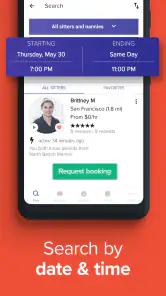
- Search by location
- availability
- experience
- and childcare specialties.
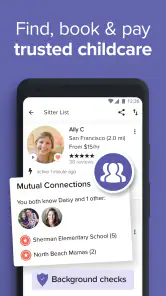
- Profiles include reviews
- references
- background-check details
- and parent ratings.
- Book recurring care or one-time babysitting for flexible scheduling.
- In-app messaging helps clarify expectations before confirming a booking.
- Useful for finding sitters familiar with infants
- multiples
- or special needs.
Cons
- Availability can be limited in smaller cities or less populated areas.
- Service fees may increase the total cost beyond the sitter’s hourly rate.
- Some sitters require minimum booking times or advance notice.
- Parents should independently verify important details before the first visit.
- Cancellation terms and refund eligibility can vary by booking and sitter.

- Category
- Parenting
- Version
- 13.10.0(16774)











