Uber Eats Orders
- 405.00
- 3.2
- Installs
- 1.00M
- Price
- Free

Screenshots


Analysis by Reviewed
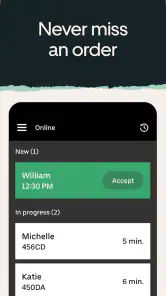
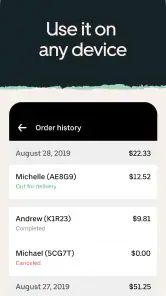
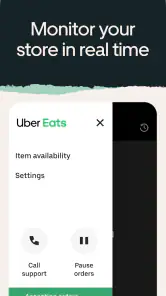
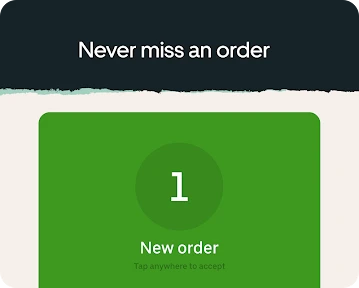
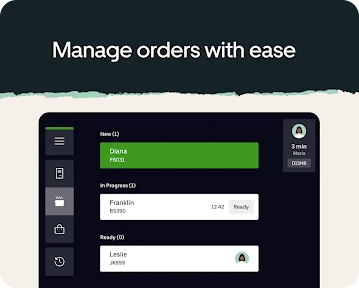
I see Uber Eats Orders as a tool for restaurant staff rather than a way for diners to place a meal delivery order. That distinction matters: it is built around managing a business’s incoming orders, so its value depends on whether you are responsible for keeping a restaurant’s service moving. Uber Technologies, Inc. makes this free business app, and its 3.2 average from around 5,900 ratings suggests that experiences are mixed. I would approach it as a practical work tool, not assume it will suit every restaurant’s setup.
Starting with the restaurant’s needs
The app makes the most sense when a restaurant already receives orders through Uber Eats and needs a dedicated place to handle them. Before relying on it during a rush, I would check that the right staff can access the account, that the device is suitable for the work area, and that everyone knows who is watching incoming orders. Those small preparations matter because a missed alert or an unclear handoff can turn a simple order into a service problem.
A useful everyday example is a small lunch team with one person at the counter and another preparing food. The counter worker can keep an eye on orders while the kitchen focuses on cooking, then pass along the details and any special instructions. That division can be smoother than switching between a consumer ordering app and other restaurant tasks, but only if the team agrees on who confirms and follows up on each order.
From incoming order to completed handoff
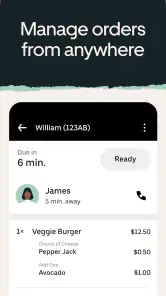
In practice, the workflow begins when an order reaches the restaurant. Staff need to review what has been requested, make sure any customizations are understood, and coordinate preparation with the kitchen. The app’s purpose is to help manage those orders; it does not remove the need for clear communication between the person handling the device and the person making the food.
Keeping the kitchen and front counter aligned
One tip I would use is to make a consistent habit of checking the complete order before passing it on, rather than relying on a quick glance at the first items. Special requests are easy to overlook when several tasks arrive together. A simple verbal read-back between the order handler and the kitchen can catch misunderstandings early, especially when the counter is busy or staff are covering multiple roles.
The handoff does not end when food is prepared. Someone still has to make sure the order is ready for the next step in the restaurant’s delivery process and that the right order goes to the right person. That is where a dedicated order-management workflow can be more useful than juggling messages or paper notes, while still depending on staff attention and a sensible process behind the screen.
Where it fits—and where it may not
For a restaurant that already handles Uber Eats orders, a focused business app can be more appropriate than using the customer-facing app or trying to keep orders straight in a general notes tool. It keeps the task centered on restaurant order handling. On the other hand, a business that does not use Uber Eats for orders may have little reason to add another app to its routine. Restaurants managing several delivery channels should also consider whether this single-channel workflow fits their broader system, rather than expecting it to replace every ordering tool.
More From Our News Desk

Clash of Clans Is Won Between the Battles

Android Auto Makes the Case for Quieter Car Software

MobiOffice: Transforming Mobile Productivity with Seamless Integration

EA SPORTS FC™ Mobile Soccer: Redefining Mobile Sports Gaming

How Microsoft OneDrive Became a Mobile Productivity Giant

How Google Translate Breaks Language Barriers Effortlessly
I would not treat the app’s rating as a guarantee of how it will work in a particular kitchen. With a 3.2 average and more than 400 written reviews, the overall response is mixed; the practical test is whether the app works reliably with your staff, devices, and service routine. The app has over a million installs, is rated for Everyone, and requires Android 7.0 or later. Its current version is 40.178.10000, and it was released on March 16, 2020.
What to check before depending on it
If you are deciding whether to use it, start by asking a few everyday questions: Who will monitor new orders during peak periods? How will kitchen staff hear about changes or special requests? What is the backup process if the device is unavailable? These are not reasons to avoid the app; they are the operational details that determine whether order management feels calm or chaotic. I would also have staff practice the handoff during a quieter shift so that responsibilities are clear before the lunch rush.
My overall view is that Uber Eats Orders is best judged as one part of a restaurant workflow, not as an automatic fix for busy service. It can give the person handling orders a dedicated place to work, while good results still depend on careful checking and communication. If your restaurant already uses Uber Eats and needs a focused way to manage its orders, it is worth evaluating with the team. If you need a system that brings several delivery services together, or your business does not take Uber Eats orders, another option may fit better.
Have you ever found yourself craving something delicious but just couldn't muster the energy to leave your couch? Or maybe you were stuck at work, dreaming about that juicy burger from your favorite joint. Well, let me introduce you to Uber Eats Orders, your new best friend when it comes to food delivery.
Ordering Made Easy
So, here's the scoop. Uber Eats is like having a personal food genie in your pocket. Whether you're in the mood for sushi, pizza, or something sweet, this app has got you covered. With just a few taps, you can browse through a plethora of local restaurants, each offering a variety of dishes to tickle your taste buds. It's like an all-you-can-eat buffet, but without the hassle of getting up.
How It Works
Getting started with Uber Eats Orders is as simple as pie. You download the app, create an account, and voila! You're ready to dive into a world of culinary delights. The interface is super user-friendly, making it easy to navigate through different cuisines and restaurant options. Plus, the app learns your preferences over time, giving you personalized recommendations. It's like having a food-savvy friend who just gets you.
Once you've made your selection, you can customize your order to your heart's content. Want extra cheese on that pizza? No problem. Need to hold the onions on your burger? Done. And the best part? You can track your order every step of the way. From the moment it's prepared to when it's en route to your doorstep, you're in the loop, ensuring your food arrives hot and fresh.
Perks and Rewards
Now, let's talk about the perks. Uber Eats often runs promotions and offers discounts to keep your wallet happy. Plus, if you're a frequent user, you'll love their rewards program. You earn points with every order, which can be redeemed for sweet deals and freebies. It's like getting rewarded just for satisfying your hunger – a win-win situation if you ask me.
And if you're someone who likes to plan ahead, you'll appreciate the scheduled orders feature. Whether it's a busy weekday lunch or a lazy Sunday brunch, you can set your order in advance and have your meal arrive at your desired time. It's all about convenience and catering to your schedule.
Final Thoughts
In a nutshell, Uber Eats Orders is a game-changer in the world of food delivery. It brings the restaurant experience right to your doorstep, offering a seamless and satisfying way to enjoy your favorite meals. Whether you're a foodie on the go or just looking for a convenient dining solution, this app has something for everyone.
So, next time you're in a food bind, remember that Uber Eats Orders is just a tap away, ready to deliver happiness straight to your door. Bon appétit!
Uber Eats Orders Frequently Asked Questions
Who is Uber Eats Orders designed for?
Uber Eats Orders is a business app from Uber Technologies, Inc., intended for managing a business’s orders rather than browsing restaurants as a customer. It may be useful to businesses that receive orders through Uber Eats and want an app for handling that workflow. The app is free to download and is rated for Everyone, though the service is most relevant to businesses participating in Uber Eats.
What should I check before installing Uber Eats Orders on my device?
Check that your device runs Android 7.0 or later, the minimum operating system required for the app. Uber Eats Orders is a business-focused app, so it is worth confirming that you need to manage a business’s orders before installing it; it is not the same experience as a customer-facing food delivery app. The app is free, and its current version is 40.178.10000.
What is Uber Eats and how does it work?
Uber Eats is a food delivery platform that connects users with a wide variety of local restaurants. Users can browse menus, place orders, and track the delivery status in real-time through the app. After placing an order, a nearby delivery partner picks it up from the restaurant and delivers it to the user’s specified location. The platform supports cashless transactions for user convenience.
Is Uber Eats available in my area?
Uber Eats operates in many cities around the world, but availability can vary based on your specific location. To check if Uber Eats is available in your area, you can download the app and enter your address. The app will inform you if services are available and display a list of nearby restaurants if they are. Availability may also depend on the time of day and local restaurant hours.
How much does delivery cost with Uber Eats?
Delivery costs on Uber Eats can vary depending on several factors including your location, the restaurant you are ordering from, and the time of day. Typically, there is a delivery fee that ranges from a couple of dollars to more, and during peak times, surge pricing may apply. The app displays the delivery fee before you place your order, so you can review all costs upfront.
Pros
- Wide variety of restaurants available.
- User-friendly interface for easy navigation.
- Fast delivery times in most areas.
- Real-time order tracking feature.
- Frequent promotions and discounts.
Cons
- Delivery fees can be high in some areas.
- Occasional order inaccuracies reported.
- Limited availability in rural locations.
- Customer service response can be slow.
- App can be buggy during peak hours.

- Category
- Business
- Version
- 40.178.10000













