TurboScan™ Pro: PDF scanner
- 2.43K
- 4.8
- Installs
- 100.00K
- Price
- $5.99

Screenshots
Analysis by Reviewed
For a first-time user, the best way to approach TurboScan™ Pro: PDF scanner is as a handy tool for turning loose paperwork into files you can keep or send. I find it most useful when I need a quick scan away from a desk, rather than as a replacement for a dedicated office scanner. Getting a clean result is straightforward, and a little care with lighting and framing makes the first attempt much less frustrating.
What to expect from a phone scanner
The useful shift is thinking of a scan as more than a photo. A camera image can record a page, but a scanning workflow gives you a chance to check the edges, improve the appearance, arrange pages, and create a file that is easier to share. That distinction matters when the recipient needs to read a form or keep a copy, rather than simply see what the paper looked like.
I’d expect this app to be strongest with ordinary documents that need to be captured promptly: receipts, signed sheets, notes, and short packets. It is less of a fit for turning a filing cabinet into a searchable archive or handling a large scanning job. That is not a criticism of a pocket scanner; it is a practical boundary. For a few pages when I’m away from a proper scanner, speed and convenience matter more than a high-volume workflow.
Transforming Your Smartphone into a Scanner
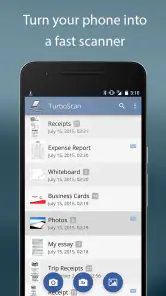
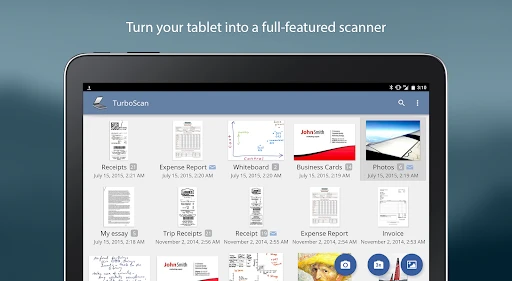
The moment I installed TurboScan™ Pro: PDF scanner, I was impressed by its simplicity and efficiency. The app's interface is straightforward, making it a breeze to navigate. With just a few taps, you can scan documents, receipts, sketches, or even whiteboards. It's like having a scanner in your pocket, ready to go whenever you need it.
From first launch to a useful scan
I’d start with a single sheet on a flat, contrasting surface, then hold the phone steady and check that the page edges are visible before capturing it. That simple setup helps avoid a skewed crop or a shadow falling across text. After the scan, take a moment to inspect the corners and small print rather than assuming a page is readable just because the preview looks sharp. This is a reassuring first task: scan one receipt, review it, and only then move on to a multi-page document.
In everyday use, I can see this fitting a familiar moment: a contractor hands over a signed form, or I get a receipt I’ll need when reconciling expenses later. I can capture the page before it gets folded into a bag, check the result, and send or keep a digital copy. For students, the same approach works for a handout or a page of notes; for small-business owners, it can help keep incoming paperwork from piling up. It’s especially useful when being able to scan immediately matters more than batch processing a stack.
Making the first capture count
Before scanning several pages, I’d test the app on the kind of paper I handle most. A clean printed sheet is an easy first check; a faded receipt or handwritten note is a more revealing test if that is what I need to preserve. Look at the smallest text and the faintest marks, not just the overall shape of the page. If those details are hard to read, improve the light or reposition the paper before starting a longer scan.
More From Our News Desk

Clash of Clans Is Won Between the Battles

Android Auto Makes the Case for Quieter Car Software

MobiOffice: Transforming Mobile Productivity with Seamless Integration

EA SPORTS FC™ Mobile Soccer: Redefining Mobile Sports Gaming

How Microsoft OneDrive Became a Mobile Productivity Giant

How Google Translate Breaks Language Barriers Effortlessly
A realistic workday example is a freelancer receiving a signed approval at a meeting. Rather than waiting until the paperwork gets home, they can capture it while the page is flat, inspect the signature and date, and send a copy while the decision is still fresh. I’d avoid scanning directly under a strong overhead light if it creates glare, and I’d keep the phone parallel to the page as much as possible. A few seconds spent arranging the shot can prevent the more annoying task of rescanning later.
High-Quality Scans in Seconds
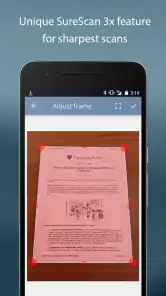
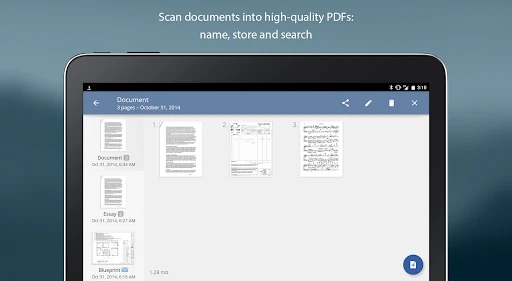
One of the standout features of TurboScan is its ability to produce high-quality scans. The app uses advanced algorithms to ensure that every scan is clear and sharp. Plus, it offers a feature called "SureScan" that takes three pictures of the document to ensure the best possible quality. I’ve tried scanning everything from crumpled receipts to glossy magazine pages, and the results were consistently impressive.
SureScan is worth treating as a quality-versus-speed choice, not a setting to use automatically for every scrap of paper. For a clean, flat page in good light, a quick capture may be all I need. If a receipt is wrinkled or the lighting is uneven, taking extra captures can be a sensible trade-off. Glossy pages can still reflect light, so I’d shift the phone or document slightly to reduce glare before relying on any capture method. A scanner app can make a phone image more usable, but it cannot recover text hidden by a deep crease or reflection.
There is also a useful judgment call between speed and certainty. If I’m capturing a receipt only to remember a modest purchase, a quick scan may be enough. For a signed agreement or a page with small, consequential details, I’d slow down, use the more careful capture option, and inspect the result before putting the original away. That habit is more valuable than assuming one capture mode is best for every document.
Easy-to-Use Editing Tools
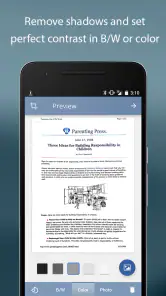
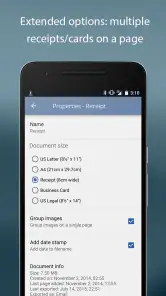
After scanning, you can easily adjust the brightness, contrast, and color of your document. The app offers a range of editing tools that let you tweak your scans until they look just right. You can also reorder pages, add new ones, or delete any that didn’t come out as expected. It’s like having a mini photo editor built right into your scanner app.
For a multipage form, I’d review the page order before sharing: it’s easy to capture a page twice or miss one while moving through a packet. Editing is also useful for separating the scan itself from the final document—correct a dim page, remove a bad capture, then check that the remaining pages tell the story in the right sequence. I wouldn’t over-adjust brightness or contrast on a page with faint handwriting, since aggressive changes can make light marks harder to see. Keeping the original-looking version is often the safer choice when the document needs to remain legible.
One non-obvious way to reduce mistakes is to pause after each page rather than racing through a stack. Check that the page is present and in the intended order before moving on. If a packet has an attached receipt or supporting page, decide where it belongs before scanning so the final file reads naturally. These small checks make editing a correction step, not a substitute for keeping track of the paperwork.
Sharing and Storing Made Simple
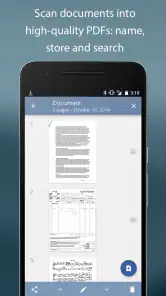
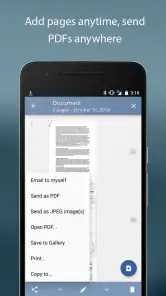
Once you’ve got your scans looking perfect, TurboScan makes it easy to share them. You can email your documents as PDFs or JPEGs, or upload them to cloud services like Dropbox, Evernote, or Google Drive. The app also saves your documents in the app itself, so you can access them anytime. It’s super handy for keeping all your important papers organized and at your fingertips.
For a document that will be printed, filed, or sent as a formal record, I’d choose PDF; for a quick image that someone only needs to view, JPEG may be more convenient. Before sending anything, I’d open the finished file and confirm the pages are complete and readable. I’d also use a clear naming habit—something like the document type and date—so a saved scan is easy to find later. That small routine matters more than building a complicated filing system inside a phone app.
For recurring paperwork, I’d settle on a naming pattern before the phone fills with vague file names. A business owner might include the supplier or project; a student might use the course and topic. The point is not to create a perfect archive, but to make the file recognizable when it needs to be retrieved. I’d also think about the recipient before choosing a format: a PDF is usually the more natural choice when pages belong together, while an image can be convenient for a one-page visual reference.
A scan is still a copy of the paper, so I would not treat saving it in the app as a reason to discard an original that must be kept. For tax, legal, or administrative records, follow the retention rules that apply to the document and keep the physical copy when required. This is a practical boundary for any phone scanner: it makes capture and sharing easier, but does not decide what counts as an official record.
Where it fits—and where it doesn’t
TurboScan is a paid business app from Piksoft Inc., priced at $5.99, and its Everyone age rating makes it suitable for general audiences. It has a 4.8 average from around 20,000 ratings, with more than 100,000 installs. Those figures suggest a well-established tool, but I’d choose it based on the workflow rather than popularity alone. It was released on April 7, 2014, and remains a focused option if my main need is capturing pages and exporting useful files.
Compared with using a phone’s built-in camera, a dedicated scanner app gives the task a more purposeful flow: capture, review, adjust, arrange, then share. Compared with a flatbed or office multifunction scanner, the phone is quicker to reach for but less suited to large batches, perfectly even lighting, or fragile originals that need careful handling. I’d skip this purchase if I only scan a page once in a while and my existing camera or a free scanning option already does the job. I’d also look elsewhere if my priority is a broader document-management system rather than straightforward scanning.
The price makes most sense for someone who expects to scan regularly and values having a focused tool ready on the phone. If I only need a scan once in a blue moon, a built-in camera or a free option may be enough, especially if it already produces files my contacts can use. On the other hand, if I often receive paperwork away from a desk, the time saved by capturing, reviewing, and sending it in one sitting can justify choosing a dedicated app.
For office-scale work, a physical scanner remains the better choice: it is designed to handle repeated pages, and it avoids having to hold a phone over every sheet. For a complex archive, I’d compare document-management tools instead, because scanning is only one part of organizing a large collection. TurboScan’s appeal is narrower and more immediate: it helps turn an individual piece of paper into a shareable file without waiting to get back to a scanner.
The app is also not a fix for every difficult original. Tiny print, pale ink, folds, and reflective surfaces can remain hard to capture, and a phone held at an angle may make a page less comfortable to read. When a document is delicate, oversized, or especially important, I’d use equipment and handling appropriate to it rather than forcing a quick phone scan. Knowing when not to use the convenient option is part of getting dependable results.
Who will get the most from it
I’d recommend it most to people whose paperwork arrives in small bursts: independent workers collecting signed forms, students saving handouts, or anyone who needs to send a receipt before leaving a shop or appointment. The app suits people who prefer to finish a small admin task immediately instead of carrying paper home and dealing with it later. Its value is less about elaborate filing and more about making that capture-and-send moment feel manageable.
I’d be less enthusiastic if someone expects an automated office archive, wants to scan thick stacks every day, or relies on searchable text to find information inside documents. Those needs call for a different kind of workflow. I’d also think twice if I rarely scan and already have a convenient tool that produces files good enough for my needs. Paying for a separate scanner app is easiest to justify when the dedicated capture and editing steps solve a recurring annoyance.
For someone trying it for the first time, the most useful question is not whether every feature will be needed, but whether the ordinary paperwork they deal with comes out clearly and is easy to pass along. I’d test one receipt, one printed page, and—if relevant—a handwritten page. That gives a more honest picture than judging the app from a single ideal sheet, while keeping the first experiment small and low-pressure.
A sensible next step
If you’re deciding whether to install it, start by thinking about what you scan most: occasional receipts, school pages, or work forms that need to be sent promptly. Then try one representative page and check the crop, text clarity, and export format before trusting it with an important packet. That quick test answers the practical questions—whether the workflow feels comfortable, whether your usual paperwork is readable, and whether the resulting file suits the person receiving it.
After that first test, try a short multipage document and inspect the sequence before sharing. This reveals a different part of the workflow than a single receipt: whether you remember to check each page and whether the final file makes sense from beginning to end. If the process feels easy, keep the habit simple—capture, review, name, and send or store. A repeatable routine is more useful than experimenting with every adjustment on every scan.
One common confusion is expecting a scan to be instantly perfect because the page looks clear on the phone screen. I’d check the saved or shared result at a comfortable reading size, especially if it includes small type or faint writing. Another is choosing an export format by habit without considering what the recipient needs. A PDF is convenient for a set of pages that should stay together; a JPEG can be adequate for a single image. Either way, checking the actual file before sending is a good final safeguard.
Overall, TurboScan™ Pro: PDF scanner is a fantastic app for anyone who needs to scan documents on the go. It’s fast, reliable, and incredibly easy to use. Whether you’re a student needing to scan lecture notes or a business professional dealing with contracts and receipts, this app has got you covered. It’s definitely earned a permanent spot on my home screen!
TurboScan™ Pro: PDF scanner Frequently Asked Questions
Can I create searchable PDFs with TurboScan™ Pro?
TurboScan™ Pro turns your phone into a full-featured PDF document scanner, which is useful for digitizing paperwork and keeping it in a portable format. If you need to search the text inside scans, check whether the app’s current tools support that workflow before relying on it. Its core purpose is scanning documents and saving them as PDFs or JPEGs.
Is TurboScan™ Pro a one-time purchase, and what should I know before paying?
TurboScan™ Pro is a paid app, priced at $5.99. Its focus is turning your phone into a full-featured PDF document scanner, so it may suit you if you regularly capture and share paperwork from your mobile device. Before downloading, consider whether you need a dedicated scanning app and whether its scanning and document-handling features fit the way you work.
What is TurboScan™ Pro and how does it work?
TurboScan™ Pro is a powerful PDF scanner app that transforms your smartphone into a portable scanner. It allows you to quickly scan multipage documents and save them as high-quality PDFs or JPEGs. The app uses advanced algorithms to auto-detect edges, straighten pages, and enhance text, ensuring your scanned documents are clear and professional. It also offers features like email sharing, cloud storage integration, and printing options.
Is TurboScan™ Pro available for both Android and iOS devices?
Yes, TurboScan™ Pro is available for download on both Android and iOS devices. It provides a seamless scanning experience across platforms, allowing users to enjoy the same robust features whether they are using an iPhone, iPad, or an Android smartphone or tablet. You can find it on the Google Play Store for Android devices and the Apple App Store for iOS devices.
Does TurboScan™ Pro require an internet connection to function?
No, TurboScan™ Pro does not require an internet connection to scan and save documents. You can use the app offline to scan documents anytime and anywhere. However, if you want to share your scanned documents via email, upload them to cloud services, or access additional online features, an internet connection will be necessary.
Pros
- Fast and reliable document scanning.
- High-quality PDF output.
- User-friendly interface.
- Supports multiple file formats.
- Offline functionality available.
Cons
- Limited editing features.
- No cloud storage integration.
- Paid app with no free version.
- Occasional OCR inaccuracies.
- Lacks advanced sharing options.

- Category
- Business
- Version
- Varies with device













