TruHearing App
- 1.86K
- 2.9
- Installs
- 100.00K
- Price
- Free

Screenshots
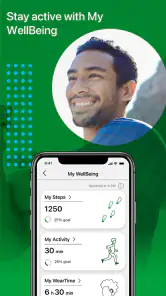
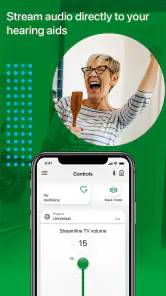
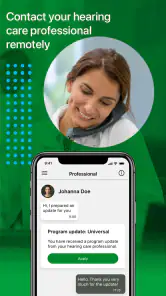
Analysis by Reviewed
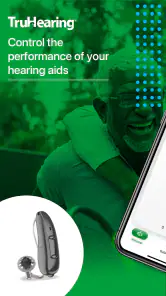
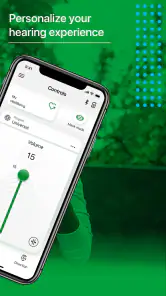
I approached TruHearing App as a companion for people who already use compatible hearing aids and want a more manageable way to interact with them. It is a free medical app from Sivantos Pte. Ltd., aimed at Everyone, and its purpose is narrower than a general hearing-health tool: it is about helping you get more practical value from your hearing aids during ordinary routines. That focus is useful, but it also means the app makes the most sense when it fits your existing hearing-aid setup.
My overall impression is mixed but fairly clear. The app can make hearing-aid ownership feel less dependent on physical controls or repeated visits for small adjustments, yet the experience is not equally comfortable for every user. Its average rating sits at 2.9 from around 3.4 thousand ratings, with roughly 1.9 thousand written reviews, so the public response suggests that convenience is not the whole story. I would consider it a potentially helpful companion, not a replacement for professional hearing care or a universal solution for every hearing situation.
How the app feels to use in everyday life
I find the everyday value of a hearing-aid companion lies less in constant adjustment than in having a clear routine when listening becomes difficult. In this section, I would focus on choosing one manageable change, noticing whether it helps, and keeping attention on the conversation rather than the screen. That practical approach also makes the app’s trade-offs easier to judge.
Readable navigation matters more than a crowded feature list
With a hearing-aid companion, I care less about having a long menu and more about finding the control I need without hesitation. A person may open the app in a quiet room, in a busy restaurant, while watching television, or when trying to understand someone from across a table. In those moments, a simple route to the relevant hearing-aid control is more valuable than decorative interface elements.
TruHearing App is best understood as a control and support layer rather than an independent medical reference library. That distinction helps set expectations. You should not install it expecting a complete hearing assessment, a diagnosis, or a substitute for an audiologist. Its useful role is more immediate: helping you manage the hearing aids you already rely on and making day-to-day use feel more deliberate.
The current version is 2.8.0.16337, and it requires Android 10 or later. That requirement is important for practical planning. If you use an older phone, the app may not be an option even if your hearing aids themselves are suitable. I would check the operating system before spending time on setup, especially if the phone is shared with a family member or kept mainly as an emergency device.
One small but meaningful habit is to decide in advance what you want the app to help with. For example, you might be trying to make conversations at home easier, manage listening in public, or reduce the need to reach behind your ear for every adjustment. Going in with one concrete goal makes the interface easier to judge. Otherwise, it is easy to confuse the presence of an app with actual improvement in communication.
More From Our News Desk

Weather by Xiaomi Review: Clear at a Glance, Less Clear Up Close

X Under Pressure: Can It Recover When Posting Goes Wrong?

Clash of Clans Is Won Between the Battles

Android Auto Makes the Case for Quieter Car Software

MobiOffice: Transforming Mobile Productivity with Seamless Integration

EA SPORTS FC™ Mobile Soccer: Redefining Mobile Sports Gaming
Useful for people who prefer visual control
Some hearing-aid users are comfortable with tiny physical buttons, while others find them difficult because of reduced dexterity, tremor, arthritis, limited reach, or simply because the controls are hard to locate by touch. A phone-based companion can be more approachable for those users because the phone offers a familiar screen and a larger interaction surface than the hearing aid itself.
That does not automatically make the experience accessible to everyone. A touchscreen still requires accurate tapping, a charged phone, and enough visual clarity to identify controls. Someone with low vision may need the phone’s own display settings or accessibility tools, but I would not assume that every part of the app responds perfectly to every system-level adjustment. The safest approach is to test the app with the settings you actually use rather than relying on general accessibility expectations.
For users with limited hand movement, the trade-off is equally important. The app can reduce the need to manipulate a small device, but it moves the task onto a larger touchscreen rather than removing the task altogether. Holding the phone, unlocking it, locating the app, and making a precise selection can still be tiring. I see the app as potentially helpful for motor limitations, not as a guaranteed hands-free alternative.
People with cognitive or memory-related difficulties may also benefit from a consistent routine. Keeping the app in a familiar place on the phone and using it for the same few tasks can reduce searching. I would avoid changing several hearing-aid settings at once, particularly before an important appointment or outing. A simple, repeatable workflow is easier to remember and makes it clearer which adjustment helped.
Hearing support is not the same as hearing improvement
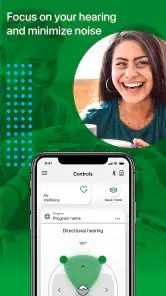
This is where expectations need careful handling. A companion app can help you interact with hearing aids, but it cannot make every voice clear in every environment. Restaurants, traffic, group conversations, echoing rooms, and people speaking while turned away all create challenges that no phone interface can erase. If you still struggle after reasonable adjustments, the right next step may be a hearing-aid review with a professional rather than more experimentation inside the app.
I also would not use the app as a reason to delay medical advice. Sudden changes in hearing, pain, discharge, dizziness, or a rapid difference between ears deserve professional attention. TruHearing App belongs in the practical management part of the journey, not in the diagnostic part.
Quiet rooms and busy places demand different habits
A realistic example is an evening at home. I might be watching television while another person speaks from the kitchen. Instead of immediately assuming the hearing aids are failing, I can use the companion app as part of a short troubleshooting routine: check whether the hearing aids are active, consider whether the issue is specific to the television or the room, and make one change at a time. The benefit is not just convenience; it is having a repeatable way to respond rather than guessing.
In a café, the same approach becomes more complicated. There may be several voices, clattering dishes, music, and changing distances. An adjustment that feels comfortable at home may not be ideal there. I would make changes before the conversation becomes urgent, and I would avoid staring at the phone throughout the meal. The app should support participation, not become another reason to withdraw from the conversation.
Outdoor use brings a different concern: situational awareness. When walking near roads, cycling, or crossing a busy area, I would not focus on the screen while making adjustments. It is better to stop somewhere safe, make the change, and return attention to the surroundings. This is an obvious-sounding tip, but it matters more for a hearing-aid control app because the user may already be working to interpret environmental sounds.
For family members or caregivers, the app may be useful as part of a shared support routine, but I would keep the hearing-aid wearer involved in every decision. A relative can help locate controls or establish a simple process, yet the wearer is the person who knows whether speech feels comfortable, harsh, distant, or tiring. Taking over completely can make the technology less empowering, even when the intention is helpful.
Where it compares well with ordinary alternatives
The most obvious alternative is using the physical controls on the hearing aids. Those controls can be quick and available without opening a phone, which is a real advantage when the phone is in another room, out of battery, or difficult to use. On the other hand, physical controls are often small and less comfortable for people with limited dexterity. TruHearing App is more appealing when visual guidance and a familiar touchscreen outweigh the speed of a button.
Another alternative is contacting a hearing-care professional for every adjustment. Professional support remains essential for fitting, persistent problems, and changes in hearing, but it is not always practical for a minor day-to-day issue. A companion app can give users more independence between appointments. The trade-off is that self-adjustment can become frustrating if the underlying problem is a poor fit, blocked sound path, battery issue, or an environment that simply exceeds what the hearing aids can handle.
Generic phone sound controls are not a direct substitute. They may change the phone’s own audio behavior, but they do not necessarily provide the hearing-aid-focused workflow that this app is intended to support. Likewise, a general hearing-test app serves a different purpose. I would choose TruHearing App for managing the hearing-aid experience, not for testing whether I have hearing loss.
Practical barriers that can interrupt an otherwise useful workflow
The biggest barrier is dependency. The value of the app is tied to the hearing aids and the phone working together as expected. If the phone is unavailable, incompatible, out of power, or difficult to operate, the app cannot be the only plan. I would always keep a basic understanding of the hearing aids’ physical controls and know how to manage a day without the app.
There is also a learning curve that may be underestimated by first-time users. Hearing is not a single slider. A change that improves one voice can make another sound less natural, and a setting that helps in a noisy room may feel uncomfortable in a quiet one. I recommend making one adjustment, listening for a short period, and reversing it if the result is worse. Randomly changing several options makes it much harder to understand what happened.
Phone visibility can become a social barrier too. Someone may feel self-conscious about checking a screen during a conversation, or may worry that others interpret it as distraction. A good routine is to make likely adjustments before entering a meeting, meal, or appointment, then use the app only when necessary. This is especially helpful for people who already feel anxious about missing parts of a conversation.
Older adults who are new to smartphones may need initial assistance. I would set up the phone so the app is easy to find, increase text size where comfortable, keep the device charged, and practice the key workflow in a calm room. Practicing during a stressful public situation is the worst time to learn. A trusted family member can help with the first setup, but the user should repeat the steps independently afterward.
Language, vision, hearing fatigue, and hand control can overlap. A person may be able to read the screen but become overwhelmed after a long day of listening. Another may understand the controls but struggle to tap accurately. This is why I would judge the app in the user’s actual routine, not only during a short installation test. The best interface on paper can still be tiring when attention and energy are limited.
What I would check before committing to it
First, I would confirm that the phone uses Android 10 or a newer version and that the hearing aids are the intended devices for the app. I would then try the basic workflow at home, where there is less pressure and it is easier to notice whether the app genuinely reduces effort. If setup becomes confusing, I would ask the hearing-care provider or a technically confident family member for help rather than repeatedly changing settings without a plan.
Second, I would test three contexts separately: a quiet conversation, television or other home listening, and a busier public setting. The point is not to force the app to solve all three in the same way. It is to learn whether the controls are understandable and whether using them feels faster or less stressful than the physical alternative.
Third, I would decide what success means. For one person, success may be making a small adjustment without removing the hearing aids. For another, it may be feeling more confident before leaving home. If the app does not reduce effort after a fair trial, there is little reason to keep using it simply because it is free.
The app is free, carries an Everyone content rating, and has passed the point of being an obscure experiment, with over one hundred thousand installs. Those details make it easy to try, but they should not be mistaken for a promise that it will suit every hearing-aid wearer. A free download still costs time to learn, and that time is worthwhile only if the resulting routine is genuinely easier.
Who I would recommend it to
I would recommend giving TruHearing App a try if you use the hearing aids it is designed to support, prefer visual controls, or find tiny physical buttons awkward. It is also worth considering if you want more independence between professional appointments and are willing to learn a small, consistent phone-based routine.
I would be more cautious for someone who rarely carries a smartphone, dislikes touchscreens, has an older Android device, or expects the app to automatically fix difficult listening environments. In those cases, the physical controls, a remote or dedicated accessory if available for the hearing-aid system, or direct support from a hearing-care professional may be a better fit.
My inclusive verdict is therefore practical rather than enthusiastic: this is a potentially useful bridge between hearing aids and everyday life, especially for users who benefit from a visual interface and more deliberate control. Its accessibility value comes from reducing reliance on tiny device controls, but it still asks users to manage a phone, a screen, and a learning process. I would install it when those trade-offs match my needs, keep a backup method for controlling the hearing aids, and judge it by whether conversations become easier to manage—not by the mere presence of extra controls.
TruHearing App Frequently Asked Questions
What is TruHearing, and how does the app fit into hearing care?
TruHearing is a medical app developed by Sivantos Pte. Ltd., with a store summary focused on helping users enjoy their hearing aids. It is intended as a mobile companion for hearing-related needs, rather than a substitute for professional care. The app is free to download, and its content rating is Everyone. Whether it suits you depends on your hearing-care needs and the services available to you.
What is the TruHearing App used for?
The TruHearing App is designed to help eligible users manage their hearing-care benefits and access related services from a mobile device. Depending on your plan and location, it may let you review benefit information, find participating hearing professionals, manage appointments, access support resources, and view details about hearing aids or services. Available features can vary by insurance provider and membership.
Who can use the TruHearing App?
The app is primarily intended for people who receive hearing benefits or services through TruHearing and an associated health plan, employer, or insurance provider. You may need an active member account and personal identification details to sign in. Some functions may not be available unless your plan includes TruHearing coverage, so eligibility should be confirmed with your benefits administrator or TruHearing support.
How do I sign in or create an account in the TruHearing App?
After installing the app, you generally sign in using the credentials connected to your TruHearing membership or benefits account. New users may be asked to register with information such as their member details, date of birth, or contact information. If registration fails, your information is not recognized, or you forget your password, use the available recovery options or contact TruHearing customer support.
Can I use the app to find a hearing provider or arrange an appointment?
One of the app’s most useful purposes is helping members connect with hearing-care providers within the applicable TruHearing network. Depending on your plan and region, you may be able to search for nearby professionals, review provider information, and request or manage an appointment. Availability, appointment scheduling, and provider listings can differ, so confirm details directly with the selected office.
Pros
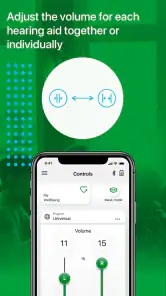
- Quick access to hearing-aid settings and support resources
- Helps users keep track of appointments and hearing-care information
- Useful guidance for getting started with compatible hearing devices
- Can simplify communication with TruHearing’s customer support team
- Convenient mobile access for users managing hearing-care services
Cons
- Features may be limited if you are not a TruHearing customer
- Compatibility can vary by hearing-aid model and mobile device
- Some functions may require an active internet connection
- The app may not replace in-person hearing tests or professional care
- Support and service availability can depend on your insurance plan
- Category
- Medical
- Version
- 2.8.0.16337












