Signia App
- 4.32K
- 2.9
- Installs
- 1.00M
- Price
- Free

Screenshots
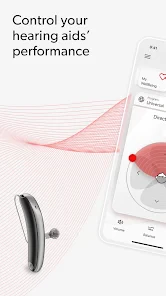
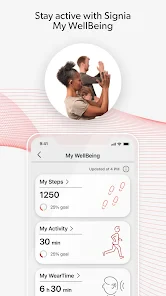
Analysis by Reviewed
I see the Signia App as a useful companion rather than a substitute for hearing care: its strongest value is letting Signia hearing-aid users make quick, practical adjustments from a phone. That convenience matters when the sound around you changes during the day, but it also sets a clear boundary. You need compatible Signia hearing aids to make the controls relevant, so this is not a general hearing-enhancement app for someone who simply wants to amplify phone audio.
Who will get the most from it
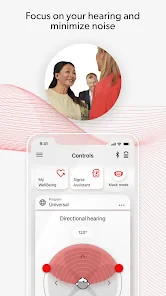
I’d recommend it first to people who already wear Signia hearing aids and want more control without reaching for the devices themselves. A simple example is arriving at a busy café: rather than sticking with one setting, you can use the app’s controls to adjust volume or choose a program for the surroundings. The benefit is less about turning every difficult conversation into an easy one and more about having a convenient way to respond when listening conditions change.
It is also a better fit for someone comfortable using a smartphone alongside their hearing aids. If you prefer physical controls or want an app that works independently of a hearing device, this probably isn’t the right choice. I’d also keep expectations measured: personalized settings can make listening feel more comfortable, but they do not replace professional advice when a hearing problem or device fit needs attention.
Everyday control, with a few practical trade-offs
The app is free, aimed at everyone, and comes from Sivantos Pte. Ltd. Its medical category makes sense given its role in managing hearing aids, but I would not treat it as a diagnostic tool. A helpful habit is to make small adjustments and pay attention to which settings suit particular environments, rather than changing several controls at once. That makes it easier to tell what actually helped when you move from a quiet room to a crowded one.
There is a useful distinction between adjusting sound and fixing the source of a problem. If voices remain hard to follow in a particular setting, changing volume may not be enough; the environment, hearing-aid program, or the devices themselves may be the issue. In that situation, I’d use the app as a control point, not assume that another tweak will solve everything. People seeking a broad hearing test, medical guidance, or support for non-Signia devices should look elsewhere.
Seamless Integration with Your Hearing Aids
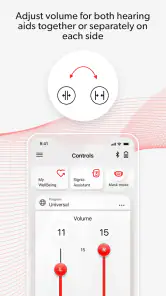
First off, let’s talk about integration. The app syncs flawlessly with your Signia hearing aids. I must admit, setting it up was a breeze. With just a few taps, I was connected and ready to go. What I appreciate most is how intuitive the app feels. It’s not one of those apps where you have to dig through endless menus to find what you need. Everything is right there at your fingertips. Hearing aid control is made simple with volume adjustments and program changes available instantly.
Personalized Hearing Experience
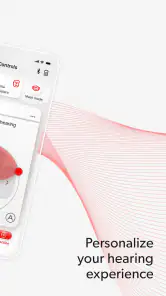
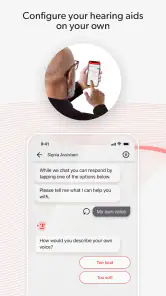
Now, onto my favorite feature: personalization. The app gives you the ability to customize your hearing settings. You can tweak the bass, mid, and treble to match your personal preferences. It’s like having an equalizer for your ears! Plus, the app learns from your habits and suggests adjustments that could improve your experience. It’s like having a little audiologist in your pocket.
More From Our News Desk

Weather by Xiaomi Review: Clear at a Glance, Less Clear Up Close

X Under Pressure: Can It Recover When Posting Goes Wrong?

Clash of Clans Is Won Between the Battles

Android Auto Makes the Case for Quieter Car Software

MobiOffice: Transforming Mobile Productivity with Seamless Integration

EA SPORTS FC™ Mobile Soccer: Redefining Mobile Sports Gaming
One nifty feature is the ‘Mask Mode’. In this day and age, where masks are part of our daily attire, this mode helps you hear speech more clearly when someone’s wearing a mask. I tested it out in a crowded café, and I have to say, it worked wonders!
Stay Connected with Ease
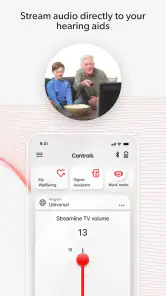
Let’s not forget about connectivity. The app supports Bluetooth streaming directly from your phone, so you can enjoy your favorite tunes or podcasts without missing a beat. Phone calls are also crystal clear, which is a huge plus for someone like me who’s always on the go. The connection is stable, and I’ve yet to experience any annoying dropouts.
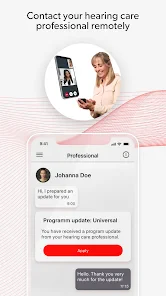
Moreover, the app keeps you updated with real-time notifications if there are any firmware updates for your hearing aids. It’s a nice touch that ensures your devices are always running the latest features.
What to expect before installing
The app has an average rating of around 2.9 from roughly 30,000 ratings, alongside about 4,300 written reviews, so user experiences are not uniformly glowing. I wouldn’t read that as proof that it will work poorly for you, but it is a reason to keep compatibility and connection expectations realistic. The important first question is whether your particular Signia hearing aids pair successfully with your phone; the app’s ease is only useful once that link is working.
Signia has passed one million installs, and its current version is 2.7.21.17379. It was released on September 16, 2019, and requires Android 10 or later. If your phone meets that requirement, the practical next step is to check that Bluetooth is enabled and keep the hearing aids close during setup. If pairing proves unreliable, repeated adjustments in the app are unlikely to help until the connection itself is stable.
How it compares with other options
Compared with the basic controls built into many hearing-aid apps, the appealing part here is the combination of program and sound adjustments with phone streaming and update notifications. Those extras make it more useful as an everyday companion than a remote volume slider alone. On the other hand, a device’s built-in controls may be quicker for someone who does not want to handle a phone, and a general audio app cannot offer the same direct relationship with Signia hearing aids.
For a realistic routine, I’d use the app before a long outing: check the current program, make a modest change if the setting calls for it, and leave the phone accessible for a later adjustment rather than constantly fine-tuning. At home, streaming a podcast or taking a call can be convenient, while a quiet conversation may need no intervention at all. That restraint is a useful part of getting value from personalization; more control does not mean every listening moment needs a change.
Keeping adjustments useful
There is a trade-off in having several ways to personalize sound: it is easier to experiment, but also easier to lose track of which change helped. I’d treat a familiar setting as a reference point and make one adjustment at a time, especially when moving between places with very different background noise. That approach is more practical than repeatedly changing tone and volume in the middle of a conversation, when it can be hard to judge the result.
A useful everyday test is a short, low-pressure situation rather than an important call or appointment. If a program or tone adjustment makes speech more comfortable in a particular room, note the setting mentally and see whether it helps again in a similar environment. If it does not, return to the prior choice instead of assuming that more tweaking must be better. The app gives you convenient control; your own listening comfort remains the measure of whether a change is worthwhile.
When a phone is the right remote
Phone control is most valuable when the device is already in your hand: changing a program before entering a noisy shop, adjusting volume during a walk, or starting a podcast without handling the hearing aids. It is less compelling when you want to make a quick change while carrying bags, wearing gloves, or trying to stay focused on another task. In those moments, the hearing aids’ own controls may be simpler if your devices offer them.
I would also think about who helps manage the devices. A family member may find it easier to assist with settings when the controls are visible on a phone, but the wearer should remain involved in deciding what sounds comfortable. The app can make adjustments accessible; it cannot tell another person how the wearer experiences speech or background noise. That distinction matters if the app is being used as part of someone else’s hearing routine.
Personalized Hearing Experience
Now, onto my favorite feature: personalization. The app gives you the ability to customize your hearing settings. You can tweak the bass, mid, and treble to match your personal preferences. It’s like having an equalizer for your ears! Plus, the app learns from your habits and suggests adjustments that could improve your experience. It’s like having a little audiologist in your pocket.
One nifty feature is the ‘Mask Mode’. In this day and age, where masks are part of our daily attire, this mode helps you hear speech more clearly when someone’s wearing a mask. I tested it out in a crowded café, and I have to say, it worked wonders!
Stay Connected with Ease
Let’s not forget about connectivity. The app supports Bluetooth streaming directly from your phone, so you can enjoy your favorite tunes or podcasts without missing a beat. Phone calls are also crystal clear, which is a huge plus for someone like me who’s always on the go. The connection is stable, and I’ve yet to experience any annoying dropouts.
Moreover, the app keeps you updated with real-time notifications if there are any firmware updates for your hearing aids. It’s a nice touch that ensures your devices are always running the latest features.
Final Thoughts
In conclusion, the Signia App has truly impressed me with its user-friendly interface and robust features. It’s a powerful companion for anyone using Signia hearing aids. Whether it’s the personalization options or the seamless connectivity, this app ensures that your hearing experience is nothing short of exceptional. If you’re looking to get the most out of your hearing aids, I’d highly recommend giving this app a try. Trust me, you won’t be disappointed!
My verdict
Overall, I think the app makes the most sense for an existing Signia hearing-aid user who wants convenient phone-based control, sound personalization, and streaming in one place. Its strongest case is everyday flexibility, not a promise to remove every listening challenge. Before relying on it, confirm that your devices pair with your phone and remember that the app complements the hearing aids rather than replacing them. If that matches what you need, it is worth trying; if you want an independent hearing tool or prefer not to manage settings on a phone, another option will suit you better.
Signia App Frequently Asked Questions
Can I use the Signia App without Signia hearing aids?
The Signia App is designed as a companion for compatible Signia hearing aids, rather than as a standalone hearing test or general listening app. Its main purpose is to let users manage aspects of their hearing-aid experience from a phone. If you do not use compatible Signia devices, the app is unlikely to offer the controls that make it useful.
Is the Signia App free to download, and does that mean using it is free?
The Signia App is free to download, which makes it easy to try if you already have compatible hearing aids. The app itself is a companion tool, though, and it does not replace the hearing devices it is designed to work with. Before downloading, consider whether you have compatible Signia aids and whether you want to manage them through your phone.
Is the Signia App suitable for someone who has not used a hearing-aid control app before?
The Signia App is intended to give hearing-aid users a way to manage their listening experience from a phone. If you are new to this kind of app, you can use its controls to make adjustments rather than relying only on the aids’ physical controls. The app is medical software for use with compatible Signia hearing aids, so it is most relevant if you already use, or are considering, those devices.
Who develops the Signia App, and what is its general reputation among users?
The Signia App is developed by Sivantos Pte. Ltd. It has an average rating of around 2.9 from roughly 30,000 ratings, alongside about 4,300 written reviews. Those figures suggest that experiences vary, so it is sensible to consider how well the app’s functions match your hearing aids and your needs rather than assuming every user will have the same experience.
What is the Signia App and what does it do?
The Signia App is a comprehensive mobile application designed for users of Signia hearing aids. It provides a seamless interface for controlling hearing aid settings, managing volume levels, and customizing listening experiences. The app also offers features such as remote support, allowing users to connect with their audiologists for assistance and adjustments without needing to visit a clinic.
Pros
- User-friendly interface for easy navigation.
- Comprehensive hearing aid customization options.
- Real-time hearing aid adjustments.
- Remote support from audiologists.
- Seamless Bluetooth connectivity.
Cons
- Requires internet for some features.
- Limited compatibility with older devices.
- Battery drain with continuous use.
- Complex setup for first-time users.
- Occasional connectivity issues.
- Category
- Medical
- Version
- 2.7.21.17379