

Track-It Hurricane Tracker
- 228.00
- 4.6
- Installs
- 50.00K
- Price
- Free

Screenshots
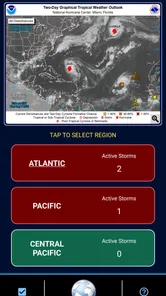
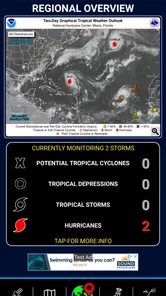
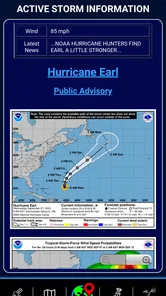
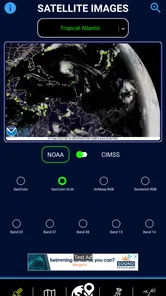
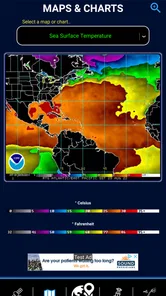
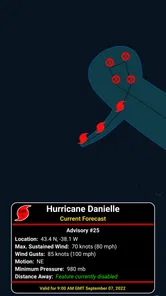
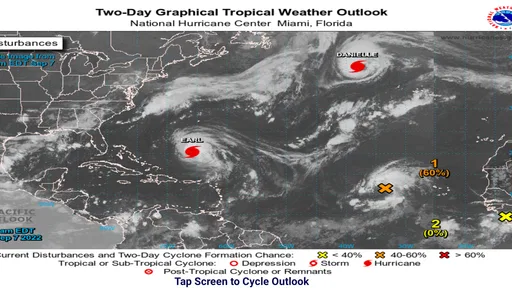
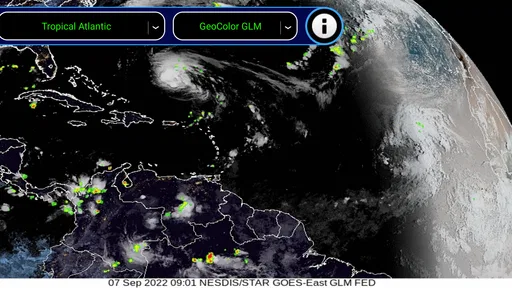
Analysis by Reviewed
When a tropical system starts appearing in the forecast, I would rather have a focused tracker than sort through a general weather app’s crowded home screen. Track-It Hurricane Tracker takes that narrower approach. Developed by Down South Customs, this free weather app is built around following hurricanes and tropical activity, with enough supporting tools to make it useful during an unfolding situation rather than merely interesting when the sky is clear.
My overall view is positive, but specific: this is a practical companion for people who actively monitor hurricane threats, not a complete replacement for official emergency information or a full everyday weather service. Its appeal comes from concentration. Instead of treating tropical systems as one small card among hourly temperatures and pollen counts, it gives them the attention they deserve.
The app has been available since September 23, 2010, and its long presence helps explain why it feels more like a dedicated utility than a fashionable weather interface. The current release is version 7.1.05, it runs on Android 5.0 and later, and the content rating is Everyone. That combination makes it approachable for a wide range of users, including households that want a simple screen to check together when a storm begins to matter.
What makes this hurricane tracker useful in real situations
I find a dedicated hurricane tracker most useful when it helps me make a steady habit of checking conditions, rather than encouraging a snap decision from one update. In this section, I focus on how that routine can fit around family plans, travel, and preparation, while keeping the tracker in its proper role alongside local guidance.
A focused view when general weather apps feel too broad
Most weather apps are designed for routine decisions: whether to carry an umbrella, what jacket to wear, or how hot the afternoon may become. Hurricane tracking requires a different rhythm. I want to see the storm’s progress, understand whether the situation is changing, and return to the same information repeatedly without rebuilding my search each time.
That is where Track-It earns its place. Its purpose is immediately clear, and the experience is centered on tropical systems rather than ordinary daily forecasts. The store summary describes it as a simple hurricane tracking app with many features intended to help users stay safe, and that description matches the app’s role best when “simple” means focused rather than bare.
I also appreciate that the app does not need to be useful every day to justify keeping it installed. A hurricane tracker is naturally seasonal and situational. It may sit untouched for weeks, then become one of the apps I check repeatedly during a developing storm. That is a different value proposition from a standard weather app, and Track-It understands it.
More From Our News Desk

 Gmail
GmailGmail in a Busy Inbox: Who Benefits Most?
From first account to crowded workday, Gmail earns its place through dependable search and flexible sorting—but its best fit depends on how much inbox maintenance you can tolerate.

 Prime Video
Switching to Prime Video: What Changes in Your Viewing Routine
Prime Video can make a compelling second home for streaming, but switching means learning a different catalog, rental layer, and route from browsing to playback.

 Universal TV Remote Control
Universal TV Remote Control Works Best as a Reliable Backup
A phone remote earns its place through quick setup and reliable habits. Here is how to get more from Universal TV Remote Control—and where its limits show.

 Weather - By Xiaomi
Weather by Xiaomi Review: Clear at a Glance, Less Clear Up Close
Xiaomi’s weather app makes everyday forecasts quick to scan, but its calm surface can leave useful details and recovery paths harder to find than they should be.

 X
XX Under Pressure: Can It Recover When Posting Goes Wrong?
A resilience-focused review of X, examining setup, mistaken posts, interruptions, weak connections, and the gaps that matter when recovery needs to be dependable.

 Clash of Clans
Clash of Clans Is Won Between the Battles
Its raids are quick; its community is a long-term project of coordination, teaching, rivalry, and shared responsibility—with all the friction that entails.
Latest News



Useful for building a repeatable checking habit
During severe weather, the hardest part is often not opening an app once. It is checking consistently without relying on memory, rumors, or a single dramatic social-media post. A dedicated tracker encourages a repeatable routine: open it at set points during the day, compare what has changed, and use that information alongside official alerts and local instructions.
One practical workflow is to check the tracker before work, again after returning home, and once more before making decisions about travel or outdoor plans. I would not treat any one screen as permission to ignore an evacuation order, but a focused tracker can help me recognize when a system deserves closer attention.
This is particularly useful for people who live near the coast, have family in a storm-prone area, manage property remotely, or travel through regions where tropical weather can disrupt plans. It can also help someone who is not directly threatened but needs to follow a storm affecting relatives or a planned trip.
Its modest footprint is part of the appeal
Track-It has attracted a solid audience, with more than fifty thousand installs and an average rating of 4.6 from around five hundred ratings. I see those figures less as proof that it will suit everybody and more as a sign that the app has found a clear audience. People who download a dedicated hurricane tool generally want that specific focus, and the rating suggests many of them find it worthwhile.
The app is free to download, which lowers the barrier to trying it before hurricane season rather than waiting until a storm is already approaching. There are in-app purchases ranging from $0.99 to $4.99 per item, so I would inspect the available options before assuming every feature is included at no cost. The free entry point is helpful, but users who want the fullest experience should be aware that extra purchases exist.
What I would do before relying on it
I would install it well before a storm, open it in calm conditions, and learn where the important information appears. That small preparation step matters. When a storm is approaching, a person may be stressed, distracted, or sharing the phone with another family member. Familiarity removes one unnecessary problem.
I would also keep a second source available. Official emergency management channels, local authorities, and established national weather services remain essential for warnings, evacuation instructions, shelter information, and location-specific decisions. Track-It can support that process, but a hurricane tracker should not be treated as the sole authority for personal safety.
Another useful habit is to avoid checking only when a storm looks dramatic. A system’s path and risk can change before conditions outside feel dangerous. Looking at the tracker regularly gives me a better sense of movement and timing than opening it only after strong winds begin.
Where the feature-rich approach helps
The app’s promise of “lots of features” matters because hurricane monitoring is not just about a single current temperature. A useful tracker needs to help users follow a system as it develops, and a dedicated feature set can make that process less fragmented than switching among several unrelated apps.
For me, the strongest benefit is continuity. I can return to one hurricane-focused tool instead of searching the web for a new map or article every time I want an update. That reduces friction and makes it easier to compare what I am seeing now with what I saw earlier.
There is also a psychological advantage to a dedicated tool. General weather apps often place severe events beside ordinary notifications, which can make an important tropical update feel like just another forecast tile. A hurricane tracker keeps the situation visually and mentally separate. That does not make the information more accurate by itself, but it can make me more attentive to it.
The meaningful limitation: focus is not the same as completeness
The same specialization that makes Track-It attractive can make it the wrong choice for some people. If I want a single app for radar, hourly forecasts, air quality, pollen, routine notifications, and hurricane monitoring, I would probably prefer a broader weather service. Track-It is better understood as a dedicated layer for tropical activity, not an all-purpose replacement.
I also would not use it as my only emergency resource. A tracker can show the broader storm picture, but local decisions depend on factors such as exact location, flooding, roads, terrain, shelters, and instructions from authorities. Those details may come through channels outside the app. Anyone who treats a hurricane tracker as a substitute for official alerts is asking it to perform a job it should not perform alone.
There is a second, smaller trade-off around optional purchases. The app is free, but the presence of paid items means the experience may not be identical for every user. I would rather know what is included before a storm than discover that a preferred convenience requires a purchase during an urgent moment. That is not automatically a flaw, but it is a reason to explore the app early.
The interface may also feel less compelling to someone who expects the polished visual design and broad personalization found in newer mainstream weather products. Track-It’s value is functional concentration. If my priority is animated presentation, extensive lifestyle data, or a highly customized daily dashboard, another weather app may feel more satisfying.
Who should install it
I think Track-It is a strong fit for residents of hurricane-prone regions, especially those who want a dedicated tool ready before the season becomes active. It also makes sense for relatives monitoring storms from another state, frequent travelers along coastal routes, landlords watching conditions around a property, and anyone who prefers a specialized app over a general forecast service.
It is suitable for households because the Everyone rating keeps the app broadly accessible. A parent could use it as one part of a family storm-preparation routine: check the tracker, review official local instructions, charge devices, and discuss what to do if conditions change. The app does not replace that conversation, but it can provide a shared starting point.
I would be more cautious recommending it to someone who rarely encounters tropical weather and only wants a normal daily forecast. That person may install it, find little reason to open it most of the year, and get more value from the weather app already on the phone. Likewise, users who need highly localized emergency guidance should prioritize official regional resources first.
How it compares with the usual alternatives
Compared with a standard weather app, Track-It is narrower but more intentional. A mainstream forecast app usually wins for everyday convenience because it combines current conditions, short-term forecasts, radar, and routine alerts. Track-It wins when the main question is not “What will the weather be this afternoon?” but “How is this tropical system progressing, and where should I look next?”
Compared with checking a browser search or social media, the dedicated app offers a more stable workflow. Search results can be inconsistent, while social feeds mix useful observations with speculation and repetition. A focused tracker gives me a place to begin, although I would still verify urgent decisions through authoritative channels.
Compared with official emergency apps or government websites, Track-It may be easier to use as a storm-following companion, while official sources remain more important for warnings and instructions. I see these tools as complementary rather than interchangeable. The best setup is not necessarily one app doing everything; it is a small, sensible combination where each source has a clear job.
Small habits that make the app more useful
First, I would use it before I need it. Installing during a crisis leaves less time to understand the layout, evaluate optional features, and decide whether it fits my routine. A quiet-day test is one of the simplest ways to prevent avoidable confusion.
Second, I would pair the app with a written household plan. The tracker can help me follow a storm, but it cannot decide where my family will go, which roads are safe, or how we will communicate if power and mobile service become unreliable. Turning app checks into concrete preparation is where the information becomes useful.
Third, I would avoid interpreting one update in isolation. Hurricane risk is about movement and changing conditions, not just a single snapshot. Looking at the trend across several checks gives me better context, while official guidance supplies the local meaning that a broad tracking tool cannot provide by itself.
Finally, I would review the purchase options while there is no pressure. Since individual in-app items cost between $0.99 and $4.99, knowing what I actually need helps me avoid buying impulsively. If the free experience covers my purpose, I can keep it simple; if an optional feature genuinely improves my workflow, I can make that decision calmly.
My final recommendation
After using it as a dedicated hurricane companion, I see Track-It as a focused and sensible choice rather than a universal weather solution. Its strongest quality is that it gives tropical weather its own space, which makes repeated monitoring easier than relying on a general forecast app that treats hurricanes as one item among many.
The limitations are important but manageable. I would not expect it to replace a complete daily weather service, and I would never rely on it alone for emergency instructions. The optional purchases also deserve a quick look before a storm arrives. Those points keep me from calling it indispensable for everyone.
For the right reader, though, the recommendation is clear. If you live near hurricane-prone areas, regularly follow storms affecting family or travel, or simply want a dedicated tracker ready when conditions change, I think Track-It Hurricane Tracker is worth installing while the weather is calm. Down South Customs has made a specialized tool with a clear purpose, and its best use is straightforward: follow the storm here, confirm decisions with official sources, and use both to prepare before urgency takes over.
Track-It Hurricane Tracker Frequently Asked Questions
Who is Track-It Hurricane Tracker intended for?
Track-It Hurricane Tracker is a weather app for people who want to follow tropical storms and hurricanes, whether they live in a potentially affected area or are keeping an eye on conditions elsewhere. Its content rating is Everyone, and it is free to download. The developer is Down South Customs. As with any weather tool, its information is best used alongside official local guidance when safety decisions are involved.
What devices can run Track-It Hurricane Tracker?
The app supports Android devices running version 5.0 or later. Before downloading, check your device’s operating system version and make sure you have enough space for the installation. Track-It Hurricane Tracker is designed for mobile use, so you can check storm information while away from home when you have a connection. Keeping your device charged is also helpful during severe weather, when access to timely updates can matter.
Is Track-It Hurricane Tracker free, and does it include in-app purchases?
Track-It Hurricane Tracker is free to download, with in-app purchases priced between $0.99 and $4.99 per item. You can install it without an upfront purchase, then review any optional purchase details in the app before confirming a transaction. If you prefer not to make purchases, check your device’s purchase controls and settings. The app’s core purpose is hurricane tracking, so consider which features you actually need before buying extras.
What is Track-It Hurricane Tracker used for?
Track-It Hurricane Tracker is designed to help users monitor tropical storms, hurricanes, and other developing weather systems. It typically presents storm locations, forecast paths, intensity information, projected movement, and related alerts in one place. The app can be useful for everyday awareness, travel planning, and following a storm, but it should complement—not replace—official instructions from local emergency authorities.
Does Track-It Hurricane Tracker provide live hurricane updates?
The app is intended to display regularly updated hurricane and tropical-weather information, including storm positions and forecast changes. How quickly information appears depends on the available data source, your internet connection, and the app’s update schedule. During an active emergency, users should also check official meteorological agencies and local government announcements, since those sources may issue urgent warnings before third-party tracking apps refresh.
Pros
- Clear hurricane paths and projected movement are easy to follow.
- Useful storm alerts help users stay informed during active systems.
- Supports tracking multiple storms in different regions.
- Maps provide valuable context for nearby coastlines and locations.
- Helpful for trip planning during hurricane season.
Cons
- Forecast paths can change quickly and should not replace official warnings.
- Some advanced tracking features may require a subscription.
- Frequent alerts may become distracting during busy storm periods.
- Map details can be difficult to read on smaller phone screens.
- Reliable internet access is needed for current storm information.











