

The Old: Antique Identifier
- 348.00
- 4.8
- Installs
- 50.00K
- Price
- Free

Screenshots

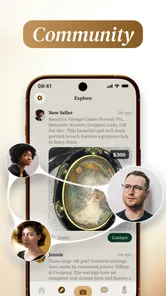
Analysis by Reviewed
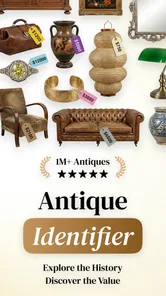
I tried The Old: Antique Identifier with a simple question in mind: can a phone camera make the first step of researching an old object easier, or is it just a quick novelty? My impression is that it is most useful as a starting point. It turns a photograph of an antique into an initial conversation about possible identity, rarity, value, and selling, but it should not be treated as a final appraisal.
That distinction matters because an old object can be difficult to judge from appearance alone. Condition, repairs, provenance, materials, maker’s marks, regional style, and current demand can change its value dramatically. The app is appealing because it brings those questions together in a mobile education tool rather than making you search through scattered pages immediately. I found the experience particularly interesting for estate-sale browsing, inherited household items, flea-market discoveries, and anyone who is simply curious about what has been sitting in a cupboard for years.
Developed by LeoStudio Global Ltd., this free app belongs to the education category and is suitable for Everyone. It runs on Android from version 8.0 onward, so it is accessible on many older devices as well as newer phones. The current release is version 1.0.5, and its average rating is 4.8 from around 2.3 thousand ratings. It has passed 50 thousand installs, which gives it a meaningful early audience without making it feel like an established professional valuation service.
How The Old fits into real antique research
I find it helpful to treat antique research as a chain of small decisions rather than a single scan: what to photograph, which clues to trust, and what to check next. That approach makes it easier to keep the app’s suggestions in proportion, especially when an object’s story or condition matters as much as its appearance. The next section looks at how those pieces fit together in a practical investigation.
A useful first pass, not a replacement for expertise
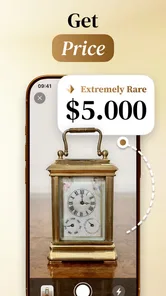
The central workflow is easy to understand: photograph an object, let the app examine the image, and use the result to guide further research. That makes the tool less intimidating than opening a general search engine and trying to describe an unfamiliar vase, clock, chair, coin, or decorative item with the right words.
What I like about this approach is that it helps create a vocabulary. A beginner may not know whether an object looks Victorian, Art Deco, mid-century, handmade, mass-produced, or influenced by a particular craft tradition. Even an imperfect suggestion can point the next search in a more productive direction. Instead of searching for “old bowl with flowers,” you may begin looking into a material, style, period, or object type that gives your research more focus.
The value estimate should be read in the same spirit. It can help you decide whether an item deserves closer inspection, but it cannot see everything that affects a sale. A clean, well-lit photograph may reveal shape and decoration while hiding hairline cracks, replaced parts, fading, odor, unstable joints, or later alterations. A high-looking estimate is a reason to investigate, not a reason to assume you have found a bargain.
More From Our News Desk

 Gmail
GmailGmail in a Busy Inbox: Who Benefits Most?
From first account to crowded workday, Gmail earns its place through dependable search and flexible sorting—but its best fit depends on how much inbox maintenance you can tolerate.

 Prime Video
Switching to Prime Video: What Changes in Your Viewing Routine
Prime Video can make a compelling second home for streaming, but switching means learning a different catalog, rental layer, and route from browsing to playback.

 Universal TV Remote Control
Universal TV Remote Control Works Best as a Reliable Backup
A phone remote earns its place through quick setup and reliable habits. Here is how to get more from Universal TV Remote Control—and where its limits show.

 Weather - By Xiaomi
Weather by Xiaomi Review: Clear at a Glance, Less Clear Up Close
Xiaomi’s weather app makes everyday forecasts quick to scan, but its calm surface can leave useful details and recovery paths harder to find than they should be.

 X
XX Under Pressure: Can It Recover When Posting Goes Wrong?
A resilience-focused review of X, examining setup, mistaken posts, interruptions, weak connections, and the gaps that matter when recovery needs to be dependable.

 Clash of Clans
Clash of Clans Is Won Between the Battles
Its raids are quick; its community is a long-term project of coordination, teaching, rivalry, and shared responsibility—with all the friction that entails.
Latest News



Why the camera setup changes the result
Antique identification is unusually sensitive to photography. I would not take one rushed picture and accept the first result as definitive. For a better session, I would photograph the entire object first, then capture separate images of the front, back, underside, close-up details, labels, signatures, stamps, serial marks, fasteners, and damaged areas.
Lighting is just as important. Strong reflections can hide glaze, engraving, or surface wear, while a dark room can make materials look older or heavier than they are. Soft daylight is usually a safer starting point than a harsh flash. A plain background also helps the object stand out, especially when its shape is the main clue.
One practical insight is to keep the original image and the detail images together rather than treating each scan as a separate discovery. The full view establishes proportions; the close-ups provide evidence. If the app offers a more convincing interpretation after seeing a mark or construction detail, that change is useful information in itself. It shows which visual clues are carrying the most weight.
Where the educational angle works best
The Old is a good fit for people who want to learn while investigating. A parent and child could use it to examine objects in a family home, a student could use it to organize preliminary observations for a history project, and a collector could use it to create a shortlist before consulting specialist references.
It is also helpful when you are unsure whether an object deserves more time. Imagine finding an unfamiliar lamp at a charity shop. Instead of buying it solely because it looks old, you can inspect its base, wiring, shade fittings, and markings, then use the app’s visual guidance as one part of your decision. The result may encourage deeper research, or it may reveal that the piece is more ordinary than its appearance suggested. Either outcome can save time.
When another option is better
A specialist dealer, auction house, museum reference, or experienced collector remains the better choice for an expensive purchase, insurance documentation, estate division, or a dispute over authenticity. Those situations require physical inspection and context that a phone image cannot provide.
General web search is also stronger when you already have a distinctive maker’s mark or a clearly readable model number. In that case, typing the exact text into a search engine or checking a specialist catalog may be faster than beginning with image recognition. The Old is most useful before you know what to search for, not necessarily after the answer is already visible on the object.
Connectivity is part of the experience
The app’s image-centered workflow naturally makes connectivity important. Taking a picture is only one stage; the useful part comes when the image is processed and the app returns guidance about identity, rarity, value, or selling. I found it best to think of each scan as a small online research request rather than as a completely self-contained camera utility.
That affects where I would use it. At home, with a stable connection, I could take several careful images and compare the results without rushing. In a crowded market, basement, storage unit, or rural property, the experience may be less predictable if the network is weak. I would not make a purchase decision based on a scan that has not completed properly or that was made under poor signal conditions.
The connection also changes the rhythm of browsing. A quick object check can become a stop-and-wait process if you photograph every item in a room. My advice is to narrow the selection first. Look for unusual construction, marks, materials, or condition, then scan the objects that genuinely raise a question. This keeps the app from becoming a slow substitute for basic visual inspection.
Using it while moving through real places
Mobile use sounds convenient, but antiques are often found in awkward environments. You may be standing in a shop aisle, holding an object with one hand, dealing with dim lighting, or trying not to block other customers. In those situations, the best workflow is to take a quick overall photo only when the object is stable, then return for detail shots if the first result suggests that the item deserves attention.
I would avoid photographing fragile objects while they are balanced on a narrow shelf or being passed around. Put safety and handling first. The app cannot compensate for a cracked ceramic piece dropped during an enthusiastic scan. When an item is valuable or delicate, ask permission before moving it and photograph it where it already rests.
A second mobile insight is to record the surrounding context separately in your notes or camera roll: where the object was found, what came with it, whether there was a box or receipt, and what the seller said about its history. The app may help interpret the appearance, but provenance often depends on details that are outside the frame. Keeping those observations beside the images makes later research much more reliable.
What happens when a scan goes wrong
Image recognition can struggle with cluttered backgrounds, partial views, transparent materials, repeated patterns, reflections, and objects that combine several styles. A decorative reproduction may also look convincing enough to receive an overly confident interpretation. If the result seems too precise for the quality of the photograph, I would treat that as a signal to rescan rather than as proof.
My recovery routine would be straightforward: clean the lens, move to softer light, place the object against a calmer background, include the full shape, and then add close-ups of marks and construction. I would also remove unrelated objects from the frame. These changes improve the evidence without requiring any special knowledge.
If a scan fails because the connection is interrupted, I would wait until the phone has a dependable network and repeat the process rather than repeatedly tapping the same action. Repeating an unclear request rarely solves the underlying problem. Keeping the original photos means the object does not need to be handled again just to try another scan.
Recovery also means questioning the output. If one image suggests a rare item but the underside shows modern fittings, that contradiction deserves attention. If the estimated value changes sharply after a small change in angle, the result is probably sensitive to visual assumptions. In both cases, the disagreement is more useful than blindly choosing the most attractive answer.
Managing data and purchase expectations
Because the app is free to download, it is easy to begin experimenting without a financial commitment. It does include in-app purchases ranging from $4.99 to $34.99 per item, so I would check which part of the experience is available without payment before building a serious workflow around it. A casual user may be satisfied with occasional exploration, while someone scanning a large collection should understand how continued use fits their budget.
For data-conscious use, I would avoid scanning every object automatically. Select the clearest and most relevant images, especially when you are dealing with a large room or a whole inherited collection. Besides reducing unnecessary uploads, this makes your research easier to organize. Name or group the original photos by object and keep notes about condition, dimensions, and marks.
I would also be careful with personal material in the background. A photograph of an antique can accidentally include family documents, addresses, faces, or other private belongings. Before sending an image for analysis, move those items out of frame or crop the picture when practical. This is a small habit, but it is particularly important when photographing collections inside someone’s home.
There is another trade-off between convenience and evidence. A tightly cropped image may protect surrounding privacy and focus the analysis, but it can remove useful clues about scale or context. I prefer taking a clean full-object photograph first, then a separate close-up that excludes unrelated personal details. That gives the investigation both context and a more focused view.
Who should install it
I would recommend The Old to curious beginners, casual collectors, families sorting inherited objects, and shoppers who want a fast research prompt before deciding what to investigate. It is especially suitable if you enjoy learning the language of antiques and are willing to verify interesting results instead of treating the app as an authority.
It is less suitable for someone who needs a legally defensible valuation, a guaranteed authentication, or a professional condition report. It is also not the ideal first choice for a person who already has deep expertise in a narrow field and mainly needs catalog-level references. In that case, specialist books, databases, dealers, and auction archives may provide more precise evidence.
People with limited or unreliable connectivity should plan their use carefully. The app makes the most sense when you can photograph objects in a suitable place and allow the analysis to complete. If your main goal is to identify items during fast-paced shopping, a failed or delayed scan could be frustrating, and basic knowledge of maker’s marks may serve you better in the moment.
My practical workflow for getting better answers
I would use the app in five stages. First, inspect the object without opening the camera: note its material, construction, wear, dimensions, and anything unusual. Second, take a balanced full view in good light. Third, photograph the evidence that a general image misses, including marks, joints, backs, bases, and damage. Fourth, compare the app’s suggestions with those observations rather than accepting the headline interpretation. Finally, use the most distinctive terms from the result to continue research elsewhere.
This workflow prevents a common mistake: allowing the estimated value to influence how you see the object. Start with what is physically present, then consider the app’s interpretation. If the object is potentially valuable, seek a human opinion before selling it. When listing an item, describe its condition honestly and avoid presenting an automated estimate as a guarantee to buyers.
I also recommend treating rarity as a question, not a label. An unusual appearance does not always mean scarcity, and a common object can still be desirable in excellent condition. Compare similar examples, look for consistent maker information, and pay attention to whether the app’s interpretation depends on one ambiguous feature. This is where the educational purpose becomes more valuable than the raw estimate.
My verdict on connected antique discovery
The Old: Antique Identifier is a promising educational companion for the first stage of antique research. Its strongest quality is accessibility: a photograph can help a newcomer move from vague curiosity to more focused questions about an object’s style, possible age, rarity, value, and selling options. I enjoyed that it encourages investigation rather than requiring a specialist vocabulary from the beginning.
Its limitations are equally important. Image-based guidance depends on the quality of the photograph and the reliability of the connection, while valuation depends on details a camera may not capture. The free entry point is welcoming, but the available purchases mean frequent users should understand the cost of extended use. None of those issues makes the app pointless; they simply define the role it can play.
My recommendation is to use it as a connected first opinion, with careful photography and healthy skepticism. It is excellent for deciding which objects deserve closer research, less convincing as the final word on authenticity or price. If you approach it that way, The Old: Antique Identifier can make a confusing collection feel more approachable while still leaving room for the human judgment that antiques ultimately require.
The Old: Antique Identifier Frequently Asked Questions
Is The Old: Antique Identifier free to download, and are there in-app purchases?
The Old: Antique Identifier is free to download, with in-app purchases available for additional paid features. The app is listed in the Education category and is intended for everyone. Before using any paid option, review its price and terms in the app store so you can decide whether the available features fit your needs.
What devices and operating systems can run The Old: Antique Identifier?
The Old: Antique Identifier is available for Android devices running Android 8.0 or later. Check your device’s operating system before downloading, and make sure you have enough available storage for the app. The app’s current version is 1.0.5, so keeping it updated through your app store can help you use the latest release.
What is The Old: Antique Identifier used for?
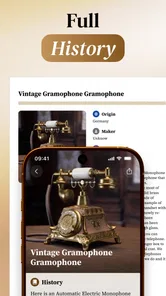
The Old: Antique Identifier is designed to help users learn more about antiques, vintage objects, collectibles, furniture, artwork, and other potentially valuable items. You can use the app to examine an object and receive an estimated identification, historical context, and general information. It is most useful as a convenient first reference before researching an item through specialist catalogs or professional appraisal services.
How do I identify an antique with The Old: Antique Identifier?
To identify an object, take clear photographs of the item using good lighting and include important details such as markings, signatures, labels, materials, and visible damage. The app analyzes the information provided and presents a suggested identification or description. For better results, photograph the object from several angles and avoid blurry images, reflections, shadows, or backgrounds that hide its distinctive features.
Can The Old: Antique Identifier determine the exact value of an item?
The Old: Antique Identifier may provide useful guidance about an object’s possible category, age, style, or historical background, but its results should not be treated as a definitive valuation. Antique prices depend on authenticity, condition, provenance, rarity, demand, and current market trends. If you are considering selling, insuring, or purchasing an expensive item, consult a qualified appraiser or specialist.
Pros
- Identifies many antiques
- artworks
- and collectibles from a single photo.
- Provides quick results without requiring specialist knowledge.
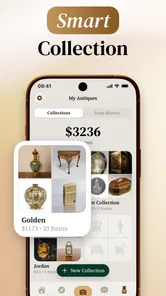
- Useful for organizing and reviewing items in a personal collection.
- Helps estimate an object’s historical context and potential value.
- Simple interface makes image-based searches easy for beginners.
Cons
- Photo quality and lighting can strongly affect identification accuracy.
- Results should not replace an appraisal from a qualified antiques expert.
- Some advanced features may require a subscription or in-app purchase.
- Rare or regional objects may receive limited or inaccurate information.
- Uploading collectible photos may raise privacy concerns for some users.













