Homework Helper & Math Solver
- 827.00
- 4.5
- Installs
- 1.00M
- Price
- Free

Screenshots

Analysis by Reviewed
I’m wary of homework apps that promise to make every difficult question simple, because a quick answer is not the same as learning how to reach it. Homework Helper & Math Solver is most useful when I treat it as a study aid: it can scan a question and help unpack a solution, but I still need to check that the reasoning makes sense for the lesson I’m working on.
Where students can get stuck
The first hurdle is often the question itself. A photo of a crowded page, faint pencil marks, or an equation written at an angle can make scanning less reliable than entering a clean problem. I’d take a close, well-lit picture with just one question in view, then check that the app has interpreted every symbol correctly before trusting the result. A missed minus sign or exponent can lead to a polished explanation for the wrong problem.
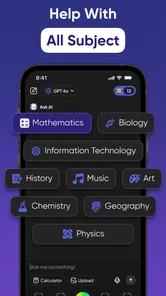
That matters especially in chemistry and geometry, where notation, diagrams, and labels carry meaning that a plain string of text may not capture. If the scan seems off, I would reframe the page or type the problem in a clearer form rather than repeatedly submitting the same image. The app’s appeal is that it can handle more than basic arithmetic, but broad subject coverage does not remove the need to inspect what it has understood.
Set up for a useful study session
This is a free education app from LeoStudio Global Ltd., with optional in-app purchases listed from $2.99 to $39.99 per item. Its audience rating is Everyone, and the current version is 1.6.9; it runs on Android 8.0 or later. Before relying on it for a study session, I’d make sure the app is up to date and that the device can take a clear picture. Those simple checks help separate a camera or version hiccup from a problem with the question itself.
Its scale is reassuring without being a guarantee: it has over a million installs, around 22,000 ratings, and a 4.5 average. I’d still judge it on whether it handles my own course material accurately. The free starting point makes it easier to try before paying, while the in-app purchases mean I would check what is included in any offer before committing. A student who only needs occasional help may have different needs from someone using it every evening.
Using it without handing over the learning
When I first downloaded Homework Helper & Math Solver, I was curious but skeptical. After all, many apps claim to help with math but fall short when it comes to more complex problems. But, boy, was I in for a surprise! The app is designed to cater to a wide range of mathematical queries, from basic arithmetic to more advanced calculus and statistics. It's like having a math tutor in your pocket, ready to assist at any time.
Features That Stand Out
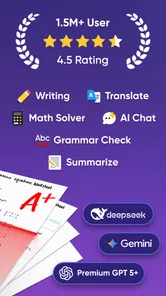
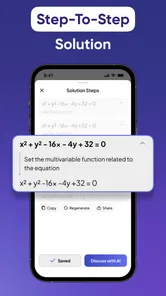
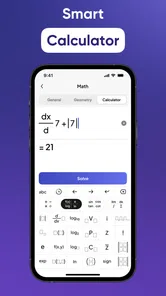
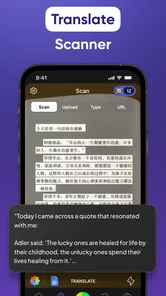
The first thing that caught my attention was the app's ability to scan handwritten problems. I mean, how cool is that? You just point your camera at your scribbled equations, and the app gets to work. No need to type in long equations, which is a massive time-saver. Additionally, the step-by-step solutions provided are a game-changer. They don't just give you the answer; they walk you through the process, ensuring you grasp the concept behind the problem.
More From Our News Desk

Weather by Xiaomi Review: Clear at a Glance, Less Clear Up Close

X Under Pressure: Can It Recover When Posting Goes Wrong?

Clash of Clans Is Won Between the Battles

Android Auto Makes the Case for Quieter Car Software

MobiOffice: Transforming Mobile Productivity with Seamless Integration

EA SPORTS FC™ Mobile Soccer: Redefining Mobile Sports Gaming
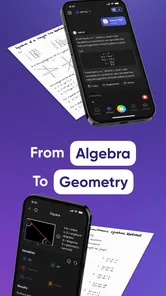
Another feature worth mentioning is the interactive graphing tool. It’s incredibly intuitive and perfect for visual learners who need to see the problem from a different perspective. Plus, the app supports a variety of languages, making it accessible to a global audience. It’s like having a multilingual math genius at your fingertips!
Make the solution teach you something
A more useful routine than copying an answer is to attempt the question first, use the explanation to find the step where you got lost, then close the app and try a similar question from your notes. For algebra, I’d compare how the app handles each transformation with the method my teacher expects; for a graph, I’d check whether the shape and intercepts fit the original expression. That extra check turns a solved exercise into practice rather than answer collection.
For example, if I were stuck on a geometry question after school, I’d photograph only the diagram and its text, verify that the labels were read correctly, and use the worked solution to identify the theorem or relationship I had missed. I would then write that rule beside the problem and redo it without looking. If the explanation skips a step I need, or uses a method my class has not covered, I’d use it as a clue and ask a teacher or classmate to clarify rather than assume the app’s route is the only valid one.
Useful routines for different kinds of homework
The scanner is most valuable when handwriting or notation would make typing tedious, but it is not automatically the best starting point for every exercise. For a short arithmetic expression, entering it directly can be quicker than framing a photo and checking the recognition. For a long equation, scanning may save effort, provided I inspect the symbols before moving on. That small choice of input method can prevent a frustrating cycle of correcting an answer that was based on a misread question.
I’d also use the app differently depending on what I’m trying to learn. If I’m practicing a procedure, I’d cover the final answer as soon as I can and work through the steps myself. If I’m reviewing a graph, I’d compare its visual shape with what I expect from the equation rather than treating the picture as proof. For chemistry, I’d pay particular attention to whether the formula and notation were captured as intended; a solution to a slightly different expression is not a useful shortcut.
A realistic evening use might be a student finishing a worksheet who reaches one unfamiliar algebra problem after completing the rest independently. Rather than sending the whole page through at once, I’d isolate that item, check the readout, and look for the first step that differs from my own attempt. Then I’d put the phone aside and solve it again on paper. This keeps the app in the role of a targeted explainer, instead of turning a whole assignment into a sequence of answers to copy.
A Few Bumps on the Road
Now, I’d be lying if I said the app was perfect. There are a few hiccups, like occasional glitches when scanning particularly messy handwriting. Also, while the free version of the app is quite comprehensive, there are some features locked behind a paywall. But honestly, considering the value it provides, the premium version seems like a worthy investment for those who regularly struggle with math.
And let’s not forget the occasional ads. They can be a bit intrusive at times, but hey, that’s the trade-off for a free app with such a robust offering.
What to check before paying
Because the app is free to start and offers optional purchases, I’d use a few real assignments to decide whether an upgrade makes sense. I’d note which tasks I return to it for, whether the free access covers those tasks, and whether any paid option clearly addresses a limitation I have actually encountered. A broad price range alone doesn’t tell me which purchase fits my needs, so I would read the offer carefully rather than assume that paying will fix a scan that is simply unclear.
That distinction matters for occasional users. If I only need help now and then, a notebook, class materials, and a teacher’s explanation may cover most of the same learning need without a recurring habit of opening another tool. For someone who regularly works through problems independently and benefits from seeing steps, the convenience may be more worthwhile. Either way, I’d make the decision based on how it performs with my own subjects, not on the idea that a paid option must be better.
When a different approach works better
Compared with doing every exercise by hand, a scanner can save time when a problem is long to enter, but it can also hide a transcription mistake behind a confident-looking answer. Compared with a general web search, a focused homework helper can keep attention on the problem and its working, while a textbook or teacher is better when I need a course-specific explanation, feedback on my own method, or a reliable sequence of lessons. I would skip this app as my main study plan if I need structured teaching from the ground up, or if my assignment rules prohibit outside solving tools.
For quick troubleshooting, I’d first retake the image with the full question visible, then simplify the input if the scan still misreads it. If a result seems strange, I’d test it in the original equation or compare it with the graph instead of assuming a loading problem. A weak connection or a device issue can also interrupt an app workflow; checking those basics and reopening the question is a sensible first move, without changing the math just to make an answer appear.
When the problem is bigger than the app
Sometimes a solution feels confusing because I have missed an earlier idea, not because the scan or the app has failed. If several steps rely on a rule I do not recognize, I’d pause and look up that topic in my course notes or ask someone to explain the foundation first. A solver can help with a particular exercise, but it is not a substitute for a planned lesson or feedback on a pattern of mistakes.
I’d also be cautious about using any homework helper during graded work unless the teacher’s rules clearly allow it. The safest use is usually practice, checking an attempt, or reviewing a worked example after class. If the assignment is meant to show independent reasoning, the right choice may be to keep the phone away and use the app later to review a similar problem. That boundary protects both the purpose of the exercise and the student’s confidence in their own work.
The Final Verdict
In conclusion, Homework Helper & Math Solver is a stellar app that lives up to its promises, making math less of a chore and more of an engaging challenge. Whether you’re a student, a parent, or just someone who enjoys dabbling in numbers, this app is a fantastic addition to your digital toolkit. It’s like having a personal math assistant who’s patient, knowledgeable, and always ready to help.
So, if you haven’t tried it yet, what are you waiting for? Give it a go and let it transform the way you approach math problems. Trust me, your future self will thank you!
My practical verdict
I’d recommend trying it for targeted help with a stuck exercise, particularly when seeing the working or a graph may make the idea click. I wouldn’t pay for an upgrade until I had checked how often I actually use it and whether the features I need are available there. The strongest results come from treating its answer as a prompt to think, not a substitute for thinking; if it misreads a question or its method does not match the class, a clear rewrite, notes, or a human explanation is the better next step.
Overall, I see it as a practical companion for students who want help getting past a specific obstacle and are willing to verify what they see. Its scan-and-explanation approach is more convenient than searching for every problem separately, while a textbook or tutor remains the better choice for systematic instruction and personal feedback. I’d try it on a few ordinary questions first, keep the steps honest by reworking them independently, and decide from that experience whether it deserves a regular place in my study routine.
Homework Helper & Math Solver Frequently Asked Questions
Is Homework Helper & Math Solver free to download, and are there optional purchases?
Homework Helper & Math Solver is free to download, though it also offers in-app purchases ranging from $2.99 to $39.99 per item. You can start with the free app and decide whether any paid options suit your needs. Check the purchase details shown in the app before confirming a transaction, especially if a child will be using the device.
What is Homework Helper & Math Solver app?
Homework Helper & Math Solver is an educational app designed to assist students with their homework and math problems. It offers a variety of tools and resources, including step-by-step solutions, explanations, and tutoring support to help users understand and solve complex mathematical equations effectively. Its store summary highlights scanning and solving homework across topics from basic math to geometry and chemistry using ChatGPT-4.1o.
How does the app ensure accuracy in solving math problems?
The app utilizes advanced algorithms and a vast database of mathematical solutions to ensure accuracy in solving math problems. Users can rely on its step-by-step solutions which are verified by educational experts. Additionally, the app is regularly updated to include the latest educational standards and methodologies. As with any homework aid, it is sensible to review the reasoning and compare it with what you have learned rather than copying an answer without understanding it.
What device requirements should I check before downloading?
The app is available for Android devices running version 8.0 or later. It is listed as an Education app developed by LeoStudio Global Ltd., and its content rating is Everyone. Before downloading, check your device’s operating system version and available storage, and use the app-store page for your device to confirm compatibility and download it.
Is the app suitable for all age groups and education levels?
Yes, Homework Helper & Math Solver is designed to cater to a wide range of age groups and educational levels, from elementary to college students. The app provides customized solutions and explanations that are tailored to the user's level of understanding, making it a versatile tool for learners at different stages. The app is rated Everyone, though younger students may still benefit from guidance when using homework-solving tools.
Pros
- Features step-by-step problem solving.
- Covers a wide range of math topics.
- Includes a built-in graphing tool.
- Offers a user-friendly interface.
- Provides quick and accurate solutions.
Cons
- Limited offline functionality.
- Some features require a subscription.
- Interface may seem cluttered at first.
- Advertisements can be distracting.
- Limited support for advanced math topics.













