Summary - AI Note Taker
- 315.00
- 4.6
- Installs
- 500.00K
- Price
- Free
Screenshots
Analysis by Reviewed
I judge an audio note-taking app by what happens after the recording ends: can I find the important point, trust it enough to act on, and pass it on without creating extra work? Summary - AI Note Taker is built for that path from spoken conversation to written reference. I see its strongest use in meetings, classes, and planning sessions where listening is more valuable than trying to write every sentence down.
Start with the kind of conversation you need to remember
Before opening the recorder, I would ask what I need to take away. If the goal is a quick reminder—“send the draft tomorrow,” for example—typing it directly into a basic notes app is simpler. If a conversation contains several ideas, explanations, or decisions, an audio-first approach is more useful because it gives me material to revisit instead of relying on memory or hurried shorthand.
That does not mean every conversation deserves a recording. I would consider whether recording is appropriate, let the people involved know, and follow any workplace or classroom rules. For a confidential discussion, a sensitive appointment, or a situation where others are uncomfortable being recorded, I would choose handwritten notes or ask permission first. Convenience should not outweigh consent or trust.
The app is a productivity tool from Labhouse Mobile, and its purpose is narrower than a general notebook: it focuses on spoken information and turning it into a written record I can review. That focus is valuable when I have a real reason to revisit a discussion, but it is unnecessary overhead for a passing thought or a short to-do list.
From conversation to usable notes
The first thing that struck me about Summary - AI Note Taker was its clean and intuitive interface. From the moment you open the app, it feels like everything is right where you expect it to be. The navigation is smooth, and the layout is minimalistic, making it easy to dive straight into note-taking without any distractions.
Getting ready before people start talking
Setting up the app is a breeze. After a quick and painless signup process, you're ready to start capturing your thoughts. The app offers a handy tutorial that guides you through the main features, which is great if you want to hit the ground running. Trust me, even if you're not tech-savvy, you'll find it pretty straightforward.
One of the standout features here is the seamless integration with your calendar. You can sync your meetings and appointments, and the app automatically prepares to take notes during these events. It's like having a personal assistant who never misses a beat.
More From Our News Desk

Clash of Clans Is Won Between the Battles

Android Auto Makes the Case for Quieter Car Software

MobiOffice: Transforming Mobile Productivity with Seamless Integration

EA SPORTS FC™ Mobile Soccer: Redefining Mobile Sports Gaming

How Microsoft OneDrive Became a Mobile Productivity Giant

How Google Translate Breaks Language Barriers Effortlessly
I would still build in a quick pre-meeting check rather than assuming automation has handled everything. Confirm that the right event is on the calendar, that the app is ready, and that recording suits the situation. This small habit is especially useful when a day includes informal calls or last-minute changes: a calendar entry can help organize a routine, but I would not let it replace checking the actual meeting details.
Capture first, then review while context is fresh
For a smoother handoff from conversation to useful notes, I would first check that the meeting is on the calendar and that the app is ready before people start talking. At the end, I would review the summary while the discussion is still fresh, correct names or phrases that matter, and turn any commitments into a separate task or follow-up message. This small review is important: a summary can help me find the thread of a conversation, but it cannot decide whether a vague suggestion was an agreed action.
In a typical workday, I might use the recording for a planning call, then revisit the written version before sending a recap to a colleague. That is a better fit than trying to share a raw transcript as if it were polished minutes. The useful output is the combination of a searchable record and my own judgment about what should be passed along.
A practical tip is to listen for the difference between an idea and a commitment. “We could test this next week” is not necessarily the same as “I’ll run the test next week.” When I review an AI-generated account, I would check that distinction before turning a sentence into an assigned task. That is a small edit, but it can prevent a note from quietly changing what the group agreed to do.
What the transcription and summary are good for
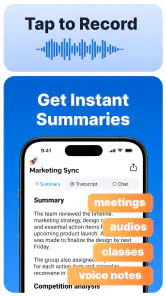
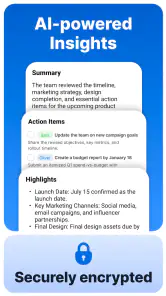
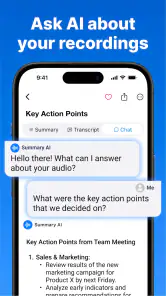
The AI-powered note-taking is nothing short of impressive. It listens to your meetings and conversations, and intelligently captures the key points. The best part? It organizes these notes into concise summaries, so you’re not left sifting through pages of unnecessary information.
The voice recognition is top-notch. It accurately transcribes spoken words, even when multiple people are talking. This feature is a game-changer for anyone who’s ever struggled to keep up with fast-paced discussions.
Another cool feature is the ability to tag and categorize notes. You can easily find what you're looking for without scrolling endlessly. Plus, the search functionality is robust, making it a snap to locate specific information.
I would treat the transcript and the summary as two different tools. A summary is the faster route when I want the main thread; the fuller text is more useful when I need to check how a point was phrased or recover a detail that did not make the short version. Neither should be treated as an unquestionable record. Names, technical terms, overlapping speech, and decisions with consequences deserve a human check.
Make later retrieval easy, not elaborate
Tags and search are most valuable when I use them consistently. A simple naming habit—such as including a project or meeting subject in the note title—makes later retrieval easier, while a small set of repeatable tags can separate planning, decisions, and reference material. I would avoid creating too many categories; if filing takes longer than finding the note, the system is working against me.
When a conversation needs to move beyond my own records, the handoff deserves another check. I would read the summary, confirm names and dates, and make sure a tentative idea is not presented as a firm decision. That is particularly useful for team discussions, where a concise recap can save time but an inaccurate one can create confusion.
For a recurring project, I would use a stable naming pattern rather than inventing a new label after every call. That makes search more dependable when I remember the subject but not the exact meeting date. I would also keep personal reactions separate from decisions: a note can be a useful record without becoming a formal account of what the whole group approved.
A realistic day with the app
Imagine I have a planning call between other work tasks. I need to listen for a changed deadline, hear which ideas are still under discussion, and contribute rather than type continuously. I can use the recording and resulting text as a memory aid, then review the key points before sending a short recap. The important part is not forwarding everything: I select the confirmed next steps, check the wording, and leave exploratory discussion out of the message unless it matters.
That workflow can also suit a student reviewing a lecture or a freelancer revisiting a client conversation. In each case, I would add a few personal markers after the session—questions to investigate, a concept to revisit, or the follow-up I owe someone. Those notes supply intent that an automated transcript cannot infer just from the words spoken.
Where it fits—and where it doesn't
For students, the workflow can be helpful when a lecture contains explanations that are hard to capture while listening. I would still add my own headings or questions afterward, because a transcript is a record of speech, not a substitute for deciding what to study. For a freelancer or small team, the same approach can make client calls easier to review before drafting a follow-up. In both cases, the strongest benefit is having more attention available during the conversation.
It is less compelling for someone who prefers handwritten notes, needs only occasional one-line reminders, or wants a carefully edited document without checking the generated text. It may also be a poor choice for sensitive conversations if recording is not appropriate or everyone involved has not agreed. I would make consent and workplace rules part of the decision before pressing record.
Compared with a basic notes app, this tool is aimed at turning spoken material into text and a condensed account, rather than simply storing what I type. Compared with recording audio alone, transcription and summaries can make review less cumbersome, but they also introduce a step where recognition errors or missing context need attention. If exact wording is essential, I would keep the original recording available and verify important passages rather than relying only on the summary.
It also occupies a middle ground between manual minutes and a plain voice recorder. Manual notes give me direct control over what matters, but they can pull my attention away from the conversation. A recorder preserves sound, but finding one point later may mean listening through a longer stretch. This app’s appeal is the written route between those options; the trade-off is that the text needs review before I rely on it.
Accessibility, sharing, and practical boundaries
The app is available on both Android and iOS, which is a huge plus. You can seamlessly switch between devices without losing your data. It also supports cloud storage, so your notes are always backed up and accessible from anywhere.
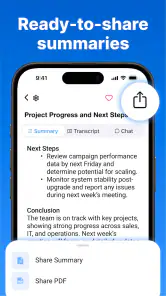
Moreover, the app can export notes in various formats, making it easy to share with colleagues or save for future reference. Whether you prefer PDF, Word, or plain text, it’s got you covered.
For accessibility, written notes can be easier to revisit than audio when I need to scan for a specific idea or read at my own pace. They can also help when listening again is inconvenient. I would still keep the needs of the people in the conversation in mind: making information easier for me to review does not automatically make recording suitable for everyone involved.
When exporting, I would choose the format based on the next person’s task. A document meant for review should be easy to annotate; a brief recap should not force a colleague to sift through a long transcript. Before sharing, I would remove irrelevant personal discussion and check that the file contains only what the recipient needs. The handoff is part of note-taking, not an afterthought.
Cost and who is likely to get value
Summary - AI Note Taker is a free productivity app from Labhouse Mobile, with in-app purchases listed from $8.99 to $79.99 per item. It has a 4.6 average from around 34,000 ratings, and more than 500,000 installs. It is rated for Everyone, so it is broadly suitable by age, though the decision to record a particular conversation still calls for common sense and respect for the people in it. The current version is 2.10.0, and it runs on Android 7.0 or later.
If you are comparing it with a manual note-taking routine, the trade-off is straightforward: you spend less time trying to write everything down, but you need to spend a little time checking the result. I would try it first on a low-stakes meeting or brainstorming session, then decide whether its summaries fit the way you actually review information. The in-app purchase range is worth keeping in mind if you are considering paid options; I would explore the free experience before deciding whether a purchase makes sense for my workflow.
The best fit, in my view, is someone who regularly attends information-heavy conversations and later needs to search, review, or share what was discussed. A student who wants to listen closely, a project lead who needs a draft recap, or a freelancer who revisits client calls may all benefit. Someone who rarely needs to revisit speech, strongly prefers writing notes by hand, or cannot record their usual conversations may get more from a standard notes app.
If you are deciding whether to pay for anything, first test the actual routine you expect to use: prepare a suitable meeting, review the generated material, and see whether it saves enough effort after editing. The free starting point makes that evaluation practical, while the in-app purchase range is a reason to be deliberate rather than assume every paid option will suit you. I would base the decision on repeated usefulness, not on the appeal of having more features in theory.
My closing take
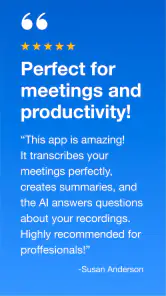
In a nutshell, Summary - AI Note Taker is a must-have tool for anyone looking to enhance their productivity and ensure they never miss a critical detail again. It combines the power of AI with a user-friendly interface to deliver an outstanding note-taking experience.
If you’re tired of the old pen and paper routine or just need a reliable way to capture information, give this app a try. It might just become your new best friend in meetings and beyond.
One sensible way to try it
I would start with a routine discussion where recording is welcome and the stakes are modest. Check the calendar setup, capture the conversation, then compare the summary with what you remember before sharing anything. That first pass shows whether the app’s way of condensing speech matches how you make decisions, and whether the review step feels worthwhile in your day.
My recommendation is practical rather than universal: use it when a conversation contains details you will genuinely need again, and keep a simpler method for everything else. It can make the path from discussion to recap less burdensome, but the final judgment remains yours. For me, that balance—less frantic writing, with a deliberate check before acting—is the reason to consider it.
Summary - AI Note Taker Frequently Asked Questions
What should I know about the app’s rating and user feedback before downloading?
Summary - AI Note Taker has an average rating of 4.6 from around 34,000 ratings, giving prospective users a broad snapshot of how it has been received. There are also around 315 written reviews to browse for individual experiences. Reading recent feedback can help you judge whether its note-taking approach and features match the way you plan to use it.
How many downloads does Summary - AI Note Taker have, and what does that indicate?
Summary - AI Note Taker has passed 500,000 installs, so it has reached a sizable group of users interested in AI-assisted note-taking. That figure can give you a sense of the app’s reach, but it does not by itself show whether the tools will suit your routine. Consider how recording, transcription, and summaries fit the tasks you want to manage.
Is Summary - AI Note Taker free to download, and are there in-app purchases?
Summary - AI Note Taker is free to download, so you can try the app without paying upfront. It also offers in-app purchases, with prices ranging from around $9 to $80 per item. Check the purchase details in the app before buying, and consider whether the available options fit your needs and budget.
Who is Summary - AI Note Taker designed for?
Summary - AI Note Taker is a productivity app for people who want help capturing and reviewing spoken or written information. Its focus on recording audio, transcribing speech into text, and summarizing meeting notes may suit students, professionals, and anyone who wants a more manageable way to revisit important discussions. The age rating is Everyone.
What is Summary - AI Note Taker and how does it work?
Summary - AI Note Taker is a productivity app designed to help users efficiently capture and summarize important information from meetings, lectures, or personal notes. It uses AI algorithms to automatically generate concise summaries, making it easier to review and recall key points without going through lengthy notes.
Pros
- Efficient automatic note organization.
- Seamless integration with calendar apps.
- User-friendly interface design.
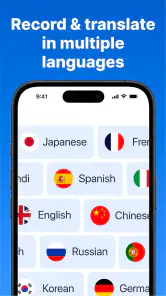
- Supports voice-to-text functionality.
- Customizable note templates.
Cons
- Limited offline functionality.
- Occasional syncing issues.
- Subscription required for premium features.
- Lacks advanced editing tools.
- No handwriting recognition support.
- Category
- Productivity
- Version
- 2.10.0












