Invoice Maker - Invoice Fly
- 3.63K
- 4.7
- Installs
- 1.00M
- Price
- Free

Screenshots

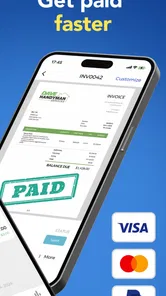
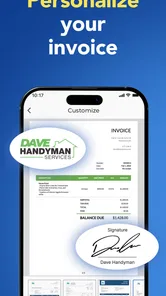
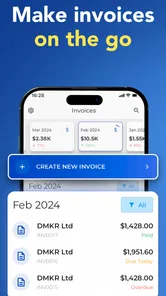

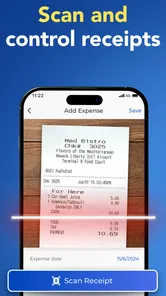
Analysis by Reviewed
I think Invoice Maker - Invoice Fly makes the most sense when invoicing is one small but important part of a busy workday. If a client asks for a bill while I’m away from my desk, being able to prepare one on my phone is more practical than promising to handle it later. The app is free to start, though it includes in-app purchases, so I’d check which tools suit my routine before relying on paid options.
Decide on a simple workflow first
A phone-based invoice tool works best when I already know what information I need to record: the client, the work completed, the amount due, and any relevant estimate or receipt. Keeping those details consistent makes each new document easier to prepare and helps avoid sending something that needs correction. I’d treat the app as a convenient place to create business paperwork, not as a substitute for deciding how I track income or handle bookkeeping.
That distinction matters for anyone comparing it with a spreadsheet, a desktop accounting package, or a general notes app. A spreadsheet can be flexible, but it takes more manual upkeep; a full accounting system may suit a business with broader financial needs, but could feel excessive for occasional billing. Invoice Fly sits closer to the quick-document end of that spectrum, which is useful when speed and a phone-friendly workflow matter most.
Quick and Easy Invoicing
One of the standout features of Invoice Maker - Invoice Fly is its simplicity. You don’t need to be a tech wizard to get your invoices sorted. Within minutes of downloading, you can start creating professional invoices straight from your smartphone. The interface is intuitive and user-friendly, ensuring that even the least tech-savvy amongst us can navigate it with ease.
Customization at Your Fingertips
What I love about this app is the level of customization it offers. You can easily add your business logo, adjust colors, and even choose from a variety of templates to ensure your invoices reflect your brand’s identity. This level of personalization is rare in many invoicing apps, which often stick you with generic templates that don’t do your business justice.
For a practical routine, I’d settle on a recognizable look and keep it steady rather than redesigning each invoice. Before sending a document, I’d review the client details, amounts, and wording on the phone screen; a polished template cannot catch a mistyped figure for me. Estimates can also fit naturally into a small-business workflow: I can prepare the expected cost first, then use the same habit of checking the details when it is time to bill for completed work.
Seamless Integration
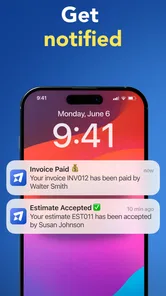
The integration capabilities here are top-notch. Invoice Maker - Invoice Fly syncs effortlessly with other accounting software, making it a breeze to manage your finances. Plus, it keeps track of your payments and sends reminders, so you’re never left wondering whether you've been paid or not. This kind of seamless functionality is a major plus for anyone juggling multiple clients and projects.
More From Our News Desk

Weather by Xiaomi Review: Clear at a Glance, Less Clear Up Close

X Under Pressure: Can It Recover When Posting Goes Wrong?

Clash of Clans Is Won Between the Battles

Android Auto Makes the Case for Quieter Car Software

MobiOffice: Transforming Mobile Productivity with Seamless Integration

EA SPORTS FC™ Mobile Soccer: Redefining Mobile Sports Gaming
Even with payment tracking and reminders, I’d keep a separate habit for reconciling invoices against actual deposits. A reminder can prompt me to follow up, but it does not replace checking whether money arrived or keeping the records my tax and accounting process requires. If I work with many clients or need detailed reporting, I’d compare the app’s workflow with a dedicated accounting tool before making it my only system.
Security and Reliability
In the world of digital transactions, security is a big concern, and rightly so. Thankfully, Invoice Maker - Invoice Fly takes security seriously. Your data is encrypted and protected, so you can rest assured your sensitive information won’t fall into the wrong hands. Coupled with its reliability, you can count on this app to be there when you need it most.
One realistic use is a freelancer finishing a short job at a client’s site: instead of jotting down a reminder and hoping to invoice later, they can prepare the paperwork while the job details are fresh. That is where a mobile-first invoicing app can beat a desktop routine. The trade-off is that careful review may be harder on a small screen, especially when entering several line items, so I would avoid rushing through a complex bill between appointments.
Invoice Maker - Invoice Fly is published by Labhouse Mobile and is listed in the business category. It has a 4.7 average from around 22,000 ratings, with over 100,000 installs. The app is rated for everyone, and its current version is 2.10.2; it requires Android 7.0 or later. Those details make it accessible to many Android users, while the free starting price leaves room to try the basic workflow before deciding whether its in-app purchases are worthwhile.
Before committing, I’d ask myself whether I need quick invoices and estimates or a full view of business finances. For the first job, this app may be a comfortable fit; for inventory, payroll, complex tax handling, or a team-wide approval process, I’d choose a broader business platform unless its current tools clearly cover those needs. I’d also test the complete path—from creating a document to sharing it and recording payment—before using it for a time-sensitive client request. That small trial reveals whether the layout, purchase options, and routine fit my work.
In summary, Invoice Maker - Invoice Fly is an invaluable tool for freelancers, small business owners, and anyone who needs to manage invoices efficiently. It’s easy to use, customizable, and integrates smoothly with other software. If you’re looking for a reliable invoicing solution that you can carry in your pocket, this app is certainly worth a try. Trust me, once you start using it, you’ll wonder how you ever managed without it!
Invoice Maker - Invoice Fly Frequently Asked Questions
Who developed Invoice Maker - Invoice Fly?
Invoice Maker - Invoice Fly is a business app developed by Labhouse Mobile. If you want a mobile tool for preparing routine business documents, the developer and the app’s invoice-focused purpose may help you decide whether it fits your needs. It is intended for making invoices, bills, receipts, and estimates while you are on the go.
Who is Invoice Maker - Invoice Fly designed for?
Invoice Maker - Invoice Fly is a business app for people who need to prepare invoices, bills, receipts, or estimates while on the go. Its focus on these everyday documents makes it relevant to freelancers and small business owners looking for a mobile way to handle basic billing tasks. It is free to download, with in-app purchases available.
What features does Invoice Maker - Invoice Fly offer?
Invoice Maker - Invoice Fly offers a comprehensive suite of features designed for small business owners and freelancers. Users can create professional invoices, estimates, and receipts with customizable templates. The app supports multiple currencies and tax configurations, making it flexible for international use. Additionally, users can send invoices directly via email and accept payments online.
Is Invoice Maker - Invoice Fly easy to use for beginners?
Yes, Invoice Maker - Invoice Fly is designed with user-friendliness in mind. The intuitive interface allows users to easily navigate through features and create invoices without any prior experience. The app also includes helpful tutorials and customer support to assist beginners in understanding and utilizing all its functionalities effectively.
How secure is my data with Invoice Maker - Invoice Fly?
Invoice Maker - Invoice Fly prioritizes data security and uses advanced encryption to protect user information. The app ensures that all data, including client details and financial transactions, are securely stored and transmitted. Users can also set up password protection and regular backups to enhance their data security further.
Pros
- Intuitive user interface simplifies billing.
- Supports multiple currencies for global business.
- Customizable invoice templates enhance branding.
- Real-time invoice tracking saves time.
- Secure data storage ensures privacy.
Cons
- Limited free version features.
- No offline mode available.
- Steep learning curve for beginners.
- Customer support response time varies.
- Requires stable internet connection.












