

Storm Guard - Weather Radar
- 91.00
- 4.1
- Installs
- 10.00K
- Price
- Free
Screenshots
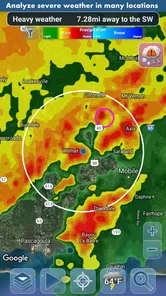
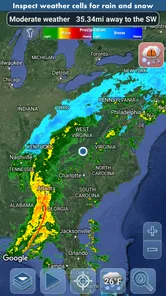
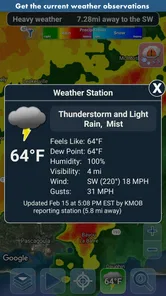
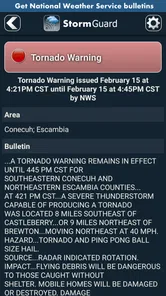
Analysis by Reviewed
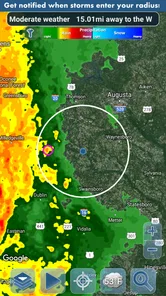
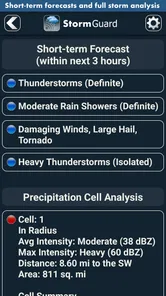
When I want a weather app to answer one practical question—“Do I need to change my plans because rain or snow is approaching?”—Storm Guard - Weather Radar takes a more focused approach than a typical forecast screen. Developed by Kernalite, this free weather app is built around real-time rain and snow detection notifications, with storm analysis intended to make incoming conditions easier to act on. I found that emphasis useful because it shifts attention away from endlessly checking a forecast and toward noticing a change that may affect the next part of my day.
The app is not trying to replace every weather tool on my phone. Its value is narrower and, in the right situation, more immediate. A daily forecast can tell me that precipitation is possible, but an alert about rain or snow developing nearby is more relevant when I am about to walk, cycle, drive, work outdoors, or leave laundry outside. The strongest reason to use Storm Guard is its event-focused warning style, not the expectation that it will become a complete planning system for every kind of weather.
Why real-time precipitation alerts matter more than another forecast
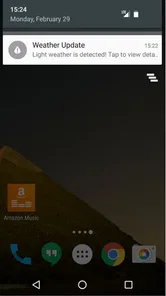
Most weather apps are designed around scheduled forecasts: today, tomorrow, the coming week, and sometimes an hourly timeline. That information is useful, but it creates a small gap between prediction and action. I may already know that showers are possible later, yet still need to decide whether to leave now, bring a coat, postpone an errand, or protect something outdoors. Storm Guard addresses that gap by concentrating on detected rain and snow and notifying me when conditions deserve attention.
That distinction becomes especially noticeable with short-lived or fast-changing weather. A forecast can remain broadly correct while still being unhelpful at street level. If I am deciding whether to walk to a nearby shop, “rain sometime this afternoon” is less useful than knowing that precipitation is being detected in the area now. The alert does not remove the need for judgement, but it gives me a timely reason to look outside, check my route, or wait a little.
I also like the fact that the app’s identity is clear. It is a weather app in the everyday sense, but the Storm Guard name reflects its emphasis on watching for changing conditions rather than simply displaying a temperature. The store summary highlights real-time rain and snow detection notifications alongside storm weather analysis, so the central experience is easy to understand before installing it.
That focus makes comparison with conventional weather apps fairly straightforward. A broad forecast app is usually better for temperatures, multi-day planning, sunrise information, or a detailed hourly schedule. Storm Guard makes more sense as a quick warning layer for precipitation. If my main concern is whether a jacket will be comfortable tomorrow morning, I would use a standard forecast. If my concern is whether a shower or snowfall is moving into my immediate plans, this app has the more relevant purpose.
Turning an alert into a useful decision
An alert is only valuable when it changes what I do. My most useful habit with Storm Guard is to treat a notification as a prompt for a quick decision, not as an automatic command to cancel everything. When one appears, I check the timing of my activity, the route I will take, and whether a short delay would solve the problem. For a walk, that might mean waiting indoors. For driving, it might mean allowing extra time. For outdoor work, it might mean moving a task under cover.
More From Our News Desk

 Weather - By Xiaomi
Weather by Xiaomi Review: Clear at a Glance, Less Clear Up Close
Xiaomi’s weather app makes everyday forecasts quick to scan, but its calm surface can leave useful details and recovery paths harder to find than they should be.

 X
XX Under Pressure: Can It Recover When Posting Goes Wrong?
A resilience-focused review of X, examining setup, mistaken posts, interruptions, weak connections, and the gaps that matter when recovery needs to be dependable.

 Clash of Clans
Clash of Clans Is Won Between the Battles
Its raids are quick; its community is a long-term project of coordination, teaching, rivalry, and shared responsibility—with all the friction that entails.

 Android Auto
Android Auto Makes the Case for Quieter Car Software
The car interface is no longer judged by how much it can do, but by how quietly it helps. Android Auto shows what drivers now expect—and what still gets in the way.

 MobiOffice: Word, Sheets, PDF
MobiOffice: Transforming Mobile Productivity with Seamless Integration
MobiOffice: Word, Sheets, PDF is redefining mobile productivity with a surprising blend of functionality and innovation.

 EA SPORTS FC Soccer Mobile 26
EA SPORTS FC™ Mobile Soccer: Redefining Mobile Sports Gaming
Dive into EA SPORTS FC™ Mobile Soccer, where immersive gameplay and strategic depth transform mobile sports gaming.
Latest News



This approach avoids a common mistake with weather notifications: reacting too strongly to every warning. Rain detection does not necessarily mean a long, heavy downpour, and snow detection does not automatically tell me how difficult travel will be. The app’s storm analysis can add useful context, but I still interpret the warning alongside local surroundings. Looking out of the window remains a surprisingly important part of using any precipitation alert well.
A second useful habit is to think in terms of exposure. The same notification has different importance depending on where I am going. A few drops matter little if I am already at home, but they matter a lot if I am about to start a long cycle ride with no shelter. This makes Storm Guard more valuable for people whose plans are flexible enough to respond to a warning, rather than for someone who simply wants a passive forecast in the background.
A realistic morning with changing plans
Imagine a weekday morning when I plan to walk to a station, continue by public transport, and then spend part of the day moving between buildings. A normal forecast might already have told me that showers are possible. I could still leave without an umbrella because the sky looks clear. If Storm Guard sends a rain detection notification shortly before I go, I have a practical choice: take protection, delay the walk, or choose a route with more shelter.
The benefit is not that the app predicts my entire commute perfectly. The benefit is that it catches the moment when a general possibility becomes an immediate inconvenience. That is a small difference, but it is exactly the kind of difference that can prevent wet clothes, a damaged bag, or a rushed change of plans. For snow, the same principle applies to walking surfaces, school runs, outdoor work, and short trips where conditions can change the comfort and safety of the journey.
For the best result, I would not wait until the notification appears to decide what to do. I would use the app as the final check before an activity that cannot easily be interrupted. For example, before leaving for a cycle ride, I would prepare a lightweight waterproof layer and identify a place to shelter. The alert then becomes part of a simple plan rather than a last-second source of panic.
Where storm analysis adds useful context
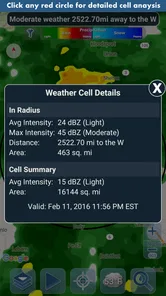
Rain and snow detection answers the immediate question of whether precipitation is being noticed. Storm weather analysis is more helpful when I need to judge whether the situation deserves more caution. A passing shower, a broader band of rain, and a developing storm should not all lead to the same response. The analysis element gives the app a more deliberate role than a basic “it may rain” notification.
I found this particularly useful when deciding whether to start an activity that would be difficult to stop halfway through. A short walk and a long outdoor job have different thresholds. If the weather appears unsettled and the app is drawing attention to storm conditions, I am more likely to postpone the longer task. That is a practical use of the information even when the app cannot make the decision for me.
There is also a useful trade-off here. More context can improve judgement, but it can also encourage overconfidence. Weather systems do not respect the boundaries of a phone screen, and an analysis view should not be treated as a guarantee. I use it to combine several clues—what the app reports, what the sky looks like, and how exposed my route will be. That combination is more dependable than relying on one alert in isolation.
Small workflows that make the app more worthwhile
One non-obvious way to use Storm Guard is as a “departure check” rather than a general browsing app. I open or consult it before leaving for an activity with a fixed start time, especially when the forecast has been uncertain. This keeps the app tied to a decision and reduces the temptation to repeatedly check weather without changing anything.
Another useful workflow is to use notifications as a trigger for protecting belongings. If I have shoes, tools, sports equipment, or other items outside, a rain warning can prompt me to move them before the weather reaches them. This is different from planning a trip, but it may be one of the most practical everyday benefits because the action takes only a moment and does not require a detailed forecast.
A third tip is to separate “comfort decisions” from “safety decisions.” For comfort, an alert might mean taking an umbrella or choosing a coat. For safety, especially during stormy conditions, I become more conservative: I avoid treating a notification as permission to continue an exposed activity. The app can help me notice changing weather, but it should support sensible caution rather than replace it.
What may frustrate some users
The focused design is also the main limitation. Someone looking for a complete replacement for a traditional weather service may find Storm Guard too specialized. Its appeal depends on caring about precipitation alerts and storm awareness. If I mainly want a long-range outlook, detailed climate information, or a broad collection of weather tools, I would probably keep a more comprehensive app as my primary choice.
Notifications can create friction as well. An alert is helpful when it arrives at the right moment, but repeated weather warnings can become noise if I am not regularly making outdoor decisions. I would be selective about how much attention I give them and avoid letting every notification interrupt work or sleep. The app is most effective when its warnings remain meaningful, not when they become background clutter.
There is also an unavoidable difference between detection and personal impact. A notification may describe precipitation in the surrounding area while my exact street remains dry, or the reverse may happen during a quickly shifting shower. That does not make the feature useless; it means I should interpret it as local weather guidance rather than a promise about the precise conditions at my front door.
The app’s age is worth keeping in mind too. It was released on February 28, 2016, and its current version is 1.60. That does not by itself determine whether the experience is good, but users who expect the newest visual design or the broadest modern weather ecosystem may notice that Storm Guard feels more purpose-built than trend-driven. I would choose it for the warning function, not for novelty.
Cost, access, and everyday suitability
Storm Guard is free to install, with individual in-app purchases priced at $0.99 each. That makes trying the core experience relatively approachable, while the purchase model is something I would inspect carefully before paying for anything. A free weather app is easiest to recommend when its basic warning purpose already fits the user’s needs; there is little reason to spend money simply because an app belongs on the phone.
The app is rated for Everyone, which suits a household utility that may be useful to commuters, parents, students, outdoor workers, and older family members. Its minimum operating system requirement is 10, so device compatibility is an important first check for anyone using an older phone or tablet. I would also remember that any weather notification tool depends on the device being able to deliver alerts reliably; a silent or restricted notification setup can undermine the entire point of the app.
Kernalite has kept the product’s purpose easy to explain: it watches for rain and snow, then adds storm-oriented context. That clarity is a strength because I do not need to learn a complicated weather vocabulary before deciding whether it belongs in my routine. The trade-off is that users seeking a large ecosystem of maps, widgets, forecasts, and planning tools may prefer a bigger all-purpose service.
Who gets the most from Storm Guard
I would recommend this app most strongly to people whose plans are affected by short-term precipitation. Cyclists, walkers, runners, outdoor workers, delivery drivers, gardeners, event organizers, and parents handling school journeys can all benefit from an alert that arrives closer to the moment of impact. It is also useful for anyone who tends to ignore a general forecast but responds well to a direct reminder before leaving.
It can be valuable for a less obvious group too: people who manage outdoor spaces or equipment. A quick warning may be enough to close a window, cover furniture, move laundry, or bring in something that should not get wet. In that role, the app is not competing with a detailed forecast; it is acting as a practical early-warning assistant.
I would be less enthusiastic about it for someone who wants one app to handle every weather question. If my routine involves detailed travel planning, long-range scheduling, or frequent comparisons between several forecast models, I would choose a broader weather application and perhaps use Storm Guard only as a supplement. Likewise, if notifications usually annoy me or I rarely change plans because of rain, its main advantage may not justify another app on my phone.
The user base gives some indication that it has found a real audience: Storm Guard has passed 10K installs, with a 4.1 average from 183 ratings and 91 written reviews. Those figures do not prove that every local weather situation will be handled perfectly, but they suggest a modest, established utility rather than an entirely untested idea. I would read the rating as encouraging but not decisive, especially because precipitation detection is highly dependent on location and personal expectations.
My final take after using its focused approach
Storm Guard - Weather Radar is best understood as a precipitation decision tool, not a complete weather command center. Its real-time rain and snow notifications can turn a vague forecast into a timely prompt, while storm analysis helps me decide whether a change in conditions deserves a minor adjustment or a more cautious response. That is a narrow job, but it is a genuinely useful one when my day includes outdoor movement or belongings that need protection.
I appreciate apps that know what problem they are solving, and this one does. I would keep a general forecast app for temperatures, planning, and broader context, then use Storm Guard when the question is more immediate: should I leave now, wait, take protection, or rethink an exposed activity? Its limitations—notification noise, local variation, and a focused feature set—are manageable if I use it as a prompt rather than an unquestionable authority.
For me, the deciding test is simple. If rain or snow regularly disrupts your plans, install it and build it into your departure routine. If you only need a weekly forecast or a polished all-in-one weather dashboard, choose the broader alternative instead. Storm Guard earns a place on my phone when I want a timely nudge about precipitation, and its free entry point makes that focused experiment easy to try.
Storm Guard - Weather Radar Frequently Asked Questions
Is Storm Guard - Weather Radar suitable for everyday weather checks?
Storm Guard - Weather Radar is a weather app from Kernalite that focuses on rain and snow detection notifications and storm analysis. It can be useful for checking conditions as part of a daily routine, especially when you want to keep an eye on changing precipitation. Its storm-focused tools are best treated as a helpful supplement to forecasts and official warnings rather than a replacement for them.
What devices and operating systems can run Storm Guard - Weather Radar?
Before downloading, check that your device meets the app’s operating-system requirement. Storm Guard - Weather Radar supports devices running version 10 or later, so an older operating system may prevent installation or use. The app is available for mobile devices, and checking the current store page on your device is a practical way to confirm compatibility before you proceed.
What is Storm Guard - Weather Radar used for?
Storm Guard - Weather Radar is designed to help you monitor current weather conditions and track developing storms. It typically provides radar imagery, precipitation movement, severe-weather alerts, and forecast information in one place. During testing, the app is most useful for checking whether rain or storms are approaching, although users should still compare important warnings with official local weather services.
Does Storm Guard - Weather Radar provide real-time weather radar?
The app is built around weather radar information intended to show precipitation and storm activity as it develops. Radar updates may not be completely instantaneous, because the data depends on the source, update schedule, internet connection, and regional coverage. Users should also remember that radar estimates can occasionally be delayed or less precise in remote areas, so the display should be treated as guidance rather than an absolute guarantee.
Can Storm Guard - Weather Radar send severe weather alerts?
Storm Guard - Weather Radar may provide notifications for significant weather conditions, such as heavy rain, thunderstorms, or other potentially dangerous events, depending on the features available in your region and the permissions enabled on your device. To receive alerts reliably, notification access and location settings may need to be activated. For life-threatening emergencies, always follow official government warnings and local emergency instructions.
Pros
- Clear radar maps make approaching storms easy to track.
- Useful weather alerts help users prepare for severe conditions.
- Multiple map layers provide detailed local weather information.
- Location tracking quickly shows conditions around your current area.
- Clean interface makes core radar tools easy to find.
Cons
- Some advanced features may require a paid subscription.
- Radar data can be delayed during rapidly changing storms.
- Frequent alerts may feel excessive in areas with unstable weather.
- Battery usage can increase when location tracking stays enabled.
- Coverage and forecast accuracy may vary by region.












