

Stemz: AI Tool for Musicians
- 762.00
- 4.4
- Installs
- 1.00M
- Price
- Free

Screenshots
Analysis by Reviewed
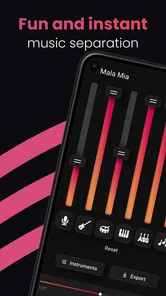
I think the clearest way to judge Stemz: AI Tool for Musicians is as a focused utility for working with existing music, rather than as a complete studio in your pocket. Its main appeal is separating vocals and instruments with AI, which can make a familiar track more useful for practice, arranging, or creative exploration. That narrower purpose is important: it helps set realistic expectations before you decide whether it belongs in your music workflow.
What the free access does—and does not—settle
Stemz is free to install, while in-app purchases range from $4.99 to $89.99 per item. That gives you a way to try the app before paying, but the wide purchase range means I would check the current in-app options against the task I actually need to do instead of assuming every tool or use is included at no cost. I wouldn’t treat “free” as proof that the full workflow is free, nor assume that a paid option is automatically worthwhile.
The app is made by MWM - AI Music and Creative Apps and sits in the music and audio category. It has a 4.3 average from around 12,000 ratings and over 500,000 installs, which suggests it has found an audience, though popularity alone can’t tell you whether its separation results suit your material. It is rated for Everyone, and the current version is 1.16.00, with Android 6.0 or later required.
Unlock Your Musical Potential
Ever had a melody lingering in your head but no way to capture it? Well, Stemz is here to save the day. With its intuitive interface, you can easily transform those fleeting tunes into full-fledged compositions. The app is designed to understand the needs of musicians, making it a breeze to create, edit, and refine your music.
Features That Make a Difference
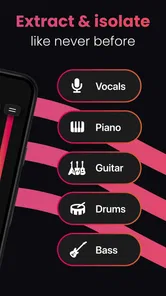
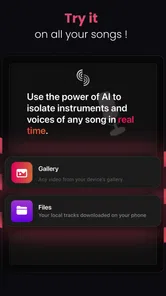
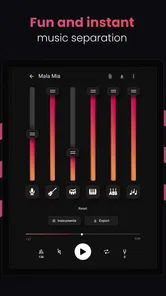
One of the standout features of this app is its AI-powered capabilities. It intelligently assists you in creating stems from your tracks. Imagine being able to isolate vocals, drums, bass, and other instruments with just a few taps. It’s like having a sound engineer in your pocket!
For a practical test, I’d start with a track where the part I want to hear is clearly audible, then listen to the separated result on headphones and compare it with the original. AI separation is most useful as a way to make a part easier to study or reuse, not as a promise that every source will come out perfectly clean. Dense mixes, overlapping sounds, and effects can leave artifacts, so I’d keep the original file and treat the output as a working version rather than a replacement master.
A useful practice routine is to lower or isolate a part you’re learning, play along, and then return to the full mix to check your timing and dynamics. Producers can also use a separated vocal or rhythm part as a rough arrangement reference before rebuilding it with their own sounds. That can speed up exploration, but it doesn’t replace recording, mixing, or a full digital audio workstation when you need detailed control over a finished production.
More From Our News Desk

 Gmail
GmailGmail in a Busy Inbox: Who Benefits Most?
From first account to crowded workday, Gmail earns its place through dependable search and flexible sorting—but its best fit depends on how much inbox maintenance you can tolerate.

 Prime Video
Switching to Prime Video: What Changes in Your Viewing Routine
Prime Video can make a compelling second home for streaming, but switching means learning a different catalog, rental layer, and route from browsing to playback.

 Universal TV Remote Control
Universal TV Remote Control Works Best as a Reliable Backup
A phone remote earns its place through quick setup and reliable habits. Here is how to get more from Universal TV Remote Control—and where its limits show.

 Weather - By Xiaomi
Weather by Xiaomi Review: Clear at a Glance, Less Clear Up Close
Xiaomi’s weather app makes everyday forecasts quick to scan, but its calm surface can leave useful details and recovery paths harder to find than they should be.

 X
XX Under Pressure: Can It Recover When Posting Goes Wrong?
A resilience-focused review of X, examining setup, mistaken posts, interruptions, weak connections, and the gaps that matter when recovery needs to be dependable.

 Clash of Clans
Clash of Clans Is Won Between the Battles
Its raids are quick; its community is a long-term project of coordination, teaching, rivalry, and shared responsibility—with all the friction that entails.
Latest News



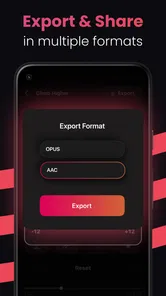
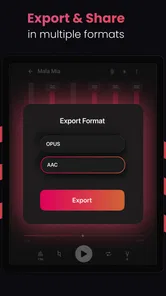
Another cool feature is its collaboration tool. You can seamlessly share your projects with fellow musicians, making it perfect for those who love to co-create. Whether you’re in the same room or halfway across the world, Stemz bridges the gap.
I’d still think of sharing as a handoff for ideas, not assume it gives collaborators the same detailed editing tools they would have in a dedicated production suite. A simple everyday use would be sending a separated part to a bandmate before rehearsal so they can learn a line or suggest an arrangement change. Keep communication about versions clear: if someone edits the source elsewhere, agree which file is the reference so the group does not end up rehearsing against different takes.
Getting useful results from a separation
One small but important habit is to test more than one kind of source before deciding whether the app earns a place in your routine. A solo vocal over a sparse backing, a busy chorus, and a recording you made yourself can behave quite differently when separated. This is not about trying to find a perfect demo track; it is about learning which material gives you a useful result and where the output becomes too messy to trust. I’d keep a short note of what worked, so I don’t mistake one unusually clean result for a guarantee.
It also helps to decide what “good enough” means before processing anything. If I only need to hear a melody more clearly, some residue from other instruments may not matter. If I want to use the stem as the centerpiece of a public recording, the same residue could be distracting and require much more cleanup than the quick separation saved. That distinction keeps the tool in its strongest role: making listening and early experiments easier, rather than promising polished, release-ready audio from every mix.
Where it fits among music tools
Compared with a conventional audio editor, Stemz is appealing when the first job is pulling useful parts out of a mixed recording. An editor or full DAW is usually the better choice for precise cuts, arranging many tracks, recording new material, or shaping a final mix. A transcription tool may be more helpful if your main question is which notes or chords are being played; separation can make listening easier, but it is not the same thing as turning audio into notation.
Before importing a song for practice or sharing a stem, consider whether you have the right to use and distribute that audio. For your own recordings, the workflow is straightforward in principle; for commercial tracks, keeping a separated file for private study is different from publishing or sharing it. This practical distinction matters more than the novelty of the AI, especially if you plan to use stems in a public release.
There is also a useful middle ground between a phone-based separation app and a full desktop setup. If I am away from my instruments and want to identify how a bass line moves, a separated part can make repeated listening less tiring. Later, I can take that understanding to a keyboard, guitar, or DAW and work it out properly. By contrast, if I already have the original multitrack session, I would go straight to those tracks instead of processing a finished stereo mix; the source recordings give me cleaner, more dependable control.
Why Musicians Love It
Now, let’s talk about why this app has been creating a buzz in the musician community. First off, it’s incredibly user-friendly. You don’t need to be a tech wizard to navigate through its features. Everything is laid out in a way that’s easy to understand, so you can focus more on making music rather than figuring out how to use the app.
Moreover, the sound quality is top-notch. You get studio-level audio output without needing expensive equipment. This is a big win for indie artists and budding musicians who might be working on a tight budget.
In my view, the best fit is a singer, instrumentalist, or home producer who wants a quick way to inspect a mix and turn listening into a more active exercise. It is less compelling if you already have a studio workflow that gives you access to the original multitrack recordings; those sources will generally offer more control than trying to separate a finished mix. It also won’t replace an instrument, lessons, or careful ear training, so I’d see it as a useful assistant rather than a shortcut to musicianship.
A realistic use case is a guitarist preparing for a rehearsal after work. They hear a short fill in a song but keep losing it beneath the vocals and drums. Separating the parts gives them a chance to listen to the guitar line in isolation, hum or play it slowly, and then check it against the whole arrangement. The useful outcome is not necessarily a perfect guitar-only file; it is being able to arrive at rehearsal with a better idea of the phrase and where it sits in the song.
For a songwriter, the same process can reveal whether a vocal melody still works when the backing is quieter, or give a rough sense of how a rhythm part supports a chorus. I would use that as a prompt for a new arrangement, not as a shortcut to copying a finished production. If the idea is worth pursuing, the next step is to record or program original parts in a tool designed for that job.
Who is likely to get value from it?
The strongest case is someone who regularly learns songs by ear, teaches or rehearses with recordings, or sketches arrangements from reference tracks. For these users, even an imperfect stem may answer a practical question quickly: Is that sound a backing vocal or a guitar? Does the bass hold one note through the bar, or move with the chord? The app is most valuable when the answer changes what you will practice or create next.
It is a weaker fit for listeners who mainly want a music player, musicians who need sheet music generated automatically, and producers who expect full multitrack editing or pristine studio stems. If your routine is already built around a DAW and you have access to separate source tracks, a dedicated editor is the more sensible choice. Likewise, if you only need to learn one part once in a while, a free trial of the workflow may be enough; paying makes more sense when you know you will return to separation often.
One question people naturally have is whether the app can make every instrument sound clean on its own. I would not plan around that. Separation works on a finished mix, where instruments may overlap in pitch, share effects, or occupy the same stereo space. Treat each output as a listening aid and check it against the original; if a noisy or smeared stem would undermine the project, look for the original tracks or record the part yourself.
Another practical question is whether it can replace a DAW. For my purposes, no: its value is the first step of isolating material, while a DAW is where I would record, edit, arrange, and mix with detailed control. Nor would I choose it over transcription software when exact notes, chords, or notation are the main goal. These tools can complement one another, but they solve different problems.
Making the price decision
Because the app is free to install and has paid in-app options, I would separate the decision to try it from the decision to buy. First, choose a real task you have coming up and see whether the free access lets you complete enough of it to judge the result. Then inspect the purchase choices in the app and compare them with how frequently you expect to use the feature. The listed price range is broad, so there is no single value judgment that applies to every buyer.
For occasional curiosity, I would be cautious about paying before testing a few familiar tracks. For regular practice or repeated arrangement work, a purchase may be easier to justify if the actual available option removes a friction point you encounter often. I would not treat the rating, install count, or the word “AI” as evidence that the paid options suit my needs; the decisive question is whether the output helps me do a specific musical task with less effort.
Final Thoughts
In a world where music apps are a dime a dozen, Stemz: AI Tool for Musicians stands out with its innovative approach and musician-friendly features. It’s more than just an app; it’s a game-changer for those looking to elevate their music-making process. So, if you haven’t tried it yet, what are you waiting for? Dive into the world of Stemz and let your creativity flow!
My verdict is more measured: it is worth trying if vocal or instrument separation would solve a real listening problem for you, especially for practice and early-stage ideas. I would skip it if you need guaranteed clean stems, detailed production controls, or a substitute for a full studio setup. Start with a track you can judge by ear, keep expectations realistic, and only consider a purchase after the free access has shown that the result is useful in your own music-making.
Stemz: AI Tool for Musicians Frequently Asked Questions
What devices and operating systems can I use with Stemz?
Stemz is available for Android and iOS, so you can use it on a compatible phone or tablet. The Android version requires Android 6.0 or later. The app is listed as suitable for everyone, and its focus on music tools makes it relevant to musicians who want to work with audio on a mobile device.
Is Stemz free to download, and what does it cost to use?
Stemz is free to download, so you can try the app without paying an upfront purchase price. It also offers in-app purchases, with listed items ranging from $4.99 to $89.99. Check the purchase options in the app before buying, and consider whether the available features fit your needs and budget.
What is Stemz: AI Tool for Musicians and how does it work?
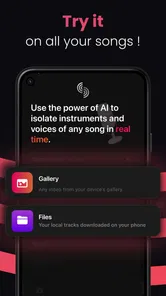
Stemz is an innovative AI-powered application designed to assist musicians by separating audio tracks into individual stems. This means users can isolate vocals, drums, bass, and other instruments from any song, allowing for a deeper analysis or remixing of tracks. The app uses advanced AI algorithms to ensure high-quality output, making it a powerful tool for both amateur and professional musicians seeking to enhance their creative processes.
Is Stemz compatible with both Android and iOS devices?
Yes, Stemz is available for both Android and iOS platforms, ensuring a wide range of compatibility for users. This cross-platform availability allows musicians to access the app’s features on their preferred devices, whether they are using a smartphone or tablet. Simply download it from the Google Play Store or the Apple App Store to get started.
Are there any subscription fees or in-app purchases in Stemz?
Stemz offers a free version with basic functionalities, but for users looking to unlock its full potential, there are premium features available through subscription plans. These plans may offer enhanced audio processing, additional stem extraction options, and other advanced tools. Users should review the pricing details in the app store listing before downloading to understand any costs involved.
Pros
- Innovative AI-driven music creation
- User-friendly interface for all levels
- Wide range of musical instruments
- Real-time collaboration features
- Regular updates and new features
Cons
- Requires stable internet for optimal use
- Some advanced features need in-app purchases
- Occasional bugs reported by users
- Limited offline functionality
- May be overwhelming for total beginners













