Stay Focused: Site/App Blocker
- 3.93K
- 4.4
- Installs
- 5.00M
- Price
- Free
Screenshots

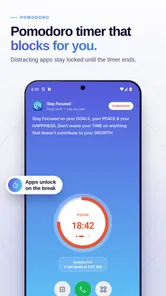
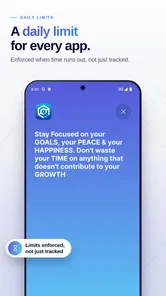
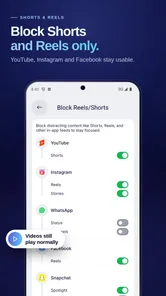
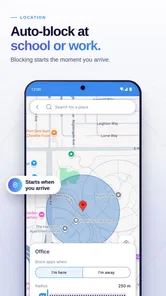
Analysis by Reviewed
I usually reach for a blocker app when “I’ll check one thing” has quietly turned into half an hour of scrolling. Stay Focused: Site/App Blocker is built for that exact moment: it helps put limits around distracting apps, websites, short videos, and reels so your phone is less tempting when you need to work, study, or simply stop refreshing the same feeds. After using it as a productivity tool, I found its main appeal is not that it makes discipline effortless, but that it adds a deliberate pause between an impulse and the action.
This is a free productivity app from INNOXAPPS LLP, available for everyone and supported by optional in-app purchases ranging from $0.49 to $99.99 per item. That price range matters because the basic decision is easy: you can try the app without paying upfront, then decide whether any paid option adds enough value to your routine. With an average rating of 4.4 from around 169,000 ratings and more than 5 million installs, it is clearly being used at a substantial scale. I would still treat those figures as a sign of broad interest rather than a guarantee that its approach will suit every phone or personality.
How Stay Focused fits into everyday self-control
The app sits in the productivity category, but I would describe it more accurately as a layer of friction for digital habits. Instead of asking you to rely entirely on willpower, it lets you decide which distractions should become harder to reach. That can include a social app that keeps pulling you back, a website that eats into study time, or short-form video and reels that are particularly difficult to leave once they start.
That distinction is important. A normal timer tells you how long you have spent. A blocker changes what happens next. If I set a boundary before beginning a task, I am less likely to make an automatic choice during a moment of boredom. The app therefore works best when used as part of a plan, not as a punishment for having a phone.
My preferred way to use it is to start with one clearly defined problem. For example, I might protect a ninety-minute writing session from the two apps I open without thinking. I would not block everything immediately. A broad setup can become irritating when I genuinely need a messaging service, a browser, or an authentication app. Selective restrictions are more sustainable because they target the habit that is actually costing me time.
Setting up a useful block rather than an annoying one
The first practical question is always what to restrict. I recommend watching your own behavior for a day before creating several rules. Notice whether the real interruption is an app, a particular website, short videos inside an otherwise useful service, or the repeated habit of switching between several distractions. Stay Focused is most useful when the rule reflects that pattern.
A good starting setup is a short study or work window with only the most disruptive destinations selected. Keep essential tools available, especially anything needed for calls, navigation, banking, school access, or two-factor sign-in. This small bit of preparation prevents the common mistake of making a block so aggressive that the phone becomes inconvenient for legitimate reasons.
More From Our News Desk

Weather by Xiaomi Review: Clear at a Glance, Less Clear Up Close

X Under Pressure: Can It Recover When Posting Goes Wrong?

Clash of Clans Is Won Between the Battles

Android Auto Makes the Case for Quieter Car Software

MobiOffice: Transforming Mobile Productivity with Seamless Integration

EA SPORTS FC™ Mobile Soccer: Redefining Mobile Sports Gaming
I also like the idea of separating “deep work” from “low-energy time.” During focused work, a strict block can be appropriate. During a lunch break, a lighter rule may be more realistic. Treating every hour as if it requires maximum restriction can lead to frustration and make it tempting to disable the system altogether.
A realistic study and work routine
Imagine a student preparing for an exam after dinner. The phone is nearby, and the first interruption is not a deliberate decision; it is a reflex. A short-video app opens, then a social feed, then a browser tab. With Stay Focused configured before studying, those destinations can become unavailable or restricted during the planned session. The student can still use the phone for a timer, notes, or a necessary call, while the most tempting detours are kept out of reach.
For office work, the same approach is useful when a task is repetitive rather than intellectually exciting. I would create a block before opening the document, not after losing momentum. That timing is one of the less obvious lessons with this kind of tool: the rule has more power when it is established while I am calm and intentional. Trying to negotiate with myself after the distraction has already started is much harder.
Parents and families should think about the app differently. It may help create a routine around a shared device, but it should not replace a conversation about screen habits. A restriction that appears without explanation can feel like surveillance, while a known study schedule gives the boundary a clear purpose. The Everyone age rating describes the app’s content classification, not a promise that every family will find its controls suitable for every child.
Where the free access creates real value
The strongest value proposition is that I can test the central idea without an upfront purchase. If my problem is occasional distraction and a simple blocking routine is enough, free access may already justify keeping the app installed. That makes it easier to judge the experience against my actual habits rather than buying based on a promise.
Paid value is a separate question. The presence of in-app purchases from $0.49 to $99.99 per item means the potential cost varies significantly, so I would inspect the exact option shown in the app before committing. A low-cost addition may make sense for someone who uses blocking every day, while a high-priced purchase deserves much more scrutiny. I would not assume that paying automatically produces better self-control.
In practical terms, the app earns its place when it prevents enough unplanned phone time to improve a real routine. That could mean finishing a report before a deadline, completing a reading session, or keeping the phone out of a bedtime loop. The value is behavioral rather than decorative: if the restrictions do not change what I do, even a small purchase would be wasted.
Trade-offs I noticed when relying on a blocker
The main trade-off is convenience. A blocker has to be strong enough to interrupt an impulse, but not so strong that it blocks a legitimate task. Websites and apps are not always purely good or bad. A browser can be a distraction one minute and a research tool the next. A video platform can contain both useful lessons and endless recommendations. The more mixed your phone use is, the more carefully you need to choose what gets restricted.
There is also a psychological trade-off. Some people feel relieved when a boundary removes a decision. Others become more interested in defeating the boundary. If I repeatedly spend my focus session looking for ways around the restriction, the app is revealing that the chosen rule or timing is wrong. I may need a shorter session, fewer blocked targets, or a different place to keep the phone rather than escalating the restriction immediately.
Another limitation is that a blocker cannot solve distractions outside the phone. If my laptop, television, or another device is within reach, I can simply move the habit elsewhere. Stay Focused is therefore best viewed as one part of a focus environment. Putting the phone across the room, turning off unnecessary notifications, and deciding the next task in advance can make its restrictions much more effective.
I would also be cautious about blocking essential services. Before starting an important session, test whether the apps you need for communication, transport, work access, or emergencies remain usable. A productivity tool should reduce avoidable interruptions, not create a new problem when something time-sensitive appears.
How it compares with ordinary phone tools
Built-in screen-time controls are often a sensible alternative, especially if I want basic limits without installing another app. They can be convenient because they are already part of the operating system and may cover broad usage patterns. Stay Focused is more appealing when I want a dedicated self-control workflow centered on blocking distracting destinations, including the short-form content that tends to turn a quick break into a long one.
A simple countdown timer is useful for creating a work rhythm, but it does not necessarily stop me from opening a tempting app. A notification-based reminder can tell me to return to work, yet it may itself become another interruption. The dedicated blocker approach is more forceful because it changes access rather than merely displaying advice.
There is a cost to that forcefulness. Built-in tools may feel less intrusive, while a specialized blocker asks me to configure rules and accept more friction. If I only need a gentle reminder to take breaks, Stay Focused could be excessive. If reminders have repeatedly failed because I ignore them, the stronger intervention is more likely to justify trying it.
Small workflow choices that make it more effective
One useful technique is to create a rule around a specific activity rather than a vague goal such as “use my phone less.” Before a study session, identify the exact apps or sites that cause the detour. Before sleeping, focus on the services that trigger one last check. This turns an emotional intention into a practical boundary.
A second technique is to leave a replacement ready. If I block short videos but have no clear alternative during a break, I may simply feel restless and undo the rule. A book, saved article, offline playlist, or short walk gives the pause somewhere to go. The blocker removes the easy option; I still need to choose a better one.
A third is to review the rule after a few sessions. If I keep needing a blocked service for legitimate reasons, the setup is too broad. If I never notice the restriction because another app has become the new escape route, the setup is too narrow. This kind of adjustment is more useful than treating the first configuration as permanent.
I would also avoid making the most severe setting the default for every situation. A demanding deadline may justify a firm block, while routine administration may only need a modest limit. Matching the intensity to the task reduces the chance that the app feels like an obstacle during ordinary phone use.
Who should try it, and who should skip it
Stay Focused is a good fit for people who already know which digital habits are disrupting them. Students, remote workers, writers, and anyone preparing for an exam can benefit from a boundary that is created before concentration begins. It is also useful for someone who repeatedly opens short-video or reels content automatically and wants a deliberate interruption rather than another promise to stop after the next clip.
The free entry point makes it reasonable for occasional users to experiment. I would start with one daily focus period and judge the result by a concrete outcome: did I finish the assignment, complete the reading, or get to bed without the usual scrolling loop? That test is more meaningful than simply admiring a blocked-app list.
I would skip it if my main problem is disorganization rather than distraction. The app may stop me from opening a feed, but it will not decide which project matters, break a large task into steps, or replace a calendar. Someone who needs reminders, project planning, or team collaboration may get more from a conventional productivity suite.
I would also hesitate if my phone use changes constantly and depends on many services for work. In that case, frequent rule adjustments can become their own burden. A lighter built-in limit or a physical change, such as leaving the phone outside the workspace, may be more practical.
My verdict on paying for it
Because the app is free to start, I see little reason to pay before testing whether its blocking approach changes a real habit. Use it during the exact period when distraction normally happens, keep the first rule narrow, and observe whether the restriction helps you complete something meaningful. If it does, then consider whether a paid option solves a specific limitation you have encountered.
I would judge any purchase by repeated daily usefulness, not by the size of the feature list or the highest possible price. The listed purchase range is wide, so checking the individual item and its cost is essential before confirming anything. Free access may be all many users need; paid value depends on whether the additional option supports a routine that is already working.
My overall view is positive, with a clear condition: Stay Focused works best as a practical barrier, not as a magical cure for phone dependence. Its large user base and 4.4 average suggest that the concept resonates with many people, while the real test remains personal. If your biggest issue is automatic access to apps, websites, shorts, or reels, this is a sensible productivity app to try. If you need planning, accountability from other people, or a solution that covers every device, I would choose a different tool or combine this one with those methods.
For me, the best reason to recommend it is simple: it moves the decision away from the moment of temptation. Configure the boundary before the work begins, protect only what genuinely derails you, and keep essential services available. Used that way, the free starting point offers a fair experiment, and any later purchase can be judged on results rather than hope.
Stay Focused: Site/App Blocker Frequently Asked Questions
Does Stay Focused work on both Android and iOS?
Stay Focused is a mobile productivity app for managing distractions, but blocking features can depend on the platform and the permissions available on your device. Before downloading, check that the version offered for your device supports the controls you want, such as app or website restrictions. Once installed, follow its setup instructions and review permissions so the features you choose can work as intended.
What permissions might Stay Focused need, and why?
To identify when you open restricted apps or websites and apply your rules, Stay Focused may request access to device features such as accessibility or usage access. These permissions can be important to the blocking functions, so read each request carefully and consider whether it fits your needs. Grant only the access you are comfortable with, and use the app’s setup guidance to understand how to enable the controls you select.
Can Stay Focused help me build better study or work habits?
Stay Focused is intended to support more deliberate screen habits by letting you set restrictions around distracting apps, websites, and short-form videos. You can use schedules or limits to create focused periods for studying or work, then adjust them to fit your routine. It is a tool for self-control rather than a replacement for planning, so its usefulness depends on choosing realistic rules and following them consistently.
Who develops Stay Focused, and what kind of app is it?
Stay Focused is a productivity app developed by INNOXAPPS LLP. It is intended for people who want to manage screen habits by blocking distracting apps and websites, setting study timers, and limiting access to short-form videos and social feeds. Its focus is practical self-control: you choose the distractions to address and configure restrictions around the routines you want to build.
What is Stay Focused: Site/App Blocker used for?
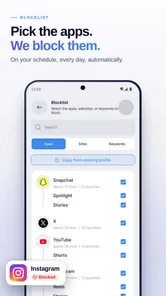
Stay Focused: Site/App Blocker is designed to help you reduce distractions from your phone. After setting it up, you can restrict access to selected applications and websites, create blocking schedules, and monitor your usage habits. It can be useful for studying, working, sleeping, or simply spending less time on social media and other frequently opened services.
Pros
- Blocks distracting apps and websites with flexible schedules.
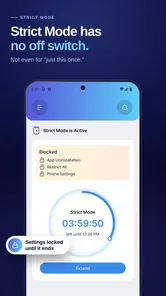
- Strict modes help prevent impulsive changes to blocked settings.
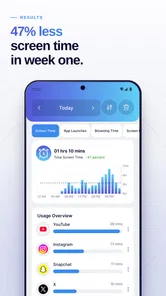
- Usage statistics make daily screen-time habits easy to understand.
- Whitelist options keep essential apps and websites accessible.
- Recurring limits support consistent focus and productivity routines.
Cons
- Some advanced blocking tools may require a premium subscription.
- Incorrect settings can block apps needed for work or communication.
- Determined users may find ways to bypass restrictions.
- Background monitoring can affect battery life on some devices.
- The interface may feel overwhelming until all settings are configured.












