Speedometer - Odometer App
- 290.00
- 4.5
- Installs
- 1.00M
- Price
- Free
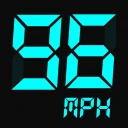
Screenshots
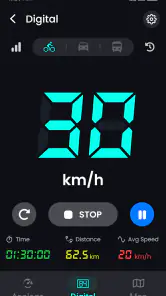
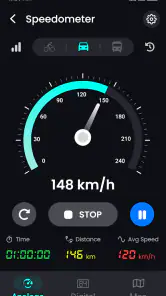
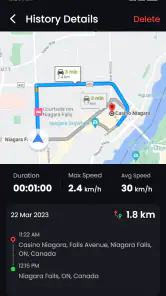
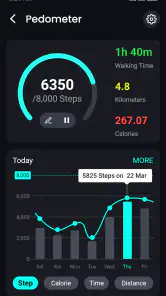
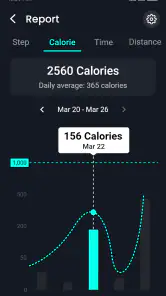
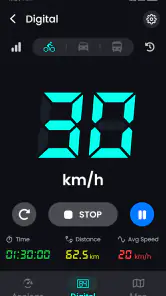
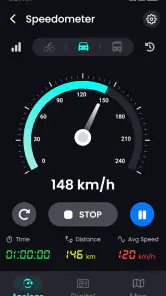
Analysis by Reviewed
I judge a driving utility less by the first time I open it than by whether I still have a reason to keep it around after the novelty wears off. A speed display can be satisfying to try, but its lasting value depends on whether it fits a real routine: checking a trip, keeping an eye on distance, or comparing a journey later without turning every drive into a data project. That is the lens I bring to Speedometer - Odometer App, a free Maps & Navigation app from GeniusTools Labs.
What the first week is good for
In the first few days, a separate speed readout is easy to appreciate. You can open the app before setting off, glance at the display when safely stopped, and get a second perspective on how quickly you are moving. The appeal is particularly clear if you drive a vehicle with a small or awkwardly placed dashboard display, or if you occasionally travel in a vehicle where the built-in instruments are unfamiliar. It gives the phone a focused job rather than asking you to learn a full navigation system.
The first-week test should be practical, not just a novelty check. Try it on a familiar route in open conditions, where GPS reception is less likely to be obstructed, and compare its speed indication with the vehicle’s display while keeping your attention on the road. A phone-based reading is useful as a reference, but I would not treat any app as a reason to stare at a screen or as a substitute for the vehicle’s instruments. Set up the phone before moving, secure it appropriately, and make any comparisons when it is safe.
The app is rated for Everyone, and its uncomplicated purpose should make sense to a broad range of drivers. Its current version is 3.1.2, and it supports Android 5.0 or later. It has reached over a million installs and holds a 4.5 average from around twelve thousand ratings, which suggests plenty of people have found a reason to try it. Those figures are useful context, not a guarantee that GPS will behave identically on every phone or in every location.
From first impression to a useful driving habit
Features That Keep You Hooked
Now, let's dive into what makes this app tick. The speedometer feature is spot on. I tested it against my car's built-in system, and it was incredibly accurate. No more second-guessing whether your speedometer is telling the truth. Plus, it offers both analog and digital displays, so you can choose whichever suits your style.
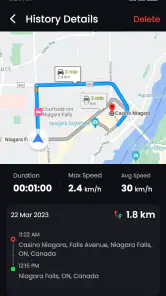
Another cool feature is the odometer. It keeps track of your total distance traveled, which is perfect for those who like to keep a record of their road trips. There's also a trip history option, so you can look back on your adventures and even share them with friends if you're into that sort of thing.
Why You Might Love It
One of the standout features for me is the HUD mode. This allows you to project your speed onto your windshield. It’s like something straight out of a sci-fi movie! It’s perfect for night drives or when you just want to keep your eyes on the road. Plus, it adds that extra bit of cool factor to your driving experience.
More From Our News Desk

Clash of Clans Is Won Between the Battles

Android Auto Makes the Case for Quieter Car Software

MobiOffice: Transforming Mobile Productivity with Seamless Integration

EA SPORTS FC™ Mobile Soccer: Redefining Mobile Sports Gaming

How Microsoft OneDrive Became a Mobile Productivity Giant

How Google Translate Breaks Language Barriers Effortlessly
And if you're someone who's conscious about your fuel consumption, the app provides insights into your average speed and how efficiently you're driving. It's like having a mini driving coach right in your pocket.
Making distance tracking useful after the novelty
A trip record becomes more valuable when you decide in advance what you want it to tell you. For a weekend drive, distance and elapsed time can help you remember how long a route actually takes, rather than relying on a vague impression. For recurring errands, a few records can make it easier to compare routes or notice that a familiar journey changes with traffic and stops. I would use those details as a personal reference, not as a formal log that must be exact in every condition.
A small habit helps avoid confusing one journey with another: start tracking when you are ready to leave, and stop when the trip is finished. If you pause for a long break or switch vehicles, decide whether you want one continuous record or separate legs before you begin. That simple choice makes a history easier to interpret later. It is also worth checking the recorded trip soon after arrival, while you still remember whether a detour, stop, or weak signal might explain an odd-looking result.
For someone who drives for work, distance information may be handy for rough personal tracking, but I would not assume it meets an employer’s or tax authority’s recordkeeping rules. If you need auditable mileage, categorized expenses, or reliable export into a work process, choose a dedicated mileage tool designed around those obligations. This app is better suited to casual awareness and trip memories than to paperwork where a discrepancy could matter.
A realistic everyday drive
Picture a driver borrowing a family car for a Saturday visit in an unfamiliar area. Before leaving, they place the phone where it can be viewed without obstructing the road, select a display they can read quickly, and start a trip record while parked. During the drive, the speed readout is a secondary reference; the driver still follows the vehicle’s instruments, road signs, and conditions. After arriving, the distance and time offer a useful reminder of how the outing went. On the return trip, starting a separate record makes the two journeys easier to compare.
That kind of routine is where the app makes sense to me: occasional, deliberate use, with a clear reason to track something. It is less compelling if you already glance at your dashboard and never revisit trip details. A driver who only wants directions will get more from a conventional navigation app, while someone who wants a permanent driving log should look for a tool whose records, exports, and retention options match that need. The right choice depends less on how many displays an app offers than on what you plan to do with the information afterward.
Choosing between phone GPS and familiar alternatives
Compared with a car’s built-in speedometer, a phone app is flexible and can travel with you between vehicles, but it depends on GPS reception and the phone being positioned safely. The dashboard remains the more natural primary reference because it is already part of the driving position. I see the app as a companion for occasional comparison or trip tracking, not a replacement that should take priority over the vehicle’s equipment.
Compared with a full navigation app, this tool has a narrower job. Navigation is the better choice when you need turn-by-turn directions, route planning, or help finding a destination. A dedicated GPS device may suit drivers who want a separate screen and do not want to rely on a phone during a long journey. In contrast, this app’s attraction is its focused combination of speed and distance information. If all you need is directions, installing a separate speedometer may add little; if you are curious about a journey’s pace and length, that focused view can be more convenient.
For cycling or walking, the same kinds of speed and distance figures can be interesting, but road-focused expectations do not automatically transfer to those activities. GPS readings can fluctuate when movement is slow, routes pass beneath cover, or the phone has a poor view of the sky. I would treat a short or interrupted reading cautiously and avoid using it as a precise fitness measurement. A sport-specific tracker is a better fit when consistent exercise records are the main goal.
Things to Keep in Mind
Of course, no app is without its quirks. The GPS signal can sometimes be a bit finicky, especially in areas with poor reception. It's not a dealbreaker, but something to keep in mind if you often drive in remote locations. Also, while the app is great for casual use, I wouldn't rely on it for precise navigation or as a full replacement for dedicated GPS devices.
That limitation affects how I would interpret every number it shows. A momentary speed reading can lag or jump when reception is unstable, and a recorded distance can differ from what you expect if the signal drops or the route includes covered stretches. A quick check on a clear, familiar drive is a better way to learn how it behaves on your phone than making assumptions based on one trip through tunnels, dense streets, or remote roads. If a reading looks implausible, I would not use it to make a driving decision.
There is also a practical trade-off in using a phone for a driving tool: the screen needs a safe place, and the phone must remain usable for whatever else you rely on it for. A bright display may be distracting at night, while a windshield reflection depends on the glass, angle, and surrounding light. I would test the HUD while parked and keep it only if the reflection is genuinely easy to read without pulling attention from the road. The novelty is not worth an awkward setup.
The maintenance burden and the points that wear thin
Keeping the app useful does not call for a complicated routine, but it does require a little discipline. I would open it only when I have a specific tracking purpose, make sure the phone is positioned before moving, and check the result after parking. That prevents the app from becoming another screen to fiddle with while driving. If I use trip history, I would review it occasionally and keep only the records I actually care about, rather than accumulating journeys I will never revisit.
Battery and attention are the two everyday costs I would watch. GPS use during a long outing can compete with other phone tasks, so I would begin a trip with enough charge and avoid assuming the phone can comfortably handle tracking, navigation, calls, and entertainment for an entire day without planning. The exact effect depends on the device and how it is used, but the broader trade-off is straightforward: the more jobs the phone handles at once, the less convenient a dedicated dashboard instrument can seem.
Some users may also find that the app’s usefulness fades once they have satisfied their curiosity about speed or logged a few trips. That is not necessarily a flaw; a simple utility should not demand daily attention. But if you are looking for a habit-forming driving dashboard, extensive vehicle analytics, or a complete navigation workflow, its focused role may feel limited. I would keep it only if I can name a recurring reason to open it, such as checking a route’s duration or keeping a casual record of a particular drive.
The app is free to install, with in-app purchases listed from $0.99 to $99.99 per item. I would decide whether its basic role is useful before spending anything, and check the purchase details in the app so the cost and purpose are clear. Paying makes sense only if an option solves a specific problem for you; it should not be necessary to justify keeping a tool that otherwise sits unused.
Who will get lasting value from it
I can see this being worthwhile for drivers who sometimes use different cars, enjoy keeping informal trip records, or want a second speed display for a particular situation. It can also suit someone who likes reviewing average speed and distance after a journey, provided they treat those figures as context rather than a precise diagnosis of driving skill or fuel economy. Its value comes from answering small questions about trips, not from replacing the car’s systems.
I would skip it if you need dependable turn-by-turn guidance, certified mileage records, professional fleet tracking, or a measurement you can treat as exact in every environment. It is also a poor fit if mounting or glancing at a phone would distract you, or if the vehicle’s existing instruments already meet your needs. In those cases, a dedicated navigation product, a purpose-built mileage logger, or simply the car’s own display is the more sensible choice.
GeniusTools Labs has kept the concept straightforward, and that simplicity is both the appeal and the boundary. The app belongs in the Maps & Navigation space, but it is not a map-led journey planner in the usual sense. Its value is most apparent when you already know where you are going and want a convenient way to observe speed, distance, and trip duration along the way.
Long-term verdict
In conclusion, the Speedometer - Odometer App is a solid choice for anyone looking to enhance their driving experience. It's packed with features that are both fun and functional. So, if you're ready to take your driving to the next level, why not give it a try? Safe travels, everyone!
My more lasting recommendation is a little narrower: try it if you have a real, occasional use for a separate speed and trip view, then judge it by whether you actually return to those records. The first launch can be entertaining, but a useful routine is what earns it space on a phone. Keep the dashboard as your primary reference, use the app only when it adds something meaningful, and uninstall it if the novelty is all that remains.
Speedometer - Odometer App Frequently Asked Questions
What is Speedometer - Odometer App, and what does it track?
Speedometer - Odometer App is a Maps & Navigation app for monitoring a journey with GPS. Its summary highlights speed, distance, and time tracking, with readings shown in km/h or mph on a map. It may be useful if you want a phone-based speed display and a record of how far you have traveled, rather than relying only on a vehicle’s dashboard.
What features does the Speedometer - Odometer App offer?
The Speedometer - Odometer App offers a range of features including real-time speed tracking, distance measurement, and a built-in odometer. The app provides customizable speed units and can alert you when you exceed a preset speed limit. Additionally, it offers a GPS route tracker and can function offline once the maps are downloaded.
Is the Speedometer - Odometer App accurate in tracking speed and distance?
Yes, the app is designed to provide highly accurate speed and distance tracking by utilizing the smartphone's GPS sensors. However, the accuracy may vary depending on the quality of the GPS signal and the device's hardware. Users have reported high reliability in urban and rural areas, but a clear line of sight to the sky enhances performance.
Does the Speedometer - Odometer App consume a lot of battery?
The Speedometer - Odometer App does consume more battery than typical apps because it uses GPS continuously to track speed and distance. To mitigate battery drain, it's advisable to keep the device connected to a power source during extended use, especially for long road trips or cycling sessions. The app also includes a power-saving mode to help manage battery usage.
Can I use the Speedometer - Odometer App offline?
Yes, the app can be used offline, but with limited functionality. You need to download the necessary maps beforehand to enable offline GPS tracking. Without an internet connection, live traffic updates and location sharing features will be unavailable. Offline usage is particularly useful for areas with poor network coverage.
Pros
- Accurate speed tracking.
- User-friendly interface.
- Supports multiple units.
- Customizable alerts.
- Battery-efficient operation.
Cons
- Ads can be intrusive.
- Limited offline functionality.
- Requires GPS for accuracy.
- No dark mode option.
- Limited support for older devices.
- Category
- Maps & Navigation
- Version
- 3.1.2













