

Speedometer: GPS Speedometer
- 4.93K
- 4.5
- Installs
- 10.00M
- Price
- Free
Screenshots
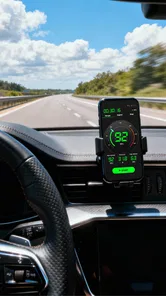
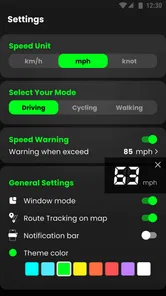
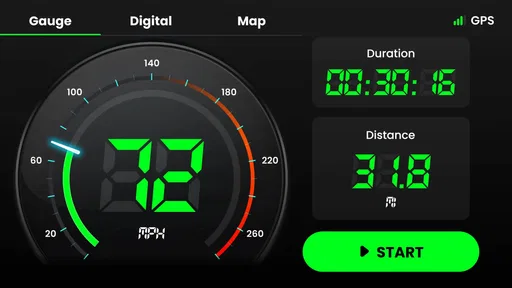
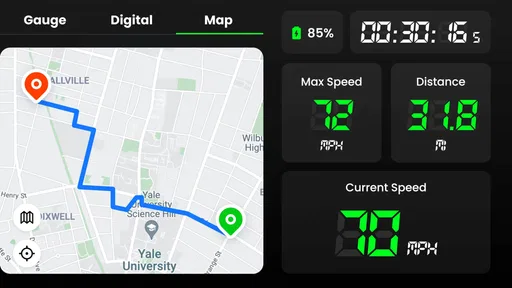
Analysis by Reviewed
If you ever find yourself needing to keep track of your speed while driving, cycling, or even jogging, the Speedometer: GPS Speedometer app might just be your new best friend. Let's dive into what makes this app tick, and why it could be the perfect companion for your journeys.
The first-week appeal
First off, what grabbed my attention about the Speedometer: GPS Speedometer is its user-friendly interface. You don't need a degree in rocket science to figure it out. Everything is laid out in a simple, easy-to-navigate format. This app is designed for anyone and everyone, from tech-savvy millennials to tech-averse grandparents.
That simplicity matters most when I only need a quick check rather than another complicated navigation setup. A cyclist can glance at speed on a familiar route, while someone borrowing a vehicle can use a separate speed readout without changing the car's built-in system. I would set the preferred measurement unit before setting off, then position the phone securely; fiddling with either while moving defeats the point of a straightforward tool.
During the first few outings, I would use it for one clear purpose at a time rather than turn every trip into a test. On a familiar drive, I might check whether the separate display is easy to read from its safe mounting position. On a walk or jog, I could compare pace and distance across a known route without needing a route-planning screen. That small, deliberate trial helps answer the practical question quickly: does a separate GPS readout make this activity easier, or is the dashboard or existing app already enough?
Reading GPS speed sensibly
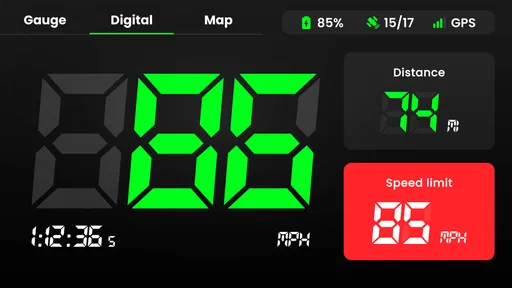
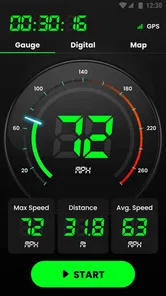
One of the most impressive aspects is the app's accuracy in speed measurement. It uses your phone's GPS to provide real-time speed data, which is surprisingly precise. Whether you're cruising down the highway or cycling through a park, the app keeps you updated with your exact speed.
Moreover, it offers customization options, allowing you to switch between different units of measurement. So whether you prefer miles per hour or kilometers per hour, the app has got you covered.
GPS readings are most useful as a separate reference, not a reason to stop checking the road or your vehicle's instruments. Reception and movement can affect a phone-based reading, so I would treat a sudden jump or lag as a cue to verify conditions rather than react sharply. If you need dependable route guidance, traffic, or turn-by-turn directions, a full navigation app is the better everyday choice; this one is more focused on speed and distance.
More From Our News Desk

 Weather - By Xiaomi
Weather by Xiaomi Review: Clear at a Glance, Less Clear Up Close
Xiaomi’s weather app makes everyday forecasts quick to scan, but its calm surface can leave useful details and recovery paths harder to find than they should be.

 X
XX Under Pressure: Can It Recover When Posting Goes Wrong?
A resilience-focused review of X, examining setup, mistaken posts, interruptions, weak connections, and the gaps that matter when recovery needs to be dependable.

 Clash of Clans
Clash of Clans Is Won Between the Battles
Its raids are quick; its community is a long-term project of coordination, teaching, rivalry, and shared responsibility—with all the friction that entails.

 Android Auto
Android Auto Makes the Case for Quieter Car Software
The car interface is no longer judged by how much it can do, but by how quietly it helps. Android Auto shows what drivers now expect—and what still gets in the way.

 MobiOffice: Word, Sheets, PDF
MobiOffice: Transforming Mobile Productivity with Seamless Integration
MobiOffice: Word, Sheets, PDF is redefining mobile productivity with a surprising blend of functionality and innovation.

 EA SPORTS FC Soccer Mobile 26
EA SPORTS FC™ Mobile Soccer: Redefining Mobile Sports Gaming
Dive into EA SPORTS FC™ Mobile Soccer, where immersive gameplay and strategic depth transform mobile sports gaming.
Latest News



There is also a useful distinction between checking a number and relying on it. A phone's GPS speed can be a helpful second opinion when a vehicle display is hard to see or when I want a simple record of a short outing, but it is not a substitute for safe driving judgement. I would wait until the phone has a clear view of the sky and the reading has settled before treating it as useful. In a tunnel, among tall buildings, or during stop-start movement, I would expect the number to be less steady and would give more weight to the vehicle's instruments.
That makes the app a better fit for a controlled comparison than for decisions that require instant precision. For example, if I am checking a bicycle ride, I can review how a steady stretch feels against the displayed speed without staring at the screen. If I am driving, I would set everything up while parked and leave the display where it can be glanced at briefly. The key trade-off is simple: a dedicated readout can be convenient, but it asks me to manage a phone safely and accept the limits of GPS reception.
Distance, alerts, and practical trade-offs
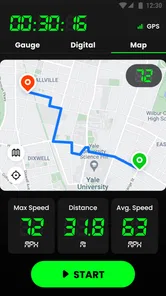
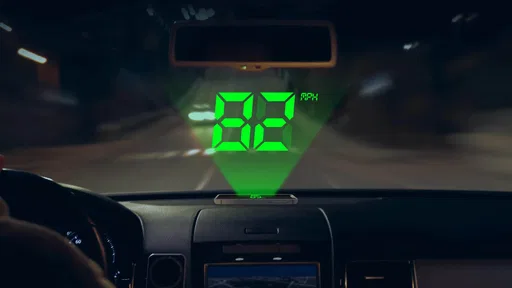
Beyond its speed tracking capabilities, the app also comes equipped with a digital odometer. This feature is a game changer for those who need to keep track of distance traveled, especially useful for long road trips or for athletes monitoring their training distances. Additionally, it supports a HUD mode, which projects your speed onto your car's windshield—perfect for nighttime driving.
For a useful routine, I would reset or note the distance at the start of a specific outing, then compare the result with the route or training plan afterward. That makes the odometer more meaningful than leaving it running without a clear purpose. HUD is a convenience to test while parked: windshield shape, reflections, and ambient light can affect how readable a reflected display feels, so it should never become a distraction or replace looking at the road.
Distance tracking can also help with practical planning beyond exercise. If I regularly drive between two places and want a quick sense of the trip length, starting with a clear outing boundary makes the odometer result easier to interpret. For a cyclist, noting a ride's distance can help distinguish a short recovery loop from a longer training day. I would avoid comparing numbers from trips where I forgot to start or stop the measurement; inconsistent beginnings and endings are more likely to confuse the record than to provide useful insight.
The same discipline matters for the HUD. I would first check the reflection while stationary and decide whether it is genuinely legible from my normal driving position. A reflection that looks clear in a parked car may become washed out or distracting under different light, so this is not a feature I would assume works equally well in every vehicle. If it does not suit the windshield or makes me focus on the reflected image, the ordinary phone display—or simply the vehicle's own instruments—is the better choice.
Another handy feature is the speed alert. You can set a speed limit, and the app will notify you if you exceed it. It's like having a virtual co-pilot reminding you to stay within safe speed limits.
An alert works best as a personal reminder, not as a guarantee that every road's current limit is being identified for you. Before a drive, choose a sensible threshold and make sure the phone is positioned safely; if repeated warnings become annoying, adjusting the limit or leaving alerts off may suit a familiar route better. This is a small but important distinction from navigation apps that may combine speed information with route context.
For a daily commute, I would treat the alert as a simple nudge rather than a complete speed-limit assistant. A preset threshold may be useful when I want a reminder not to creep above a chosen speed, but it cannot replace paying attention to posted signs and changing road conditions. If the route has frequent changes in limits, a navigation app with road context is likely more practical. If the same alert keeps interrupting a ride or drive, turning it off is a sensible adjustment, not a failure to use the app properly.
Month-to-month value and upkeep
Now, one might worry about battery consumption with constant GPS usage, but the developers seem to have optimized the app quite well. It doesn't drain the battery as much as one would expect, which is always a plus for those long-haul journeys.
Even so, continuous GPS use is a practical trade-off: on a long outing, I would start with a charged phone and avoid treating a speed display as something that must remain open all day. A short trip, a training session, or a particular stretch where I want to check speed is a more natural habit. That keeps the app useful without making it another screen I feel obliged to monitor.
The easiest way to make it stick is to connect it to a recurring task. A cyclist might open it before a weekly route and use the distance figure as a quick session check; a driver might use it only on trips where the dashboard speed is inconvenient to read. That kind of habit gives the app a clear job without turning it into a daily obligation. If I stop having that specific need, removing it is more sensible than keeping it installed just because it once seemed interesting.
Maintenance is modest but not nonexistent. I would keep the phone charged, mount it before moving, select the units I actually use, and avoid leaving the screen active for outings where I do not need a separate reading. Those small choices reduce the chance of fumbling with settings at the wrong time and make occasional use less of a chore. If the device is already needed for navigation or music, I would also think about whether another open screen is worth the added attention and battery use on that particular trip.
For occasional use, a phone's built-in map app or a vehicle dashboard may already be enough. The separate speedometer earns its place when I want an at-a-glance speed and distance tool without navigating a route. Simple Design Ltd. develops this free Maps & Navigation app; it has a 4.5 average from around 144,000 ratings and more than 10 million installs. The Everyone age rating makes it broadly accessible, though anyone using a phone while driving still needs to follow local rules and keep attention on the road.
Compared with a standard navigation app, this one is more narrowly focused: navigation is built around getting somewhere, while a standalone speedometer is about monitoring a trip or activity. Compared with a car's dashboard, it offers a separate phone-based display and distance tracking, but lacks the natural integration of a built-in instrument. Which is preferable depends on the trip. For directions through an unfamiliar area, I would choose navigation; for a quick speed-and-distance check on a familiar outing, the simpler dedicated tool may be easier to interpret.
The app is also not an ideal choice for someone who expects automatic, context-aware guidance throughout a changing drive. Its speed alert should not be confused with a system that knows the current limit on each road, and its GPS reading is not something I would treat as infallible in poor reception. People who need turn-by-turn directions, live traffic, or a vehicle-integrated display will likely be happier with their usual navigation app or dashboard. Its strongest audience is narrower: people who have a recurring reason to see speed and distance separately.
Keeping a place in the routine
In conclusion, the Speedometer: GPS Speedometer app is a robust, reliable tool for anyone needing to keep an eye on their speed. Its ease of use, coupled with its range of features, makes it a standout choice. Whether you're using it for driving, cycling, or any other activity where speed tracking is essential, this app delivers on its promises.
Its lasting value depends on whether speed and trip distance are things you check repeatedly. A commuter who wants a quick secondary readout, or a cyclist comparing familiar rides, may keep returning to it. Someone who mainly needs directions, traffic information, or a vehicle-integrated display may find a navigation app or dashboard more convenient and have little reason to open this one. That is not a flaw so much as a clear boundary around its job.
It is worth being honest about the novelty factor, too. A large speed display can be engaging the first time I try it, and the extra modes may invite experimentation, but excitement alone will not make it a lasting tool. The feature that matters is whether it solves a small repeated problem: checking speed from a more convenient position, keeping an outing's distance in view, or setting a personal reminder. If those needs come up only once, the app may not earn a permanent place on my phone.
For someone deciding whether to keep it, I would give it a few ordinary outings rather than judge it on a single test. Use the same unit, choose a safe mounting position, and see whether the speed and distance displays are genuinely useful in the activity you do most. If you keep reaching for it without compromising attention or needing repeated setup, it has a practical role. If you forget it after the first week, your existing dashboard or map app probably already covers the need.
The current version is 1.2.4, and the app is free to download, with in-app purchases ranging from $4.49 to $49.99 per item. I would check the purchase details in the app before paying and decide whether its basic speed-and-distance role already covers my needs. The best reason to keep it installed is a recurring, specific use—not novelty or the hope that it will replace a full navigation system.
Because the app is free to download but offers in-app purchases, I would explore its everyday usefulness before spending anything. The range of listed purchase prices is broad enough that I would read each option carefully and consider whether it adds something I will actually use. If my needs are limited to an occasional speed or distance check, I would not assume that paying is necessary; the sensible decision is to judge the app by the tasks I repeat, not by the presence of extra purchase choices.
So, if you're in the market for a dependable speed tracking app, give this one a spin. It's not just about getting from point A to point B—it's about doing it safely and efficiently.
Speedometer: GPS Speedometer Frequently Asked Questions
Who is Speedometer: GPS Speedometer designed for?
Speedometer: GPS Speedometer may suit people who want to check their speed and distance during everyday travel or outdoor activities. Its focus is on GPS-based speed tracking, with the store summary also highlighting speed limits and time. The app is in the Maps & Navigation category, so it is intended as a practical navigation companion rather than a dedicated professional measuring instrument.
Can Speedometer: GPS Speedometer help me keep track of distance as well as speed?
Yes. Speedometer: GPS Speedometer is intended to track both speed and distance using GPS. That can make it useful when you want to follow a journey or activity rather than just glance at your current pace. As with any GPS-based app, the quality of the readings can depend on the device’s GPS reception and the conditions around you.
Who develops Speedometer: GPS Speedometer, and what is its age rating?
Speedometer: GPS Speedometer is developed by Simple Design Ltd. and has an Everyone content rating, which makes it suitable for a broad audience. It is a Maps & Navigation app built around speed and distance tracking. If you are choosing an app for a family device, the Everyone rating may be helpful when comparing options.
What devices and operating systems can run Speedometer: GPS Speedometer?
Speedometer: GPS Speedometer is a mobile app for Maps & Navigation, developed by Simple Design Ltd. It requires Android 6.0 or later, so check your device’s operating-system version before downloading. The app is free to install, with optional in-app purchases. Its content rating is Everyone, making it suitable for a broad audience.
What is Speedometer: GPS Speedometer and how does it work?
Speedometer: GPS Speedometer is a mobile application designed to measure your speed in real-time using your device's built-in GPS. It tracks your speed while driving, cycling, or running, providing readings in units such as km/h or mph. The app uses satellite data to calculate speed, and its stated purpose also includes tracking distance and checking speed limits and time.
Pros
- Accurate speed tracking
- User-friendly interface
- Customizable display
- Supports multiple units
- Works offline
Cons
- Drains battery quickly
- Ads in free version
- Limited features without premium
- Occasional GPS signal loss
- No route tracking feature













