

SpeakEasy: Home Speech Therapy
- 161.00
- 3.6
- Installs
- 100.00K
- Price
- Free

Screenshots
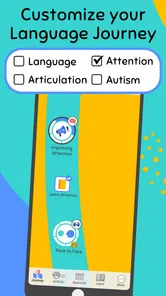
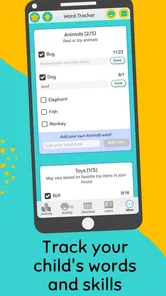


Analysis by Reviewed
I approached SpeakEasy: Home Speech Therapy as a parent looking for a practical way to support early language development between professional appointments. It is a free parenting app from SpeakEasy Community, and its purpose is easy to understand: give families speech-focused activities they can use at home rather than leaving all practice to a clinic visit. That makes it interesting for parents who want a repeatable routine, but it also means expectations matter. This is a support tool, not a replacement for a speech-language professional.
My overall impression is that the app is most useful when I treat it as a small, focused part of the day. It is not something I would hand to a child and expect to manage independently. The real value comes from an adult being present, turning the exercises into conversation, and noticing how the child responds. Used that way, it can make home practice feel less improvised. Used as a substitute for assessment or individualized therapy, it is not the right choice.
How SpeakEasy fits into a family’s daily routine
The first thing I would clarify is what “home speech therapy” means here. The app is designed to encourage early language development, so I see it as a guided practice companion for parents. It can help create moments for listening, repeating, naming, and interacting, but a phone cannot observe a child as carefully as a trained therapist can. A professional can adjust goals, identify patterns, and account for hearing, motor, developmental, or social factors. An app generally cannot provide that same level of judgment.
That distinction does not make SpeakEasy unhelpful. In fact, it gives the app a sensible place in a family’s routine. Many parents know they should talk, read, and practice with a child, yet still struggle to decide what to do for a few focused minutes. A dedicated speech app can reduce that uncertainty. Instead of searching randomly for activities, I can open the tool with a particular purpose in mind and keep the interaction short enough to fit around meals, play, or bedtime.
I would not measure success by how quickly a child taps through a screen. For this kind of app, the better question is whether it encourages more useful interaction away from the device. If a prompt leads a parent to repeat a word during bath time, point out objects on a walk, or pause during a picture book so a child can respond, the app is doing something worthwhile. If it becomes passive screen time, its benefit is much smaller.
What the speed feels like in real use
Parents often want to know whether an app feels quick enough for a young child. SpeakEasy’s practical speed is less about racing through screens and more about keeping the activity moving. Young children can lose interest when an adult spends too long preparing an exercise, so I would open it before inviting the child over, choose a calm moment, and keep the phone within easy reach. That simple preparation matters more than trying to make every session long.
A useful routine is to decide on one small target before starting. For example, I might focus on encouraging a child to attempt a sound, identify a familiar object, or take a turn in an exchange. I would then stop while the child is still engaged rather than extending the session just because more material remains. This approach makes the app feel faster and also gives the parent a clearer way to notice progress.
More From Our News Desk

 Gmail
GmailGmail in a Busy Inbox: Who Benefits Most?
From first account to crowded workday, Gmail earns its place through dependable search and flexible sorting—but its best fit depends on how much inbox maintenance you can tolerate.

 Prime Video
Switching to Prime Video: What Changes in Your Viewing Routine
Prime Video can make a compelling second home for streaming, but switching means learning a different catalog, rental layer, and route from browsing to playback.

 Universal TV Remote Control
Universal TV Remote Control Works Best as a Reliable Backup
A phone remote earns its place through quick setup and reliable habits. Here is how to get more from Universal TV Remote Control—and where its limits show.

 Weather - By Xiaomi
Weather by Xiaomi Review: Clear at a Glance, Less Clear Up Close
Xiaomi’s weather app makes everyday forecasts quick to scan, but its calm surface can leave useful details and recovery paths harder to find than they should be.

 X
XX Under Pressure: Can It Recover When Posting Goes Wrong?
A resilience-focused review of X, examining setup, mistaken posts, interruptions, weak connections, and the gaps that matter when recovery needs to be dependable.

 Clash of Clans
Clash of Clans Is Won Between the Battles
Its raids are quick; its community is a long-term project of coordination, teaching, rivalry, and shared responsibility—with all the friction that entails.
Latest News



The app is not a good match for a parent expecting instant results from a few sessions. Early language development is gradual, and children respond differently depending on tiredness, attention, confidence, and communication style. SpeakEasy can help a family practice consistently, but consistency should not be confused with a guaranteed timeline. I would use it to support a plan, not to promise a particular outcome.
When the app gets the most demanding use
The heaviest moments are likely to be ordinary family situations rather than technical stress tests. A parent may be trying to use the app while a child is restless, a younger sibling is nearby, or the household is moving between activities. In those moments, the main challenge is not simply whether the app opens. It is whether the adult can understand the next activity quickly and turn it into an interaction instead of another distraction.
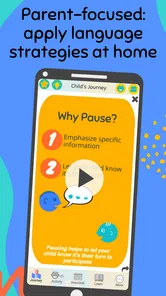
I found the best mental model to be “parent-led practice.” I would look at the activity first, explain it in my own words, and then put the screen in the background as much as possible. This avoids a common problem with educational apps: the child starts watching the device instead of communicating with the person beside them. It also makes the exercise easier to adapt if a child is not ready for the exact task.
A realistic example would be a parent using SpeakEasy after dinner, when there are only a few quiet minutes available. Rather than opening the app during the meal, the parent could preview one activity, wait until the table is cleared, and invite the child to participate. If the child responds well, the parent can repeat the same language naturally while getting ready for bed. If the child is tired, ending early is more sensible than forcing progress. That workflow makes the app a prompt for real communication rather than a separate chore.
Stability, interruptions, and the role of the adult
For a parenting tool, reliability includes more than avoiding crashes. A dependable experience should let a parent return to the activity without losing the purpose of the session, understand what to do next, and recover calmly when a child interrupts. SpeakEasy works best when I keep the routine simple enough that a brief interruption does not ruin it. I would avoid treating one session as a formal lesson that must be completed from beginning to end.
Families should also remember that young children are unpredictable users. They may touch the screen, walk away, repeat an activity, or refuse to participate. That is not necessarily an app failure. A parent needs to decide when to follow the activity, when to simplify it, and when to switch to ordinary conversation. The app can suggest a direction, but the adult remains responsible for reading the child’s response.
Recovery after a disrupted session is easier if the parent keeps a small note of what seemed useful. I would record a word the child attempted, a sound that caused frustration, or an activity that encouraged more eye contact and turn-taking. The next session can then begin with something familiar instead of starting blindly. This is a more valuable use of the app than repeatedly opening it without remembering what happened last time.
The published average is 3.6 from around 675 ratings, with around 161 written reviews, so the public response is mixed rather than universally enthusiastic. I read that as a reason to approach the app with practical expectations. It may fit one family’s routine well and feel less suitable to another, especially when children need highly individualized support. The rating does not decide the app’s value by itself, but it does suggest that parents should try it and judge whether its approach matches their child.
Device limits and choosing the right setting
SpeakEasy is listed for Everyone and requires Android 9 or later. That makes the operating-system requirement relatively approachable for families using a reasonably current Android phone or tablet, but the device still needs to be comfortable for shared use. A small phone may be convenient for the parent but awkward when a child needs to see an image or follow an activity. A larger screen can improve shared attention, although it may also make the device more tempting as entertainment.
I would choose a quiet, stable place rather than using the app while walking, driving, cooking, or handling other tasks. Speech practice depends on hearing and responding, so background noise can make the interaction less useful even if the app itself runs normally. Headphones would also work against the shared nature of the exercise if the parent needs to hear the child clearly. The best setup is usually simple: a charged device, a comfortable position, and an adult who is not trying to multitask.
Storage and resource demands are practical considerations for any family app, but I would not judge SpeakEasy by how many minutes a child can remain on it. Its strongest use does not require an extended session. Short, repeatable practice is more realistic than leaving the app open for a long period. That also reduces the chance that the device becomes the focus instead of the conversation.
The app is free to install, while in-app purchases are listed from $11.99 to $71.94 per item. That pricing range is important for a parent deciding whether to explore it casually or build it into a longer-term routine. I would begin with the free experience and only consider paying after understanding how well the activities fit the child and whether the adult can use them consistently. A purchase should add practical value to the family’s routine, not be made because a parent feels pressured to solve a developmental concern quickly.
Where it beats ordinary alternatives
The usual alternative is informal practice without an app: talking during daily routines, reading picture books, singing, and following advice from a therapist or pediatric professional. Those approaches remain essential, and I would never replace them with screen-based exercises. SpeakEasy’s advantage is organization. It can give a parent a starting point when spontaneous activities feel repetitive or when the adult wants a clearer structure for a few minutes of practice.
Compared with general children’s learning apps, a speech-focused tool has a narrower purpose. A colorful alphabet or preschool game may be entertaining, but entertainment alone does not ensure that a child is taking turns, listening carefully, or attempting language. SpeakEasy is more relevant when the parent wants the activity to support communication rather than broad academic play.
Compared with professional therapy, however, the app is much less personal. A therapist can change the difficulty immediately, observe pronunciation closely, and connect exercises to a child’s wider development. SpeakEasy is better viewed as a bridge between appointments or a way to make home practice more deliberate. If a child has persistent difficulty, regression, pain, suspected hearing problems, or frustration that is affecting daily life, I would seek professional guidance instead of relying on an app.
Three ways to get more from each session
Preview before involving the child. I would read through the activity first, decide what response I am hoping to encourage, and remove unnecessary pauses. This keeps the child from waiting while the parent learns the exercise and makes a short session feel more natural.
Use the app as a launch point, not the whole lesson. If an activity involves a word or concept, I would carry it into the next ordinary routine. Practicing the same language while dressing, eating, or looking at a book helps connect the exercise with real communication.
Track responses, not just completion. Finishing an activity is less informative than noticing whether the child attempted a sound, initiated a turn, copied a gesture, or stayed engaged. A tiny record of those observations can help a parent explain patterns to a professional and choose better starting points next time.
A fourth useful adjustment is to let the child’s mood change the plan. If the child is playful, I might extend the conversation away from the screen. If the child is tired, I would choose a familiar prompt or stop. This flexibility is not a weakness in the method; it is necessary when working with very young children. A rigid expectation can turn a helpful tool into a source of tension.
Who should use it, and who should skip it
I think SpeakEasy is a good candidate for parents who want a structured way to encourage early language at home, especially when they are willing to participate rather than hand over the device. It may also suit families who already have professional advice and want a convenient way to make practice more regular between visits. The free entry point makes it reasonable to test without immediately committing to a paid program.
I would be cautious if the parent is looking for a diagnostic answer, a guaranteed treatment plan, or an app that a child can use alone. It is also not the right first response to a serious concern that has not been discussed with a qualified professional. A general home tool cannot account for every reason a child may communicate differently, and a parent should not interpret an app activity as a clinical assessment.
Children vary widely in attention and comfort with screens, so the app may be less effective for a child who becomes absorbed in tapping or resists any device-based activity. In that case, direct play, books, songs, and professional recommendations may be better. The strongest users are not necessarily the families with the newest device; they are the families able to turn a prompt into patient, face-to-face interaction.
My performance verdict after weighing the trade-offs
SpeakEasy: Home Speech Therapy earns its place as a focused parenting aid, not as a complete therapy service. Its strengths are its clear purpose, its usefulness as a routine starter, and the way it can help a parent move from vague good intentions to a short, repeatable practice moment. The experience is most convincing when the adult stays involved and carries the language into everyday life.
The limitations are equally important. Progress will not be instant, the app cannot personalize care like a therapist, and a child’s attention may make even a well-designed activity difficult to use. The in-app purchase range also means parents should test the free experience carefully before spending money. I would not recommend paying simply because the family is anxious; I would pay only if the content demonstrably fits the child’s needs and the routine is sustainable.
SpeakEasy Community has made a tool that can be useful in the space between professional advice and daily family life. With over 100K installs and a current version of 1.0.13, it has reached enough families to be a recognizable option in this niche, while its 3.6 average reminds me to keep the recommendation measured. My final advice is straightforward: try it with an adult beside the child, keep sessions brief, connect activities to real conversation, and treat professional support as the foundation when concerns are significant. For parents seeking a practical prompt for early language practice, it is worth exploring; for anyone expecting a complete replacement for therapy, it is not.
SpeakEasy: Home Speech Therapy Frequently Asked Questions
Is SpeakEasy: Home Speech Therapy free to download, and what might cost extra?
SpeakEasy is free to download, though some content is offered through in-app purchases. These range from around $12 to $72 per item, so check the purchase details before choosing paid features. A free download does not necessarily mean every activity is included at no cost. If a child will use the app, it is sensible for a parent or caregiver to review the available options and manage any purchases.
What is SpeakEasy: Home Speech Therapy, and who is it designed for?
SpeakEasy: Home Speech Therapy is a mobile app that provides guided speech and language practice at home. It is mainly intended for children who need support with pronunciation, vocabulary, articulation, or early communication skills, while parents or caregivers help manage the activities. The exercises are designed to supplement professional guidance, not replace an assessment or treatment plan from a qualified speech-language therapist.
How does SpeakEasy: Home Speech Therapy work?
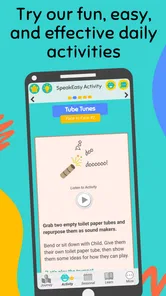
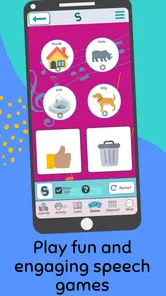
After setting up a profile, a parent or caregiver can explore speech activities and practice sessions suited to the child’s needs and age. The app typically uses short, repeatable exercises, visual prompts, and spoken examples to make practice easier to follow. Consistent sessions are important, but results can vary considerably depending on the child’s difficulties, participation, age, and whether the app is being used alongside professional therapy.
Can SpeakEasy replace a speech-language pathologist or professional evaluation?
No. SpeakEasy should be viewed as a home-practice tool rather than a replacement for a speech-language pathologist, pediatrician, or formal developmental evaluation. The app may help families reinforce skills between appointments, but it cannot reliably diagnose the cause of a speech delay or identify hearing, neurological, developmental, or oral-motor concerns. Seek professional advice if difficulties persist, worsen, or affect communication and daily life.
Is SpeakEasy suitable for every child with speech or language difficulties?
The app may be useful for some children, but it is not automatically appropriate for every speech or language concern. Children have different abilities, diagnoses, attention spans, and learning preferences, and some may require individualized exercises or specialist support. Parents should review the activities carefully, adapt practice to the child’s comfort level, and ask a qualified professional whether the app matches the child’s specific communication goals.
Pros
- Short
- guided exercises make daily speech practice easy to fit into a routine.
- Useful visual and audio prompts can support independent practice at home.
- Progress tracking helps users monitor completed activities and maintain motivation.
- Suitable for reinforcing therapy goals between appointments with a speech professional.
- Simple navigation makes the app approachable for children
- parents
- and caregivers.
Cons
- It cannot replace a personalized assessment or treatment plan from a speech therapist.
- Some exercises may feel repetitive after extended use.
- Content may not address every speech
- language
- or developmental difficulty.
- Accurate progress tracking depends on consistent practice and user participation.
- Certain features or exercises may require payment or an internet connection.













