

Autism Speech and Language
- 20.00
- 3.8
- Installs
- 50.00K
- Price
- Free
Screenshots
Analysis by Reviewed
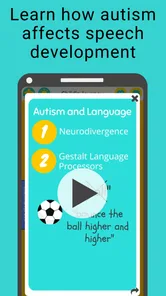
Helping a child practise speech can feel difficult when every day brings a different mood, attention span, and communication challenge. Autism Speech and Language is designed for parents of autistic children who want a simple way to support speech and language development at home. I approached it as a practical parenting app rather than a replacement for professional care, and that distinction matters from the first use.
The app is free to install, with optional in-app purchases ranging from $11.99 to $71.88 per item. It is listed for Everyone, works on Android starting with version 9, and comes from SpeakEasy Community. The current release is version 1.0.3. Its focus is narrow in a useful way: it is not trying to be a general family organizer or a broad learning platform. It aims to give parents a dedicated place to support communication practice.
That focus makes it appealing to families who want something more structured than improvised activities, but it also means expectations should stay realistic. A phone app cannot observe a child in the same way a speech-language professional can, and it cannot turn practice into progress by itself. In my view, its best role is as a repeatable support tool between appointments or during ordinary home routines.
What the first session feels like
After installing it, I would begin with a short, calm session rather than trying to explore everything at once. The store summary points directly to speech and language development, so the most useful first question is not “How many activities can I complete?” but “What communication opportunity can I support today?” That change in mindset helps keep the app connected to a child’s real needs.
For a first-time parent, the experience is easiest to understand when treated as guided practice. The child does not need to sit through a long lesson, and the parent does not need to turn the phone into a classroom. A few focused minutes can be more useful than pushing through an activity after attention has already disappeared.
I also recommend using the app when the child is comfortable rather than introducing it during a rushed transition, a meal, or a difficult bedtime. This is a small but important practical detail. If the first experience becomes associated with pressure, the tool may be harder to bring back later, regardless of how well its activities are designed.
The audience is clearly parents of autistic children, but families differ widely in communication style, age, sensory preferences, and support needs. Some children may respond well to direct practice on a screen, while others may engage more readily with toys, pictures, movement, or familiar objects. I would use the app as one option in a wider routine, not as the only method.
More From Our News Desk

 Gmail
GmailGmail in a Busy Inbox: Who Benefits Most?
From first account to crowded workday, Gmail earns its place through dependable search and flexible sorting—but its best fit depends on how much inbox maintenance you can tolerate.

 Prime Video
Switching to Prime Video: What Changes in Your Viewing Routine
Prime Video can make a compelling second home for streaming, but switching means learning a different catalog, rental layer, and route from browsing to playback.

 Universal TV Remote Control
Universal TV Remote Control Works Best as a Reliable Backup
A phone remote earns its place through quick setup and reliable habits. Here is how to get more from Universal TV Remote Control—and where its limits show.

 Weather - By Xiaomi
Weather by Xiaomi Review: Clear at a Glance, Less Clear Up Close
Xiaomi’s weather app makes everyday forecasts quick to scan, but its calm surface can leave useful details and recovery paths harder to find than they should be.

 X
XX Under Pressure: Can It Recover When Posting Goes Wrong?
A resilience-focused review of X, examining setup, mistaken posts, interruptions, weak connections, and the gaps that matter when recovery needs to be dependable.

 Clash of Clans
Clash of Clans Is Won Between the Battles
Its raids are quick; its community is a long-term project of coordination, teaching, rivalry, and shared responsibility—with all the friction that entails.
Latest News



Its average rating is 3.8 from around 92 ratings, with around 20 written reviews. That suggests a mixed but meaningful early response rather than universal approval. The app has passed 50K installs, so it has reached a sizeable group of families, although that number should not be treated as proof that it will suit every child.
Why the narrow focus can help
Many parenting apps spread their attention across schedules, milestones, games, sleep, feeding, and education. Autism Speech and Language is easier to place because its purpose is communication support. If your immediate goal is to create more opportunities for speech and language practice, that narrower identity can reduce the temptation to jump between unrelated tools.
There is also a useful emotional advantage. Parents often know that repetition matters, but they may not know how to make repetition feel natural. A dedicated app can act as a prompt to practise consistently instead of waiting for a perfect moment. The strongest result may therefore be improved routine, not simply a single successful response inside the app.
Still, I would not choose it as a general entertainment app. A child looking for open-ended games, drawing, music, or broad preschool content may find the communication focus too limited. Families wanting detailed clinical documentation, professional progress reports, or a complete therapy-management system should also look at specialist services instead.
Preparing for a useful first setup
Before opening the first activity, decide what “success” will mean for your child. It might be looking toward a communication prompt, attempting a sound, selecting an appropriate response, copying a word, or staying engaged long enough to complete a small step. Keeping the target modest prevents the session from becoming a test.
I would also prepare a quiet place and keep a familiar object nearby. If the app presents a word or communication idea, the object can help connect the screen to something real. For example, if the practice relates to requesting, having a preferred toy or snack available may create a natural reason for the child to communicate rather than making the activity feel abstract.
Parents should explore the app alone before inviting the child to participate. This gives you time to understand the flow, notice where you may need to provide help, and decide whether the language fits your family. It also avoids the common mistake of learning the interface while the child is already waiting for a response.
Because the app is free to download but includes paid items, I would review the available choices before beginning a longer routine. A free starting point is useful for judging whether the approach suits your child. There is no reason to commit to an optional purchase before you understand how your child reacts to the basic experience.
The Everyone age classification may reassure families looking for broadly suitable content, but an age label is not a personalised recommendation. Parents still need to supervise use and decide whether the material matches their child’s developmental level and communication goals. That is especially important when a child becomes frustrated by unfamiliar instructions or repeated prompts.
Turning the first activity into a real communication moment
The first meaningful success may be smaller than a spoken word. If a child points, taps, imitates a sound, chooses between options, or shows a clear attempt to communicate, I would count that as valuable information. Waiting only for perfect pronunciation can cause parents to overlook the early steps that make later communication possible.
A practical routine is to present one prompt, pause, and give the child time to respond. Many adults fill silence too quickly by repeating the instruction or answering for the child. With this kind of practice, a patient pause can reveal whether the child needs more time, a visual cue, a model, or a simpler choice.
When the child responds, acknowledge the attempt immediately and naturally. If the target is connected to an object in the room, give the object, continue the activity, or show that the communication had a real effect. This is more motivating than treating the response as a score that exists only inside the app.
One of the most useful ways to use the app is to stop after a successful moment instead of automatically extending the session. Ending while the child is still comfortable can make the next attempt easier. Parents often feel pressure to get more practice because the phone is available, but short sessions can protect attention and reduce resistance.
Here is a realistic example. Imagine a parent using the app after school while the child is calm but tired. The parent chooses one communication goal, keeps a favourite cup nearby, and offers a prompt. The child does not say the word but touches the relevant choice. The parent responds by giving the cup and praising the attempt. Later, during snack time, the parent repeats the same opportunity without opening the app. In that situation, the app has done its job as a bridge to everyday communication.
Confusion that can make the app feel less effective
The first common misunderstanding is expecting the app to produce immediate spoken language. Speech development is not a simple input-output process, and an unsuccessful response does not necessarily mean the activity is unsuitable. It may indicate tiredness, an unclear prompt, too much noise, an unfamiliar concept, or a need for a different communication method.
A second issue is treating every session like an assessment. Parents may instinctively repeat an activity until the child gives the desired answer. That can turn support into pressure. I prefer using the app to offer opportunities, then observing what helps: a slower pace, a model from the parent, a real object, a choice between two possibilities, or a break.
Another point of friction is the difference between app practice and generalisation. A child may respond on a screen but not use the same communication skill at home, school, or in the community. That does not make the practice pointless, but it means parents should deliberately move the skill off the device. Repeat the same idea during dressing, play, meals, or requests for help.
Parents should also avoid assuming that spoken words are the only valuable outcome. Some children communicate through gestures, selections, sounds, signs, or other supported methods. If the app encourages a communication attempt, build on that attempt rather than dismissing it because it does not look like conventional speech.
There is a practical trade-off between convenience and personalisation. An app can be ready when a parent has a few minutes, but it may not adapt as closely as a professional who knows the child’s history. If your child has complex communication needs, frequent distress, or a current therapy plan, I would use the app only in a way that fits guidance from the relevant professional.
How it compares with familiar alternatives
The usual alternative is informal practice without an app: talking during play, modelling words, offering choices, reading together, and responding to gestures. That approach is flexible and costs nothing, and it may be better for children who dislike screens. Autism Speech and Language is more useful when the parent needs a reminder, a dedicated practice context, or a way to make communication work feel more intentional.
Another alternative is a general educational app. Those apps may offer more variety and stronger entertainment value, but speech and language practice can become one feature among many. This app’s advantage is that it keeps the parent’s attention on communication rather than letting the child move quickly from one unrelated game to another.
Professional therapy remains the stronger choice when a child needs individual assessment, carefully selected goals, or ongoing adjustment. The app cannot replace that relationship. Its value is greatest for home reinforcement, especially when a parent wants to practise between appointments without inventing every activity from scratch.
Families should also consider whether paid content changes the value equation for them. Since the app is free at the starting point but offers optional purchases, I would compare any paid material with the support already available through therapy, school, or other trusted resources. A purchase may be worthwhile if it gives your household a routine you will genuinely use; it is less worthwhile if the child rarely engages with the format.
Building a routine without creating pressure
I would begin with a predictable moment in the day, such as after breakfast or before a familiar play activity. The exact time matters less than consistency. A parent can open the app, choose one manageable focus, practise briefly, and then repeat the same communication opportunity away from the screen.
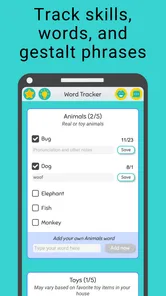
Keep a simple note of what happened after each session. You do not need a complicated chart. Write down the prompt, the child’s response, and what support seemed helpful. This can reveal patterns that are easy to miss, such as better engagement before lunch, stronger responses with real objects, or frustration when too many choices are presented.
That observation is one of the app’s hidden strengths when used thoughtfully: it can help parents become more deliberate observers. The app itself is not a substitute for interpretation, but it gives a consistent situation in which you can notice how your child responds. Over several sessions, those observations may be more useful than chasing a perfect completion rate.
Use the same language outside the app whenever possible. If a session introduces a request, repeat that request during play and daily care. If the child communicates successfully without the device, celebrate that just as warmly. The goal is not to make the phone indispensable; it is to help communication become more available in ordinary life.
It is also fine to skip a day or change the routine when the child is unwell, overwhelmed, or uninterested. Consistency should not mean forcing participation. A flexible parent who recognises when to pause is more likely to maintain a positive relationship with practice over time.
Who will get the most from it
I think this app is best suited to a parent who wants a focused starting point and is willing to participate actively. It works better when an adult models, waits, adapts, and connects the activity to the child’s environment. It is not the kind of tool I would hand over with the expectation that independent screen time will create the main benefit.
It may be particularly helpful for families beginning to organise home practice, parents who need ideas for short sessions, and caregivers who want to reinforce communication goals in between other forms of support. The free entry point also makes it easier to test the approach before deciding whether optional content is appropriate for your household.
I would be more cautious if your child becomes distressed by mobile devices, needs highly individualised communication support, or already has a therapy routine that leaves no room for another tool. In those cases, a professional-led plan, real-world interaction, or a non-screen approach may be a better fit. The app should add clarity, not create another obligation.
It is also not ideal for someone seeking a broad parenting companion. Its identity is centred on autism-related speech and language support, so parents looking for sleep tracking, behaviour charts, developmental records, or family scheduling will need other tools. Choosing it makes sense when communication is the specific priority.
My recommendation after using it as a parent-focused tool
Autism Speech and Language has a clear purpose and a sensible place in a home communication routine. I like the fact that it encourages parents to focus on speech and language rather than distracting them with unrelated features. The most important benefit, in my experience, is not simply opening an activity; it is giving the parent a repeatable prompt for noticing, waiting, and responding more intentionally.
The limitations are equally important. The app cannot personalise support like a clinician, guarantee spoken progress, or make a child engage on demand. Its usefulness depends heavily on how the adult uses it. Parents who expect an automatic teaching solution may be disappointed, while parents who treat it as a short, supervised practice aid are more likely to find value.
With a 3.8 average and more than 50K installs, it has enough early adoption to be worth considering, but I would still judge it through your child’s response rather than popularity. Start with the free experience, keep the first session brief, and look for any meaningful communication attempt instead of demanding a perfect answer.
My bottom line is simple: use it as a bridge from guided practice to everyday communication. If it helps you create calm, repeatable opportunities and carry them into meals, play, and family routines, it can earn a useful place on your device. If your child dislikes the format or needs specialist intervention, stepping away from the app is not failure; it is good parenting judgement.
Autism Speech and Language Frequently Asked Questions
How much does Autism Speech and Language cost, and are there in-app purchases?
Autism Speech and Language is free to download, which lets families explore the app before deciding whether it suits their needs. It also offers in-app purchases, with items priced from around twelve dollars to around seventy-two dollars. Check the purchase options before starting, and consider using device-level purchase controls so a child cannot buy anything accidentally.
What is Autism Speech and Language, and who is it designed for?
Autism Speech and Language is an educational and communication-support app intended to help children and individuals with autism practice speech, vocabulary, listening, and language skills. It may also be useful for parents, caregivers, teachers, and speech therapists who want structured activities for home or classroom use. The app should be considered a supplementary tool rather than a replacement for professional assessment or therapy.
What speech and language activities are included in the app?
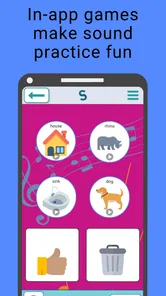
The app generally focuses on exercises that encourage word recognition, pronunciation, vocabulary development, listening comprehension, and everyday communication. Depending on the version and device, activities may use pictures, sounds, repetition, matching, or simple interactive prompts. These exercises are most effective when an adult participates, explains unfamiliar words, and adapts the difficulty to the learner’s communication level and individual needs.
Can Autism Speech and Language replace a speech therapist or autism treatment?
No. Autism Speech and Language can provide additional practice, but it cannot diagnose autism, create a personalized treatment plan, or replace a qualified speech-language pathologist, occupational therapist, psychologist, or physician. Communication needs vary considerably between individuals. Before relying on the app, caregivers should discuss its use with a professional and continue any recommended therapy, educational support, or medical care.
Is the app suitable for non-speaking children or users with different communication abilities?
The app may be helpful for some non-speaking or minimally speaking users, especially when activities support listening, picture identification, vocabulary, or alternative ways of expressing choices. However, suitability depends on the person’s age, comprehension, sensory preferences, motor skills, and communication system. Families should check whether the app supports their preferred approach, such as visual prompts or augmentative and alternative communication tools.
Pros
- Supports speech and language practice in a simple
- child-friendly format.
- Can help reinforce vocabulary
- sounds
- and everyday communication skills.
- Useful as an extra activity alongside professional speech therapy.
- May encourage independent practice at home or during travel.
- Designed to make language exercises feel more interactive and engaging.
Cons
- It cannot replace assessment or treatment from a qualified speech therapist.
- Progress may vary greatly depending on the child’s needs and abilities.
- Some activities may become repetitive after frequent use.
- Parents or caregivers may need to guide younger children during exercises.
- Compatibility and available features may differ across Android and iOS devices.













