

Snowflake rose gold watch face
- 45.00
- 4.1
- Installs
- 5.00K
- Price
- $0.99
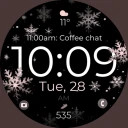
Screenshots
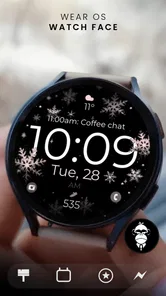
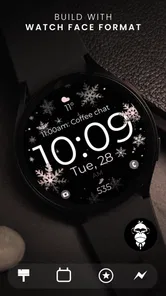
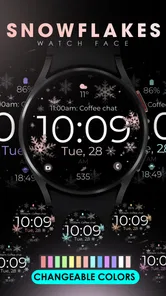
Analysis by Reviewed
I usually choose a watch face by asking one practical question first: will I still enjoy looking at it after the novelty wears off? The Snowflake Rose Gold Watch Face is aimed at people who want their smartwatch to feel more like a deliberate accessory than a tiny dashboard. Its winter-inspired ornament and warm metallic tone give it a dressed-up look, while the digital format keeps the time easy to check. I see the appeal most clearly for someone who likes a polished wrist but doesn’t want a busy, information-heavy layout.
Starting with the watch you already wear
Because this is a personalization app rather than a standalone timekeeping tool, the first decision is whether its visual style suits your watch and your routine. The rose-gold treatment is distinctive, so it will pair naturally with warm-toned bands and jewelry, but it may feel less at home beside a sporty strap or a very minimal outfit. I’d think of it as a choice for everyday wear with a decorative edge, not a universal face that disappears into every setting.
It comes from Monkey’s Dream, a developer focused here on a single visual idea rather than a broad collection of unrelated tools. The app is listed in the personalization category and costs $0.99. That small purchase changes the calculation: this is best judged as a specific design you genuinely want, not as a free sampler you might install on a whim. It has an Everyone age rating, so there’s no mature-content concern to weigh when deciding whether it suits your household.
Aesthetic Appeal
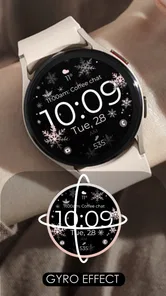
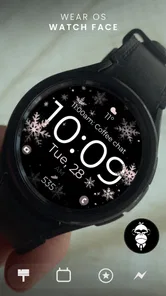
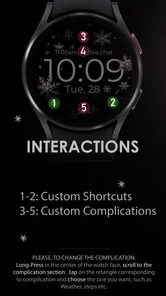
Let’s talk about the aesthetics first because, let’s face it, that’s what caught my eye initially. The Snowflake Rose Gold Watch Face is adorned with intricate snowflake patterns, elegantly rendered in a rose gold hue. It’s the kind of design that immediately makes you think of cozy winters and warm drinks. The gentle shimmer of the rose gold complements the snowflake motif perfectly, creating a sophisticated look that’s versatile enough for both day and night wear.
From installation to the daily glance
When I set up a watch face, I want the phone-to-watch handoff to be simple: choose the design, apply it, then check that it remains legible on my wrist in the situations where I actually use it. The original experience here felt straightforward, with clear setup guidance and settings that were easy to navigate. I’d still take a moment after applying it to look at the watch outdoors and indoors; an ornate pattern that looks lovely in a preview can compete with small text on a compact display.
A useful way to judge it is to wear it through a normal day rather than deciding from the first screen. Imagine checking the time while carrying groceries, then glancing down during a commute, and later looking at your wrist before meeting friends. In those quick moments, the main test is whether the time stands out against the decoration. If it does, the face has done its job; if your eye keeps landing on the snowflakes first, a plainer digital design will be more practical for rushed checks.
Functionality and Features
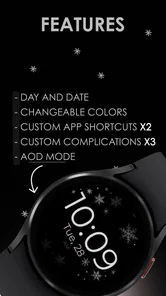
Of course, a watch face is more than just a pretty picture. It’s got to have the brains to match the beauty, right? Well, this watch face doesn’t disappoint. It comes packed with customizable features that let you tweak everything from the color scheme to the complications displayed. Whether you want to monitor your steps, check the weather, or simply keep an eye on the time, it’s all easily accessible and customizable to fit your needs.
More From Our News Desk

 Gmail
GmailGmail in a Busy Inbox: Who Benefits Most?
From first account to crowded workday, Gmail earns its place through dependable search and flexible sorting—but its best fit depends on how much inbox maintenance you can tolerate.

 Prime Video
Switching to Prime Video: What Changes in Your Viewing Routine
Prime Video can make a compelling second home for streaming, but switching means learning a different catalog, rental layer, and route from browsing to playback.

 Universal TV Remote Control
Universal TV Remote Control Works Best as a Reliable Backup
A phone remote earns its place through quick setup and reliable habits. Here is how to get more from Universal TV Remote Control—and where its limits show.

 Weather - By Xiaomi
Weather by Xiaomi Review: Clear at a Glance, Less Clear Up Close
Xiaomi’s weather app makes everyday forecasts quick to scan, but its calm surface can leave useful details and recovery paths harder to find than they should be.

 X
XX Under Pressure: Can It Recover When Posting Goes Wrong?
A resilience-focused review of X, examining setup, mistaken posts, interruptions, weak connections, and the gaps that matter when recovery needs to be dependable.

 Clash of Clans
Clash of Clans Is Won Between the Battles
Its raids are quick; its community is a long-term project of coordination, teaching, rivalry, and shared responsibility—with all the friction that entails.
Latest News



One of the standout features is its compatibility with both Android and iOS devices, which means you’re not restricted by your choice of phone. The app provides seamless integration, ensuring that the watch face performs optimally across different devices. Plus, the battery optimization is commendable; it doesn’t drain your battery, which is a big win in my book.
Choosing what to keep visible
With a decorative face, restraint can improve the result. I’d begin with only the information I check repeatedly, then add other complications one at a time. That makes it easier to see whether the snowflake detailing and the extra data can coexist without making the display feel crowded. For a workday, a time-focused setup may be calmer; for errands, a step count or weather glance could be more useful. The trade-off is that every added detail asks for space and attention, so the best arrangement is not necessarily the one with the most options enabled.
This is also where the face differs from a plain digital default or a highly functional fitness layout. A stock face often wins on quick readability and familiarity, while a fitness-first option usually prioritizes activity information. This design makes a stronger case for mood and personal style. I’d choose it when I want my watch to look considered, but switch to a simpler alternative for exercise, detailed health checks, or any day when glance speed matters more than appearance.
User Experience
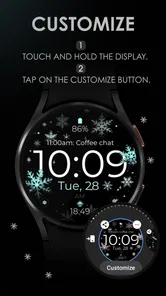
Now, let’s dive into the user experience. Installing the watch face was a breeze. The app guides you through the setup process with clear instructions, and before you know it, your smartwatch is sporting a brand new look. Navigating through the settings is intuitive, even for someone who’s not particularly tech-savvy.
Another thing I love about this watch face is how it strikes a balance between simplicity and functionality. It’s not cluttered with unnecessary details, yet it provides all the essential information at a glance. The display is crisp and clear, making it easy to read even in bright sunlight.
Making it work across different parts of the day
I’d treat the face as a style choice that can earn its place through small, repeated checks, not as the single screen that has to serve every situation. On a desk-heavy day, the rose-gold detail can make the watch feel more like jewelry than another device asking for attention. Before heading out, I’d check whether the time is still obvious at a quick glance, then leave the display alone rather than repeatedly tuning it. If I’m going to exercise or need to follow changing activity information, I’d switch to a purpose-built face and return to this one afterward.
That sort of handoff is useful because the watch face is not the same thing as the watch’s broader functions. Its job is to shape what I see first, not to replace a phone weather app, a fitness screen, or a calendar view. I wouldn’t buy it expecting a new source of information; I’d buy it for the way it presents the watch I already own. Keeping that distinction clear helps avoid disappointment and makes the paid design easier to judge on its own merits.
Where the routine can snag
The main limitation is that a strong decorative style won’t suit everyone or every watch band. If you prefer a neutral face that blends into the background, or if you rely on a dense set of glanceable data, this is probably not the right daily choice. I’d also avoid assuming that a face that looks balanced in one setup will remain so after changing complications; check the actual watch display after each adjustment rather than trusting the preview alone.
There’s also a practical question about fit: does the warm metallic palette complement the watch hardware and band you actually wear most? A mismatch is not a technical fault, but it can make a carefully decorated face feel less cohesive. I’d test it with the usual strap before deciding it belongs on the watch full-time. If your bands change often, a less distinctive face may be the easier default, with this one kept for outfits and occasions where its color feels intentional.
Another trade-off is seasonal mood. The snowflake motif has a clear winter association, which is part of its charm, but it may feel less suited to someone who wants one design that stays visually neutral all year. I can see it working beyond winter if the rose-gold finish is the main attraction; if the snowflakes are what stand out most to you, you may prefer to rotate it rather than leave it on permanently. A small collection of faces for different contexts can be more satisfying than asking one decorative design to fit every mood.
The app has a 4.1 average from 123 ratings, with 45 written reviews, and has passed 5K+ installs. Those figures suggest it has found an audience, but they don’t settle whether the style is right for you. At $0.99, I’d make the decision based on the design and the practical test of readability, rather than expecting a wide range of themes or treating it as a substitute for a feature-rich fitness face.
Who will appreciate this design most
I’d recommend it first to someone who enjoys a visible decorative detail and already knows that rose gold suits their everyday accessories. It makes sense for a person who checks the time often but doesn’t need a dense screen of metrics every time they raise their wrist. It may also suit someone who likes changing watch faces to match clothes or the season, because its strong identity gives that rotation a clear purpose rather than trying to be an invisible all-rounder.
I’d steer away from it if your priority is the fastest possible reading, if you prefer a plain background, or if your watch is mainly a fitness tool during the day. People who want lots of compact information on the face may be happier with a stock layout designed around complications. Likewise, if you’re unsure about the motif or color, the price is still a purchase rather than a risk-free trial, so I’d decide based on whether you genuinely like the look—not on the hope that a decorative face will somehow become more functional than a simpler alternative.
What to check before settling on it
Before making it your daily face, I’d use a simple test: apply it, look at it in the lighting where you usually check your watch, and see whether the time is the first thing your eye finds. Then consider whether the information you use most often remains convenient. If the face feels balanced with a restrained set of details, keep it for a full day and notice whether you still enjoy seeing it after the initial novelty. That gives you a more useful answer than judging it from a still preview.
People often wonder whether a decorative face can still be practical. My answer is yes, provided the visual treatment doesn’t interfere with your particular display and habits. The digital presentation is a helpful starting point for quick time checks, but small screens and individual preferences vary, so the wrist test matters. If the display feels crowded, removing optional information or choosing a plainer face is more sensible than trying to make this design do every job.
Another reasonable question is whether it should replace the face that comes with a watch. I wouldn’t frame it that way. The built-in option is often the safer everyday choice when you need familiar data or a neutral look; this one is more appealing when you want the watch to make a style statement. Keeping both choices available gives you a practical escape route for workouts, busy days, or outfits that don’t suit rose gold, without giving up the decorative option when it does fit.
Final Thoughts
In conclusion, if you’re looking to add a touch of elegance to your smartwatch, the Snowflake Rose Gold Watch Face is worth considering. It combines stunning design with practical features, making it a standout choice among the myriad of watch faces available in the market. Whether you’re dressing up for a formal event or just want to add a bit of sparkle to your everyday routine, this watch face is sure to impress.
So, go ahead and give it a try. You might just find yourself glancing at your wrist more often, not just to check the time, but to admire the beauty of your new watch face.
Snowflake rose gold watch face Frequently Asked Questions
What should I know about the app before downloading it?
Snowflake Rose Gold Watch Face is a personalization app by Monkey's Dream, made for people who want a digital watch display with a polished rose-gold look. Its store summary describes a modern, sleek design with a gyro effect, while the short description highlights the snowflake rose-gold style. The app costs $0.99, so you can consider its price alongside the appearance you want.
What features does the Snowflake Rose Gold Watch Face offer?
The Snowflake Rose Gold Watch Face provides a stunning aesthetic with its intricate snowflake design set against a luxurious rose gold background. It offers customizable widgets for essential information like date, weather, and battery life. The watch face is compatible with various smartwatch brands and is designed to enhance both functionality and style.
Is the Snowflake Rose Gold Watch Face compatible with all smartwatches?
The Snowflake Rose Gold Watch Face is designed to be compatible with most Android and iOS smartwatches that support custom watch faces. However, it's best to check the compatibility list on the app store page to ensure it works with your specific device. Updates often expand compatibility to new smartwatch models.
How user-friendly is the customization process for this watch face?
Customizing the Snowflake Rose Gold Watch Face is straightforward and intuitive. Users can easily adjust settings via the companion app, offering options to change widget placements, color themes, and more. The user interface is designed to be accessible for both beginners and advanced users, ensuring a seamless customization experience.
Does the watch face affect battery life significantly?
The Snowflake Rose Gold Watch Face is optimized to minimize battery consumption, although, like any watch face, it may slightly affect battery life depending on usage patterns. Users have reported minimal impact during regular use, but enabling features like constant display or frequent updates can increase battery usage.
Pros
- Elegant design with rose gold accents
- Easy to read time display
- Customizable widgets for added functionality
- Compatible with most Android watches
- Low battery consumption
Cons
- Limited color options
- No interactive features
- Might not appeal to all genders
- Requires premium for full features
- Occasional sync issues with some devices













