

Dream 132 bronze watch face
- 62.00
- 4.0
- Installs
- 10.00K
- Price
- $1.49
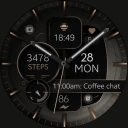
Screenshots
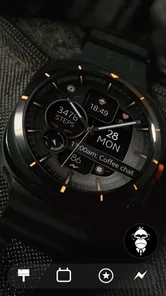
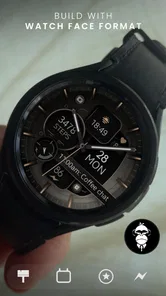
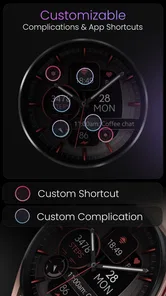
Analysis by Reviewed
I’d treat Dream 132 bronze as a paid watch-face purchase, not a free customization option: it costs $1.49. That is a modest one-time outlay if you know you enjoy this particular bronze, analog look, but it still makes the decision more personal than trying a free face and moving on. I’d first ask whether its style fits the watch I actually wear every day, rather than buying it just because the preview looks polished.
Where the price has to earn its place
At that price, the appeal is less about collecting another watch face and more about settling on one you’ll want to keep on your wrist. Monkey’s Dream makes personalization apps, and this release arrived on August 22, 2023. It has an average rating of 4.0 from around 343 ratings, which gives a prospective buyer some context, though ratings can’t tell you whether the bronze design suits your own screen or wardrobe.
The practical question is whether a distinctive analog presentation matters to you. If you regularly switch faces to match an outfit or occasion, this may be one option in a rotation rather than a daily essential. If you prefer one consistent look and like warm metallic tones, paying for a face you’ll see throughout the day can feel more worthwhile than downloading several free designs that never quite click.
What to consider before installing
Before purchasing, check that your watch runs Wear OS and that you’re comfortable choosing a decorative analog design over a more information-heavy layout. Dream 132 is listed for Everyone, and it has passed 10,000 installs, but neither point guarantees that it will be the right fit for your device or habits. I’d also keep expectations grounded: a watch face changes the appearance of the watch; it isn’t a replacement for a separate app when you need a specific tool.
There’s a useful everyday test here: picture glancing at your wrist while walking into a meeting, then checking it again outside in bright daylight. A bronze face may look especially at home with a leather strap or smarter clothes, but the visual warmth that makes it attractive could be less suited to someone who wants a stark, high-contrast digital display at a quick glance. Think about legibility and your usual settings, not just the styling in a product image.
I’d also avoid buying on the assumption that every watch face offers the same customization choices. The confirmed description presents this as customizable, but it doesn’t establish the exact options available on every watch. That’s a reason to check the face’s installation and settings on your own Wear OS device before building a routine around a particular layout. If you need a specific complication to stay visible, make that requirement part of your decision.
Hey there, fellow smartwatch enthusiasts! Today, I want to dive into a unique app that has been catching my eye lately. Let’s talk about the Dream 132 bronze watch face, a stunning addition to any smartwatch collection. If you’re anything like me, you love customizing your gadgets, and this watch face is all about adding a touch of elegance and sophistication to your wrist.
More From Our News Desk

 Gmail
GmailGmail in a Busy Inbox: Who Benefits Most?
From first account to crowded workday, Gmail earns its place through dependable search and flexible sorting—but its best fit depends on how much inbox maintenance you can tolerate.

 Prime Video
Switching to Prime Video: What Changes in Your Viewing Routine
Prime Video can make a compelling second home for streaming, but switching means learning a different catalog, rental layer, and route from browsing to playback.

 Universal TV Remote Control
Universal TV Remote Control Works Best as a Reliable Backup
A phone remote earns its place through quick setup and reliable habits. Here is how to get more from Universal TV Remote Control—and where its limits show.

 Weather - By Xiaomi
Weather by Xiaomi Review: Clear at a Glance, Less Clear Up Close
Xiaomi’s weather app makes everyday forecasts quick to scan, but its calm surface can leave useful details and recovery paths harder to find than they should be.

 X
XX Under Pressure: Can It Recover When Posting Goes Wrong?
A resilience-focused review of X, examining setup, mistaken posts, interruptions, weak connections, and the gaps that matter when recovery needs to be dependable.

 Clash of Clans
Clash of Clans Is Won Between the Battles
Its raids are quick; its community is a long-term project of coordination, teaching, rivalry, and shared responsibility—with all the friction that entails.
Latest News



Design and Aesthetic Appeal
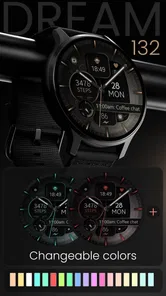
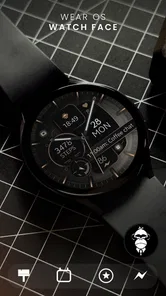
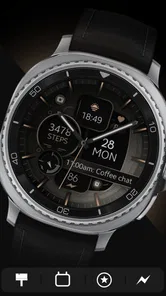
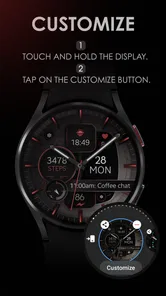
First things first, let’s talk about the design. The Dream 132 bronze watch face is all about that classic, timeless look. It takes inspiration from luxury timepieces, featuring a bronze finish that just screams class. The moment you set your eyes on it, you’ll notice the meticulous attention to detail. The watch face includes intricate markings and a subtle, textured background that gives it a premium feel.
What I love about it is the way it blends modern functionality with a vintage look. It’s like wearing a piece of history on your wrist, but with all the perks of modern technology. The color palette is warm and inviting, making it perfect for both formal and casual settings.
Functionality and Features
Now, we all know that looks aren’t everything, right? So let’s get into the nitty-gritty of what this watch face can do. It’s not just a pretty face; it’s packed with features designed to make your life easier. You’ve got your standard time display, of course, but it also includes customizable widgets for things like weather updates, step count, and even heart rate monitoring.
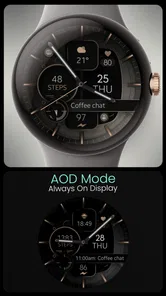
One of the standout features for me is the battery-saving mode. You know how some watch faces tend to drain your smartwatch battery faster than you can say “charging cable”? Well, with this one, that’s not an issue. It’s optimized to keep your watch running longer, which is a huge plus in my book.
Ease of Use
Installing the Dream 132 bronze watch face is as easy as pie. If you’ve installed watch faces before, you’ll find the process pretty straightforward. It’s compatible with most smartwatches, and the app itself is user-friendly. Just a few taps, and boom, you’ve got a brand-new look for your device.
It’s also worth mentioning how smooth the transitions are when you switch between different features. The user interface is intuitive, and you won’t find yourself fumbling around trying to figure out how to access different functions. Everything is right where you’d expect it to be.
How it fits into a daily routine
For a realistic test, I’d judge this face by the moments when a watch is most useful: checking the time while carrying groceries, glancing at the wrist during a commute, or seeing whether a meeting is about to start without taking out a phone. A tidy analog layout can make those quick checks feel natural, especially if you already read traditional hands at a glance. The trade-off is that anyone who relies on dense digital information may find an analog design less efficient, even when the appearance is more appealing.
A small but useful habit is to spend a day with the face before deciding whether its visual balance works for you. Notice whether the markings remain easy to read at your normal glance distance, whether the bronze tone feels comfortable indoors and outdoors, and whether the available complications support your routine. That is more revealing than changing settings repeatedly in the first few minutes, when the novelty of a new design can make every choice seem better.
Choosing between this and other watch faces
Compared with free faces, this is a straightforward paid alternative for someone who wants a particular polished, bronze appearance rather than the lowest-cost option. Compared with highly practical digital faces, its stronger case is style and an analog feel, not fitting the maximum amount of information onto one screen. I’d choose it when I want my watch to look considered with everyday or smarter clothes; I’d choose a simpler digital face if a fast, glanceable readout of several details matters more than a classic look.
That distinction also helps answer whether it is worth keeping installed. If you enjoy changing faces often, it can serve as the dressier choice in a small rotation. If you rarely alter your watch’s appearance and already have a face that is easy to read and suits your style, the purchase may add little beyond a different color and mood. The strongest reason to buy is a clear preference for this design, not a hope that any new face will make the watch more useful.
A practical way to decide
I’d make the choice by starting with the way I use my watch, not by imagining an ideal setup. If I mostly glance at the time between tasks, an analog face may be all I need. If I use the watch as a compact dashboard, I’d first identify the information I expect to see without tapping or scrolling, then check whether the face’s available customization can support that routine. That simple distinction can prevent paying for a look that feels attractive in a preview but inconvenient over a full day.
For example, on a workday with a commute and back-to-back appointments, I might value quick time checks and a face that looks appropriate in a meeting. On a long walk, I might care more about seeing activity information at a glance. I would not assume one design serves both needs equally well: I’d try the face in the setting where I expect to wear it most, and keep a more information-dense alternative available if my routine calls for it.
Another useful check is to compare the face at the brightness and display settings I normally use, rather than judging it only in a bright room or from a close-up image. Small markings and warm colors can read differently at arm’s length, especially when I’m moving. If I find myself tilting my wrist or pausing to interpret the display, that is a meaningful drawback for a watch face, even if I still like its appearance.
Customization without guesswork
Because the face is described as customizable, I’d approach its settings with one clear goal at a time. First, I’d see which elements can actually be changed on my watch; then I’d decide whether those choices improve readability or merely add visual clutter. When a face offers several configurable areas, it can be tempting to fill every space. I’d resist that impulse: an analog design often works best when its main job, telling the time quickly, remains visually obvious.
I’d also treat complications as a compatibility check rather than an assumption. A complication is only useful if the watch supports the information source I want and the face gives it enough room to remain legible. If weather, activity, or heart-rate access is central to my decision, I’d verify those choices in the face settings on my own device before relying on them. If the options don’t match my needs, a dedicated fitness or utility face is the more sensible pick.
These checks also help answer a common practical concern: whether the face can replace a separate tool. I wouldn’t count on that. A watch face can surface selected information, but it is not the same as opening a weather, health, or scheduling app for a fuller view. I’d buy it for its appearance and the quick details I can configure, not as a promise that every daily task will be handled from the watch screen.
Who is likely to appreciate it
I can see this being a good fit for someone who already owns a Wear OS watch, likes traditional watch styling, and wants a warmer alternative to the usual black or brightly colored digital layouts. It may particularly suit a person who wears one watch throughout the day and wants it to look at home with both casual clothes and a smarter outfit. Its value is personal rather than universal: the more often the bronze design feels like the right choice, the easier it is to justify a paid face.
It is less compelling for someone who wants to try a lot of designs at no cost, needs the sharpest possible glance at several metrics, or dislikes analog hands. It may also be a poor match if a specific layout or complication is essential and cannot be checked before purchase. In those cases, I’d favor a free face I can test first or a digital design whose information arrangement is already known to meet my needs.
The purchase is a small one, but I’d still avoid treating the price as a reason to skip compatibility and usability checks. Dream 132 is a Personalization app from Monkey’s Dream, and its Everyone content rating makes it broadly suitable from an age-rating perspective. It has been installed by over 10,000 users, but popularity does not settle the question that matters most here: whether the face is comfortable to read and appealing on my particular watch.
What the overall value depends on
There is no free-access case to weigh here: the stated price is $1.49, so I’d decide whether the design earns that cost for me. The price is modest, but a paid option should still offer something I actually want. In this case, the strongest reason is a specific preference for the bronze analog appearance and the ability to personalize the face, rather than a claim that it will make the watch fundamentally more capable.
For a person who keeps a small rotation of faces, this could be the dressier choice that gets used regularly. For someone who downloads designs, tries them once, and forgets them, even a low price can turn into another purchase with little practical value. I’d think about how often I change faces and whether this one fills a gap that my current choices do not. That is a more useful value test than comparing it with every free design available.
In conclusion, if you’re in the market for a watch face that combines elegance with functionality, the Dream 132 bronze watch face is definitely worth checking out. It’s got the looks to impress and the features to keep you organized. Whether you’re heading to a business meeting or just lounging at home, this watch face has you covered.
So, what are you waiting for? Give your smartwatch the facelift it deserves and watch as your wrist becomes the center of attention wherever you go. Happy customizing!
My buy-or-skip verdict is simple: I’d consider it if I use a Wear OS watch, genuinely like bronze styling, and want an analog face to wear often enough to justify a paid choice. I’d skip it if I’m looking for a free option, depend on a dense digital readout, or need a particular complication confirmed before buying. The app has an Everyone content rating, but the deciding factor for me is still personal fit: the design should make my regular watch checks more enjoyable without getting in the way.
Dream 132 bronze watch face Frequently Asked Questions
What kind of app is Dream 132 Bronze Watch Face, and what does it look like?
Dream 132 Bronze Watch Face is a personalization app for Wear OS that gives a compatible smartwatch a modern, sleek analog appearance with a bronze look. Its design is intended to make the time easy to read while adding a distinctive style to the watch display. It may suit users who prefer a traditional clock face with a contemporary finish.
What features does the Dream 132 Bronze Watch Face offer?
The Dream 132 Bronze Watch Face offers a variety of features designed to enhance your smartwatch experience. It includes customizable widgets, weather updates, step counter, heart rate monitor, and multiple time zone support. The watch face is designed with an elegant bronze theme, providing both functionality and style. It is also optimized for battery efficiency, ensuring longevity.
Is the Dream 132 Bronze Watch Face compatible with all smartwatches?
The Dream 132 Bronze Watch Face is compatible with most Wear OS smartwatches. However, it is always recommended to check the specific compatibility with your device model prior to downloading. Users should ensure their smartwatch is running the latest software updates to fully take advantage of all features offered by this watch face.
How can I customize the Dream 132 Bronze Watch Face to suit my preferences?
Customization is a key feature of the Dream 132 Bronze Watch Face. Users can easily modify the watch face through the settings on their smartwatch. Options include changing the color scheme, adjusting widget placements, and setting preferred metrics for display such as step count or heart rate. This allows for a personalized user experience.
Does the Dream 132 Bronze Watch Face affect smartwatch battery life?
The Dream 132 Bronze Watch Face is designed to be battery efficient. It intelligently manages power consumption by optimizing animations and screen brightness. While any additional feature can have some impact on battery life, users report minimal effects, allowing for prolonged usage without frequent charging.
Pros
- Elegant and stylish design
- Customizable color themes
- Battery efficient
- Easy to read interface
- Supports multiple time zones
Cons
- Limited free features
- May not fit all screen sizes
- No interactive elements
- Requires frequent updates
- In-app purchases for premium features













