

SmartRVRoute 2 RV Navigation
- 101.00
- 3.5
- Installs
- 10.00K
- Price
- Free
Screenshots
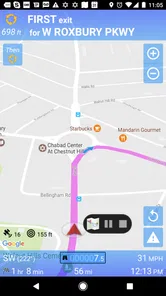
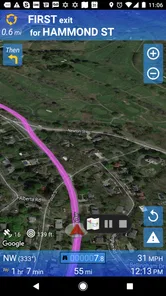
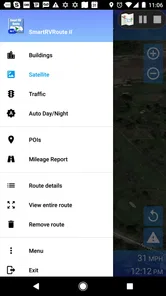
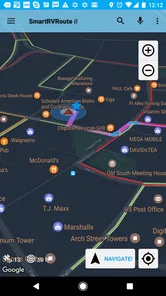
Analysis by Reviewed
Planning an RV trip is different from planning an ordinary car journey. A route that looks perfectly reasonable on a phone may be awkward for a large vehicle, difficult to manage from the driver’s seat, or inconvenient when the person navigating is also handling campsite details. SmartRVRoute 2 is built for that particular problem: it is a travel and local navigation app from SmartRouting aimed at live RV routing rather than general-purpose driving alone. I found its focus useful when the trip involved more than simply entering an address and following the quickest line.
The app is free to install, but its model is subscription-based, with in-app purchases ranging from around twenty-five dollars to two hundred dollars per item. That makes the decision less casual than downloading a standard map application. I would treat it as a tool to evaluate before committing, especially if several people in a household may use the same device or account. Its average rating is 3.5 from roughly 130 ratings, and the app has passed 10,000 installs, so it has a modest footprint rather than the broad familiarity of the biggest navigation brands.
How it fits into a shared RV trip
The most convincing use case is a household preparing for a long weekend or a longer road trip in a motorhome, camper, or travel trailer. One person can concentrate on driving while another checks the route, watches the next decision, and handles changes when the plan shifts. That division sounds simple, but it matters in an RV because a route is not only about distance. Turning space, road confidence, stops, and the practical rhythm of the vehicle all affect whether a trip feels relaxed.
I would set up the app before leaving the driveway, not while the vehicle is moving. The passenger can review the planned journey, confirm the destination, and keep the phone positioned where both people can see it without reaching across the cabin. This creates a useful boundary: the driver follows the spoken or visual guidance, while the passenger manages the screen. It is a safer and calmer arrangement than passing the phone back and forth whenever the route needs attention.
SmartRVRoute 2 makes more sense when the RV is the center of the trip rather than an incidental way to reach a destination. If I am driving a normal car to a hotel in a familiar town, a mainstream maps app is usually quicker to open and easier to share. The dedicated approach becomes more interesting when the vehicle’s size and the need for live route guidance are central to the journey.
For a couple sharing one phone, the practical question is not simply whether both people can look at the display. It is who is responsible for entering destinations, who notices a reroute, and who decides whether to accept it. I would agree on those roles before departure. That small conversation prevents the common situation in which the driver assumes the passenger is monitoring the route while the passenger assumes the driver has already seen a change.
What I would do before turning the key
I would first install the app on the device that will actually travel in the RV, then open it while connected to a reliable network. The current version is 4.2.20260327_908, and it requires Android 6.0 or later. That compatibility is helpful for older phones that may still be used as dedicated navigation screens, but I would still check the device itself: an aging battery, a loose charging cable, or a dim display can undermine any navigation app.
More From Our News Desk

 Weather - By Xiaomi
Weather by Xiaomi Review: Clear at a Glance, Less Clear Up Close
Xiaomi’s weather app makes everyday forecasts quick to scan, but its calm surface can leave useful details and recovery paths harder to find than they should be.

 X
XX Under Pressure: Can It Recover When Posting Goes Wrong?
A resilience-focused review of X, examining setup, mistaken posts, interruptions, weak connections, and the gaps that matter when recovery needs to be dependable.

 Clash of Clans
Clash of Clans Is Won Between the Battles
Its raids are quick; its community is a long-term project of coordination, teaching, rivalry, and shared responsibility—with all the friction that entails.

 Android Auto
Android Auto Makes the Case for Quieter Car Software
The car interface is no longer judged by how much it can do, but by how quietly it helps. Android Auto shows what drivers now expect—and what still gets in the way.

 MobiOffice: Word, Sheets, PDF
MobiOffice: Transforming Mobile Productivity with Seamless Integration
MobiOffice: Word, Sheets, PDF is redefining mobile productivity with a surprising blend of functionality and innovation.

 EA SPORTS FC Soccer Mobile 26
EA SPORTS FC™ Mobile Soccer: Redefining Mobile Sports Gaming
Dive into EA SPORTS FC™ Mobile Soccer, where immersive gameplay and strategic depth transform mobile sports gaming.
Latest News



Next, I would enter a realistic destination and inspect the route as a passenger. I would look for confusing turns, unusual approaches, and places where the route might require a decision that is hard to make from a large vehicle. This is one of the most useful habits with any specialized navigation tool: the app can guide the journey, but the occupants remain responsible for recognizing road conditions and signs.
I would also test the account arrangement before the trip. If the app is installed on a shared household phone, that device becomes the navigation center for everyone using it. If a partner prefers a separate phone, I would avoid assuming that installing the app on both devices automatically creates a shared trip, shared subscription, or synchronized plan. The safest expectation is that each device and account should be checked on its own, particularly because the paid model can make account boundaries important.
That boundary is especially relevant in a family. A parent might download the app, while another adult drives most of the time. I would make sure the person who will be navigating can open the app and understand its route display before leaving. I would not wait until the first unfamiliar junction to discover that the main user is signed out, the screen is difficult to read, or the subscription choice is attached to a different account.
Subscription decisions need a deliberate check
The free installation should not be confused with unlimited free use. The store presentation describes a paid subscription-based service, and the in-app purchase range reaches from around twenty-five dollars to two hundred dollars per item. Because those are substantial differences, I would read each purchase screen carefully rather than tapping through quickly. The right choice depends on the trip pattern, not just on whether the app looks useful during the first few minutes.
For an occasional RV renter, committing to an expensive option may be difficult to justify. A person who owns an RV and travels frequently may see more value in a dedicated routing service, but I would still compare the purchase with the cost of using a familiar navigation app alongside careful route planning. The important trade-off is convenience versus commitment: SmartRVRoute 2 is aimed at a specific vehicle context, while ordinary map tools are often easier to use casually and may already be familiar to everyone in the household.
I would make the subscription decision on the adult’s account that will manage the trip. I would not let a child or occasional passenger handle the purchase screen simply because they are comfortable with phones. That is not a criticism of the app; it is sensible household organization when a navigation product includes costly in-app items. The adult who owns the journey should know which account is being used and which device is expected to provide guidance.
Coordinating people, routes, and responsibility
Navigation works best when the app is one part of a travel routine rather than the only source of judgment. I would use it for live guidance, then combine that guidance with a short conversation about fuel, rest stops, weather, and the day’s destination. In an RV, the passenger may notice practical concerns before the driver does, such as a crowded approach, a difficult parking area, or the need to stop earlier than planned.
A useful workflow is to agree on the next major destination before departure, then let the passenger handle small adjustments. If the group decides to change plans, the passenger can enter the new stop while the driver continues safely. I would avoid making repeated route edits from the driver’s seat. The value of a live navigation app is reduced if the person driving is also expected to type, compare options, and interpret the screen.
Another non-obvious advantage of a dedicated RV tool is psychological: it gives the household a single place to discuss the route in terms of the vehicle being used. That can reduce arguments caused by a car-oriented route that looks efficient on paper but feels unsuitable in practice. Still, I would not treat any route as permission to ignore signs, restrictions, or local instructions. The app can support a decision; it cannot replace the driver’s responsibility.
When several people want to participate, I would keep one primary navigation device active and use the other phone for communication or backup planning. Running competing route instructions on two screens can create confusion, especially when the apps disagree about a turn. If another family member wants to follow progress, I would share the plan verbally or through the household’s normal communication method rather than turning the cabin into a control room.
This arrangement also helps with account boundaries. The person who paid for the service should remain the person who understands access to it. A shared device can be convenient, but it can also blur who is signed in, who can change settings, and who is responsible for renewal. I would write down the account owner and keep the login details managed by an adult, without assuming that every member of the household needs direct access.
Age, trust, and the right level of independence
The content rating is Everyone, which fits the app’s purpose as a navigation tool rather than entertainment. That does not mean every child should be given control of the route or purchase process. A younger passenger can help identify the next town, watch for a destination, or remind the group about a planned stop, but an adult should remain responsible for interpreting directions and making safety decisions.
For teenagers, the app could be a useful way to learn how travel planning works. I would let a responsible teenager review the route before departure and explain why the group chose one plan over another. I would not ask them to operate the phone while the vehicle is moving, and I would keep purchases and account changes with the adult who owns the subscription. Trust here is practical: give a young passenger a meaningful role without handing over responsibilities they are not ready to manage.
Older relatives may appreciate the large-screen use of a dedicated phone, but the household should check readability and hearing before relying on it. If someone struggles to see a small display or follow spoken prompts in a noisy cabin, the passenger should take over route monitoring. I found that this kind of arrangement is more dependable than assuming the person in the passenger seat will automatically understand every instruction.
The app’s age rating tells me that its intended content is broadly suitable, but it does not establish family-sharing behavior, child profiles, or special parental controls. I would therefore organize access using the household’s device and account habits rather than expecting the navigation app to manage family roles. That distinction matters when a product is used by several people but designed around the travel task itself.
Where it beats ordinary map apps, and where it does not
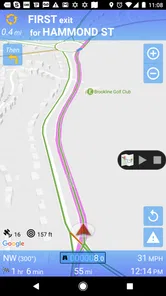
Compared with a general maps application, SmartRVRoute 2 has a clearer identity. It is not trying to be a universal directory for every kind of local search; its emphasis is live RV routing and navigation. That focus can be valuable to an RV owner who wants the trip planned around the vehicle rather than treating the RV like a regular car.
General map apps still have important advantages. Most people already know how to search in them, switch between destinations, save places, and coordinate with friends. They are often the easier choice for a mixed trip where one day involves an RV and the next involves walking around a city. If the household wants one familiar app for every traveler and every vehicle, the learning curve and subscription commitment here may outweigh the specialized focus.
I would also compare the app with the vehicle’s built-in navigation, if available. A built-in screen may be more comfortable for the driver, while a phone-based tool can be easier for the passenger to update. The better choice depends on which system handles the actual RV journey more clearly. I would not assume that a specialized label automatically makes every route better; I would test a few familiar journeys and judge the instructions, display, and workflow for myself.
One of the strongest trade-offs is simplicity versus specialization. SmartRVRoute 2 is easier to justify when the household repeatedly travels in an RV and wants a navigation experience centered on that use. It is harder to justify for someone who takes one occasional trip, dislikes subscriptions, or mainly needs restaurant searches and walking directions. In those cases, an ordinary map service may be the more practical companion.
My household verdict after using it
I see SmartRVRoute 2 as a focused tool for RV households that are willing to prepare properly and manage the paid model carefully. Its free entry point makes evaluation possible, while the subscription structure means I would not recommend purchasing immediately without checking the route experience on the real device. The developer, SmartRouting, has positioned it for a clear travel problem, and that focus is more meaningful to me than a long list of unrelated navigation features.
I would recommend it to an RV owner who regularly travels with a partner or family member, especially when one person can act as navigator and the other can concentrate on driving. I would also recommend it to households that want a deliberate pre-trip routine: test the app, confirm the account, review the route, and decide who handles changes. Those steps reveal whether the app fits the household before the journey becomes stressful.
I would skip it if I only needed occasional directions in a normal car, if I wanted a completely free navigation habit, or if every member of the household needed equal access without careful account organization. I would also choose a familiar general map app when the trip is mostly urban exploring, walking, or searching for nearby places rather than managing an RV route.
My final advice is to judge it in the context of your actual vehicle and your actual travel team. Install it on the device that will be used, let the passenger learn the controls, and make the subscription decision with the adult account owner present. The best experience comes from treating the app as a shared travel instrument, not as a replacement for human route judgment. Used that way, SmartRVRoute 2 can bring useful structure to RV journeys; used casually or without checking the paid boundaries, it may create more household friction than it removes.
SmartRVRoute 2 RV Navigation Frequently Asked Questions
Is SmartRVRoute 2 free to download, and does it require a subscription?
SmartRVRoute 2 is free to download, but its navigation service is subscription-based. In-app purchase options range from around $25 to $200 per item, so check the available subscription choices and terms in the app before committing. This distinction matters if you only want to try the app briefly: downloading it does not necessarily mean that the ongoing RV routing features are free to use.
Which phones can run SmartRVRoute 2, and is it suitable for all ages?
SmartRVRoute 2 is a travel and local navigation app from SmartRouting. It runs on Android devices using Android 6.0 or later, and its content rating is Everyone. Before downloading, check that your device meets the operating-system requirement and has enough available storage for the app and any maps or other resources you plan to use. The app is intended for RV travel, rather than general entertainment.
What is SmartRVRoute 2 RV Navigation, and who is it designed for?
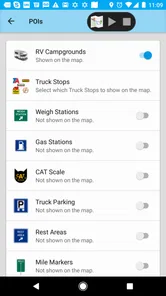
SmartRVRoute 2 RV Navigation is a route-planning and navigation app created for recreational vehicle drivers. It is intended for motorhomes, caravans, travel trailers, and other large vehicles that may need routes adapted to their dimensions. Compared with standard navigation apps, its main purpose is to help users plan journeys while considering vehicle size, road suitability, fuel stops, campgrounds, and RV-related travel needs.
Does SmartRVRoute 2 consider my RV’s height, length, width, and weight?
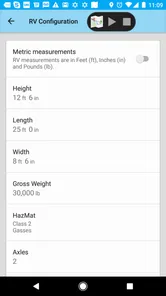
The key benefit of an RV navigation app is its ability to use vehicle-specific information when calculating routes. Before relying on SmartRVRoute 2, users should enter their RV’s measurements and weight as accurately as possible, including height with roof equipment such as air conditioners or antennas. However, drivers should still check road signs and local restrictions, because map data may be incomplete, outdated, or unable to reflect temporary closures and changing conditions.
Can I use SmartRVRoute 2 without an internet connection?
Offline availability depends on the map regions and navigation features supported by the current version of SmartRVRoute 2. Some RV travelers may be able to download map data before leaving areas with reliable mobile service, which is especially useful on remote roads and at campgrounds. It is recommended to test downloaded maps in advance and keep a backup route, since live traffic, weather, and road updates generally require an internet connection.
Pros
- Designed specifically for RVs
- with routes tailored to vehicle size and restrictions.
- Helps avoid unsuitable roads
- low bridges
- narrow streets
- and weight-limited routes.
- Useful campground and RV-friendly destination information for trip planning.
- Offline map support can be valuable in remote areas with weak mobile coverage.
- Clear navigation guidance is easier to follow from a large RV dashboard display.
Cons
- RV-specific routing may require accurate vehicle dimensions and weight settings.
- Map data and campground listings may not be equally detailed in every region.
- Some advanced navigation or map features may require a paid subscription.
- Large route calculations can take time
- especially on older phones.
- Users should still verify road conditions
- closures
- and clearance signs themselves.













