

SmartTruckRoute Truck GPS Navi
- 1.82K
- 4.1
- Installs
- 500.00K
- Price
- Free
Screenshots
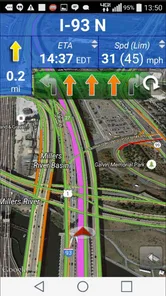
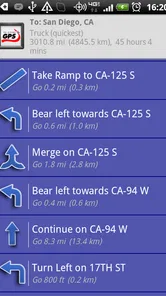
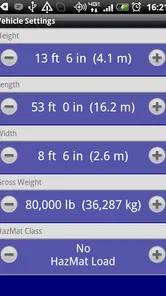
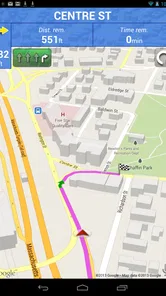
Analysis by Reviewed
I judge truck navigation apps by one question: can I trust the route when the vehicle is too tall, too long, or too heavy for an ordinary road? SmartTruckRoute Truck GPS Navi is built around that concern. Its main promise is not simply to draw a line between two points, but to help professional drivers avoid low bridges and truck restrictions. That focus gives it a clearer purpose than a standard car-navigation app, especially when a wrong turn can mean a stressful detour rather than a few extra minutes.
In my experience, the app makes the most sense for drivers who regularly work with delivery vehicles, tractor-trailers, buses, or other large vehicles. It is a free Maps & Navigation app from SmartRouting, with an Everyone age rating, so it is broadly accessible. It has reached over 500 thousand installs and holds a 4.1 average from around 4.1 thousand ratings, which suggests that many users find the truck-focused approach useful while still leaving room for practical limitations.
The central capability deserves most of the attention: truck GPS routing that takes low bridges and restrictions seriously. That sounds like a small adjustment to ordinary navigation, but it changes how I think about a trip. A car route usually treats a road as available unless there is a temporary closure or a general traffic problem. A truck route has to consider whether the vehicle can physically use that road. For a driver, that difference matters before the journey begins, not only after a warning appears.
Why restriction-aware routing matters more than a shorter route
When I use a normal navigation app in a car, I tend to value speed, traffic avoidance, and a simple arrival estimate. With a truck, the shortest route can be the wrong route if it passes beneath a bridge with insufficient clearance or enters a road where large vehicles are restricted. The useful idea behind SmartTruckRoute is therefore not “find any route quickly,” but “find a route that fits the vehicle’s practical limits.”
This is the kind of distinction that is easy to underestimate until a route becomes impossible. A low bridge does not behave like ordinary congestion. Traffic may clear, but the clearance will not change because the driver is in a hurry. A restricted road is also different from a slow road: the issue is whether the vehicle is allowed or able to continue, not whether the driver can tolerate a delay.
The app’s daily map updates are important in that context. I would not treat a navigation database as a permanent source of truth, because road rules and restrictions can change, but frequent updates give the routing system a better chance of reflecting current conditions than an old, untouched map. For a professional driver, checking that the app is current before a working day is a sensible habit.
What I like about this focus is that it encourages a different planning mindset. Instead of waiting for turn-by-turn instructions to reveal a problem, I would enter the vehicle details and inspect the proposed journey with restrictions in mind. The route then becomes part of a pre-trip check. That small change can be more valuable than a polished interface or a dramatic collection of extra features.
More From Our News Desk

 Weather - By Xiaomi
Weather by Xiaomi Review: Clear at a Glance, Less Clear Up Close
Xiaomi’s weather app makes everyday forecasts quick to scan, but its calm surface can leave useful details and recovery paths harder to find than they should be.

 X
XX Under Pressure: Can It Recover When Posting Goes Wrong?
A resilience-focused review of X, examining setup, mistaken posts, interruptions, weak connections, and the gaps that matter when recovery needs to be dependable.

 Clash of Clans
Clash of Clans Is Won Between the Battles
Its raids are quick; its community is a long-term project of coordination, teaching, rivalry, and shared responsibility—with all the friction that entails.

 Android Auto
Android Auto Makes the Case for Quieter Car Software
The car interface is no longer judged by how much it can do, but by how quietly it helps. Android Auto shows what drivers now expect—and what still gets in the way.

 MobiOffice: Word, Sheets, PDF
MobiOffice: Transforming Mobile Productivity with Seamless Integration
MobiOffice: Word, Sheets, PDF is redefining mobile productivity with a surprising blend of functionality and innovation.

 EA SPORTS FC Soccer Mobile 26
EA SPORTS FC™ Mobile Soccer: Redefining Mobile Sports Gaming
Dive into EA SPORTS FC™ Mobile Soccer, where immersive gameplay and strategic depth transform mobile sports gaming.
Latest News



What the app is trying to solve
SmartRouting has developed this as a dedicated truck navigation app rather than a general-purpose map with a truck icon added as an afterthought. The product is identified as SmartTruckRoute Truck GPS Navi, while the store’s short description presents the name as SmartTruckRoute. That naming can feel slightly inconsistent, but the purpose is clear: this is aimed at truck-oriented route planning.
The important question is not whether it can show a map. Most navigation apps can do that. The question is whether the route logic is more appropriate for a large vehicle than the route offered by a typical car app. For someone driving a compact car, the extra specialization may not matter. For someone whose vehicle dimensions determine which roads are safe, it is the reason to consider the app at all.
I also see value in using it alongside ordinary navigation rather than assuming it must replace every other map tool. A general app may still be more convenient for finding a shop, checking a business listing, or exploring local streets on foot. SmartTruckRoute is more narrowly useful: its strength is the journey where road suitability matters more than broad lifestyle features.
How I would prepare a route
Before moving, I would treat the initial setup as essential rather than optional. A truck route is only as good as the vehicle information behind it. If the app asks for dimensions or restrictions relevant to the vehicle, those details should be entered carefully and kept current when the vehicle or trailer changes. A route planned for one truck should not automatically be trusted for another with different clearance or access requirements.
This is one of the most practical tips for using a specialized navigator: do not rush through the first configuration simply because the destination is urgent. The few minutes spent checking the vehicle profile can protect the whole trip from a bad assumption. I would also review the route before departing, paying particular attention to the approach to urban areas, bridges, delivery zones, and roads where truck access may be limited.
Daily map updates are a helpful part of this routine, but I would still compare the app’s route with physical road signs and instructions at the site. A digital route should support the driver’s judgement, not replace it. If a sign on the road conflicts with what the screen suggests, the sign wins. That is not a criticism unique to this app; it is a basic rule for using any navigation system responsibly.
Another useful habit is to think beyond the destination pin. A truck may be able to reach the general address but struggle with the final approach, a narrow entrance, a local restriction, or a loading area. I would use the app to plan the broad route, then examine the final streets with extra care. This is where specialized navigation can help most as a planning tool, while local knowledge and on-site judgement remain necessary.
A realistic working-day example
Imagine I am carrying a load to a customer in an unfamiliar town. A standard car route might send me through a central road because it is direct and appears open. In a small vehicle, that could be perfectly reasonable. In a tall delivery truck, however, the same route might lead toward a low bridge or a street with truck restrictions. I would rather spend time reviewing a longer compliant route before leaving than discover the problem when turning onto the restricted road.
With SmartTruckRoute, the useful workflow would be to set the vehicle information, enter the delivery destination, inspect the proposed route, and look for any point that deserves a manual check. I would then save enough time for an unexpected diversion instead of treating the arrival estimate as a guarantee. If the delivery involves several stops, I would be especially careful about checking each leg, because a route that works for one part of town may not be appropriate for the next.
The benefit here is not necessarily that every journey becomes faster. In fact, a truck-safe route may be longer than the route a car would take. The benefit is reducing the chance of an avoidable obstruction. For a driver managing a schedule, avoiding a bridge clearance problem can be more important than shaving several minutes from an idealized route.
Where it fits beside everyday navigation apps
Compared with a typical car-navigation app, SmartTruckRoute has a narrower but more relevant purpose for large vehicles. General apps often feel smoother for broad points of interest, casual trips, and quick local searches. They may also be familiar to passengers and private drivers. But familiarity does not make a car route suitable for a truck.
I would choose this app when vehicle restrictions are the deciding factor. I would choose a general map when I am travelling in a car, walking around a destination, or looking for rich local discovery tools. There is no need to force one app into every role. The better choice depends on whether the journey is constrained by the vehicle itself.
This comparison also explains why some people may rate the app highly while others may find it unnecessary. A professional driver can appreciate a route that avoids a serious physical or legal problem. A private driver may open the same app and wonder why the planning feels more specialized than needed. That is not a weakness in the concept; it is a reminder that the app serves a particular job.
What daily updates do and do not change
Maps updated daily sound reassuring, and I consider that a meaningful advantage for a routing product. Roads are not static. Restrictions can be revised, construction can alter access, and a previously acceptable route can become unsuitable. More frequent map maintenance gives the app a better foundation for making current decisions.
Still, an update schedule cannot guarantee that every local change will be reflected immediately or that every sign will be interpreted perfectly. I would use the daily update strength as a reason to keep the app current, not as permission to stop checking the road. For unusual loads, unfamiliar regions, or routes with serious clearance consequences, a second verification remains wise.
This is also why I would avoid planning a complicated route days in advance and then assuming it will remain identical. A preliminary plan is useful, but a final check closer to departure is more sensible. The app is strongest when its current map information is combined with current vehicle details and a driver who is willing to review the route.
The trade-offs I noticed
The first trade-off is specialization. Because the app is designed around truck routing, it may not be the most comfortable choice for someone who wants a general map companion. If my main need were restaurant discovery, walking directions, or spontaneous sightseeing, I would probably prefer a broader navigation service. SmartTruckRoute earns its place when truck suitability is central.
The second trade-off is that safe routing can be less direct. Avoiding low bridges and restricted roads may send the vehicle around an area rather than through it. That can increase distance, fuel use, and driving time. I would not judge the app negatively for avoiding a road that a truck should not use, but I would judge it by how clearly it helps me understand the practical cost of that decision.
The third trade-off is responsibility. A specialized route can reduce risk, but it does not remove the need to read signs or understand the vehicle. Drivers still need to know their actual height, weight, length, and operating limitations. If the setup contains incorrect information, the app’s route may be inappropriate even if the software is working exactly as intended.
There is also a monetization point to consider. The app is free to install, while in-app purchases are listed from $19.99 to $159.99 per item. That range is wide enough that I would inspect the purchase details carefully before committing. For an occasional driver, the free entry point may be attractive. For a business deciding whether to equip several vehicles, the total cost deserves a deliberate review rather than an assumption that “free” means every useful function is free.
The current version is 2.2.101.1, and the minimum operating system is Android 4.0.3. The older system requirement makes the app potentially accessible on aging Android hardware, which can be useful when a dedicated in-cab device is not new. At the same time, anyone using older hardware should pay attention to general device performance and display readability, because a navigation app is only helpful if the driver can use it comfortably and safely.
Questions I would ask before installing
A driver may first wonder whether this app is suitable for a private car. It can be installed by a general user because the age rating is Everyone, but I would not choose it as my main navigator unless I had a real need for truck-oriented restrictions. A normal car app will likely feel more natural for ordinary personal travel.
Another question is whether it can be trusted without checking anything else. My answer is no. I would trust it as a valuable planning aid, especially because its purpose is to account for low bridges and restrictions, but I would still follow posted signs and review the route before departure. The larger and more expensive the vehicle or load, the more important that second layer of judgement becomes.
Some users will also want to know whether the app is useful for repeated work routes. I think it can be, particularly when the same vehicle travels through areas with recurring clearance or access problems. The best workflow is to keep the vehicle profile accurate, check the current map before each shift, and treat familiar routes as candidates for review rather than permanent guarantees. Familiarity can hide changed restrictions.
A further concern is whether the app suits every kind of professional driver. I see the strongest fit for drivers whose routes regularly cross unfamiliar areas or involve large vehicles. If someone only drives a known local route and already understands every restriction, the benefit may be smaller. Conversely, a driver carrying an unusual load should not assume that a standard truck profile covers every special requirement.
Finally, I would ask whether the purchase options are worthwhile. That depends on how often truck routing is needed and what the selected item includes. Since the app has a free starting point but also lists paid in-app items, I would read the relevant purchase screen carefully and compare the cost with the time and risk saved on real work journeys. The right value calculation is personal: an occasional user and a full-time fleet driver will not measure it in the same way.
Who gets the most from it
The clearest audience is the driver who cannot afford to treat roads as universally accessible. Delivery drivers, long-haul operators, independent hauliers, and people moving large vehicles through unfamiliar towns are the users I would point toward first. For them, the specialized routing idea is not decoration. It addresses a genuine operational problem.
I would also recommend it to a driver who has been inconvenienced by ordinary navigation sending a large vehicle toward unsuitable roads. That experience makes the value easy to understand. The app may not eliminate every difficult decision, but it can encourage a more appropriate route-planning process from the beginning.
I would be more cautious about recommending it to someone who only wants a simple, general-purpose navigator. If the trip is in a small car, the truck-specific focus may add complexity without solving a meaningful problem. Likewise, drivers who need a broader ecosystem for walking, local discovery, or casual travel may prefer a conventional map app and use SmartTruckRoute only when the vehicle demands it.
My final assessment
After looking at the app through its main capability, I see SmartTruckRoute Truck GPS Navi as a focused tool rather than a universal replacement for every map service. Its strongest idea is straightforward: route a large vehicle with low bridges and restrictions in mind, then keep the map information refreshed daily. That is a practical distinction, and it can matter far more than a short route or a familiar interface.
I would use it as part of a careful pre-trip routine: confirm the vehicle details, check the current map, inspect the route around bridges and restricted areas, and remain alert to road signs. The app is most useful when it supports that judgement rather than pretending to replace it. Its free availability lowers the barrier to trying it, while the listed in-app purchase range means regular users should examine the paid options before building it into a work budget.
My recommendation is positive for truck drivers who routinely face clearance and access problems, especially those travelling beyond familiar roads. I would skip it as a primary app for ordinary car journeys, where a general navigator may be more convenient. For the right driver, though, the focused approach is exactly the point: avoiding one impossible road can be more valuable than finding the shortest road.
SmartTruckRoute Truck GPS Navi Frequently Asked Questions
Is SmartTruckRoute Truck GPS Navi available for both Android and iOS?
SmartTruckRoute Truck GPS Navi is a mobile navigation app for truck-focused route planning. Before downloading, check that your phone meets the operating-system requirements shown for the version available in your app store. The app supports Android devices running Android 4.0.3 or later, so compatibility with an older phone is worth checking before you begin setting up routes.
What does SmartTruckRoute’s map and routing service offer?
The app focuses on truck GPS routes that account for low bridges and road restrictions, rather than treating a truck like an ordinary passenger car. Its maps are updated daily, which can help drivers plan around changing road information. As with any navigation tool, use the route as guidance and pay attention to current road signs and conditions while driving.
What is SmartTruckRoute Truck GPS Navi, and who is it designed for?
SmartTruckRoute Truck GPS Navi is a navigation app created specifically for professional truck drivers and commercial vehicle operators. Unlike a standard car navigation app, it is designed to consider truck-related restrictions such as vehicle height, weight, length, width, hazardous-material rules, and road limitations. It can be useful for long-haul drivers, delivery operators, fleets, and anyone who needs routing based on a truck’s physical dimensions rather than ordinary passenger-car directions.
Does SmartTruckRoute create routes based on my truck’s dimensions and restrictions?
Yes, one of the app’s most important features is the ability to use truck information when calculating routes. Before starting a trip, drivers can generally enter details such as height, weight, length, and width, along with other relevant restrictions. The app then attempts to avoid unsuitable roads, low bridges, weight-limited routes, and restricted areas. However, drivers should always verify signs and local regulations because map data can change or contain inaccuracies.
Does SmartTruckRoute work without an internet connection?
SmartTruckRoute is primarily designed as a connected navigation service, so an internet connection may be needed for live traffic information, updated maps, route changes, weather-related information, and other online features. Depending on the version and subscription, some map or navigation functions may be available offline, but users should not assume that every feature will work without data access. It is wise to check offline availability and prepare routes before entering areas with weak coverage.
Pros
- Truck-specific routing considers vehicle size
- weight
- and road restrictions.
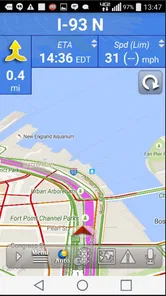
- Live traffic updates can help drivers avoid delays and adjust routes quickly.
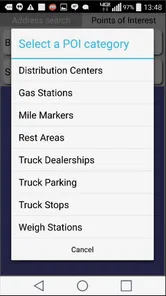
- Displays truck stops
- rest areas
- weigh stations
- and fuel locations.
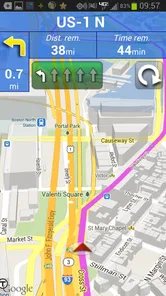
- Voice navigation and turn-by-turn guidance support safer hands-free driving.
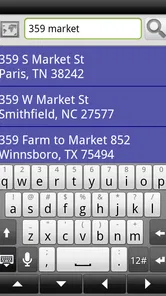
- Route planning includes useful tools for managing multi-stop deliveries.
Cons
- Some advanced routing and navigation features require a paid subscription.
- Map accuracy may vary by region
- especially for temporary truck restrictions.
- The app can use significant battery and mobile data during long trips.
- Interface may feel crowded when many route details and alerts appear together.
- GPS guidance still needs driver verification because road conditions can change.













