

SmartTruckRoute 2 Nav & IFTA
- 1.83K
- 4.1
- Installs
- 100.00K
- Price
- Free
Screenshots
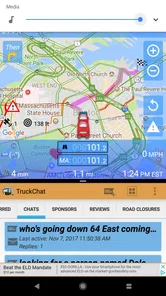
Analysis by Reviewed
When I plan a trip in a truck, the fastest route is not automatically the best route. A low bridge, a road restriction, or a traffic delay can turn an ordinary delivery into a serious problem. That is why I found SmartTruckRoute 2 Nav & IFTA more useful than a regular car-navigation app for commercial driving. It is built around truck routing, live traffic, and IFTA-related work rather than simply drawing a line between two addresses.
My overall impression is that this is a practical Maps & Navigation app for drivers who need to think about the vehicle as much as the destination. It is free to install, aimed at Everyone, and developed by SmartRouting. The app has an average rating of 4.1 from around three thousand ratings, with more than a thousand written reviews, so it has attracted a meaningful user base without looking like a niche experiment.
From a delivery request to a truck-ready route
I find the most useful way to judge a truck-navigation app is to start before the engine is moving: what information can I check early enough to avoid a rushed choice? In this section, I look at how a delivery request becomes a route worth reviewing, including why the truck and its constraints should shape the plan from the outset. That sets up the next step: checking how traffic and the route behave once the day is underway.
Starting with the real driving problem
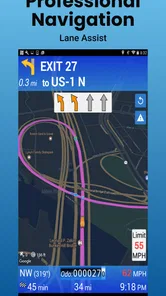
The useful starting point is not “Where is the destination?” but “What kind of truck is going there, and what can go wrong on the way?” A normal navigation app may be perfectly adequate for a private car, yet that same route can be unsuitable for a tall, heavy, or otherwise restricted commercial vehicle. SmartTruckRoute 2 is designed to address that difference by focusing on truck routes and avoiding low bridges and restrictions.
I would use it before leaving a yard, terminal, or rest stop, especially when the destination is in an unfamiliar city. The first practical step is entering the trip and checking that the route makes sense for the actual job. A driver should not treat the first suggested line as an instruction to follow blindly. The app is most valuable when it becomes part of a short planning routine: confirm the destination, review the proposed path, consider the truck’s limitations, and then begin the drive.
That workflow matters because a delivery address is not always the same as a safe approach. A receiver may sit on a street that is easy to reach in a car but awkward for a tractor-trailer. Even when the route avoids an obvious low bridge, the final approach still deserves attention. I see the app as a strong first filter for truck suitability, not as a replacement for the driver’s judgment at the gate, loading area, or last turn.
Building the route step by step
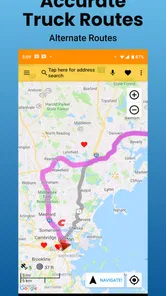
Once the trip is entered, the main benefit is the truck-oriented route calculation. Instead of prioritizing only distance or ordinary travel time, the app is intended to steer commercial vehicles away from restrictions that can create a dangerous or expensive detour. This is the central reason I would choose it over a basic phone map for a working truck.
More From Our News Desk

 Weather - By Xiaomi
Weather by Xiaomi Review: Clear at a Glance, Less Clear Up Close
Xiaomi’s weather app makes everyday forecasts quick to scan, but its calm surface can leave useful details and recovery paths harder to find than they should be.

 X
XX Under Pressure: Can It Recover When Posting Goes Wrong?
A resilience-focused review of X, examining setup, mistaken posts, interruptions, weak connections, and the gaps that matter when recovery needs to be dependable.

 Clash of Clans
Clash of Clans Is Won Between the Battles
Its raids are quick; its community is a long-term project of coordination, teaching, rivalry, and shared responsibility—with all the friction that entails.

 Android Auto
Android Auto Makes the Case for Quieter Car Software
The car interface is no longer judged by how much it can do, but by how quietly it helps. Android Auto shows what drivers now expect—and what still gets in the way.

 MobiOffice: Word, Sheets, PDF
MobiOffice: Transforming Mobile Productivity with Seamless Integration
MobiOffice: Word, Sheets, PDF is redefining mobile productivity with a surprising blend of functionality and innovation.

 EA SPORTS FC Soccer Mobile 26
EA SPORTS FC™ Mobile Soccer: Redefining Mobile Sports Gaming
Dive into EA SPORTS FC™ Mobile Soccer, where immersive gameplay and strategic depth transform mobile sports gaming.
Latest News



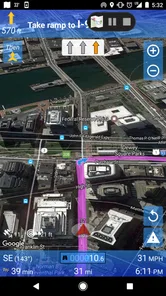
Live traffic adds a second layer to the decision. A restriction-safe route can still be a poor choice if congestion has built up ahead. In practice, I would look at the route before pulling out, then glance at the traffic situation during a safe stop rather than repeatedly interacting with the phone while moving. The combination is useful because avoiding a bridge is only half the job; arriving with a realistic view of current road conditions is the other half.
A good habit is to compare the route with the delivery schedule before accepting it. The shortest-looking option may pass through more urban streets, while a slightly longer path may be easier for a large vehicle to manage. I would also pay attention to the final miles, where navigation errors are often more stressful than highway decisions. Industrial areas can have confusing entrances, divided roads, and access points that are technically near the destination but unusable for a truck.
The app’s IFTA focus is another reason it belongs in a commercial driver’s toolkit. Fuel-tax reporting is not the same task as turn-by-turn navigation, and I would not expect one screen to solve every accounting responsibility automatically. Still, having navigation and IFTA-related information in the same app can reduce the need to switch between unrelated tools while reviewing a trip. That is a practical advantage for an owner-operator or small fleet workflow, where every extra handoff creates another chance to forget or duplicate something.
The handoffs between driver, dispatcher, and destination
Navigation rarely happens in isolation. A dispatcher may send an address, a customer may change a delivery window, and a driver may discover that the written instructions do not match the physical entrance. SmartTruckRoute 2 fits best when the driver remains the person who checks the route and communicates the final plan back to the team.
For example, imagine I receive a morning delivery in a city I do not know. I would enter the destination, inspect the truck-friendly route, and use the traffic view to judge whether the planned arrival still looks realistic. If traffic changes, I would report the revised expectation to the dispatcher rather than assuming the original schedule remains possible. When I arrive near the receiver, I would use the app to guide me through the approach but still follow posted signs and the facility’s instructions.
This division of responsibility is important. The app can help with route selection, but it cannot ask a warehouse employee which gate accepts inbound trailers. It also cannot resolve a mismatch between a street address and a customer’s loading instructions. I like the app more when I treat it as the route-planning layer in a larger process, not as the only source of truth.
The same principle applies to IFTA-related work. A driver may use the app while organizing trip information, but a fleet’s reporting routine may still require checking records before submission. I would build a simple end-of-trip habit: review what the app shows, compare it with the trip paperwork or company process, and pass the relevant information to whoever handles reporting. That extra check is less exciting than navigation, but it prevents a convenient tool from becoming a single point of failure.
What the completed trip looks like
The best outcome is not merely reaching the destination. It is completing the delivery without being forced into a last-minute maneuver because the route ignored the truck’s limitations. In that sense, the app’s strongest contribution is preventive. It helps me think about unsuitable roads before they become an immediate problem.
Live traffic can improve the result further by making the route more responsive to current conditions. A driver who checks congestion early may have more time to discuss a delay, adjust a stop, or warn the receiver. That is much more useful than discovering the problem only after entering a jammed corridor.
For an owner-operator, the combined navigation and IFTA orientation may also make trip organization feel more coherent. I would not describe it as a complete replacement for every fleet-management system, but it can occupy a useful middle ground between a consumer map and a large professional platform. It gives an individual driver a more relevant starting point without requiring the complexity of a full dispatch suite.
The app is also accessible from an operating-system perspective. Its minimum requirement is Android 6.0, which makes it usable on older compatible Android devices that may still be installed in a truck. The current version is 4.2.20260727_932. I would still test the app on the actual phone or tablet used in the cab before depending on it for a long trip, because an older device can affect the experience even when the operating system is supported.
Where the workflow breaks down
No truck-routing app removes every risk. The first weakness is the possibility of overconfidence. A route that is designed to avoid low bridges and restrictions still needs to be checked against road signs, temporary closures, construction, weather, and local access instructions. I would never use the app as permission to ignore a posted restriction or to make a turn that feels unsafe.
The second friction point is the difference between route logic and delivery reality. A route can be appropriate for the truck but still end badly at the destination because the receiver uses a separate entrance or has strict arrival instructions. This is where a phone call, written directions, or a dispatcher’s local knowledge can outperform navigation software. The app gets me close; the final handoff still depends on people and the site itself.
Traffic information can also change faster than a driver can react. If the route updates while I am moving, I would wait until stopping safely before studying the alternatives. A navigation tool is only helpful when it supports attentive driving rather than competing with it. Drivers who want a completely hands-off experience may find that any phone-based solution demands more personal discipline than they expected.
There is also a cost consideration. The app is free, but in-app purchases range from around sixteen dollars to roughly two hundred dollars per item. That makes it important to understand which parts of the experience are included and which may require payment before building a company-wide routine around them. A casual driver may be satisfied with the free starting point, while a professional user should evaluate the purchase options against actual reporting and routing needs.
Because it is listed for Everyone, the app is broadly accessible, but that age classification should not be confused with professional simplicity. Truck navigation involves decisions about vehicle dimensions, road suitability, and delivery timing. A new driver may need additional training to interpret the route responsibly. The app can support experience; it cannot create it.
Who should use it, and who should choose something else
I think SmartTruckRoute 2 is a good match for truck drivers, owner-operators, and small operations that want vehicle-aware routing without immediately adopting a larger fleet platform. It is particularly useful for people who regularly travel unfamiliar roads, deal with bridge-height concerns, monitor traffic, or need navigation and IFTA-oriented work in one place.
It is less compelling for someone who only drives a car or van and has no commercial routing concerns. A standard consumer map may feel simpler for that use. It may also be the wrong choice for a large fleet that already depends on a dispatch system with detailed compliance, vehicle tracking, messaging, and centralized reporting. In that situation, the value of adding another app depends on whether its truck-routing workflow fills a specific gap or merely duplicates existing tools.
I would also hesitate to recommend relying on it alone for highly specialized hauling unless the driver has carefully verified the route and the vehicle restrictions involved. The more unusual the load, the more important it becomes to combine navigation with official road information and experienced planning. SmartTruckRoute 2 is strongest as a practical route assistant, not as a universal authority for every commercial-driving scenario.
My final take after following the full workflow
What I like most is the way the app begins with the actual problem of truck travel: reaching a destination without being sent toward a low bridge or another restriction. The addition of live traffic makes the route more useful for the day’s conditions, while the IFTA angle gives it relevance beyond ordinary turn-by-turn guidance.
What I would keep in mind is the handoff between software and real-world driving. I would enter the trip carefully, inspect the route, check traffic before departure, confirm the destination’s access instructions, and review the trip information afterward. That sequence turns the app from a passive map into a repeatable working tool.
SmartRouting has built a focused app for a real commercial need, and the result is more useful to me than a generic navigation app when I am thinking about a truck rather than a car. It is free to start, supports Android devices from version 6.0 onward, and has reached over one hundred thousand installs. My recommendation is straightforward: try it if bridge clearances, restrictions, traffic, and IFTA organization are part of your normal work, but keep human checks in the loop. The safest result comes from using the app to prepare the decision, not from surrendering the decision to the app.
SmartTruckRoute 2 Nav & IFTA Frequently Asked Questions
What devices and operating systems can run SmartTruckRoute 2 Nav & IFTA?
SmartTruckRoute 2 Nav & IFTA is a Maps & Navigation app from SmartRouting, designed for drivers who want truck-focused routing and related trip tools on a mobile device. On Android, it requires version 6.0 or later. The app is rated for Everyone, though the professional trucking features are most relevant to commercial drivers and fleet operators. Check your device’s compatibility in its app store before downloading.
What is SmartTruckRoute 2 Nav & IFTA used for?
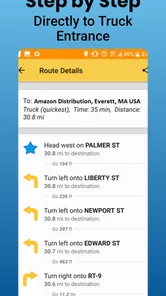
SmartTruckRoute 2 Nav & IFTA is designed for professional truck drivers and fleet operators who need truck-specific navigation combined with trip-planning and compliance tools. It can help calculate routes based on vehicle restrictions, provide turn-by-turn directions, estimate fuel and toll expenses, and support IFTA mileage and fuel tracking. The app is intended to make long-haul planning more organized, although drivers should always confirm road conditions and posted restrictions.
Does SmartTruckRoute 2 provide navigation suitable for commercial trucks?
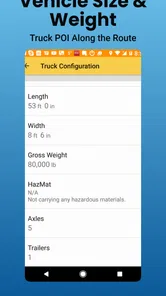
Yes, the app is built with commercial trucking in mind rather than ordinary passenger vehicles. Route calculations can take details such as truck dimensions, weight, hazmat requirements, and other vehicle restrictions into account, helping reduce the risk of being directed onto unsuitable roads. However, no navigation app is perfect, so users should review the suggested route before departure and follow official signs, local regulations, and dispatcher instructions.
Can the app help with IFTA reporting and fuel tracking?
SmartTruckRoute 2 includes tools intended to assist with IFTA-related record keeping by tracking mileage and fuel information across jurisdictions. These features can reduce manual calculations and make it easier to organize data for reporting. Drivers still need to enter accurate fuel purchases, verify jurisdiction details, and retain receipts or other required documentation. The app should be treated as a planning and recording aid, not a replacement for professional tax advice.
Does SmartTruckRoute 2 work without an internet connection?
Some navigation functions may be available through downloaded or cached map data, but users should not assume that every feature works fully offline. Live traffic updates, weather information, map changes, cloud synchronization, and certain account-based services generally require an active internet connection. Before starting a trip through areas with weak coverage, it is wise to prepare the route in advance, download available map data, and keep an alternative navigation method available.
Pros
- Truck-specific routing considers vehicle size
- weight
- and road restrictions.
- IFTA mileage tracking can simplify fuel-tax reporting for drivers and fleets.
- Live traffic updates help adjust routes and avoid major delays.
- Voice navigation supports hands-free driving and safer trip management.
- Useful trip planning tools for stops
- fuel
- parking
- and delivery schedules.
Cons
- Some advanced routing and fleet features require a paid subscription.
- Map data may occasionally miss new closures or recently changed restrictions.
- GPS navigation can drain battery during long trips without a charger.
- The interface may feel complex for occasional or first-time truck drivers.
- Accurate IFTA records depend on correct trip
- fuel
- and vehicle data entry.













