Ski Tracks
- 541.00
- 3.2
- Installs
- 500.00K
- Price
- $1.99

Screenshots

Analysis by Reviewed
If you're a fan of skiing or snowboarding and haven't yet heard of Ski Tracks, you're in for a treat. This nifty app is like having a personal ski buddy right in your pocket. So, grab a cup of hot cocoa, and let me tell you all about it!
Before the first run: set expectations
I find this most useful when I want a personal record of a day on the mountain, rather than another all-purpose fitness dashboard. It is a paid sports app from Core Coders Ltd, priced at $1.99, with an Everyone age rating. Its average is 3.2 from around 6,800 ratings, so I’d treat that as a reason to check whether its focused approach suits you, not as a guarantee that it will fit every phone or skiing routine. It has over 500,000 installs and has been available since January 12, 2013.
A practical use is a family day when everyone meets at the lodge at different times: a saved record can help you look back at where you skied and how the day unfolded, without relying on mobile data in the mountains. I’d still keep the group’s meeting plan independent of the app. A track is a record of your own outing, not a substitute for staying in touch or following mountain safety guidance.
Choosing it for a particular kind of ski day
That distinction helps me decide when to reach for a dedicated ski log and when to leave it out of the plan. On a relaxed day with a few familiar runs, the useful outcome is a personal account of the outing: a route to revisit, a sense of how much ground I covered, and a handful of figures that give the day some shape. If I’m skiing with a group that wants to stay together or coordinate changing plans, I’d use a separate communication method and treat the track as a record, not a rendezvous tool.
It also suits someone who enjoys comparing outings without turning every session into formal training. A beginner might use the map to remember which part of the mountain felt comfortable, while a regular skier might simply enjoy seeing how a varied day unfolded. Neither use requires chasing a personal best. I’d skip it if I wanted turn-by-turn guidance, a live location shared with friends, or a comprehensive fitness history across many sports; those needs call for different tools.
What is Ski Tracks?
Ski Tracks is an app designed for winter sports enthusiasts who love to keep track of their skiing or snowboarding adventures. It’s available on both Android and iOS, ensuring that no matter what device you have, you can join in on the fun. The app uses GPS to record your ski runs, providing you with detailed statistics and insights into your performance on the slopes.
The Nitty-Gritty of Features
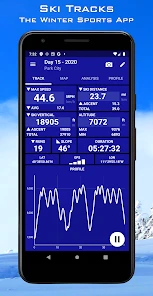
Alright, let’s dive into the fun part—the features! The app logs your maximum speed, distance, altitude, and even the number of runs. If you’re like me and love to geek out over stats, this is a goldmine. Plus, it works offline, which means no data roaming charges when you’re in the mountains. Sweet, right?
More From Our News Desk

Clash of Clans Is Won Between the Battles

Android Auto Makes the Case for Quieter Car Software

MobiOffice: Transforming Mobile Productivity with Seamless Integration

EA SPORTS FC™ Mobile Soccer: Redefining Mobile Sports Gaming

How Microsoft OneDrive Became a Mobile Productivity Giant

How Google Translate Breaks Language Barriers Effortlessly
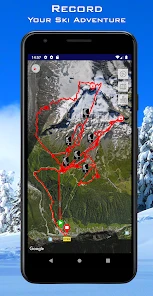
Another cool feature is the mapping. You get a 3D map of your runs, making it easier to brag to your friends about that killer slope you conquered. And let’s not forget the weather reports and ski conditions updates, which are a total lifesaver when planning your day on the snow.
A sensible routine on the mountain
My low-fuss approach is to open the app before heading out, start tracking when I’m ready to ski, and then check the day’s record once I’m safely off the slope. That last step matters: I wouldn’t stop mid-run to inspect a screen or adjust settings. GPS records are most useful as a post-run memory aid, and looking at them indoors also makes it easier to compare the map and stats without rushing.
One small but useful habit is to make sure the phone is secured and has enough battery before leaving the lodge. GPS tracking can be demanding over a full day, so I’d avoid assuming the phone will have plenty of charge left for photos, messages, and the trip home. If accurate tracking matters to you, keeping the device in a consistent pocket rather than moving it between bags also makes your routine simpler.
Keeping the session simple
For a straightforward outing, I’d make the recording part of the routine before I put on gloves and head for the lift. Starting in a sheltered place gives me a moment to check that I’m ready, rather than trying to manage a phone while moving. I’d also decide in advance whether I want one record for the whole day or prefer to stop during a long break; the important point is to be consistent enough that the saved session reflects what I actually want to review.
There’s a trade-off in carrying a phone for a task a watch can often handle. A phone is easy to inspect after skiing and gives the map room to be useful, but it can be awkward to take out in cold weather and should be secured carefully. If I’m already relying on a watch for activity tracking, I’d compare the convenience of keeping everything on my wrist with the richer mountain context I want from a dedicated ski record. For a day focused on skiing rather than general exercise totals, the latter may be worth the extra device handling.
Is It Easy to Use?
You bet! The interface is pretty straightforward. Even if you’re not the most tech-savvy person, you’ll find it easy to navigate. Just hit the start button when you're about to begin your run, and the app does the rest. At the end of the day, you can review your stats and even share them on social media. Trust me, your Instagram followers will be impressed!
Where the record is useful—and where it falls short
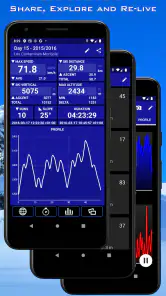
The main handoff is from the mountain to your own review: speed, distance, altitude, run count, and the 3D map give you something concrete to revisit after skiing. Sharing can turn that record into a quick recap for friends, but I’d treat posted stats as a snapshot, not a precise sporting verdict. GPS traces and maximum-speed readings are best read with common sense, especially if the number seems surprising.
Compared with a general fitness tracker, the appeal here is its winter-sports focus and the way the map helps place activity on the mountain. A watch or fitness app may be a better fit if you want one record across several kinds of exercise or prefer not to handle your phone. Likewise, if your priority is live coordination with friends, don’t choose a personal tracking log as your main communication tool. Offline use is a real advantage in areas with weak service, but it does not remove the need for GPS reception or a charged device.
Making sense of what gets recorded
I’d use the day’s figures as a way to add context, not as a scorecard. Maximum speed can be an entertaining detail, but one unexpected reading shouldn’t become a claim about how fast I usually ski. The same common-sense approach applies to distance and run count: they help me remember the outing, while the map gives those numbers a place. This makes the record more useful for personal reflection than for comparing ability with someone using a different phone or tracking setup.
The map can also help with a small but practical memory task: after a mixed day, I can revisit where I spent time instead of relying on a vague recollection of “a few runs over there.” That does not make it a route planner. I would check mountain signage and local guidance while skiing, then use the saved track afterward to reconstruct the day. Keeping those roles separate is a useful safeguard against treating a record as navigation.
My Personal Take
As someone who’s tried a fair share of ski apps, Ski Tracks stands out for its simplicity and effectiveness. It doesn’t bombard you with unnecessary features; instead, it focuses on what matters most to skiers and snowboarders. Plus, the ability to track your progress over time is super motivating.
In conclusion, whether you’re a seasoned pro or a newbie hitting the slopes for the first time, this app is a fantastic companion. It’s like having a little piece of tech cheering you on as you glide down the mountain. So, next time you're gearing up for a ski trip, make sure Ski Tracks is on your phone. You won't regret it!
Who I’d recommend it to
I’d suggest it to skiers and snowboarders who enjoy looking back at a day’s routes and basic performance figures, and who are happy to start a session themselves. It is less compelling if you only want live navigation, group messaging, or a broad training platform. The app’s focused purpose is its strength, but it also means it should not be expected to solve every practical problem a day on the slopes brings.
What I’d check before relying on a full day’s log
Before a longer outing, I’d do a short test on an easy day: start a session, let it record a few runs, and review the result afterward. That gives me a chance to learn the basic routine and see whether the saved route is clear enough for the way I like to remember a mountain day. It is a better time to notice an issue than halfway through a trip when I’m counting on the phone for other things as well.
Battery planning deserves the same attention. I would begin with a comfortably charged phone, keep it protected from the cold as best I can, and avoid opening the screen repeatedly just to watch the numbers change. If I need the phone for calls, photos, or lift arrangements, I’d treat those needs as part of the same battery budget. Offline recording avoids dependence on mobile data for that task, but it does not mean the phone can run indefinitely or that GPS reception is guaranteed in every spot.
Where alternatives make more sense
The usual alternatives fall into two broad camps: a general fitness tracker, which can put skiing alongside other workouts, and a wearable that keeps recording without needing to take a phone out. Those can be more convenient for someone who wants a single exercise history or values hands-free use above a ski-specific map. I’d choose this app when the mountain route and a dedicated record of the day matter more to me than an all-purpose training dashboard.
There is also a simple no-extra-app option: remember the day through photos, a paper note, or a quick message to friends. That can be enough for an occasional skier who has little interest in activity statistics. The dedicated log earns its place when I want a track and figures to review later, but it would be needless friction if I only want to enjoy a few runs and move on.
After the lift ride: turning a track into a useful recap
When I’m back indoors, I’d look over the record while the day is still fresh. The route can prompt memories of which areas I visited, while the numbers give a rough outline of how active the outing was. If I share anything, I’d choose a small, understandable recap rather than presenting one reading as proof of skill. That keeps the handoff from my phone to friends light and avoids making a personal log sound more exact than it is.
For repeat visits, the value is less about chasing a bigger number and more about having a point of comparison. I can notice whether a day felt more spread out, whether I spent longer exploring one area, or simply which routes I want to remember. Those are modest benefits, but they are exactly the sort of details I tend to forget by the next trip. I would not use the record alone to judge technique or decide whether a slope is suitable; those decisions need observation and mountain-specific information.
My recommendation in context
Overall, I see it as a focused companion for people who enjoy keeping a personal account of skiing or snowboarding and are comfortable bringing a phone along. Its appeal is the combination of GPS tracking, mountain-oriented mapping, and figures that can make a day easier to recall. The compromise is that it remains a personal tracking tool: it cannot replace safe habits, group communication, or a broader fitness system when those are the real priorities.
If that balance matches the way you ski, the one-time cost may feel reasonable for a tool you return to on snow days. If you are unsure, I’d first ask myself a simple question: will I actually enjoy reviewing a map and a few outing statistics later? If yes, it has a clear purpose. If not, a general tracker—or no tracker at all—may leave you with less fuss and just as much enjoyment on the mountain.
Ski Tracks Frequently Asked Questions
Who develops Ski Tracks, and what kind of app is it?
Ski Tracks is a sports app from Core Coders Ltd, created for people who want to keep a record of their time on the slopes. Its store summary calls it “The world's favourite winter sports application.” If you are considering a download, the app’s focus is skiing-session tracking rather than general fitness or social networking.
What platforms is Ski Tracks available on?
Ski Tracks is available for both Android and iOS devices, making it accessible to a wide range of smartphone users. Whether you have an Android phone or an iPhone, you can download and enjoy the features of this app to enhance your skiing experience. Ensure your device meets the app’s minimum requirements for optimal performance.
Does Ski Tracks require an internet connection to function?
One of the great features of Ski Tracks is that it does not require an internet connection to record your skiing data. The app uses GPS to track your performance, allowing you to use it even in remote mountain areas without cellular service. However, an internet connection is needed for sharing your data and accessing certain features after your session.
How does Ski Tracks enhance my skiing experience?
Ski Tracks provides a comprehensive tracking solution that logs various details about your skiing sessions, including speed, distance, altitude, and duration. It offers visual maps of your routes and detailed statistics that help you analyze and improve your performance over time. This makes it an excellent tool for both beginner and advanced skiers aiming to track their progress.
Is Ski Tracks user-friendly for beginners?
Yes, Ski Tracks is designed with user-friendliness in mind, offering an intuitive interface that is easy to navigate. Beginners will find it simple to start tracking their ski sessions with just a few taps. The app includes a helpful tutorial to guide new users through its features, ensuring a smooth start for everyone.
Pros
- Comprehensive data tracking for skiing activities.
- Offline map access for remote ski areas.
- Low battery usage during tracking.
- Detailed performance analytics and stats.
- Easy sharing of ski experiences on social media.
Cons
- Interface can be confusing for beginners.
- Lacks real-time weather updates.
- Limited customization of tracking features.
- No option for family sharing of data.
- Subscription required for premium features.
- Category
- Sports
- Version
- Varies with device





