Ace Trace - Shot Tracker
- 250.00
- 3.2
- Installs
- 100.00K
- Price
- Free

Screenshots
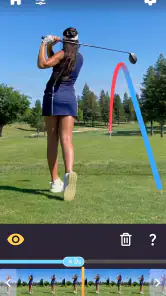
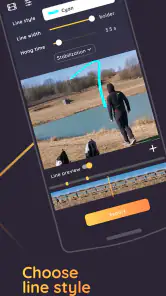
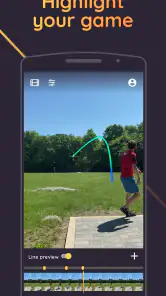
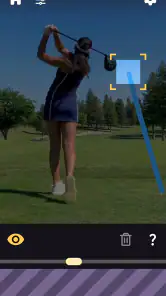
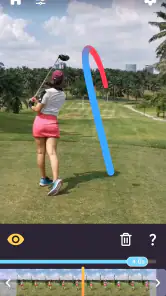

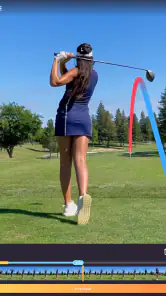
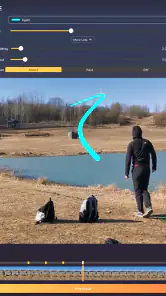
Analysis by Reviewed
I tried Ace Trace as a sports app with a fairly focused purpose: turning recorded shots into visual tracers for golf, disc golf, baseball, and similar activities. That makes it more interesting than a simple scorecard, but also more specialized than an all-purpose sports camera editor. I can imagine using it after a weekend round to show a friend exactly how a ball curved, or reviewing a short clip with a child who wants to understand why a throw went wide.
It is free to download, aimed at Everyone, and comes from Fitness & Sports apps. The app has passed 100 thousand installs, while its average sits at 3.2 from around 1.3 thousand ratings. Those numbers suggest a real audience, but also a mixed experience. My impression matches that balance: the idea is appealing and the right clip can look useful, yet the app asks for patience when the footage, sport, or intended result is not a good match.
How Ace Trace fits into a shared sports routine
The most natural household use is not leaving the app open all day on a shared phone. It works better as a short review tool after an activity. One person records a swing, throw, or kick, then another person helps choose the clip and inspect the result. That simple division matters when several people use the same device, because the app becomes part of a conversation rather than a private training log.
Imagine a parent and teenager at a driving range. The parent records a few swings, hands over the phone, and the teenager checks which shot produced the clearest trace. Later, they can compare the visual path with what they felt during the swing. The value is not that a line replaces coaching; it is that the clip gives both people something concrete to discuss instead of relying only on memory.
The same approach suits disc golf. A group can capture a difficult throw and review whether the disc began on the intended angle or drifted earlier than expected. For baseball, a player may want to look at a hit or pitch with teammates. In each case, the app is most useful when everyone agrees on the question before opening the clip: are we checking direction, timing, curve, or simply trying to preserve a memorable shot?
That last point is important. A tracer can make a highlight more understandable, but it does not automatically explain performance. If the camera angle hides the object, the overlay may be less convincing than a plain replay. I would use the visual result as a discussion aid, not as a final technical verdict.
What makes the app different from ordinary video
A normal phone camera gives you the raw action. Ace Trace adds an interpretive layer, which is the reason to choose it over the gallery app. Instead of scrubbing through a clip repeatedly and guessing where the ball or disc traveled, you can focus on the path shown over the footage. That can save time during a casual review with friends.
More From Our News Desk

Clash of Clans Is Won Between the Battles

Android Auto Makes the Case for Quieter Car Software

MobiOffice: Transforming Mobile Productivity with Seamless Integration

EA SPORTS FC™ Mobile Soccer: Redefining Mobile Sports Gaming

How Microsoft OneDrive Became a Mobile Productivity Giant

How Google Translate Breaks Language Barriers Effortlessly
However, the trade-off is control. A standard video editor is usually better when you need trimming, captions, side-by-side comparisons, or broad creative editing. A sports-specific tracer is better when the main question is “where did the shot go?” I would not install this expecting a complete coaching platform. Its appeal is narrower and clearer: visualizing an attempt in a way that makes the movement easier to talk about.
Another non-obvious strength is its cross-sport character. You do not need a separate app for golf and disc golf if your household moves between both. That makes it practical for families or friend groups with varied interests. The compromise is that a broad sports scope may feel less tailored than a dedicated golf analyzer or baseball training tool designed around one discipline.
Setting it up without mixing up everyone’s clips
On a shared device, the first challenge is not the tracer itself; it is keeping ownership clear. Before recording, I would agree on whose session is being captured and where the resulting clip should go. If several people take turns, a quick spoken label such as “Sam’s second drive” is surprisingly helpful. It avoids the later confusion of trying to identify similar swings from thumbnails alone.
I would also avoid treating the phone as a permanent communal scoreboard. The app is better used in defined sessions: record a small batch, review the useful clips, and then return the device to its normal owner. This keeps the household routine manageable and reduces the chance that one person’s sports media gets mixed with another person’s everyday photos.
People should also remember that the app’s age classification of Everyone does not mean every result will be equally easy for every child to understand. A younger user may enjoy seeing a line over a ball flight, while an older beginner may start treating that line as a precise measurement. I would explain that the output is a visual aid and encourage the child to compare it with the original video.
The current version is 3.26, and the app requires at least iOS 11. That makes the technical entry point relatively approachable for devices that meet the requirement, but a family should still check the device before planning a group activity. A shared phone that is nearly full, has a weak camera, or is awkward to position can create more frustration than the app itself.
Practical boundaries for recording
Good footage matters more here than many first-time users expect. I would place the phone where the action remains visible from start to finish, rather than choosing a position simply because it is convenient. A clear background and a stable view should make the subject easier to follow. If people are walking in front of the camera or the action leaves the frame, no later adjustment can fully repair that recording.
For a household session, one person should take responsibility for filming while the athlete concentrates on the attempt. Switching roles every shot sounds fair, but it often produces inconsistent angles and makes comparisons less useful. A better routine is to record a short series from one position, then move the phone only when there is a clear reason to change the view.
This is one of the app’s most important limitations: it depends on the quality and suitability of the source clip. It is not a substitute for a tripod, a thoughtful camera position, or enough light to distinguish the moving object. If your usual sports videos are shaky, distant, or crowded, you may spend more time correcting expectations than learning from the tracer.
I would also keep the original video instead of relying only on the processed version. The unaltered clip provides context that an overlay can hide, including the athlete’s setup, body movement, and what happened immediately after contact. Keeping both versions is especially useful when a child or beginner wants to revisit the attempt later and ask a new question.
Coordinating review sessions with friends and family
Ace Trace works best when review is collaborative but organized. If everyone talks at once, the visual line becomes entertainment rather than feedback. I prefer a simple order: the athlete describes what they intended, another person watches the raw clip, and only then does the group discuss the traced path. That sequence reduces the temptation to force every observation to fit the overlay.
For a family, this can turn a short practice into a useful learning ritual. A parent might ask a child to predict the direction before showing the processed result. The child then compares expectation with outcome. That exercise encourages observation without requiring the parent to present themselves as a coach or claim that the app has diagnosed the problem.
For friends, the app can make a casual round more social after the activity. Instead of arguing about whose shot was closest or whose throw curved most, the group can review selected clips. I would still keep the tone light. A visual tracer can support friendly comparison, but it should not become a reason to embarrass someone whose attempt was poor.
One useful workflow is to choose only the clips that answer a question. Reviewing every attempt can become repetitive, especially if the group is large. Select one clear example, one surprising result, and perhaps one attempt that needs another look. This keeps the app’s distinctive feature visible without turning the evening into a long editing session.
Another practical insight is to separate entertainment clips from improvement clips. A spectacular shot may be worth saving even if its technical lesson is limited. A plain-looking attempt may be more valuable for practice because its path is easier to compare with the intended line. Treating those as two different purposes prevents disappointment when the most exciting video is not the most educational one.
When a different tool is the better choice
If your main goal is keeping detailed scores, club statistics, distances, or a long-term training history, I would look first at a dedicated scoring or performance app. Ace Trace’s distinctive role is visual shot tracking, not replacing every other sports utility. A scorecard may be faster during play, while this app makes more sense afterward.
If your goal is polished social content, a general video editor may offer more flexibility. You may prefer that alternative when you need music, titles, multiple clips, or precise control over the final presentation. Ace Trace is the better fit when the path of the shot is the central visual element and you do not want to build that effect manually.
There is also a case for using nothing beyond the phone camera. Beginners who are still learning basic technique may gain more from watching posture and contact than from focusing on a traced line. I would introduce this app after the athlete can describe what they are trying to improve. Without that focus, the overlay can become a novelty that produces excitement but little progress.
Age, trust, and realistic expectations
The Everyone rating makes the app suitable for a broad audience in terms of classification, and its sports use can fit children, teenagers, adults, and older relatives. The more important question in a shared household is how the recordings are handled. I would ask before filming another person, particularly when friends or children are involved, and I would avoid presenting the processed clip as an objective judgment of someone’s ability.
That boundary builds trust. A child may be happy to see a successful shot traced, but less comfortable if every mistake is replayed for the group. Let the athlete choose which clips to examine when possible. This is a small habit, yet it changes the app from something imposed on a player into something they can use to understand their own attempts.
Adults should also be careful with comparisons. The app can show different paths, but it does not make two clips identical. Camera placement, distance, background, and the type of action all affect how useful a comparison is. I would compare attempts recorded in similar conditions and treat differences as clues rather than proof that one person has better technique.
For older users or anyone uncomfortable with new sports technology, the app is easier to introduce through a single demonstration. Show one raw clip, then the traced version, and explain what the visual line is meant to help with. Avoid describing it as a magic analysis tool. That honest introduction makes it less likely that the user will expect professional-grade measurement from a casual phone recording.
The financial model also deserves a household conversation. The app is free, but it includes in-app purchases ranging from $0.99 to $69.99 per item. I would not hand the phone to a child and assume that “free” means there can be no purchase decision. Whoever manages the device should review the purchase process and decide whether optional spending fits the family’s rules before a practice session begins.
What daily use feels like after the novelty fades
During the first session, the tracer is naturally entertaining. The real test is whether it remains useful once the surprise wears off. In my view, it does when you use it selectively. A golfer working on a recurring miss can record a few attempts, review the clearest examples, and then put the phone away. A disc golfer can use it after a round to revisit one troublesome angle rather than process every throw.
The app is less compelling when you expect it to create a complete record of every activity. That kind of routine can make filming feel like work, especially if the group is trying to enjoy a relaxed outing. I would make it an occasional checkpoint: use it when a shot raises a question, when a player wants feedback, or when a memorable attempt deserves a visual keepsake.
There is a useful emotional benefit in that approach. Players often remember only the result—good or bad—but a visual path can make the attempt feel more specific. Instead of saying “I missed left,” someone can discuss when the shot began moving left and whether the next attempt should start differently. That does not guarantee improvement, but it creates a better conversation than a vague reaction.
Still, I would not let the app dominate the activity. A shared sports device should support participation, not pull everyone into constant screen review. Set a limit before starting, such as checking a few selected clips at the end. This is particularly important with children, who may become more interested in replaying the animation than in practicing the movement that produced it.
My household verdict on Ace Trace
I recommend Ace Trace to people who want a simple visual way to revisit golf, disc golf, baseball, and related sports footage, especially when the activity is shared with friends or family. Its strongest use is narrow but worthwhile: capture a clear attempt, add a tracer, and use the result to make a specific conversation easier.
I would skip it if you want a full sports diary, advanced coaching measurements, or a general-purpose video editor. I would also skip it when your phone cannot reliably capture the action or when nobody in the group wants to spend time selecting and reviewing clips. In those situations, a scorekeeping tool, a dedicated training app, or the ordinary camera may serve you better.
The mixed average of 3.2 is a fair reminder to keep expectations grounded. The concept is appealing, but the experience depends heavily on footage, sport, camera position, and how the household uses the result. The free entry point makes experimentation easy, while the optional purchases mean the person responsible for the device should keep an eye on spending.
For me, the deciding question is not whether the app can make a dramatic visual. It is whether that visual helps the athlete and the people watching understand one particular attempt. When the answer is yes, Ace Trace adds something a normal replay does not. When the answer is no, it quickly becomes an extra step between the activity and the memory of it.
As a sports app from Fitness & Sports apps, it has a clear identity rather than trying to be everything at once. The current version, 3.26, keeps the product positioned as a practical tracer for several activities, and the broad age rating makes it easy to consider for shared use. My final advice is to start with one person, one sport, and a small set of clips. If that focused test produces useful conversations, the app has earned a place in your household’s sports routine.
Best use: a focused, shared review of a few clear shots—not a replacement for coaching, scoring, or careful video editing.
Ace Trace - Shot Tracker Frequently Asked Questions
Is Ace Trace - Shot Tracker available for Android and iOS?
Ace Trace - Shot Tracker is a sports app for tracking shots in golf, disc golf, baseball, and other activities. Before downloading, check the app store on your device for compatibility and availability. The app requires iOS 11 or later where applicable, so it is worth confirming that your device meets the minimum requirement before installing.
Is Ace Trace - Shot Tracker free to download, and are there in-app purchases?
The app is free to download, but it also offers in-app purchases priced from $0.99 to $69.99 per item. That means you can install it without an upfront purchase, while some features or content may involve additional costs. Review the purchase options in your app store before buying anything, especially if you share a device or have purchase restrictions enabled.
What is Ace Trace - Shot Tracker used for?
Ace Trace - Shot Tracker is designed to help golfers review and understand their shots using video and shot-tracking tools. After recording your swing or round, the app can help organize footage, follow ball flight, and provide a clearer view of performance. It is useful for players who want more structured practice, easier swing review, and a visual record of progress over time.
Do I need special golf equipment or sensors to use Ace Trace?
The app is primarily built around smartphone video and tracking features, so many users can begin with a compatible phone and a clear view of the shot. However, the exact tracking experience may depend on the device, camera position, lighting, and available app features. Some advanced functions or supported modes may require compatible accessories, specific setup conditions, or additional equipment.
How accurate is the shot tracking in Ace Trace - Shot Tracker?
Tracking accuracy can vary depending on camera placement, video quality, weather, lighting, background visibility, and how clearly the ball is captured after impact. The app can be helpful for reviewing shots and identifying patterns, but it should not automatically be treated as a replacement for professional launch-monitor equipment. For the best results, follow the setup instructions and record from a stable, unobstructed position.
Pros
- Automatic shot tracking helps identify patterns over time.
- Useful visual maps make shot locations easy to review.
- Supports practice analysis without requiring a coach nearby.
- Simple interface keeps session data quick to access.
- Can help players set measurable goals for improvement.
Cons
- Tracking accuracy may vary with phone placement and lighting.
- Some advanced features may require a paid subscription.
- Outdoor use can drain the phone battery during long sessions.
- Incorrectly detected shots may require manual review or correction.
- Limited device compatibility may affect the tracking experience.
- Category
- Sports
- Version
- 3.26





