

Simply Sing: My Singing App
- 11.54K
- 4.4
- Installs
- 10.00M
- Price
- Free

Screenshots

Analysis by Reviewed
I like singing apps most when they make it easy to get from “I feel like singing” to actually trying a song, without turning a casual hobby into homework. Simply Sing: My Singing App is built around that idea: it gives you a place to sing along, practise with feedback, and share a performance. In my experience, its appeal is less about polishing every technical detail and more about making it comfortable to pick up a song and give it a go.
When a singing session depends on the connection
A key practical question with a song-based singing app is what happens between choosing a track and actually singing it. I’d treat a stable connection as part of the experience when browsing for songs or moving between activities, rather than assuming every part will work without internet. That matters if you plan to use it somewhere with patchy reception: decide what you want to sing before you leave, and avoid relying on a last-minute search in a low-signal spot.
Connectivity also changes the feel of a casual session. At home, it’s easy to browse and try another song when the first pick doesn’t suit your voice. On a commute or during a break, a slow connection can interrupt that relaxed flow. I wouldn’t make it my only plan for a sing-along in a place where the network is unreliable; a familiar track ready to go is a safer starting point than expecting instant browsing.
Getting Started with Simply Sing
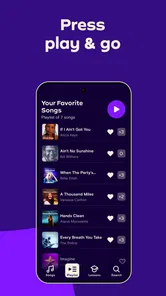
First off, downloading Simply Sing: My Singing App was a breeze. It's available on both Android and iOS, so no one's left out in the cold. Once installed, I was welcomed with a sleek and straightforward interface that invites you to start singing right away. No fuss, no muss—just the way I like it.
Features That Hit the Right Note
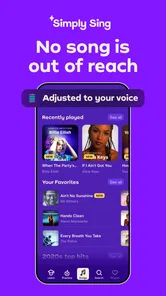
One of the standout features is its song library, which is surprisingly extensive. You can find everything from classic hits to the latest chart-toppers. It feels like having a karaoke bar in your pocket. Plus, the app allows you to search songs by genre, mood, or even era, making it super easy to find exactly what you're in the mood for.
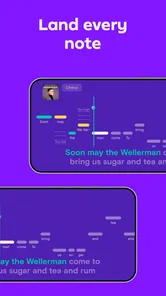
What really caught my attention, though, is the vocal coaching feature. It gives real-time feedback on your pitch and timing, which is perfect for those of us who might need a little nudge to stay on key. It's like having a personal vocal coach who doesn't judge your off-notes!
Making the most of short sessions
I’d use the coaching in small, repeatable bursts rather than treating it like a full singing lesson. Pick one song you already know, listen closely to the pitch and timing feedback, then try the same passage again. Familiarity makes it easier to focus on what your voice is doing instead of spending the whole session learning the melody. It’s also a gentler way to practise if you’re new to singing and don’t want to start with a difficult song.
More From Our News Desk

 Gmail
GmailGmail in a Busy Inbox: Who Benefits Most?
From first account to crowded workday, Gmail earns its place through dependable search and flexible sorting—but its best fit depends on how much inbox maintenance you can tolerate.

 Prime Video
Switching to Prime Video: What Changes in Your Viewing Routine
Prime Video can make a compelling second home for streaming, but switching means learning a different catalog, rental layer, and route from browsing to playback.

 Universal TV Remote Control
Universal TV Remote Control Works Best as a Reliable Backup
A phone remote earns its place through quick setup and reliable habits. Here is how to get more from Universal TV Remote Control—and where its limits show.

 Weather - By Xiaomi
Weather by Xiaomi Review: Clear at a Glance, Less Clear Up Close
Xiaomi’s weather app makes everyday forecasts quick to scan, but its calm surface can leave useful details and recovery paths harder to find than they should be.

 X
XX Under Pressure: Can It Recover When Posting Goes Wrong?
A resilience-focused review of X, examining setup, mistaken posts, interruptions, weak connections, and the gaps that matter when recovery needs to be dependable.

 Clash of Clans
Clash of Clans Is Won Between the Battles
Its raids are quick; its community is a long-term project of coordination, teaching, rivalry, and shared responsibility—with all the friction that entails.
Latest News



For a realistic everyday use, imagine having ten minutes at home before dinner. I’d choose a comfortable song, warm up with a verse, and use the feedback to spot a section that needs attention. That’s a more useful goal than expecting a quick session to transform your voice. If you want detailed vocal technique, breathing instruction, or a structured course, a dedicated singing-teaching app or lessons with a teacher may suit you better.
Choosing songs that make practice useful
The song choice can make a bigger difference than how long I spend practising. A familiar melody lets me notice whether a phrase feels too high or low without first having to work out where the tune goes. I’d start with a song that feels comfortable in its original key, then use the app’s pitch-and-timing guidance to see how the performance feels. If I’m straining, I’d switch songs rather than repeatedly pushing through a range that doesn’t suit me.
That approach is especially useful for someone who sings for enjoyment but has never had formal lessons. Feedback can help me pay attention to a particular moment, but it isn’t the same as an instructor explaining why a note feels uncomfortable or how to change technique safely. I’d treat the coaching as a prompt for listening more carefully, not as a verdict on whether I can sing.
Sharing Your Talent
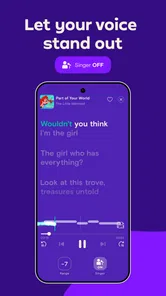
Another cool aspect is the ability to share your performances with friends. Once you've nailed a song, you can record your performance and share it on social media or with friends within the app. It's a fun way to showcase your skills or, in my case, get a few laughs. There's also a community of fellow singers you can connect with, which adds a social element to your singing journey.
Taking it along and recovering from hiccups
This is best suited to people who enjoy singing for fun, want a low-pressure way to practise, or like sharing a performance with friends. If you mainly want to play music while doing other things, a conventional music-streaming app is a better fit; Simply Sing is centered on joining in with a song, not replacing a general-purpose player. Likewise, singers who need precise, professional vocal analysis should regard its feedback as a helpful nudge, not a substitute for expert coaching.
If a song search or another network-dependent moment stalls, I’d first check the connection and try again before assuming the app itself is at fault. Moving to a stronger signal can be more useful than repeatedly tapping the same control. For a mobile session, headphones can help you hear the track and your own voice more clearly, but choose a comfortable volume and keep awareness of your surroundings if you’re singing outside the home.
What to do when a session gets interrupted
A connection hiccup is particularly annoying when you have only a short break to sing. I’d avoid starting with a long browse in that situation: open the app while the signal is good, settle on a song, and then begin practising. If a screen takes longer than expected, give it a moment, check whether the connection has dropped, and retry once the signal is steadier instead of rapidly repeating taps. That won’t remove every interruption, but it makes troubleshooting calmer and helps distinguish a temporary network problem from a song choice that simply isn’t working for you.
For someone planning a group sing-along, I’d also test the setup before friends arrive rather than making the first song search part of the gathering. The app’s social side is more enjoyable when the group can focus on singing, not waiting for a search or deciding who should share a recording. If sharing matters to you, take a moment to review a performance before sending it; a playful recording can feel different once it leaves the room.
User Experience and Design
The app's design is clean and intuitive. I never felt overwhelmed or lost, which is a huge plus in my book. Navigation is smooth, and loading times are quick, so you can jump from singing one song to the next without any annoying delays.
If I had to nitpick, I'd say that the app could offer more customization options for the interface. But that's a minor detail in an otherwise fantastic app.
Where it fits among music apps
Compared with a standard music-streaming app, this is for taking part in a song rather than simply putting music on in the background. A streaming player is the more natural choice when I want a playlist for cooking, a commute, or a party where nobody plans to sing. Simply Sing makes more sense when I want to focus on my own voice, use the pitch and timing feedback, or turn a familiar track into a small practice session.
It also occupies a different lane from a structured vocal course. A course or a teacher is a better fit if I want lessons that build progressively, detailed explanations of technique, or guidance tailored to a specific vocal problem. Here, the advantage is convenience and a low-pressure way to try singing; the trade-off is that approachable feedback shouldn’t be mistaken for comprehensive instruction.
Cost, audience, and data-conscious habits
Simply Sing is a free Music & Audio app from Simply Ltd, with optional in-app purchases priced from $6.99 to $89.99 per item. I’d start with the free experience and only consider paying if the features I actually use make the cost worthwhile. The app is rated for Everyone, and its current version is 2.11.7; it requires Android 8.0 or later. It has a 4.3 average from around 260,000 ratings and more than 5 million installs, which suggests broad uptake, though popularity alone can’t tell you whether its approach suits your voice or routine.
Because singing and song browsing can involve repeated use of a mobile connection, I’d be mindful of where I practise if I’m trying to conserve data. On a limited plan, using a Wi-Fi connection for browsing and keeping sessions shorter while away from home is a sensible habit. I’d also avoid recording or sharing a take until I’m happy with it; that saves time and prevents an impulsive share from becoming something I regret. The app was released on January 11, 2024, but what matters more day to day is whether its current tools fit the way you like to sing.
A practical routine for limited data
If I were watching my mobile-data use, I’d make song discovery the part of the session I do over Wi-Fi and keep away-from-home practice focused on one or two songs I already know. That avoids turning a five-minute break into a long stretch of browsing and retries. I’d also be selective about recording and sharing, since those activities can involve more than simply singing along. This is a sensible way to keep the app useful without assuming how much data any particular session will consume.
The free starting point is useful for deciding whether this style of singing practice suits me before I spend anything. Optional purchases range from $6.99 to $89.99 per item, so I wouldn’t treat a paid option as an automatic upgrade. I’d first ask whether I use the app often, whether the available singing tools meet my needs, and whether the specific purchase is worth its price to me. That’s a better basis for deciding than paying because I hope it will act like a full vocal course.
Who will get the most from it
I’d recommend it most to casual singers who enjoy karaoke, people who want a little guidance while practising, and anyone who finds it easier to keep a hobby going when there’s a simple app to open. It can suit a quiet evening at home, a quick break when reception is reliable, or a shared session where friends are happy to take turns. The social features add a reason to finish a song and share it, though I’d use them only when I genuinely want other people to hear the result.
I’d steer away from it if I needed a dependable offline library, professional-grade vocal analysis, or a formal learning plan. It’s also not the right substitute for a regular music player if my goal is listening rather than singing. Those are not small differences: they shape whether the app feels convenient or frustrating. Matching the tool to the activity is the simplest way to avoid expecting it to solve a problem it wasn’t designed around.
Final Thoughts
Simply put, Simply Sing: My Singing App has become a go-to for my singing sessions. Whether I'm aiming to improve my skills or just looking to have some fun, it delivers on all fronts. It's user-friendly, packed with helpful features, and most importantly, it's a blast to use.
So, if you're looking for an app to help you hit those high notes or just want to enjoy a good sing-along, give Simply Sing a try. Who knows, it might just be the app that turns you into the next big thing—or at least the star of your living room concert!
My connectivity verdict
For me, this works best as a connected companion for planned or spontaneous singing at home, where browsing and trying another song feels easy. It can also suit a short mobile practice when reception is dependable, but I wouldn’t count on uninterrupted use in a dead zone or treat it as an offline karaoke library. That distinction is worth keeping in mind before you build a session around it.
Overall, I’d recommend it to casual singers who want approachable feedback and a social reason to practise. I’d skip it if I needed a guaranteed no-network experience, a highly customizable interface, or a formal training program. The strongest approach is to keep expectations simple: use it to enjoy singing, learn from small bits of feedback, and choose a different tool when connectivity or specialist instruction matters more.
Simply Sing: My Singing App Frequently Asked Questions
Is Simply Sing free to download, and what purchases should I expect?
Simply Sing is free to download, so you can install it without paying upfront. It also offers in-app purchases, with prices ranging from $6.99 to $89.99 per item. Check the purchase details shown in the app before choosing anything, as paid options can affect which parts of the experience you can access. The free download makes it possible to try the app before deciding whether to spend.
What age group is Simply Sing intended for?
Simply Sing has an Everyone content rating, making it suitable for a broad audience. Its singing-focused format may appeal to people who want to practice, explore songs, or simply enjoy using their voice. As with any music app, the best fit depends on what the user is looking for, but the age rating indicates that its content is considered appropriate for general audiences.
Can I use Simply Sing to sing songs that feel too high or too low for my voice?
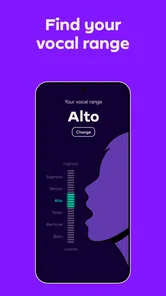
Yes. Simply Sing’s central appeal is helping users enjoy singing songs even when the original notes feel too high or too low for their voice. The app is designed to adapt the singing experience to different vocal ranges, making songs feel more approachable. It is aimed at interactive singing rather than simply playing audio, so it may suit people who want to participate instead of just listening.
Is Simply Sing suitable for casual singers who just want to enjoy music?
Simply Sing is made for people who want to sing, whether they are learning or already comfortable with their voice. Its focus is on helping songs suit different vocal ranges, so it can appeal to casual singers as well as those who want guided practice. The app is in the Music & Audio category, and its age rating is Everyone.
What features does Simply Sing offer for beginners?
Simply Sing is tailored for both beginners and experienced singers. For beginners, it offers vocal exercises, personalized feedback, and step-by-step lessons to improve pitch and rhythm. The app also includes a user-friendly interface with guided tutorials to help users navigate through their vocal journey, making it an excellent choice for those new to singing.
Pros
- User-friendly interface
- easy to navigate.
- Wide variety of songs to choose from.
- Offers real-time feedback on singing.
- Provides vocal training exercises.
- Includes offline mode for practice.
Cons
- Requires in-app purchases for full access.
- Limited free content available.
- High data usage for song streaming.
- Some features need stable internet.
- Occasional app crashes reported.













