Simply Draw: Learn to Draw
- 1.26K
- 4.7
- Installs
- 1.00M
- Price
- Free

Screenshots
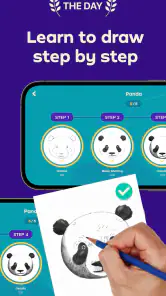

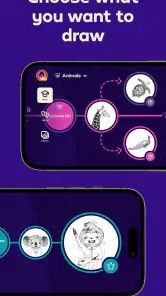
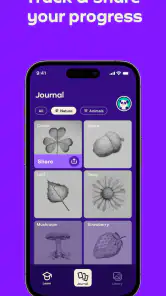

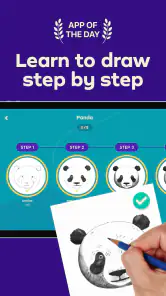
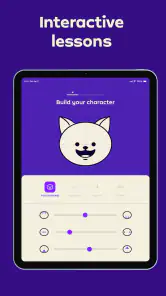
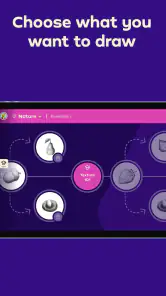
Analysis by Reviewed
I approached Simply Draw: Learn to Draw as a low-pressure way to practise drawing rather than a replacement for a sketchbook or a full art course. That distinction matters: the app’s appeal is having guidance close at hand when I want a starting point, while the real progress still comes from paying attention and drawing regularly.
What the free starting point tells you
Simply Ltd makes this an education app, and it is free to install. There are in-app purchases priced from $14.99 to $89.99 per item, so I’d treat the free access as a chance to decide whether the teaching style suits me before spending anything. Those figures describe the listed purchase range; they don’t tell me which particular lessons or features are included with each item, so I wouldn’t assume every part of the app is free or that one purchase unlocks everything.
The app is rated Everyone, runs on Android 11 or later, and its current version is 1.5.0. Its 4.7 average from around 33,000 ratings, alongside more than a million installs, suggests that plenty of people have tried it, but popularity alone can’t say whether its approach will fit your goals. I’d use the first session to judge the lesson format, not the headline numbers.
Getting Started with Simply Draw
When I first opened Simply Draw: Learn to Draw, I was greeted by a clean, intuitive interface that immediately made me feel comfortable. No overwhelming menus or confusing buttons—just a straightforward path to start my drawing journey. The app kicks off with a quick tutorial that’s super helpful for getting the lay of the land.
Features That Stand Out
One of the coolest things about this app is its step-by-step tutorials. Whether you’re into sketching cute animals, realistic portraits, or landscapes, there’s something here for everyone. The app breaks each drawing down into manageable steps. It’s like having a personal art instructor who’s patient and never rushes you.
Another feature I found pretty neat is the variety of tools available. You’ve got pencils, pens, and brushes, each with customizable sizes and colors. It’s perfect for experimenting with different styles and techniques. Plus, there’s a handy undo button for when your creativity takes a wrong turn.
Choosing a sensible first practice
For a first session, I’d resist the temptation to pick the most ambitious subject. Choose one that lets you concentrate on a single skill, such as noticing how simple shapes fit together, rather than trying to perfect every line and detail. That makes it easier to tell whether the instruction is helping you understand the drawing or merely keeping you occupied.
More From Our News Desk

Clash of Clans Is Won Between the Battles

Android Auto Makes the Case for Quieter Car Software

MobiOffice: Transforming Mobile Productivity with Seamless Integration

EA SPORTS FC™ Mobile Soccer: Redefining Mobile Sports Gaming

How Microsoft OneDrive Became a Mobile Productivity Giant

How Google Translate Breaks Language Barriers Effortlessly
A useful test is to repeat just one stage after a short break, without checking the screen immediately. If you can recall the order of the marks or the relationship between the shapes, you’re beginning to absorb a method. If not, that’s still useful information: slow down, study the part that confused you, and try again instead of restarting the entire picture.
Practice Makes Perfect
The app doesn’t just provide tutorials; it also encourages practice. There’s a section dedicated to free drawing where you can let your imagination run wild. It’s a great way to apply what you’ve learned in the lessons. I found myself spending hours just doodling and trying out new ideas.
For those who love a challenge, Simply Draw offers daily drawing prompts. These are fantastic for pushing your creativity and getting out of your comfort zone. It’s a fun way to stretch your skills and maybe even discover a new favorite subject to draw.
Making a lesson useful in everyday life
A practical way I’d use a guided exercise is to keep a scrap sheet beside me and make a tiny note after each step: what changed, and why did the shape become clearer? That turns copying into observation. When I return to the subject later, I can try drawing it from memory first, then revisit the guidance to spot what I missed. This is a useful bridge between following instructions and making independent sketches.
It also suits short, interrupted sessions better than a long class. I might open a lesson while waiting for a meal to cook, complete one section, and stop before rushing through the rest. If I’m drawing on paper, I can use the screen as a reference and keep my pencil work separate; if I’m using the app’s drawing area, I can experiment there. Either way, a quick session works best when I choose one goal, such as getting the outline right, rather than expecting a finished picture every time.
A realistic routine for busy days
Imagine having a few quiet minutes before leaving home, with a pencil and a spare page nearby. I’d open a lesson, work through one small part, and leave the page where I can see it later. In the evening, I could try the same subject again from memory. That second attempt is often more revealing than completing several guided steps in one sitting, because it shows what I actually noticed and remembered.
For a child or a family activity, I’d make the goal collaborative rather than competitive: each person can follow the same broad prompt but make their own choices about the result. The point is not to produce matching pictures. It is to have a clear starting point and a reason to talk about what shapes or details each person noticed. An adult can also help decide when to pause, especially if a younger user finds purchase prompts distracting.
Community and Sharing
If you’re someone who thrives on feedback, the app has a community feature where you can share your creations. It’s a positive space where artists of all levels can interact, give advice, and support each other. I posted a few of my drawings and was pleasantly surprised by the encouraging comments.
There’s also an option to share your art on social media directly from the app. It’s a nice touch for those proud moments when you want to showcase your hard work to friends and family.
Using feedback without losing your own direction
Sharing can make practice feel less solitary, but I wouldn’t use reactions as a score for whether I’m improving. A more useful question is whether I can point to a specific change in my work: a clearer outline, better spacing, or more confidence starting a subject. If I post a drawing, I’d ask for feedback on one thing I’m actively working on. That gives other people a more useful way to respond and keeps the exercise focused.
I’d also keep a few private sketches alongside anything I share. That makes it easier to experiment without worrying about presentation. A polished result can be satisfying, but rough attempts are where I can see which parts of a lesson are sticking and which still need practice.
How it compares with other ways to learn
Compared with a blank sketchbook, guided lessons are helpful when I don’t know what to draw or how to break a subject into parts. A sketchbook, on the other hand, is better for building a habit of making choices without a model in front of me. I’d alternate between them: use a lesson to study construction, then close it and try a different subject using the same basic shapes. That avoids turning every practice session into tracing or imitation.
Compared with watching a general video tutorial, a step-based format can make it easier to pause and work through one stage at a time. Videos may be preferable when I want to see an artist explain a broader technique or demonstrate a full process in context. Simply Draw makes more sense when I want an approachable prompt and a clear next action, not an open-ended library to browse.
When a different learning tool makes more sense
The right alternative depends on what I’m trying to learn. If I want a loose, self-directed habit, an ordinary sketchbook and a subject in front of me leave more room for observation and personal decisions. If I need to understand a technique in depth, a book or a structured course may give more explanation and context than a compact drawing exercise. If I learn best by watching someone demonstrate hand movement and talk through choices, a video lesson may be a better fit.
Those alternatives are not automatically better; they solve different problems. The value of a guided app is that it helps me start when the blank page feels awkward. The trade-off is that following a sequence can make me rely on prompts. I’d use the lesson as a scaffold, then deliberately change the subject, angle, or details when practising on my own.
Learning at Your Own Pace
One of the aspects I love most about Simply Draw is the flexibility it offers. There’s no pressure to complete lessons within a certain time frame. You can learn, practice, and improve at your own pace. Whether you have five minutes or an hour, you can dive into the app and make some progress.
For beginners, this is a huge plus. It takes away the intimidation factor and makes learning to draw feel achievable, regardless of your starting skill level.
Who is likely to get the most from it?
I’d recommend trying it if you’re a beginner who wants structure, someone returning to drawing after a long break, or a parent looking for an accessible creative activity to explore with a child. The Everyone content rating makes it suitable for a broad audience, though I’d still be the one to decide whether the purchase prompts and app experience are right for a younger user. It can also help a hobbyist who needs a subject to practise, as long as they treat each lesson as a study rather than a measure of artistic ability.
I’d skip it if my main goal were advanced anatomy, perspective theory, portfolio critique, or a carefully sequenced professional curriculum. A dedicated course, an instructor, or a traditional art book may offer more depth for those needs. Likewise, if I already know what I want to draw and prefer complete freedom, the guided approach may feel like an extra step instead of a benefit.
Who should be cautious about paying?
I’d be cautious if I’m unsure whether drawing will become a regular hobby, or if I mainly want open-ended digital art tools rather than instruction. Free installation makes it easy to try the app, but it doesn’t mean that every lesson or tool is free. Before buying, I’d check what the particular purchase covers in the app and whether those lessons match the skill I want to practise. I’d also avoid treating a larger listed price as proof that it offers better teaching for my needs.
For someone who already draws confidently, the beginner-friendly structure may feel repetitive. That doesn’t make it useless: a familiar exercise can still be a warm-up or a way to practise simplifying shapes. But if I’m looking for critique, advanced study, or freedom to build a drawing from scratch, I’d spend my time with a teacher, a specialised course, or independent reference practice instead.
Keeping the value in perspective
The strongest value is not simply the number of exercises; it is the reduction in friction between wanting to practise and beginning. I’d pick one lesson, gather paper and a pencil, and repeat the subject once without looking at the screen. That small second attempt reveals whether I’m learning the underlying shapes or only following along. It also makes the free starting experience more informative before I consider any paid option.
Because purchases range from $14.99 to $89.99 per item, I’d avoid buying on impulse. First, see how often you return to the app and whether its instruction changes how you draw. If you only open it once in a while, the free access may be enough to explore; if you build a steady routine and know exactly what you want from a purchase, weigh that cost against lessons you’ll genuinely use. I wouldn’t treat the higher price as automatically better value without knowing which item fits my needs.
Final Thoughts
Overall, Simply Draw: Learn to Draw is a fantastic tool for anyone looking to improve their drawing skills. It’s accessible, user-friendly, and packed with features that cater to both beginners and more advanced artists. Whether you’re looking to pick up a new hobby or refine your existing skills, this app is definitely worth a try.
So, if you’ve been itching to draw but didn’t know where to start, give Simply Draw a shot. You might just surprise yourself with what you can create!
Simply Draw: Learn to Draw Frequently Asked Questions
Who develops Simply Draw: Learn to Draw, and what kind of app is it?
Simply Draw: Learn to Draw is an educational app developed by Simply Ltd. Its focus is learning to draw through step-by-step lessons, so it is designed around guided practice rather than serving only as a general-purpose drawing tool. That makes it a useful option for people who want structured instruction as they build drawing skills.
What devices can run Simply Draw: Learn to Draw?
Simply Draw: Learn to Draw is available for Android and iOS devices, with Android 11 as the minimum operating system requirement. Before downloading, check that your device is running a compatible version of its operating system and has enough available storage for the app. Meeting the system requirement is the key first step to getting started.
What is Simply Draw: Learn to Draw?
Simply Draw: Learn to Draw is an intuitive app designed for both beginners and experienced artists who want to enhance their drawing skills. It provides step-by-step tutorials, a variety of drawing tools, and a user-friendly interface that makes learning to draw easy and enjoyable on both Android and iOS devices.
Does Simply Draw require an internet connection?
Simply Draw: Learn to Draw primarily functions offline, so you can access most features without an internet connection. However, for accessing new tutorials, updates, or certain community features, an internet connection might be necessary. This makes it perfect for on-the-go learning, whether you’re online or not.
Is Simply Draw free to download, and what should I know before installing it?
Simply Draw: Learn to Draw is free to download, and its content rating is Everyone. The app also offers in-app purchases, so some optional content or features may require payment. Its average rating is 4.7 from around 33,000 ratings, giving prospective users a quick sense of how other users have responded before they install it.
Pros
- User-friendly interface for beginners.
- Wide variety of drawing tools available.
- Step-by-step tutorials included.
- Offline mode for drawing anywhere.
- Regular updates with new features.
Cons
- Limited advanced features for professionals.
- Some tutorials require in-app purchases.
- Ads can be intrusive at times.
- No option for exporting in high resolution.
- Lacks social sharing integration.
- Category
- Education
- Version
- 1.5.0