

Simply Guitar - Learn Guitar
- 10.62K
- 4.6
- Installs
- 10.00M
- Price
- Free

Screenshots

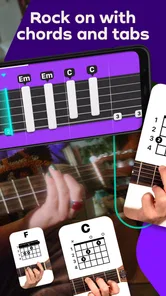
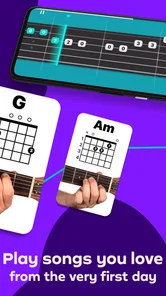


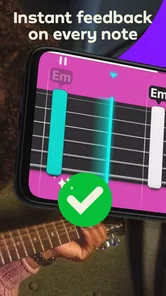
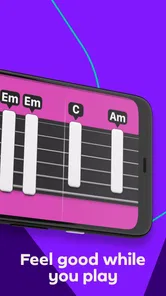
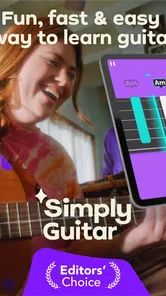
Analysis by Reviewed
I found that the first hurdle with Simply Guitar is not a lesson but getting a comfortable playing setup: the phone needs to hear the instrument while you can still see the screen. If the sound recognition seems inconsistent, I would first check the simple things—move the phone closer, reduce background noise, and make sure the guitar is tuned. A quiet room and a clear view of the lesson make it easier to tell whether a missed note comes from my playing or from the setup.
Small setup checks that save practice time
Before starting a session, I tune carefully and place the phone where it can pick up the strings without being blocked by my hands or body. I also keep the volume of any nearby music low; competing sound can make listening-based practice harder. These are ordinary troubleshooting steps rather than guarantees, but they help isolate the cause when feedback feels off. If the app is not responding as expected, I pause, check the tuning and surroundings, then try the passage again instead of repeating it faster.
That approach matters most for beginners, who may not yet know whether a chord is unclear because of finger placement, a muted string, or a noisy room. Slowing down to inspect one change at a time is more useful than treating every prompt as proof that the app—or the player—is wrong.
Getting Started with Simply Guitar
First off, setting up Simply Guitar is a breeze. I downloaded it on my smartphone, and within minutes, I was all set. The app starts with a friendly introduction, guiding you through tuning your guitar, which is crucial for any beginner. The instructions are clear, and it even has a built-in tuner, so you don’t need to download another app for that. How cool is that?
Learning at Your Own Pace
One of the things I really loved about Simply Guitar is that it lets you learn at your own pace. Whether you're a complete newbie or someone trying to polish their skills, the app adjusts to your level. The interactive lessons are structured in a way that's not overwhelming, which is perfect for keeping motivation high. I found myself learning new chords and strums before I knew it. The app uses a combination of video tutorials and real-time feedback, which is super engaging. You play along with your favorite songs, and it feels like having a personal instructor right there with you.
Features that Make a Difference
What sets Simply Guitar apart from other learning apps are its interactive elements. The app listens to you play and gives instant feedback, which is crucial for correcting mistakes on the go. There are tons of songs across various genres, so you’re never stuck with boring practice. Plus, the app constantly updates its library, which means you’re always learning something fresh and exciting. The user interface is slick and intuitive, making navigation a breeze even for those not so tech-savvy.
Turning short lessons into a routine
I get more from this style of learning when I treat the app as a practice guide rather than something to leave running while I casually play. A useful routine is to revisit a difficult chord change, repeat it slowly, and then return to the lesson or song section. That gives me a concrete goal for a short session and makes feedback easier to interpret. For an everyday example, I might fit in a few minutes after work, with the guitar already nearby; I can focus on one transition instead of expecting a single session to make me fluent.
More From Our News Desk

 Gmail
GmailGmail in a Busy Inbox: Who Benefits Most?
From first account to crowded workday, Gmail earns its place through dependable search and flexible sorting—but its best fit depends on how much inbox maintenance you can tolerate.

 Prime Video
Switching to Prime Video: What Changes in Your Viewing Routine
Prime Video can make a compelling second home for streaming, but switching means learning a different catalog, rental layer, and route from browsing to playback.

 Universal TV Remote Control
Universal TV Remote Control Works Best as a Reliable Backup
A phone remote earns its place through quick setup and reliable habits. Here is how to get more from Universal TV Remote Control—and where its limits show.

 Weather - By Xiaomi
Weather by Xiaomi Review: Clear at a Glance, Less Clear Up Close
Xiaomi’s weather app makes everyday forecasts quick to scan, but its calm surface can leave useful details and recovery paths harder to find than they should be.

 X
XX Under Pressure: Can It Recover When Posting Goes Wrong?
A resilience-focused review of X, examining setup, mistaken posts, interruptions, weak connections, and the gaps that matter when recovery needs to be dependable.

 Clash of Clans
Clash of Clans Is Won Between the Battles
Its raids are quick; its community is a long-term project of coordination, teaching, rivalry, and shared responsibility—with all the friction that entails.
Latest News



This guided format is a good fit if you want structure and prompts without arranging a lesson with a person. Compared with free video tutorials, it offers a more interactive practice loop; compared with a live teacher, it cannot watch my posture or explain in conversation exactly why a hand position feels awkward. I would use both if technique or persistent discomfort became a concern, rather than assuming an app can replace individual coaching.
Making song practice more useful
Learning through songs can make repetition feel less like an exercise, but I find it helps to separate enjoyment from diagnosis. If a phrase goes wrong, I return to the specific chord change or strumming motion that caused trouble rather than playing the whole song repeatedly and hoping it improves. That keeps a short session focused and makes it easier to notice whether I am having trouble with timing, a chord shape, or simply remembering what comes next.
I would also avoid measuring progress only by how quickly I can get through a lesson. A cleaner change between two chords is a meaningful result, even if I have not moved far through the course. Beginners often benefit from repeating a small section while their fingers learn where to go; pushing ahead too soon can make later songs feel harder than they need to. The app gives structure, but choosing a sensible pace is still the player's job.
Features that Make a Difference
What sets Simply Guitar apart from other learning apps are its interactive elements. The app listens to you play and gives instant feedback, which is crucial for correcting mistakes on the go. There are tons of songs across various genres, so you’re never stuck with boring practice. Plus, the app constantly updates its library, which means you’re always learning something fresh and exciting. The user interface is slick and intuitive, making navigation a breeze even for those not so tech-savvy.
The listening approach also has a trade-off: feedback can tell me whether a played note is being recognized, but it is not the same as a person checking every detail of my technique. If I keep getting stuck on one passage, I stop and inspect my finger placement and string contact instead of just chasing another successful prompt. A guitar that is badly out of tune or a room with a lot of competing sound can also muddy the experience, so those checks are worth repeating before deciding the lesson itself is the problem.
When the app may not be the cause
It is tempting to assume a missed note means the recognition is faulty, especially when I feel sure that I played it. But a string can be touched accidentally by a nearby finger, and a chord may sound uneven even when the fingers look close to the right positions. I find it more useful to check one string at a time, relax my hand, and try the shape again than to rush through several attempts. That gives me a clearer clue about whether the issue is the sound reaching the phone or the way I am fretting the guitar.
If the lesson remains difficult after checking the instrument and room, I would change the practice target rather than grind through it. A short pause, a slower attempt, or returning to a simpler movement can prevent frustration from taking over. If playing causes persistent discomfort, I would stop and seek guidance on comfortable technique instead of treating the app's prompts as a reason to push through it. This is one clear boundary of self-guided learning: software can structure practice, but it cannot see tension in my hands or adjust my posture in person.
Who will get the most from it?
Simply Ltd makes this education app for people who want a guided, guitar-specific starting point, and I think it suits self-motivated beginners especially well. It works with any guitar, so I would not treat the choice of instrument as a reason to delay trying it. More experienced players may still appreciate a structured refresher, but anyone looking for advanced theory, detailed technique correction, or a teacher who can adapt every explanation in real time may prefer lessons with a human instructor or a more theory-focused resource.
It is also a practical choice for someone who wants to practise at home without coordinating a weekly appointment. A learner with a few quiet minutes and a guitar within reach can use a structured lesson to get started, while someone who needs accountability may find a scheduled teacher or group class more motivating. I would not recommend relying on an app alone if the main goal is preparing for a performance or correcting a persistent technical issue; tailored feedback matters more in those situations.
The app is free to install, is rated for Everyone, and runs on Android 6.0 or later. Its current version is 9.7.3; it has earned a 4.6 average from around 333,000 ratings and has passed 10 million installs. Optional in-app purchases range from $9.99 to $179.99 per item, so I would check the available terms in the app before committing. That makes the free entry point easy to try, but it is worth deciding what you are comfortable spending rather than assuming every lesson or song is included without payment.
Choosing between guided lessons and other ways to learn
The usual alternatives each solve a different problem. Free video lessons are convenient when I want to hear an explanation or compare several teachers' approaches, but they generally leave me to judge my own playing. A book can be useful for reading music or revisiting a clear written explanation, yet it does not listen as I practise. Simply Guitar's particular value is the feedback loop: I play, get a response, and continue within a guided learning format. That is helpful for getting started, not a guarantee that every musical question has been answered.
A human instructor costs time and money, but can notice details an app cannot reliably assess, explain a confusing movement in another way, and shape lessons around a specific goal. I would see the app as a lower-friction practice companion rather than a direct replacement. Someone who learns best by experimenting freely may prefer songs, videos, or playing with other people; someone who freezes without a clear next step may benefit more from the app's guided sequence.
Worth the Investment?
Now, let's talk about the elephant in the room—cost. While Simply Guitar offers a free trial, to access all the juicy content, you’re going to need a subscription. It’s a small price to pay for the wealth of knowledge and convenience it offers. Think of it as an investment in your musical journey. Besides, compared to hiring a personal tutor, it’s a steal!
Because the available purchases can differ in scale, I would decide what I need before paying: try the available learning experience, see whether the lesson style suits me, and read the terms shown in the app carefully. The most important question is not whether a large catalogue sounds appealing, but whether I will actually make room to practise. If I only pick up a guitar occasionally, free videos or a borrowed learning book may be enough. If a guided routine helps me return to it, paying for continued access may make more sense to me.
When practice stops progressing, I would first check the basics: tune again, reduce background noise, reposition the phone, and replay the section at a manageable pace. If the same physical difficulty remains, that is a sign to seek a clearer demonstration or personal feedback, not simply to repeat the lesson indefinitely. The app is most useful when I can identify a small skill to work on and return regularly; it is less convincing as a complete substitute for a teacher or as a shortcut to polished playing.
In conclusion, if you're serious about learning guitar without the hassle of scheduling classes or commuting, Simply Guitar is definitely worth checking out. It’s user-friendly, packed with useful features, and makes learning guitar fun and accessible. So, grab your guitar, download the app, and start your musical adventure today!
Simply Guitar - Learn Guitar Frequently Asked Questions
Does Simply Guitar teach complete beginners, or should I know some guitar first?
Simply Guitar is aimed at people who want to learn guitar from scratch, so you do not need to arrive with experience. Its step-by-step lessons introduce foundational skills, and the app listens as you play to provide feedback. Beginners should still have a guitar available and be ready to practise: the app supports learning, but progress comes from playing along with the lessons.
Will Simply Guitar help me practise regularly and track whether I am playing correctly?
The app’s interactive lessons include real-time feedback as it listens to your playing through the device microphone. That can make practice feel more guided than following a lesson without any response to what you play. It is useful for checking notes and building foundational skills, though it is best viewed as a practice aid rather than a replacement for time spent playing.
Is Simply Guitar free, or will I need to pay to access lessons?
Simply Guitar is free to download, and it offers in-app purchases priced from $9.99 to $179.99 per item. Check the available purchase details in the app before choosing, so you understand what you are selecting. This distinction is useful if you are comparing the free download with continued access to lessons or other paid content.
What devices and operating systems can run Simply Guitar?
Simply Guitar is an education app from Simply Ltd for learning guitar on a mobile device. It requires Android 6.0 or later, so check your device’s operating system before downloading. The app’s lessons and feedback are designed for use alongside a guitar, making a phone or tablet convenient to keep nearby while you practice.
Can I use Simply Guitar with an acoustic or electric guitar?
The app is described as working with any guitar, and you can use either an acoustic or electric guitar. Simply Guitar listens through your device’s microphone, so you do not need extra cables or accessories to get started. Position your phone or tablet where it can pick up your playing clearly, and a quieter room can make it easier for the app to hear the notes.
Pros
- User-friendly interface for easy navigation
- Offers step-by-step tutorials for beginners
- High-quality video lessons
- Tracks progress to keep learners motivated
- Wide range of songs to practice with
Cons
- Requires subscription for full access
- Limited features in free version
- Some lessons may seem repetitive
- Occasional app glitches reported
- No offline access to lessons













