Shopping List - Listonic
- 16.94K
- 4.7
- Installs
- 10.00M
- Price
- Free

Screenshots





Analysis by Reviewed
I tend to judge a grocery-list app by a simple test: can I add an item quickly, find it again in a busy shop, and trust that everyone at home is looking at the same list? Shopping List - Listonic is built around those everyday jobs. It’s a shopping app from Listonic - Smart Grocery Shopping, and its appeal is less about turning grocery shopping into a project than about keeping a basic household task from slipping through the cracks.
Quick to use, without much setup
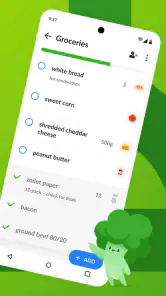
For a list you can start building straight away, Listonic feels approachable. The interface is clean, and adding familiar groceries through suggestions helps reduce typing. That matters most when I’m adding things in passing—after noticing the milk is nearly gone, for instance—rather than sitting down to plan a full shop. The free app is available for Android and iOS, and its current version is 9.7.6.
Useful when a household shares the shopping
Sharing is the feature I’d focus on if more than one person buys groceries. Instead of sending a string of messages, one person can add an item and another can see the shared list and update it. A realistic routine is to keep the list going through the week: whoever finishes the coffee adds it, and whoever shops can check what’s needed before leaving. That can cut down on duplicate purchases, though it still depends on everyone remembering to use the same list.
There’s a small workflow advantage here: add items when you notice them, not only when you’re preparing to leave. A list that grows gradually is more useful than a last-minute memory test. I’d also keep item names clear for the rest of the household; “yogurt” may be enough for one shopper, but a specific type or size can prevent guesswork for another.
Speed expectations and busy moments
Listonic is best suited to quick edits and ordinary grocery runs, not elaborate meal-planning sessions. Suggestions can make common items faster to enter, while categories give a longer list some order. In a crowded shop, grouping related products can reduce backtracking, but the benefit depends on how thoughtfully the list is organized. I would sort the list around the way I shop rather than assume the app knows the layout of my local store.
Voice input is handy when my hands are occupied, such as while unpacking groceries or cooking and noticing an ingredient is missing. I’d still glance over dictated items afterward: speech recognition can mishear a word, and a quick check is easier than discovering the mistake in the aisle. For a long list, I’d add items in small batches and review it before leaving, rather than rely on a single rushed voice entry.
Reliability depends on a shared routine
Sharing can make coordination smoother, but it works best when the household agrees that Listonic is the place to record grocery needs. If one person keeps using texts or a paper note, the shared list can become incomplete even when the app itself is simple to use. I’d settle on a habit—add things as soon as they run low, then check the list before shopping—rather than expect any app to remember on everyone’s behalf.
You May Like

Clash of Clans Is Won Between the Battles

Android Auto Makes the Case for Quieter Car Software

MobiOffice: Transforming Mobile Productivity with Seamless Integration

EA SPORTS FC™ Mobile Soccer: Redefining Mobile Sports Gaming

How Microsoft OneDrive Became a Mobile Productivity Giant

How Google Translate Breaks Language Barriers Effortlessly
For occasional shoppers, a paper list may still be quicker and more comfortable. For people who often shop with someone else, digital sharing has a clearer advantage: changes can be made without rewriting or forwarding the whole list. The trade-off is that everyone needs access to the app and a willingness to keep the list current.
Device fit and practical limits
The app is free to download and is rated for Everyone. Optional in-app purchases are offered, ranging from $0.49 to $46.99 per item, so I’d check what an upgrade includes before paying rather than assume the basic shopping routine requires it. Its minimum operating-system requirement is Android 7.0, a useful compatibility detail for anyone setting it up on an older Android device.
Listonic has a 4.7 average from around 310,000 ratings, with over 10 million installs. Those figures suggest it has found a broad audience, but they don’t tell me how it will feel on a particular phone or whether a shared-list workflow suits a particular household. It was released on April 20, 2010, and the version identified as current is 9.7.6; I’d keep the app updated through the relevant app store to use the version available for my device.
Getting Started with Listonic
First things first, downloading and setting up Listonic is a breeze. Available on both Android and iOS, it takes mere moments to install and get up and running. Once you open it, you'll be greeted with a clean, user-friendly interface that makes navigation intuitive. No more squinting at complicated menus or endless settings. Everything you need is right there at your fingertips.
Creating Your First List
Creating lists is where the magic happens. Simply tap to add items, and watch as the app suggests common grocery items based on your input. This feature saves time and ensures you don’t forget the essentials. You can also categorize items, which makes the shopping experience more organized. Trust me, spending less time hunting for items means more time enjoying the rest of the day.
Sharing is Caring
One of the standout features of Listonic is the ability to share your lists with family or roommates. Gone are the days of frantic texting back and forth about who needs what. Just share the list, and anyone with access can update it in real-time. This feature is a game-changer for busy households and makes collaborative shopping a breeze.
Smart Suggestions and Customization
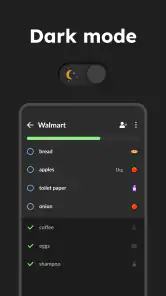
What I find particularly nifty is the smart suggestions feature. The app learns from your regular purchases and suggests items you might need to restock. It’s like having a personal shopping assistant who knows your pantry better than you do! Plus, you can customize the app to suit your preferences, whether you prefer a dark mode or specific notification settings.
Voice Input: A Handy Addition
If you’re like me and often find your hands full, you’ll appreciate the voice input feature. Simply speak your list into existence, and Listonic takes care of the rest. It’s surprisingly accurate and incredibly convenient when multitasking.
Integration with Other Apps
Listonic doesn’t stop at being just a list app. It integrates with other apps and digital assistants like Google Assistant and Alexa, making it easier to add items on the go. This kind of seamless integration means you can update your list even while driving or cooking, making it a truly versatile tool.
Why Listonic Stands Out
In a sea of shopping apps, what makes Listonic stand out? It’s the attention to detail and the user-centric design. The app is regularly updated, ensuring it remains relevant and useful. Plus, it’s free to use, although there are premium features available for those who want to take their shopping to the next level.
Final Thoughts
All in all, Shopping List - Listonic is a fantastic tool for those looking to streamline their shopping experience. It’s smart, efficient, and incredibly user-friendly. Whether you’re shopping solo or coordinating with a group, this app has something to offer. So why not give it a try and make your next shopping trip a little less stressful?
Ready to revolutionize your grocery shopping? Download Shopping List - Listonic today and see the difference for yourself. Happy shopping!
A practical way to handle a changing list
The app makes the most sense when I treat it as a running household note rather than a list I create from scratch every Saturday. Before a shop, I can scan what has accumulated, remove anything no longer needed, and group the remaining items in a useful order. That last review matters: suggestions are helpful prompts, not proof that an item is actually running low. A quick look in the fridge or cupboard keeps a familiar suggestion from turning into an unnecessary purchase.
For example, imagine I’m making dinner and realize we’re out of rice, then later notice the dish soap is nearly gone. Adding both at the moment I notice them spreads the small task across the week. When a housemate is already near the shop, the shared list gives them a single place to check. The useful detail is not just that the list is digital; it’s that the person who spots a need does not have to remember to tell the person who shops.
Making shared lists clear enough to use
A shared list can still cause confusion if its entries are too vague. I’d write “whole-grain bread” rather than “bread” when the distinction matters, and include a brand or size only when choosing the wrong one would be a problem. That keeps the list concise without leaving another shopper to guess. For household staples, a consistent naming style also makes suggestions more useful over time because the same item is less likely to appear in several slightly different forms.
There is a trade-off between detail and speed. Describing every preference takes longer than adding a short item name, but a few extra words can save a message or a substitute purchase. I’d reserve that extra detail for products where the household has a firm preference, and leave flexible items simple. That approach keeps Listonic quick for everyday additions while making the handoff between shoppers more dependable.
Where it differs from notes and heavier planners
Compared with a phone’s basic notes app, Listonic is more purpose-built for grocery errands: suggestions and categories help turn scattered needs into a shop-ready list, while sharing is more practical than repeatedly forwarding a note. A paper list can be faster for someone who shops alone, dislikes using a phone in a store, or only buys a few things. The best choice depends less on which tool has the most options and more on whether anyone else needs to contribute.
At the other end, meal-planning or pantry-management apps may suit people who want recipes, inventory tracking, or a week organized around meals. I would not choose Listonic expecting it to replace that kind of planning system. Its strength is the gap between “we need this” and “I’m at the shop”: a focused list can be easier to maintain than a broader household organizer when all I need is a reliable place to collect groceries.
What to expect from everyday performance
For ordinary use, the work is lightweight: add a few items, check them while shopping, and let another person update the shared list. I wouldn’t judge its speed by how quickly it can perform a complicated planning task, because that is not the job it is designed around. The interface and item suggestions are aimed at reducing small bits of friction. If the list is long, categories and a brief pre-shop tidy-up matter more than entering everything in one burst.
As with any shared digital routine, I’d make sure the list is visible and usable before relying on it for an important shop. If a phone is nearly out of battery or someone has not been checking the shared list, a backup note for a one-off essential is sensible. That is not a reason to avoid the app; it is a reminder that convenience depends on the device and the household habit as well as the software.
Who will get the most from it
I’d recommend trying Listonic if groceries are bought by more than one person, if household staples are often forgotten, or if texts about small purchases get buried among other messages. It is also a good fit for someone who likes adding items as they come to mind and wants suggestions and categories to make the eventual shop easier to scan. The free starting point makes it straightforward to see whether that routine works before considering any optional purchase.
I’d skip it, or keep a simpler alternative, if I rarely need a list, prefer handwriting, or do not want to involve other people in a shared shopping routine. It is also not my first pick for someone seeking a full meal calendar, recipe discovery, or detailed pantry accounting. In those situations, a paper note or a specialist planning tool may better match the task than asking a grocery list to do more than it is meant to.
A measured recommendation
My main advice is to give it a fair trial with one real household routine: add items as they run out, ask the other shopper to use the same list, and check it before leaving. That quickly reveals whether suggestions save time, whether the categories suit your usual route, and whether sharing actually prevents missed or duplicated purchases. If the routine feels natural, Listonic earns its place as a modest but useful part of grocery planning; if people keep reverting to messages or paper, the simplest tool is probably the one they will consistently use.
Overall, I see it as a practical shopping companion rather than a complete food-management system. Its strongest case is a recurring grocery list that needs to stay legible and accessible to more than one shopper. Its limits are equally clear: accuracy still relies on thoughtful entries, and the app cannot make a household remember to update the list. For that focused job, it is an easy option to consider, with enough structure to help without making a routine shop feel like a project.
Shopping List - Listonic Frequently Asked Questions
How much storage space does Shopping List - Listonic need?
The space an app uses can vary with the device and the version installed, so it is sensible to check the download details on your phone before installing. Shopping List - Listonic is focused on creating and managing grocery lists, rather than serving as a general shopping marketplace. If you are keeping an eye on storage, consider whether you have room for an app you plan to use regularly for shopping reminders.
What operating system version do I need to use Shopping List - Listonic?
Shopping List - Listonic requires Android 7.0 or later. Before downloading, check your device’s software version in its settings to make sure it meets that requirement. Keeping your operating system compatible is important for installing and running the app. The app is also available for iOS, so iPhone and iPad users can look for it through their usual app store.
Is Shopping List - Listonic free to download?
Yes. Shopping List - Listonic is free to download, and its main purpose is to make creating and managing grocery lists quick and easy. The app also offers in-app purchases, so optional paid items may be available. If you only need a straightforward way to organize a shopping list, you can start with the free app and decide whether its other options suit you.
What is Shopping List - Listonic, and who makes it?
Shopping List - Listonic is a shopping app for creating and managing grocery lists. It is developed by Listonic - Smart Grocery Shopping and is intended for everyday shoppers who want a convenient place to organize items before or during a trip to the store. Its focus is practical list-making rather than a general shopping marketplace, which makes it useful to consider if keeping grocery reminders together is your main goal.
What features does Shopping List - Listonic offer?
Shopping List - Listonic provides a user-friendly interface to create and manage shopping lists efficiently. It includes features like voice input, barcode scanning, and product suggestion based on your shopping habits. Additionally, it allows list sharing with family and friends, syncing across devices, and offline access, making your shopping experience seamless and organized.
Pros
- User-friendly interface for quick list creation.
- Syncs across devices for easy access anywhere.
- Voice input option speeds up list creation.
- Barcode scanner for fast item addition.
- Customizable categories for better organization.
Cons
- Ads can be intrusive for free users.
- Limited features without premium upgrade.
- Occasional sync delays between devices.
- Requires internet connection for full functionality.
- No dietary or allergy-specific filters.

- Category
- Shopping
- Version
- 9.7.6