ShopBack: Cashback & Rewards
- 569.00
- 3.9
- Installs
- 10.00M
- Price
- Free

Screenshots
Analysis by Reviewed
When I decide whether a cashback app is worth keeping, I look past the headline offer. The real test is whether I already shop through its available retailers, whether I can remember to start each purchase in the right place, and whether the eventual saving feels worth the extra step. ShopBack: Cashback & Rewards is most appealing when it fits into a shopping routine I already have, rather than tempting me to buy things I wouldn’t otherwise need.
Start with the shopping habit, not the offer
I’d first check whether the kinds of stores and travel bookings I use appear in the app. ShopBack is a free shopping app from developer ShopBack, and its central idea is to route a purchase through the app so eligible spending can earn cashback. The app is rated for Everyone, and its 3.9 average from around 465,000 ratings suggests plenty of people have tried it, though that number alone cannot tell you whether a particular purchase will track smoothly.
The practical question is not simply “Can I earn?” but “Will I remember to begin here?” If I’m already comparing prices, I can open ShopBack first, find a participating retailer, and then continue to the shop. That small detour makes the most sense for planned purchases, such as replacing a household item or booking travel, where I have time to check the route before paying. For a rushed checkout or an impulse purchase, the extra step may be easy to miss.
How to Decide Whether ShopBack Fits Your Routine
I would judge the app by three things: whether it covers retailers I genuinely use, whether its checkout route is easy to follow, and whether I’m willing to wait for a possible reward rather than treating it like an immediate discount. Those criteria matter more than the size of any offer shown on a particular day. A cashback app is useful only when it supports a purchase I was already going to make.
What is ShopBack All About?
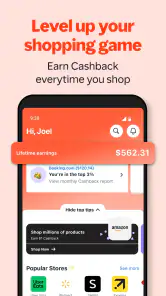
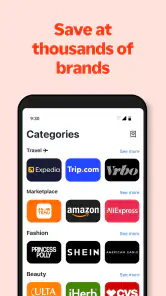
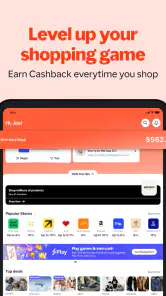
So, here's the deal with ShopBack: Cashback & Rewards. It's an app that allows you to earn cashback on your online purchases. Simple, right? But it’s not just about getting some cash back; it’s about transforming your entire shopping experience. With over hundreds of partnered stores, you’re bound to find your favorite brands here.
Getting Started with ShopBack
Setting up the app is a breeze. Just download, sign up, and boom! You’re ready to start earning. The interface is user-friendly, so even if you’re not tech-savvy, you’ll find your way around easily. Once you're in, all you need to do is browse through the list of stores, click on your desired retailer, and shop as usual. The app tracks your purchase and credits your account with cashback. It’s like magic, but better because it’s real!
Make the tracking step part of checkout
One useful habit is to treat the retailer link as the start of the transaction, not as a shortcut you can add afterward. I’d open ShopBack, choose the store, and complete the purchase in the shopping session it starts. If I jump to another tab, use a different route to the retailer, or leave checkout unfinished and return much later, I would not assume the cashback will automatically follow. For a larger planned order, keeping the route simple and checking the account afterward is a sensible way to avoid confusion.
More From Our News Desk

Weather by Xiaomi Review: Clear at a Glance, Less Clear Up Close

X Under Pressure: Can It Recover When Posting Goes Wrong?

Clash of Clans Is Won Between the Battles

Android Auto Makes the Case for Quieter Car Software

MobiOffice: Transforming Mobile Productivity with Seamless Integration

EA SPORTS FC™ Mobile Soccer: Redefining Mobile Sports Gaming
That is also why I would not use a cashback estimate as the deciding factor between two shops. I’d compare the final price, delivery terms, and the retailer’s own offer first, then consider cashback as a possible extra. This keeps a changing reward from persuading me to spend more or choose a worse deal. If a purchase does not appear as expected, I’d check the transaction details and the app’s current guidance before making assumptions about when it should show up.
A Little Extra for Your Effort
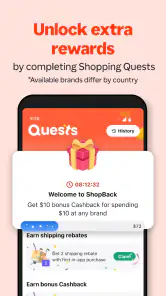
Now, let's talk about the rewards. Not only does ShopBack offer cashback, but they also have reward points. These points can be collected and redeemed for vouchers and discounts. So, essentially, you're getting rewarded twice. It's a great motivation to keep using the app, knowing that every purchase is a step towards more savings.
Where it beats a simpler alternative
Compared with shopping directly through a retailer, ShopBack adds a route to potential cashback and gives rewards-minded shoppers one place to check before they buy. That is useful if I’m already making a purchase and want to see whether a reward is available without searching across many separate retailer offers. Its browser button can make that check less disruptive when shopping on the web, although it still depends on remembering to pay attention to the cashback prompt and follow the intended shopping path.
Other approaches can suit different priorities. A retailer’s own discount may be more straightforward when I want a guaranteed price reduction at checkout, while a price-comparison tool is better when my main goal is finding the lowest total cost across shops. ShopBack is not a replacement for either: I see it as an extra checkpoint, not proof that the linked option is the best deal. Its 10 million-plus installs show that it has broad reach, but popularity does not remove the need to compare the purchase itself.
When a different approach makes more sense
If I’m already loyal to one store and its own membership offers are simple to use, I may prefer that direct route. It avoids remembering a separate portal and can make the total saving easier to see before paying. Likewise, if I’m hunting for the lowest price on a specific item, I’d compare the complete cost across retailers first. A cashback route cannot make a higher item price, delivery charge, or less suitable return arrangement disappear.
There’s also a practical difference between a discount and cashback. A discount reduces what I pay during checkout; cashback is a reward tied to a purchase and may require patience and follow-up. I’d choose an immediate, clear reduction when I need to know the exact cost now. I’d consider ShopBack when the retailer and price already make sense and the possibility of an additional return is worth a small amount of extra effort.
A realistic routine—and its trade-offs
Imagine I’m planning a trip and have already narrowed down where I want to book. Before paying, I’d search for the relevant travel option in ShopBack, check whether a cashback route is offered, and start the booking from there. I’d keep the booking details consistent and avoid opening a separate route midway through. If the reward is not available for my choice, I can proceed directly instead of changing plans just to chase it. That kind of deliberate use is more useful than opening the app after every small purchase.
A similar routine works for a planned household purchase. I’d decide what I need and set a budget before opening the app, then compare the retailer’s final price and terms with other options. Only after choosing a suitable shop would I use ShopBack to begin the transaction. This order helps keep the reward in its proper place: a possible extra on a sensible purchase, not a reason to add items or abandon a better-priced alternative.
There is a cost to switching habits: one more app to check, one more step before checkout, and a reason to keep an eye on whether a purchase has tracked. People who shop infrequently, prefer a single retailer’s loyalty scheme, or find cashback balances too fiddly may be happier sticking with direct discounts. The same goes for anyone who tends to buy more when rewards are advertised; saving a little on an unnecessary order is still spending more than planned.
Why You Should Give ShopBack a Shot
I know what you're thinking: "Shopping apps are a dime a dozen. Why should I bother with this one?" Well, here’s why. ShopBack partners with a plethora of popular retailers, offering competitive cashback rates that are hard to resist. Plus, they have seasonal promotions and exclusive deals that can enhance your savings even more.
Another cool feature is the ShopBack button for your browser. It’s a handy tool that notifies you of cashback opportunities while you’re surfing the web. You don't even need to open the app every time! Talk about convenience.
Small habits that make the app easier to use
For an order I care about, I’d avoid treating the app as something to check only after I have already filled a cart elsewhere. Starting with the retailer inside ShopBack makes the route easier to keep straight. I’d also make a quick note of the order confirmation and then check the app later, rather than repeatedly refreshing and letting an expected reward distract me from the purchase itself.
If I’m shopping on a computer, the browser button can help me notice an opportunity while browsing, but I’d still pay attention to the prompt and confirm that I’m following the route it opens. Convenience does not mean every retailer visit is automatically eligible. When I use a phone, I’d begin in the app and stay within the resulting shopping flow as much as possible. The key insight is to preserve one continuous route from discovery to checkout, instead of switching between app, search results, and retailer pages mid-purchase.
Who should keep it in their routine?
I’d recommend trying ShopBack if you regularly shop online, are comfortable taking an extra step before checkout, and are patient about rewards appearing. Its current version is 5.87.1, and it supports devices running version 7.0 or later of its mobile operating system. That makes it accessible to many older devices, though I’d still check that my own phone can install the current release before relying on it.
For occasional shoppers, the best test is simple: use it for a purchase you already planned, rather than changing your basket to make the app feel worthwhile. Notice whether the route is easy to remember and whether the rewards process suits your patience. If I find myself repeatedly forgetting to start in the app, or spending time chasing small returns, I’d stop treating it as part of my routine.
I’d skip it if I rarely buy from online retailers, need every saving to appear immediately, or dislike checking whether a purchase has tracked. It may also be the wrong fit if rewards make it harder for me to stick to a budget. In those cases, a direct sale price, a retailer’s own loyalty offer, or simply buying from the best-value shop without an extra rewards step could be more practical.
What to expect after a purchase
A common question is whether cashback should be treated as guaranteed money. I wouldn’t budget around it before it has been credited. The app’s purpose is to connect eligible shopping routes with rewards, but a buyer should still review the transaction and follow the in-app guidance if something seems wrong. That expectation keeps the app useful without turning a hoped-for return into money already spent.
Another sensible question is whether it is worth using for a small order. I’d decide based on the time and attention involved, not just the possibility of a reward. For a tiny, spontaneous purchase, opening another app and keeping track may feel like more work than the benefit. For an order I have planned and already compared, the same step is easier to justify. The right threshold is personal: if I would not bother checking the route, I should not let a small advertised reward change my decision.
Final Thoughts
In conclusion, if you're someone who loves shopping and saving, ShopBack: Cashback & Rewards is a must-have. It’s an app designed to give you a little extra something for your purchases, and who doesn’t love a good deal? The app is free to download, so there's nothing to lose. Just a heads up, though, patience is key. Cashback might take a little time to reflect in your account, but trust me, it’s worth the wait.
My recommendation is more measured: I’d try it for purchases I already intend to make, then keep it only if the retailer choices and tracking routine fit naturally into the way I shop. ShopBack is strongest as a deliberate extra step before a planned online order or travel booking; it is weaker as a substitute for comparing prices or as a reason to buy. If I can keep that distinction clear, it can be a handy companion. If not, direct discounts and simpler shopping habits are likely the better choice.
So go ahead, give it a whirl! Happy shopping and even happier saving!
ShopBack: Cashback & Rewards Frequently Asked Questions
Do I need to create an account to use ShopBack?
Yes. To begin using ShopBack’s cashback features, you need to create an account. After registering, you can browse participating retailers in the app and follow a retailer link before making a purchase. This account is where eligible cashback is tracked and credited, so signing in and shopping through the app’s route are important parts of the process.
Can ShopBack help with travel bookings as well as shopping?
Yes. ShopBack is intended for earning cashback when you shop and when you book travel plans, so it may be useful beyond everyday retail purchases. You can explore the available options in the app and open a participating retailer or travel provider through its link. Cashback depends on the specific offer and whether the booking qualifies.
Is ShopBack free to download, and which devices can run it?
ShopBack is a free shopping app from ShopBack, so you can try its cashback and rewards features without paying to download it. It is suitable for everyone and requires Android 7.0 or later on Android devices. Before installing, check that your device’s operating system meets that minimum so the app can run as intended.
What is ShopBack and how does it work?
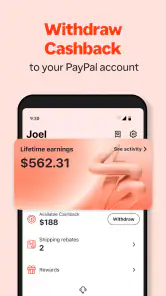
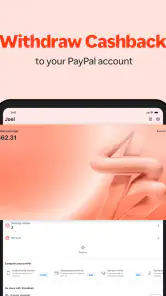
ShopBack is a cashback and rewards app designed to help users save money on their purchases. By shopping through the app at partnered stores, users can earn a percentage of their spending back as cash. The app tracks your purchases and deposits the earned cashback into your ShopBack account, which can later be withdrawn to your bank account or PayPal.
How can I start earning cashback with ShopBack?
To start earning cashback with ShopBack, first download the app and create an account. Once registered, browse through the list of partnered online stores and click on the store you wish to shop at. Make your purchase through the redirected link provided by ShopBack, and your cashback will be tracked and credited to your account once the purchase is confirmed.
Pros
- Easy-to-use interface enhances user experience.
- Wide range of partner stores available.
- Efficient tracking of cashback earnings.
- Seamless integration with payment methods.
- Regular updates improve functionality.
Cons
- Limited availability in certain regions.
- Customer service can be slow at times.
- Occasional app crashes reported.
- Cashback redemption process can be lengthy.
- Some users face verification issues.
- Category
- Shopping
- Version
- 5.87.1











